


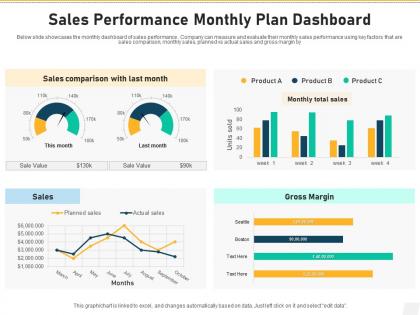
Sales Performance Monthly Plan Dashboard




Try Before you Buy Download Free Sample Product
 Impress Your
 Audience
 100%
100% Editable
 Save Hours
 of Time


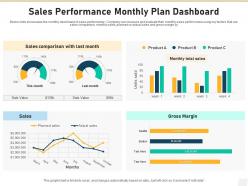
Below slide showcases the monthly dashboard of sales performance. Company can measure and evaluate their monthly sales performance using key factors that are sales comparison, monthly sales, planned vs actual sales and gross margin by.
People who downloaded this PowerPoint presentation also viewed the following :
Sales Performance Monthly Plan Dashboard with all 2 slides:
Use our Sales Performance Monthly Plan Dashboard to effectively help you save your valuable time. They are readymade to fit into any presentation structure.
FAQs for Sales Performance
Focus on conversion rates, deal size, and sales cycle length first - those show you the real pipeline health. Revenue per rep matters too. Lead response time is honestly huge but everyone ignores it for some reason. Pipeline velocity and win rates round it out nicely. Quota attainment percentage is solid if you track it. Customer acquisition cost too, assuming you've got decent data. Stick to 6-8 metrics max though. More than that and you'll just stare at numbers without actually doing anything useful with them. Trend lines help you catch patterns way faster than static numbers.
Looking at endless spreadsheets is brutal - charts and graphs save your sanity by turning those numbers into actual stories. Bar charts make it obvious which regions are killing it, line graphs show you when momentum shifts, and heat maps? They'll highlight your hotspots (or the not-so-hot zones). You'll spot trends and outliers instantly instead of hunting through data tables. The trick is matching the right chart type to each metric so your team can catch problems early. Honestly, I'd start with your biggest KPIs first, then build out from there. Way more effective than drowning in raw data.
Honestly, real-time data is a game changer for your sales dashboard. Instead of staring at last week's numbers, you're seeing what's actually happening right now. Trends pop up as they develop. Issues get caught before they blow up. And you can jump on opportunities while they're still there - nobody wants to discover their biggest deal died three days ago, you know? Live feeds show pipeline changes and deal updates instantly. My old manager used to say stale data is like driving with your eyes closed. Set up those live connections so you're working with current info, not yesterday's news.
Check your dashboard's time-series stuff first - deal velocity, win rates, pipeline growth over a few months. That's where patterns pop up. Honestly, once you get enough data, those Q4 spikes become super obvious! Seasonal trends mixed with conversion rates = decent forecasting. For opportunities, compare lead sources and territories to see what's actually working. Oh, and set up alerts for weird spikes or drops - way better than scrambling to figure out what happened three weeks later. Territory comparisons can be pretty eye-opening too.
Put your biggest numbers right up front - revenue, conversions, pipeline stuff. Nobody wants to scroll around looking for the money metrics. Group similar things together and don't go crazy with colors (I swear some dashboards look like a rainbow exploded). You'll want people to click into details when they need more info. Short sentences work. The real key though? Test it with your actual sales team first. What seems obvious to you might make zero sense to them, and they're the ones who'll be staring at this thing all day.
So basically you'll want to set up different views for different people. Sales reps just need their own pipeline stuff - quota progress, recent deals, that kind of thing. Managers though? They're looking at team performance, forecasting, conversion rates for their whole group. VPs care more about the big picture regional comparisons and strategic numbers. Most dashboard platforms are pretty flexible with permission settings and widgets. Honestly, I'd start by just asking each role what they actually look at daily - then build those views. Way easier than guessing what everyone needs.
Don't cram 20 different charts on one screen - your sales team will hate you for it. Focus on what they actually need, like quota progress front and center. Skip the vanity metrics too. Who cares about total emails sent if it's not driving revenue? Test with real salespeople before you launch anything (learned this the hard way). Make sure data updates frequently enough to matter. Oh, and start simple - you can always add more bells and whistles later once people are using it.
Connect your CRM and sales systems with automated feeds first. Then build trend comparisons for year-over-year and quarter-over-quarter stuff. Going back 2-3 years is usually the sweet spot - you'll catch seasonal patterns and growth trends that way. Show both raw numbers and percentage changes over time on your dashboard. Honestly, most people overcomplicate this part. Focus on the historical metrics that actually influence decisions, then design your views around those core KPIs. Baseline data from the past helps you spot when current performance looks weird or off-track.
Honestly, you can't go wrong with Tableau, Power BI, or Salesforce Analytics for sales dashboards. Power BI's my pick if you're using Microsoft stuff already - way cheaper than Tableau too. Google Data Studio is solid for basic needs and totally free. Already on Salesforce? Their reports might do everything you need without adding another tool (learned this the hard way at my last job). I'd figure out what you actually want to track first, then see what plugs into your existing data easiest.
Honestly, sales dashboards are a game-changer for coaching. Instead of guessing what's wrong, you get actual data showing where each rep is stuck. Maybe Sarah kills it at prospecting but can't close to save her life. The visual stuff makes problems obvious way before they blow up. During one-on-ones, I'll pull up their numbers and be like "your call volume tanked 30% - what happened?" Way better than giving vague feedback that doesn't help anyone. You can build specific development plans around what the data shows. Oh, and reps actually listen more when you've got receipts backing up your points.
Honestly, just focus on whoever's actually gonna use the thing to make decisions - sales managers, directors, maybe the reps too. Trying to please everyone is how you end up with those nightmare dashboards nobody understands. Each group wants totally different stuff anyway. Reps care about their own numbers and pipeline. Managers need the team view plus forecasting. Executives just want the big picture revenue trends. Pick one main audience first, then design everything around how they actually work. Way easier than trying to cram everything into one screen.
Dude, mobile access is clutch for sales dashboards. Your reps can check numbers during client meetings or between appointments instead of waiting to get back to the office. Real-time data on the go? That's huge. Touch navigation needs to work well though - nothing worse than trying to pinch and zoom on tiny charts while you're rushing to a meeting. I'd definitely test any tool's mobile version first because honestly, if it's clunky on phones, people just won't use it. Trust me on that one.
Dude, you HAVE to get feedback from your sales team or your dashboard will just collect digital dust. I've watched so many beautiful dashboards get completely ignored because nobody asked the actual users what they needed. Your sales people will tell you straight up if the metrics are wrong, the visuals suck, or if you're missing something obvious. They know what actually moves the needle versus what executives think matters. Schedule monthly check-ins with them - trust me on this. Otherwise you'll build something pretty that sits there being useless while everyone goes back to their Excel spreadsheets.
Honestly, start with conversion rates and average deal size - those tell you the most. Sales cycle length matters too, but revenue per rep is what I'd watch closest since it shows if people are actually performing or just looking busy. Win rates are obvious but super telling about whether your pitch actually works. Oh and pipeline velocity - forgot that one but it's key. Customer acquisition cost gives you the bigger financial picture. I pull all this stuff weekly now, then when something drops I dig into what's actually going wrong. Lead quality metrics help too but don't get lost in the weeds with too many numbers at first.
Track lead sources and conversion rates in your sales dashboard - that's where the magic happens. Different marketing channels will show totally different close rates, and honestly, it's pretty eye-opening when you see the data. Some campaigns look busy but don't actually convert (ugh, those are the worst). UTM codes on everything help you trace the whole customer journey. Then take this stuff to your weekly meetings so marketing knows what's actually working. Sales can focus on the good leads instead of chasing dead ends. Trust me, having real numbers ends those pointless sales vs marketing arguments real quick.
-
Attractive design and informative presentation.
-
Nice and innovative design.