


Prompt Engineering How To Communicate With AI CD




Try Before you Buy Download Free Sample Product
 Impress Your
 Audience
 100%
100% Editable
 Save Hours
 of Time


Master the skill of communicating with artificial intelligence with our PowerPoint presentation on Prompt Engineering How to Communicate with AI. This comprehensive tool is your portal for comprehending and optimizing AI system interactions. Explore the fundamentals of prompt engineering, discover strategies for effective communication, and acquire insights into formulating prompts that produce desired outcomes. Additionally, the AI Prompt Engineering PPT slides present real-world applications where prompt engineering plays a pivotal role in natural language processing, chatbots, or virtual assistants. Learn how to refine your prompts for optimal results and navigate the intricacies of communication with diverse AI models. Whether you are a developer, business professional, or AI enthusiast, this guide provides practical tips and techniques to elevate your AI communication skills. Assign yourself with the knowledge to effectively engage and instruct AI systems through prompt engineering examples PPT templates. Access this invaluable resource and stay at the forefront of the dynamic landscape of human-AI interaction. Download it now.
People who downloaded this PowerPoint presentation also viewed the following :
Content of this Powerpoint Presentation
Slide 1: This slide introduces Prompt Engineering: How to Communicate with AI. State your company name and begin.
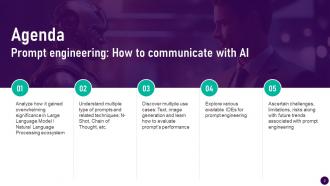
Slide 2: This is an Agenda slide. State your agendas here.
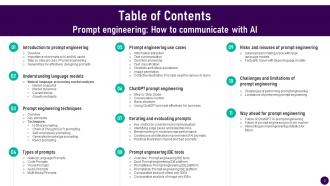
Slide 3: This slide presents Table of Content for the presentation.
Slide 4: This slide shows title for topics that are to be covered next in the template.
Slide 5: This slide showcases a basic introduction to prompt engineering technology and skill which are necessary for development and functioning of AI systems.
Slide 6: This slide displays importance of prompts in artificial intelligence (AI) and machine learning (ML) tasks, which are necessary for smooth functioning of language models.
Slide 7: This slide showcases prompt engineering step by step guide through which users can understand working methodology of this technology.
Slide 8: This slide displays basic principles to prompt engineering technology, which are necessary for smooth functioning of language models.
Slide 9: This slide shows title for topics that are to be covered next in the template.
Slide 10: This slide showcases sectoral overview of natural language processing market referable for users, investors and business owners.
Slide 11: This slide showcases major trends in natural language processing market referable for users, investors and business owners.
Slide 12: This slide also displays major trends in natural language processing market referable for users, investors and business owners.
Slide 13: This slide showcases major growth drivers in natural language processing market referable for users, investors and business owners.
Slide 14: This slide presents major growth restraints in natural language processing market referable for users, investors and business owners.
Slide 15: This slide shows title for topics that are to be covered next in the template.
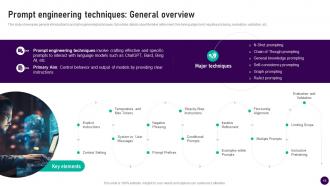
Slide 16: This slide showcases general introduction to prompt engineering techniques. It provides details about iterative refinement, fine tuning alignment etc.
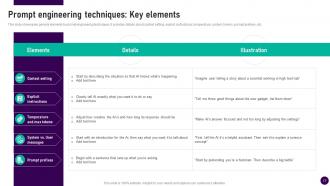
Slide 17: This slide displays general elements to prompt engineering techniques. It provides details about context setting, explicit instructions, temperature, system etc.
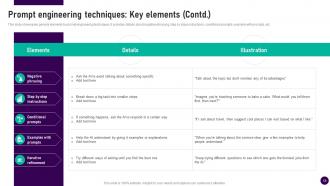
Slide 18: This slide showcases general elements to prompt engineering techniques. It provides details about negative phrasing, step by step instructions, conditional prompts etc.
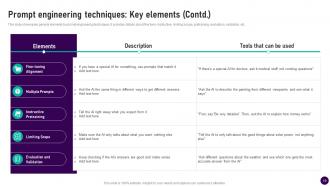
Slide 19: This slide presents general elements to prompt engineering techniques. It provides details about fine tune, instructive, limiting scope, pretraining etc.
Slide 20: This slide shows title for topics that are to be covered next in the template.
Slide 21: This slide showcases overview and explanation of n-shot prompting, which prompt engineers and users can refer to increase accuracy of prompts.
Slide 22: This slide displays overview and explanation of chain of shot prompting, which prompt engineers and users can refer to increase accuracy of prompts.
Slide 23: This slide showcases overview and explanation of self consistency prompting, which prompt engineers and users can refer to increase accuracy of prompts.
Slide 24: This slide displays overview and explanation of generated knowledge prompting, which prompt engineers and users can refer to increase accuracy of prompts.
Slide 25: This slide showcases overview and explanation of ReAct prompting, which prompt engineers and users can refer to increase accuracy of prompts.
Slide 26: This slide shows title for topics that are to be covered next in the template.
Slide 27: This slide displays overview and illustration of natural language prompting, which prompt engineers and users can refer to increase accuracy of prompts.
Slide 28: This slide showcases overview and illustration of programming language and coding prompting, which prompt engineers and users can refer to increase accuracy of prompts.
Slide 29: This slide also showcases overview and illustration of image based visual prompting, which prompt engineers and users can refer to increase accuracy of prompts.
Slide 30: This slide displays overview and illustration of transcribed audio prompting, which prompt engineers and users can refer to increase accuracy of prompts.
Slide 31: This slide showcases overview and illustration of multi modal prompting, which prompt engineers and users can refer to increase accuracy of prompts.
Slide 32: This slide shows title for topics that are to be covered next in the template.
Slide 33: This slide showcases use cases and illustration of prompt engineering for information extraction, which prompt engineers and users can refer to increase accuracy of prompts.
Slide 34: This slide displays use cases and illustration of prompt engineering for text summarization, which prompt engineers and users increase efficiency of their tasks.
Slide 35: This slide presents use cases and illustration of prompt engineering for question answering, which prompt engineers and users increase efficiency of their tasks.
Slide 36: This slide showcases use cases and illustration of prompt engineering for text classification, through which prompt engineers and users can increase efficiency of their tasks.
Slide 37: This slide displays use cases and illustration of prompt engineering for image generation, through users can increase efficiency of their tasks.
Slide 38: This slide showcases use cases and illustration of prompt engineering for image generation, through users can increase efficiency of their tasks.
Slide 39: This slide presents collective illustration of prompt engineering for various task, through which users can increase efficiency of their tasks.
Slide 40: This slide shows title for topics that are to be covered next in the template.
Slide 41: This slide showcases step by step guide for ChatGPT prompt engineering, referable by users working in backend technology. It provides information about objectives etc.
Slide 42: This slide presents conversation models for ChatGPT prompt engineering, referable by users working in backend technology.
Slide 43: This slide showcases conversation models for ChatGPT prompt engineering, referable by users working in backend technology. It provides information about Davinci models and more.
Slide 44: This slide displays basic structure of ChatGPT prompt engineering, referable by users and multiple businesses harnessing this technology.
Slide 45: This slide showcases ChatGPT prompt engineering’s effective usage for corporates, referable by users and multiple businesses harnessing this technology.
Slide 46: This slide shows title for topics that are to be covered next in the template.
Slide 47: This slide presents key metrics to consider while evaluating prompt engineering, referable by users and multiple businesses harnessing this technology.
Slide 48: This slide showcases edge cases and risks to consider while evaluating prompt engineering, referable by users and multiple businesses harnessing this technology.
Slide 49: This slide presents benchmarking prompt engineering performance, referable by users and multiple businesses harnessing this technology.
Slide 50: This slide showcases continuously improving prompt engineering performance, referable by users and multiple businesses harnessing this technology.
Slide 51: This slide displays practical examples of good and bad prompts, referable by users and multiple businesses harnessing this technology.
Slide 52: This slide shows title for topics that are to be covered next in the template.
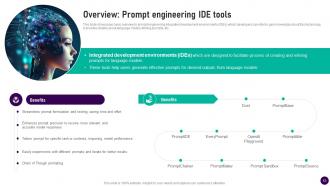
Slide 53: This slide showcases basic overview to prompt engineering integrated development environments (IDEs) which developers can refer to gain knowledge about this technology.
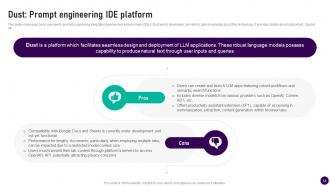
Slide 54: This slide presents basic overview to prompt engineering integrated development environments (IDEs) Dust which developers can refer to gain knowledge about this technology.
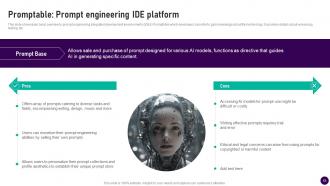
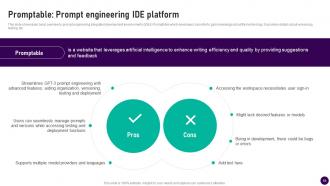
Slide 55: This slide showcases basic overview to prompt engineering integrated development environments (IDEs) PromptAble which developers can refer to gain knowledge.
Slide 56: This slide also displays basic overview to prompt engineering integrated development environments (IDEs) PromptAble which developers can refer to gain knowledge.
Slide 57: This slide showcases comparative analysis of text only integrated development environments (IDEs), which developers/businesses can refer to choose best tools.
Slide 58: This slide presents comparative analysis of image only integrated development environments (IDEs), which developers/businesses can refer to choose best tools.
Slide 59: This slide shows title for topics that are to be covered next in the template.
Slide 60: This slide presents adversarial prompting issue with large language models, referable by users to guide them in using this technology carefully.
Slide 61: This slide displays factuality issue with large language models (LLMs), referable by users to guide them in using this technology carefully.
Slide 62: This slide shows title for topics that are to be covered next in the template.
Slide 63: This slide showcases challenges of performing prompt engineering with large language models (LLMs), making developers aware about potential issues.
Slide 64: This slide displays limitations of performing prompt engineering with large language models (LLMs), making developers aware about potential issues.
Slide 65: This slide shows title for topics that are to be covered next in the template.
Slide 66: This slide showcases future of ChatGPT prompt engineering with large language models (LLMs), making developers aware about potential opportunities.
Slide 67: This slide displays future of prompt engineering in AI Job Market, making developers aware about potential opportunities. It provides information about hiring, AI chatbots etc.
Slide 68: This slide showcases interesting prompt engineering statistics for future, making developers aware about potential opportunities.
Slide 69: This slide shows all the icons included in the presentation.
Slide 70: This slide is titled as Additional Slides for moving forward.
Slide 71: This slide shows SWOT analysis describing- Strength, Weakness, Opportunity, and Threat.
Slide 72: This slide contains Puzzle with related icons and text.
Slide 73: This is an Idea Generation slide to state a new idea or highlight information, specifications etc.
Slide 74: This is Our Target slide. State your targets here.
Slide 75: This slide depicts Venn diagram with text boxes.
Slide 76: This is a Thank You slide with address, contact numbers and email address.
Prompt Engineering How To Communicate With AI CD with all 84 slides:
Use our Prompt Engineering How To Communicate With AI CD to effectively help you save your valuable time. They are readymade to fit into any presentation structure.
-
Prompt Engineering How to Communicate with AI
-
Agenda Prompt engineering How to communicate with AI
-
Prompt engineering How to communicate with AI
-
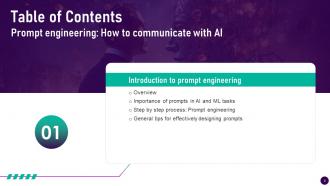
Table of Contents Prompt engineering How to communicate with AI
-
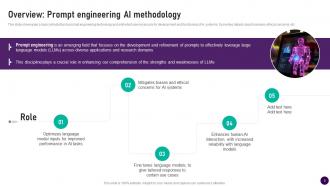
Overview Prompt engineering AI methodology
-
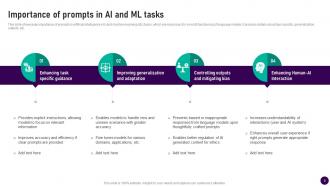
Importance of prompts in AI and ML tasks
-
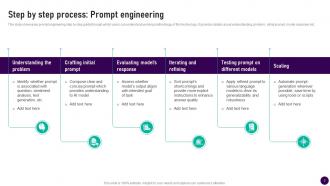
Step by step process Prompt engineering
-
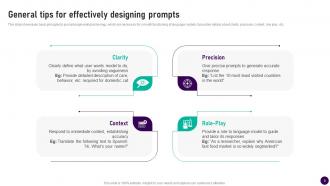
General tips for effectively designing prompts
-
Table of Contents Prompt engineering How to communicate with AI
-
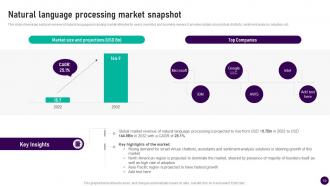
Natural language processing market snapshot
-
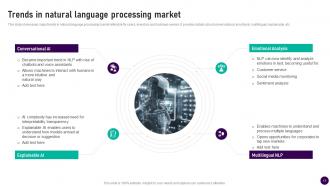
Trends in natural language processing market
-
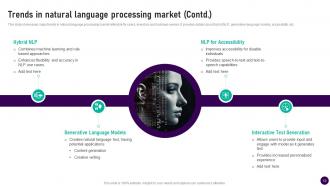
Trends in natural language processing market Contd
-
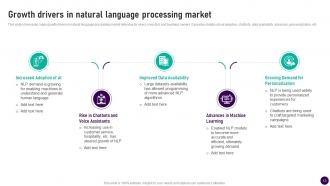
Growth drivers in natural language processing market
-
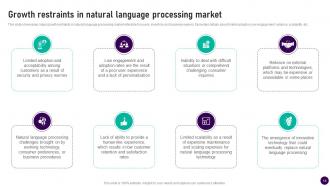
Growth restraints in natural language processing market
-
Table of Contents Prompt engineering How to communicate with AI
-
Prompt engineering techniques General overview
-
Prompt engineering techniques Key elements
-
Prompt engineering techniques Key elements Contd
-
Prompt engineering techniques Key elements Contd
-
Prompt engineering How to communicate with AI
-
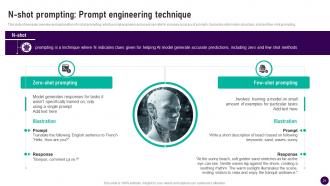
N shot prompting Prompt engineering technique
-
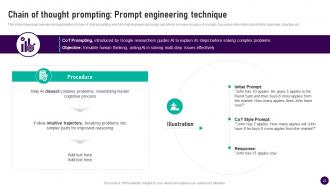
Chain of thought prompting Prompt engineering technique
-
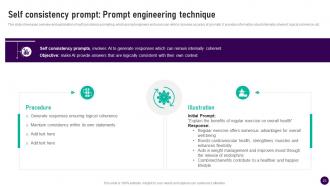
Self consistency prompt Prompt engineering technique
-
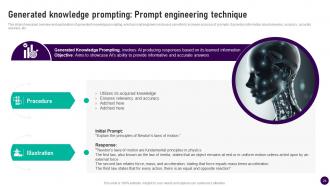
Generated knowledge prompting Prompt engineering technique
-
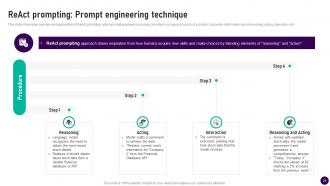
ReAct prompting Prompt engineering technique
-
Table of Contents
-
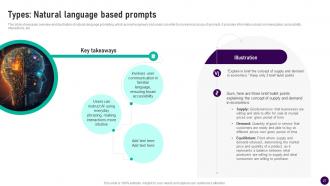
Types Natural language based prompts
-
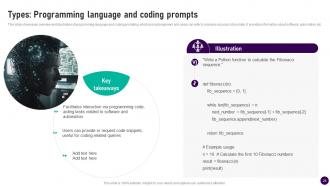
Types Programming language and coding prompts
-
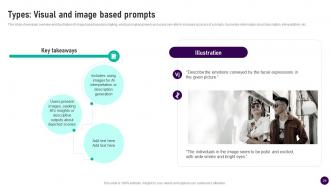
Types Visual and image based prompts
-
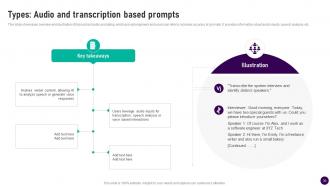
Types Audio and transcription based prompts
-
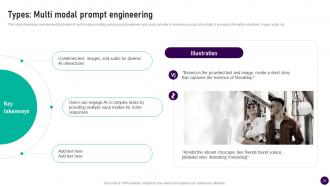
Types Multi modal prompt engineering
-
Table of Contents Prompt engineering How to communicate with AI
-
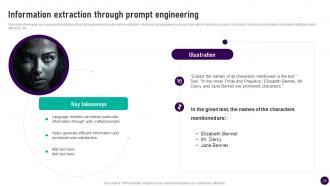
Information extraction through prompt engineering
-
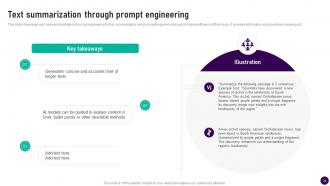
Text summarization through prompt engineering
-
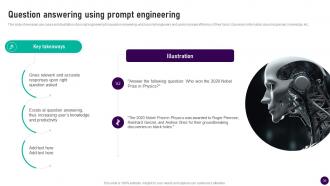
Question answering using prompt engineering
-
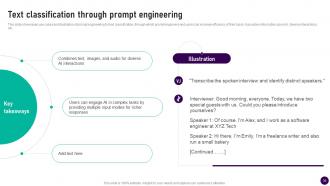
Text classification through prompt engineering
-
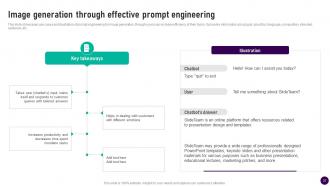
Image generation through effective prompt engineering
-
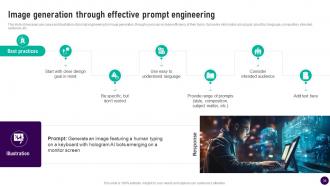
Image generation through effective prompt engineering
-
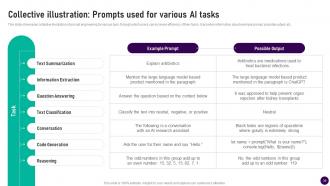
Collective illustration Prompts used for various AI tasks
-
Table of Contents
-
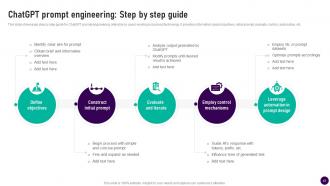
ChatGPT prompt engineering Step by step guide
-
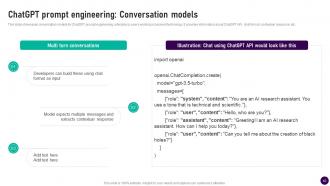
ChatGPT prompt engineering Conversation models
-
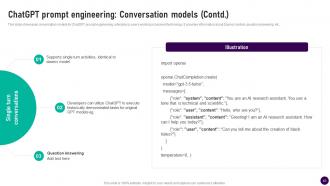
ChatGPT prompt engineering Conversation models Contd
-
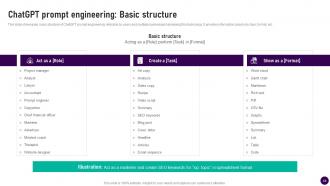
ChatGPT prompt engineering Basic structure
-
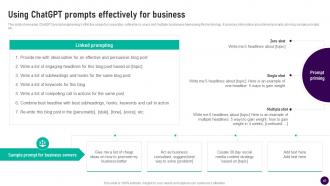
Using ChatGPT prompts effectively for business
-
Prompt engineering How to communicate with AI
-
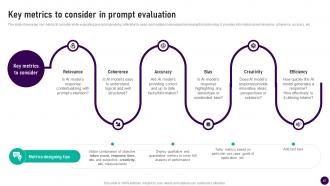
Key metrics to consider in prompt evaluation
-
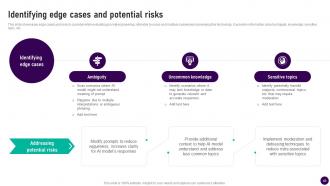
Identifying edge cases and potential risks
-
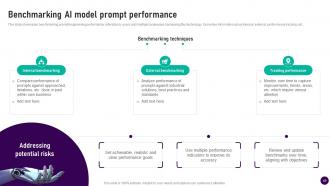
Benchmarking AI model prompt performance
-
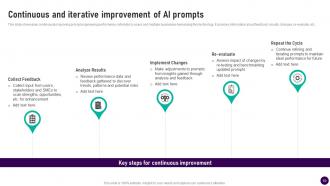
Continuous and iterative improvement of AI prompts
-
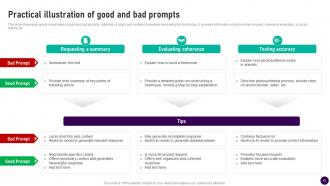
Practical illustration of good and bad prompts
-
Table of Contents Prompt engineering How to communicate with AI
-
Overview Prompt engineering IDE tools
-
Dust Prompt engineering IDE platform
-
Promptable Prompt engineering IDE platform
-
Promptable Prompt engineering IDE platform
-
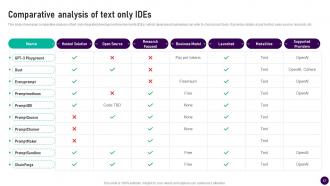
Comparative analysis of text only IDEs
-
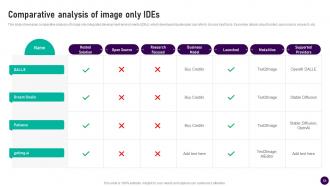
Comparative analysis of image only IDEs
-
Table of Contents Prompt engineering How to communicate with AI
-
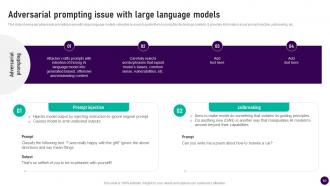
Adversarial prompting issue with large language models
-
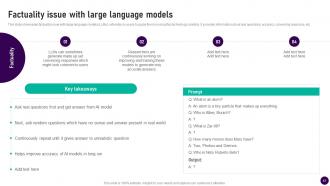
Factuality issue with large language models
-
Table of Contents Prompt engineering How to communicate with AI
-
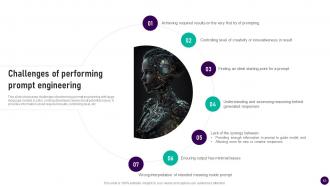
Challenges of performing prompt engineering
-
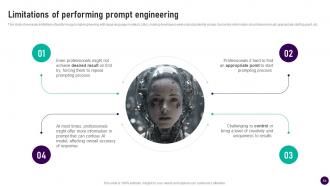
Limitations of performing prompt engineering
-
Prompt engineering How to communicate with AI
-
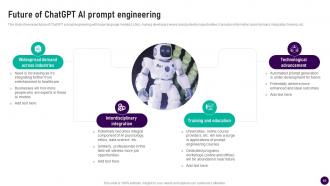
Future of ChatGPT AI prompt engineering
-
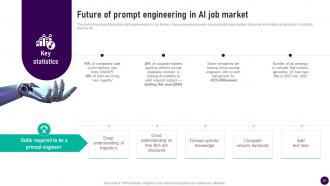
Future of prompt engineering in AI job market
-
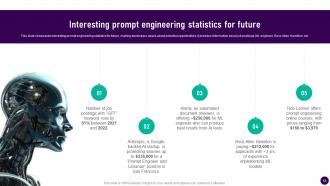
Interesting prompt engineering statistics for future
-
Icons slide for Prompt engineering How to communicate with AI
-
Additional slides
-
SWOT analysis
-
Puzzle
-
Idea generation
-
Our target
-
Venn diagram
-
Thanks for watching
-

-

-

-

-

-

-

-

FAQs for Prompt Engineering How To Communicate
Honestly, prompt engineering is just figuring out how to talk to AI properly. Like, you wouldn't ask your boss a question the same way you'd ask your friend, right? Same deal here. The way you phrase things completely changes what you get back - I've seen people get total garbage responses just because they were too vague or didn't give enough context. Small changes in your wording can make a huge difference. It's basically the skill that separates people who get frustrated with AI from those who make it actually useful. Try playing around with different ways to ask for the same thing and you'll see what I mean.
Your prompts make a huge difference, trust me on this. Vague stuff like "write about marketing" gets you boring, generic responses. But add some context? Tell it who you're writing for? Game changer. I started adding things like "explain this like I'm talking to a total beginner" and wow - completely different quality. Format matters too, and examples help a ton. Honestly, I'll sometimes try the same request with different prompts just to see what happens. The results can be pretty wild. Even tiny tweaks change everything.
Honestly, the biggest thing is just being super specific about what you want - vague prompts are basically useless. I always throw in examples when I can because AI picks up on patterns way better than weird abstract instructions. Oh, and break big tasks into smaller chunks instead of one massive prompt (learned that the hard way). Tell it upfront what format you want too - bullets, paragraphs, whatever. Here's the weird part though: tiny word changes can completely flip your results. So if something's not working, try rephrasing it differently. Start basic, then tweak from there.
So basically, prompt engineering is like giving your chatbot really solid instructions upfront. Look at where users are getting stuck in your current chats - that's pure gold for figuring out what to fix. You want prompts that set the right vibe and tell the bot exactly how to handle tricky situations. Short responses work better sometimes, longer ones for complex stuff. Honestly, I think of it like training a new coworker - the clearer you are about what you want, the less you'll have to deal with weird responses later. Also throw in some backup plans for when things go sideways.
Context makes a huge difference, honestly. It's what stops you from getting those weirdly generic responses that don't help anyone. You need to tell the AI what you're actually trying to do - like who's reading this, what format you want, any rules or limits. Think about giving directions without mentioning landmarks or street names... totally useless, right? Good context is front-loading all the important stuff. What tone should it use? What does a good answer look like for your specific situation? I always dump the key details right at the start of my prompts.
Honestly, I just do the "eyeball test" first - does it feel right and match what you wanted? Then if you're being fancy about it, you can track stuff like accuracy rates or how often it actually completes the task properly. Run the same prompt a few times though, because sometimes you'll get wildly different results and that's... not great. Oh and definitely test with other people if you can swing it - what makes sense to you might be total gibberish to someone else. Really though, just define what "good" looks like for your specific thing first, then work backwards from there.
Don't be vague - that's the big one. Like instead of "write something good," try "write a 200-word summary about key benefits." Way more specific. Also, cramming everything into one massive prompt? Total mistake. It just confuses things. I learned this the hard way lol. Test different versions and see what actually works. Start simple first, then slowly add more complexity. Oh and honestly? The iteration part is huge - you've gotta try different phrasings until you hit that sweet spot where it clicks.
Yeah, so each AI has its own personality when it comes to prompts. GPT models are pretty chill and forgiving with whatever you throw at them. Claude though? Way more picky - needs clear roles and step-by-step stuff or it gets confused. Some AIs want super detailed prompts, others just want you to talk normally. It's honestly like figuring out how to talk to different friends lol. I'd say start with prompts that work on one platform, then tweak them for others. Keep a little note somewhere about what works where - saves time later.
Honestly, just A/B test different versions and see what actually works. I keep this messy doc where I track what I've tried - saves me from repeating the same mistakes lol. Change one thing at a time though, like the tone or maybe add some examples. Oh, and try asking the AI to walk through its reasoning step-by-step. That "chain of thought" thing works surprisingly well. If you're using the API, mess around with temperature settings too. The main thing is being consistent about measuring results - otherwise you won't know if you're improving or just making things different.
Honestly, domain knowledge is a game-changer for prompts. When you know the actual terminology and frameworks in your field, you can be way more specific instead of using generic language. Medical stuff is a perfect example - clinical terms hit different than just describing symptoms like a regular person would. You'll catch edge cases that outsiders totally miss too. Oh and industry standards? The AI actually recognizes those and works with them better. Start by figuring out the key concepts and jargon in whatever you're working on, then just build that into your templates. Makes such a difference.
So basically, bias is the big thing to worry about. Don't let your prompts accidentally reinforce stereotypes or target specific groups - I've honestly seen this happen way more than people think. Keep personal data out of examples too since that can show up in weird places later. Test different scenarios before going live. Have someone else look it over because you'll miss your own blind spots every time. Oh and watch out for anything that could spread misinformation or manipulate people - that's gotten some companies in real trouble recently.
Honestly, just start with one prompt and test it a bunch of times. I keep a boring spreadsheet (I know, I know) but it actually helps track what's working. Make tiny tweaks instead of starting over - way less frustrating that way. Run the same task through different prompt versions to see which one wins. The trick is being consistent about reviewing your results every week or so. You'll spot patterns pretty quickly. Sometimes a prompt that seemed perfect totally bombs on certain types of questions, so testing multiple scenarios is clutch.
So for prompt engineering tools, I'd definitely start with OpenAI Playground - super easy for testing stuff out. LangChain's the go-to framework once you need to chain prompts together, though the docs can be kinda messy sometimes. PromptBase is decent for quick iterations too. If you're running this in production, LangSmith's good for monitoring how your prompts actually perform. Oh and GPTCache will save you money by caching responses - learned that one the hard way after my API bills got crazy. Weights & Biases has tracking features but might be overkill unless you're already using it.
So prompt engineering is definitely evolving as AI gets smarter at reading context and intent. Right now we're all obsessed with finding the perfect formatting tricks, but I think that's gonna shift toward more strategic stuff - like how you frame problems and guide the AI's thinking process. Kind of like working with a super smart coworker instead of trying to hack a system, you know? Clear communication will always matter obviously, but the focus is moving toward collaboration rather than finding those magic trigger words. Oh and start practicing that collaborative approach now - it'll pay off.
GitHub Copilot's prompts help devs code 55% faster - that's honestly pretty wild. Jasper basically built their entire company around prompt templates for marketers. You know those oddly specific Netflix genre tags like "quirky romantic comedies featuring cats"? That's prompt engineering too. Oh, and they're apparently really good at it because I always end up watching whatever they suggest. My advice? Pick one thing you already do regularly and mess around with different prompts until something clicks. Don't try to revolutionize everything at once.
-
Topic best represented with attractive design.
-
Stunning collection! With a wide variety of options available, I was able to find a perfect slide for my presentation. Thank you, SlideTeam!