


Prompt Engineering For Effective Interaction With AI Powerpoint Presentation Slides




Try Before you Buy Download Free Sample Product
 Impress Your
 Audience
 100%
100% Editable
 Save Hours
 of Time


Our Prompt Engineering for Effective Interaction with AI PowerPoint presentation is a comprehensive guide to understanding the science and importance of prompt engineering in AI-based models. This prompt engineering for optimizing large language models PPT explores the concept of prompt engineering, which involves creating and refining prompts used to generate text from language models like GPT-3. It highlights the significance of prompt engineering in enhancing AI capabilities, promoting collaboration between humans and machines, and addressing safety concerns and biases. In addition, the language model tuning strategies and techniques module delves into the working process of prompt engineering, including initial prompt creation, response evaluation, iteration, refinement, and testing on different models. It also discusses various prompt engineering techniques such as general knowledge prompting, instructional prompting, implicit bias mitigation, and control codes. Moreover, this master AI with contextual prompting deck showcases the wide range of applications for prompt engineering, including content creation, medical diagnosis, code generation, financial analysis, and customer-facing chatbots. Lastly, this prompt engineering for effective interaction with AI module provides insights into implementing prompt engineering in large language models, covering aspects like training, budget, timeline, and roadmap. Download our editable template now and master the art of prompt engineering to optimize your interaction with AI.
People who downloaded this PowerPoint presentation also viewed the following :
Content of this Powerpoint Presentation
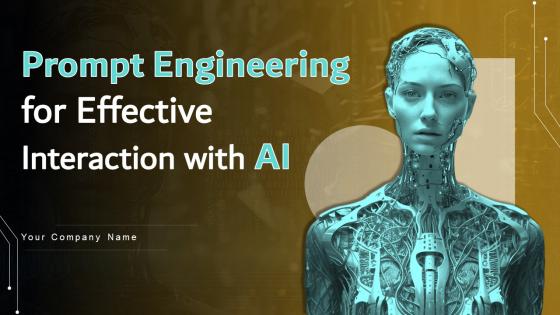
Slide 1: This slide introduces Prompt Engineering for Effective Interaction with AI. State your company name and begin.
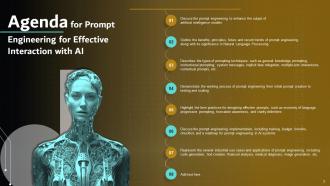
Slide 2: This slide states Agenda of the presentation.
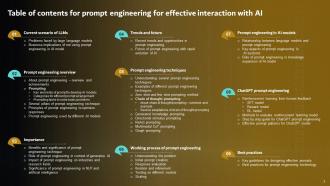
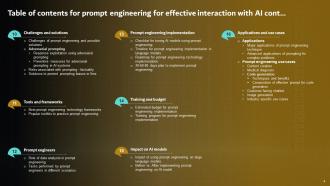
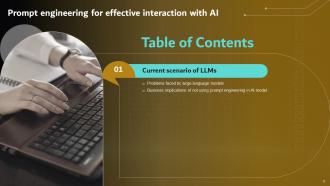
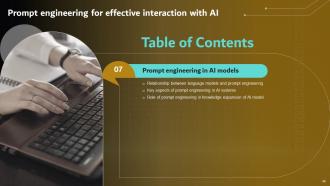
Slide 3: This slide shows Table of Content for the presentation.
Slide 4: This is another slide continuing Table of Content for the presentation.
Slide 5: This slide highlights title for topics that are to be covered next in the template.
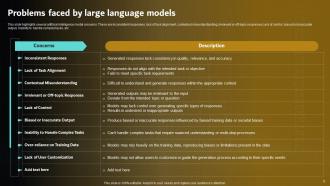
Slide 6: This slide presents Problems faced by large language models.
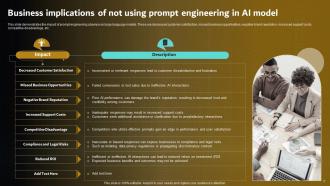
Slide 7: This slide displays Business implications of not using prompt engineering in AI model.
Slide 8: This slide highlights title for topics that are to be covered next in the template.
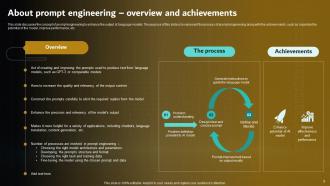
Slide 9: This slide discusses the concept of prompt engineering to enhance the output of language models.
Slide 10: This slide highlights title for topics that are to be covered next in the template.
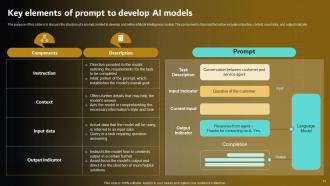
Slide 11: This slide represents Key elements of prompt to develop AI models.
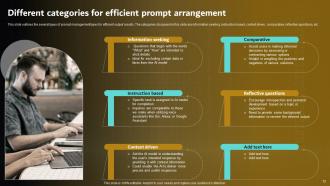
Slide 12: This slide showcases Different categories for efficient prompt arrangement.
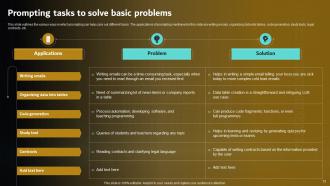
Slide 13: This slide shows Prompting tasks to solve basic problems.
Slide 14: This slide highlights title for topics that are to be covered next in the template.
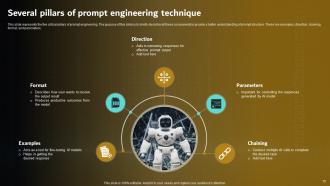
Slide 15: This slide presents Several pillars of prompt engineering technique.
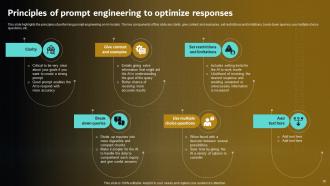
Slide 16: This slide displays Principles of prompt engineering to optimize responses.
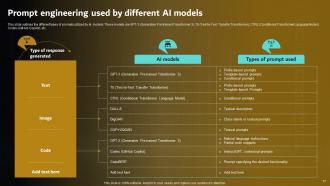
Slide 17: This slide represents Prompt engineering used by different AI models.
Slide 18: This slide highlights title for topics that are to be covered next in the template.
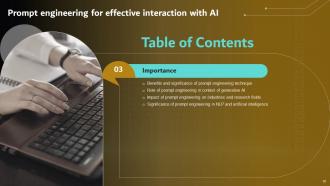
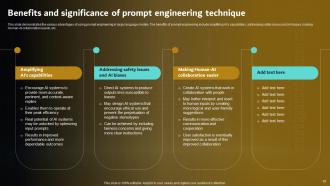
Slide 19: This slide showcases Benefits and significance of prompt engineering technique.
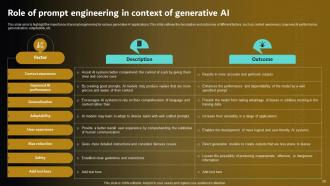
Slide 20: This slide shows Role of prompt engineering in context of generative AI.
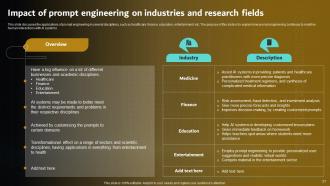
Slide 21: This slide presents Impact of prompt engineering on industries and research fields.
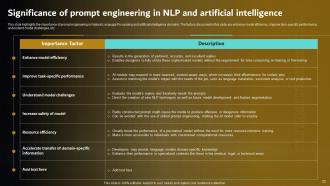
Slide 22: This slide displays Significance of prompt engineering in NLP and artificial intelligence.
Slide 23: This slide represents Prompt engineering for effective interaction with AI.
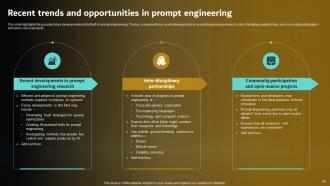
Slide 24: This slide showcases Recent trends and opportunities in prompt engineering.
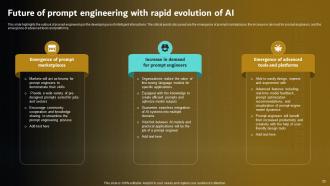
Slide 25: This slide shows Future of prompt engineering with rapid evolution of AI.
Slide 26: This slide highlights title for topics that are to be covered next in the template.
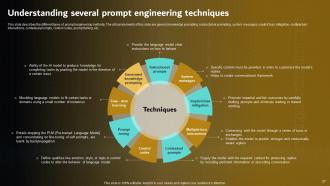
Slide 27: This slide presents Understanding several prompt engineering techniques.
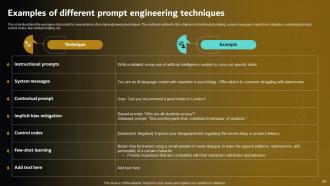
Slide 28: This slide displays Examples of different prompt engineering techniques.
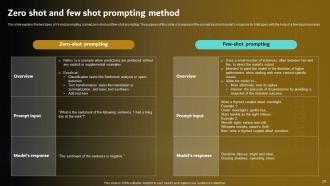
Slide 29: This slide represents Zero shot and few shot prompting method.
Slide 30: This slide highlights title for topics that are to be covered next in the template.
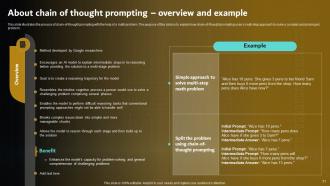
Slide 31: This slide showcases About chain of thought prompting – overview and example.
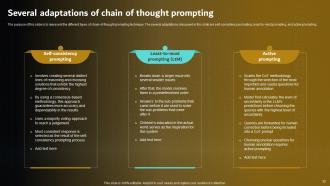
Slide 32: This slide shows Several adaptations of chain of thought prompting.
Slide 33: This slide highlights title for topics that are to be covered next in the template.
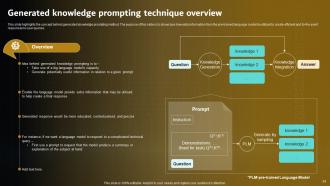
Slide 34: This slide presents Generated knowledge prompting technique overview.
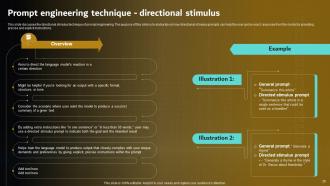
Slide 35: This slide displays Prompt engineering technique - directional stimulus.
Slide 36: This slide represents About ReAct prompting technique – overview and working process.
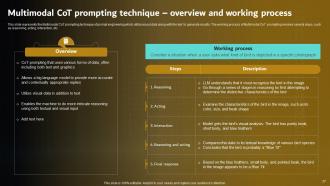
Slide 37: This slide showcases Multimodal CoT prompting technique – overview and working process.
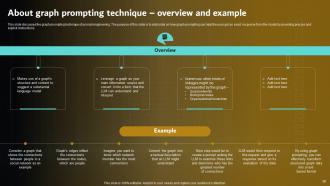
Slide 38: This slide shows About graph prompting technique – overview and example.
Slide 39: This slide highlights title for topics that are to be covered next in the template.
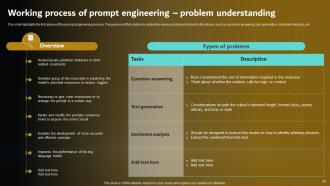
Slide 40: This slide presents Working process of prompt engineering – problem understanding.
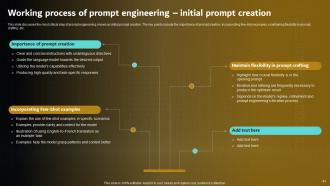
Slide 41: This slide displays Working process of prompt engineering – initial prompt creation.
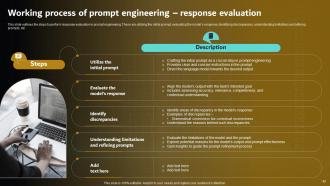
Slide 42: This slide represents Working process of prompt engineering – response evaluation.
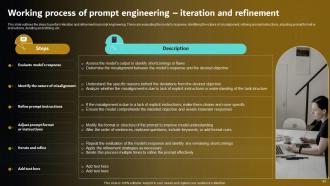
Slide 43: This slide showcases Working process of prompt engineering – iteration and refinement.
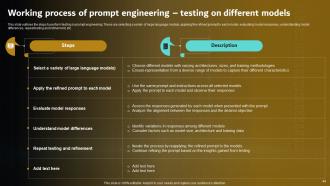
Slide 44: This slide shows Working process of prompt engineering – testing on different models.
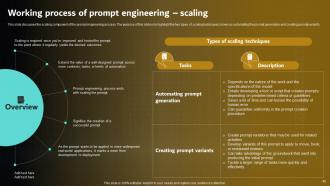
Slide 45: This slide presents Working process of prompt engineering – scaling.
Slide 46: This slide highlights title for topics that are to be covered next in the template.
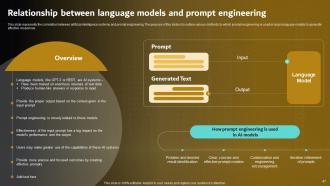
Slide 47: This slide displays Relationship between language models and prompt engineering.
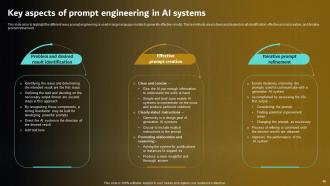
Slide 48: This slide represents Key aspects of prompt engineering in AI systems.
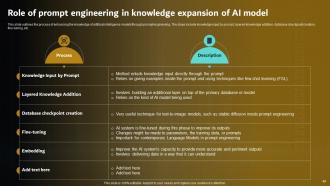
Slide 49: This slide showcases Role of prompt engineering in knowledge expansion of AI model.
Slide 50: This slide highlights title for topics that are to be covered next in the template.
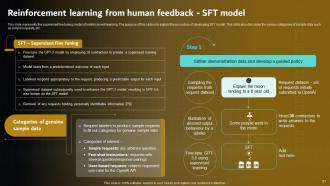
Slide 51: This slide shows Reinforcement learning from human feedback - SFT model.
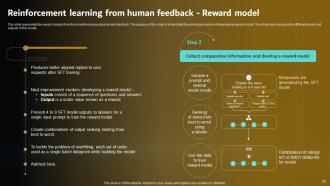
Slide 52: This slide presents Reinforcement learning from human feedback - Reward model.
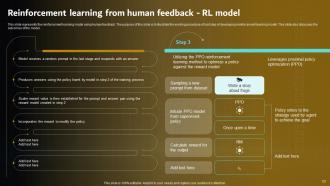
Slide 53: This slide displays Reinforcement learning from human feedback - RL model.
Slide 54: This slide highlights title for topics that are to be covered next in the template.
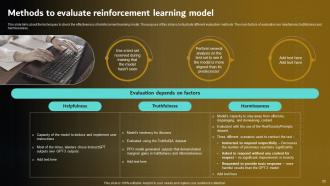
Slide 55: This slide represents Methods to evaluate reinforcement learning model.
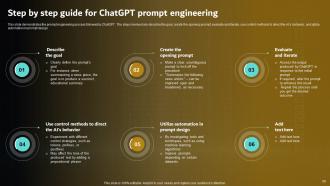
Slide 56: This slide showcases Step by step guide for ChatGPT prompt engineering.
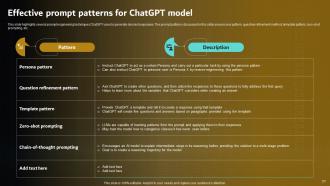
Slide 57: This slide shows Effective prompt patterns for ChatGPT model.
Slide 58: This slide highlights title for topics that are to be covered next in the template.
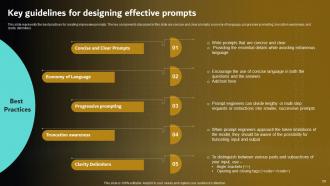
Slide 59: This slide displays Key guidelines for designing effective prompts.
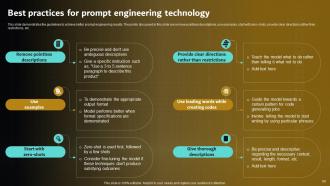
Slide 60: This slide represents Best practices for prompt engineering technology.
Slide 61: This slide highlights title for topics that are to be covered next in the template.
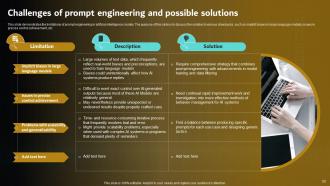
Slide 62: This slide showcases Challenges of prompt engineering and possible solutions.
Slide 63: This slide highlights title for topics that are to be covered next in the template.
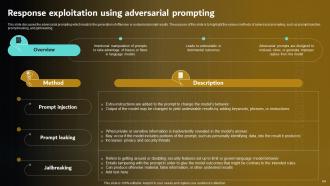
Slide 64: This slide shows Response exploitation using adversarial prompting.
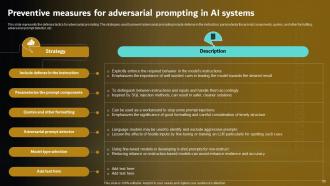
Slide 65: This slide presents Preventive measures for adversarial prompting in AI systems.
Slide 66: This slide highlights title for topics that are to be covered next in the template.
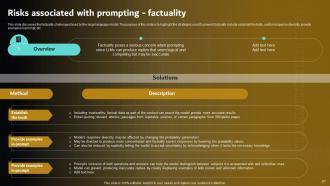
Slide 67: This slide displays Risks associated with prompting - factuality.
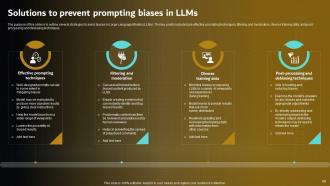
Slide 68: This slide represents Solutions to prevent prompting biases in LLMs.
Slide 69: This slide highlights title for topics that are to be covered next in the template.
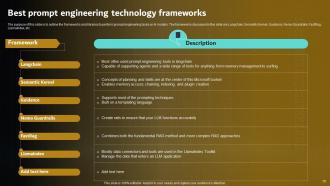
Slide 70: This slide showcases Best prompt engineering technology frameworks.
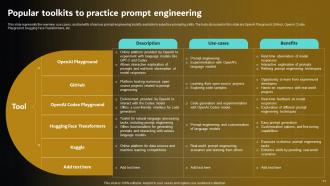
Slide 71: This slide shows Popular toolkits to practice prompt engineering.
Slide 72: This slide highlights title for topics that are to be covered next in the template.
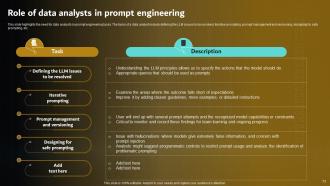
Slide 73: This slide presents Role of data analysts in prompt engineering.
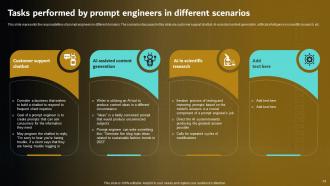
Slide 74: This slide displays Tasks performed by prompt engineers in different scenarios.
Slide 75: This slide highlights title for topics that are to be covered next in the template.
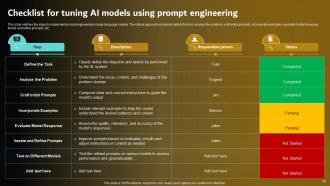
Slide 76: This slide represents Checklist for tuning AI models using prompt engineering.
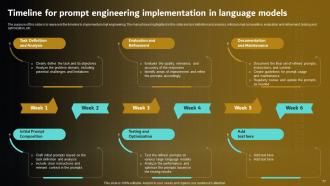
Slide 77: This slide showcases Timeline for prompt engineering implementation in language models.
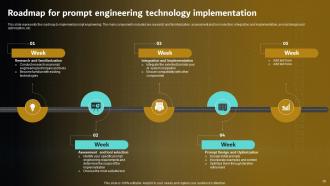
Slide 78: This slide shows Roadmap for prompt engineering technology implementation.
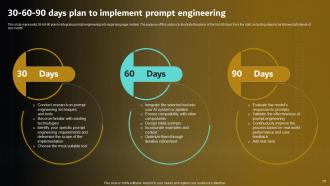
Slide 79: This slide presents 30-60-90 days plan to implement prompt engineering.
Slide 80: This slide highlights title for topics that are to be covered next in the template.
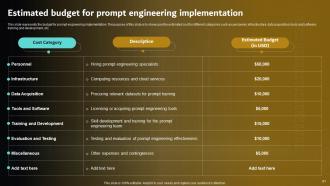
Slide 81: This slide displays Estimated budget for prompt engineering implementation.
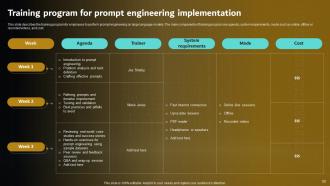
Slide 82: This slide represents Training program for prompt engineering implementation.
Slide 83: This slide highlights title for topics that are to be covered next in the template.
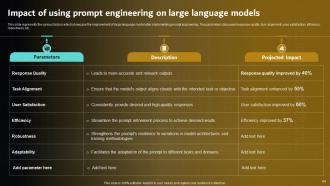
Slide 84: This slide showcases Impact of using prompt engineering on large language models.
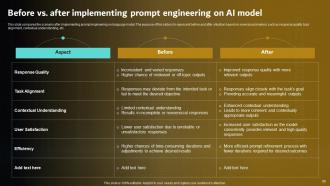
Slide 85: This slide shows Before vs. after implementing prompt engineering on AI model.
Slide 86: This slide highlights title for topics that are to be covered next in the template.
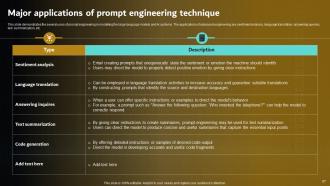
Slide 87: This slide presents Major applications of prompt engineering technique.
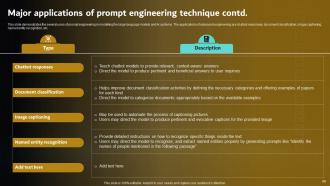
Slide 88: This slide displays Major applications of prompt engineering technique contd..
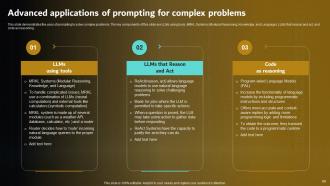
Slide 89: This slide represents Advanced applications of prompting for complex problems.
Slide 90: This slide highlights title for topics that are to be covered next in the template.
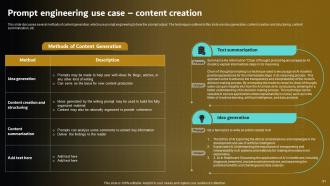
Slide 91: This slide showcases Prompt engineering use case – content creation.
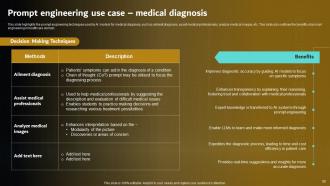
Slide 92: This slide shows Prompt engineering use case – medical diagnosis.
Slide 93: This slide highlights title for topics that are to be covered next in the template.
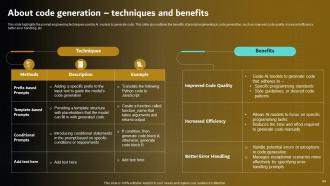
Slide 94: This slide presents About code generation – techniques and benefits.
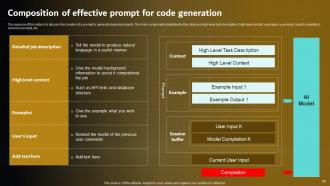
Slide 95: This slide displays Composition of effective prompt for code generation.
Slide 96: This slide highlights title for topics that are to be covered next in the template.
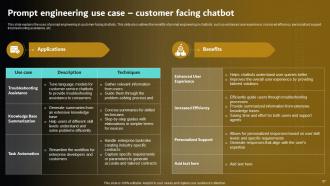
Slide 97: This slide represents Prompt engineering use case – customer facing chatbot.
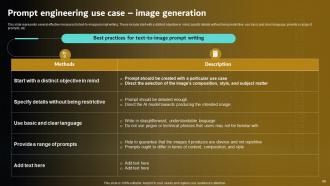
Slide 98: This slide showcases Prompt engineering use case – image generation.
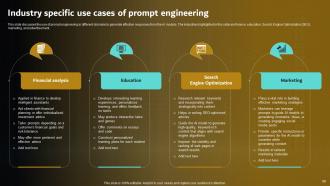
Slide 99: This slide shows Industry specific use cases of prompt engineering.
Slide 100: This slide contains all the icons used in this presentation.
Slide 101: This is a Thank You slide with address, contact numbers and email address.
Prompt Engineering For Effective Interaction With AI Powerpoint Presentation Slides with all 106 slides:
Use our Prompt Engineering For Effective Interaction With AI Powerpoint Presentation Slides to effectively help you save your valuable time. They are readymade to fit into any presentation structure.













FAQs for Prompt Engineering For Effective Interaction With AI
Honestly, just be way more specific than you think you need to be. Like, instead of "write me an email," try "write a friendly but professional email to my boss requesting next Friday off." Give examples when you can - it helps tons. Oh, and tell the AI what role to play, like "act as a marketing expert" or whatever fits. Break big tasks into smaller steps too. I learned this the hard way after getting terrible outputs for weeks. The format matters - if you want bullet points, say so! Same with tone. Here's the thing though: you'll probably need to tweak your prompt a few times. Think of it like giving directions to someone who's never been to your neighborhood. Start with what you have now and just add one specific detail. You'll see the difference right away.
Dude, prompt design literally makes or breaks everything. Be super specific about what you want - vague stuff just confuses the AI. It's like giving someone directions, you know? Your wording, examples, even how you phrase things completely changes the response you get. I've tweaked just a couple words before and gotten totally different results. Honestly kind of wild how much it matters. Try different ways of asking the same thing and see what clicks. The structure really does matter more than people think.
Dude, specificity makes such a huge difference. Like, if you're vague the AI just has to guess what you want and usually picks the most boring, generic option. But throw in some details about format, who you're writing for, tone - whatever actually matters - and suddenly it gets it. It's kinda like giving someone directions, you know? "Go downtown" is pretty useless compared to "take Highway 1 south for 3 miles, turn left at the Starbucks." I swear, just add 2-3 specific things to your next prompt and you'll see the quality jump way up. Works every time.
So basically you start with whatever prompt comes to mind, see what garbage (or gold) the AI spits out, then tweak it. Change how specific you are, throw in some examples, mess with the structure - whatever. It's honestly just like debugging code but less frustrating. Each time you try something new, you learn more about how this thing actually thinks. The trick is changing only one small thing at a time though. Otherwise you'll never know what actually worked. Keep going until it gives you something decent.
Honestly, the two big mistakes I see people make are being way too vague or trying to cram everything into one massive prompt. Like, instead of saying "summarize this," ask for "3 bullet points" or whatever format you actually want. Also - and I totally did this at first - don't assume the AI magically knows your context. Be specific about what you need. Test your prompts with different stuff to see what happens. Oh, and avoid those leading questions where you're basically fishing for the answer you already have in mind. Start simple, then tweak from there.
Yo, so I've been playing around with this stuff and it's wild how different these AI models are. GPT ones are chatty and creative, but Claude? Way more structured and analytical. Gemini does its own weird thing entirely. Here's the annoying part - a prompt that works amazing on one model completely bombs on another. They're all trained differently so they have totally different vibes. I learned this the hard way lol. If you're gonna use prompts across different models, definitely test them out first. You'll probably need to adjust based on each one's personality.
Testing prompts is honestly way more important than I realized when I started. Run A/B tests with different versions and see how consistent your results are - same prompt multiple times reveals so much. Start small with a test dataset first. Wording changes are wild - tiny tweaks can completely flip your outputs. I learned this the hard way lol. Check if responses hit the right tone and accuracy. Make some scoring rubrics so you're not all over the place with evaluation. Don't forget edge cases where everything breaks. Document what actually works instead of just winging it each time.
Dude, context is everything when you're prompting AI. Like, imagine asking someone for help but not telling them what you actually need help *with* - you'll get some bland, useless response every time. The more specific details you give upfront about your situation and what you're trying to accomplish, the better the output will be. I learned this the hard way after getting so many generic answers that completely missed what I was going for. It's kinda like onboarding someone new, except it happens fresh each conversation. Don't make the AI guess - just tell it your goals, constraints, whatever's relevant. You'll save yourself tons of back-and-forth.
Honestly, prompt engineering is everywhere these days. Healthcare uses it for diagnostic questions, finance teams do risk analysis with it. Marketing creates targeted content, education builds personalized learning - you name it. Legal drafts contracts faster, customer service makes better chatbots. Manufacturing even uses it for quality control, which I didn't expect at first. Look for repetitive tasks in your field that involve language or decisions. Map out one workflow where you're always rephrasing stuff. Then just start experimenting with those prompts systematically.
Dude, examples are seriously a game changer for prompts. Instead of the AI trying to figure out what you want, you're literally showing it. Just throw in 1-3 solid examples and boom - way better results. I think of it like teaching someone to tie shoes... you wouldn't just explain it, right? You'd demonstrate. The examples nail down your format, tone, all that stuff. Honestly, try adding just one example to whatever prompt you're working on next. You'll be surprised how much cleaner the output gets.
Oh totally, this is such a thing! Different cultures communicate so differently - like some are super direct while others are all about politeness and hierarchy. AI models tend to pick up Western communication styles, which can make things weird if you're working with international teams. I found this out when my casual prompts just... didn't work at all with some colleagues. You might need to switch up your tone or examples depending on who's using them. Sometimes I'll even tell the AI what cultural context I want it to use. Worth testing with different people though - saves you from looking clueless later!
So for prompt testing, I'd probably start with OpenAI Playground - it's free and super easy to mess around with different parameters. PromptLayer and Weights & Biases are great if you're doing tons of experiments and need to track everything (trust me, you'll lose track fast). LangSmith works well too, especially if you're already using their stuff. Honestly though? Don't sleep on just using a basic spreadsheet at first. I know it sounds boring but it actually works really well for keeping notes on what's working. You can always upgrade later once you figure out what you actually need.
Dude, this stuff matters way more than people think. Your prompts literally control what the AI spits out, and that can reinforce really messed up stereotypes. I've seen prompts that looked totally harmless but kept producing biased results around race, gender, age - you name it. The sneaky thing is bias shows up in ways you'd never expect. Test your prompts with different scenarios and get other people to look at them too. Ask yourself: could this hurt or exclude someone? It's honestly trickier than it seems at first glance.
Yeah, prompt length totally matters! Longer ones usually work better because you're giving the AI more to go off of. Short prompts? They're kinda hit or miss - sometimes you get something decent, sometimes it's super generic. But don't write a whole essay either lol, that just confuses things. I usually start basic with the main details I want, then if it doesn't quite hit right, I'll add more specifics the second time around. There's definitely a sweet spot somewhere in the middle that works best.
Honestly, user feedback is your secret weapon here. When people tell you stuff is too wordy or goes off on weird tangents, pay attention - that's exactly what you need to fix your prompts. I started keeping notes on what people complained about and wow, patterns show up fast. Like if everyone's saying "this is too technical," just add something like "keep it simple" to your prompt. Don't just randomly change things though, that's a mess. Set up some kind of system where you're actually collecting feedback regularly and testing your tweaks on the same examples. Works way better than guessing.
-
The best artificial intelligence toolkit! These presentation slides are a goldmine of information for seamless AI interactions and comprehension.
-
AI connection! The concrete material in these presentations provides us the confidence to clearly communicate AI topics.
-
Fully compatible with our AI discussion. Our audience was enthralled by the presentation.
-
Excellent value for money! An wonderful resource for anyone working with artificial intelligence.
-
AI Made Easy! This presentation simplifies Prompt Engineering, making AI more approachable to anyone.
-
AI Elevation! We've revolutionised our AI communication techniques with the help of the ppt.
-
Thumbs up for this PPT! They helped enhance my presentation on prompt engineering, and I received great feedback.
-
Excellent resource! AI slides reduced complex AI principles, making them more approachable to a wider audience.
-
Amazing variety of PowerPoint slides. Really helpful in designing professional presentations.
-
Like always a great experience with you guys. Always there on the drop of hat to help.
-
Page:
- You're currently reading page 1
- Page 2
-
