


Hyperautomation IT Powerpoint Presentation Slides





Try Before you Buy Download Free Sample Product
 Impress Your
 Audience
 100%
100% Editable
 Save Hours
 of Time


This PowerPoint presentation gives a brief idea about hyper-automation technology, including its components, benefits, working, and processes that can be automated. It also includes the reasons businesses adopt hyper-automation, a comparison between automation and hyper-automation, and an end-to-end view, according to ISG. In this HyperAutomation PowerPoint Presentation, we have covered the overview of hyper-automation testing, different tools and technologies for hyperautomation implementation, components that require tools, and top hyper-automation software. In addition, this Hyperautomation Services PPT contains the implementation of hyper-automation in the business, covering a checklist, steps to develop an automation plan and platform, implementation steps, framework, and common challenges and solutions of hyper-automation implementation. Also, the Hyperautomation Tools PPT presentation includes applications of hyperautomation in different sectors, such as healthcare, banking and finance, retail, supply chain, and business. Furthermore, this Hyperautomation Technology template caters to cost, a timeline, a roadmap for hyperautomation implementation, and a performance tracking dashboard. Moreover, this Hyperautomation Applications deck comprises the impact of hyperautomation implementation and a case study. Download our 100 percent editable and customizable template, which is also compatible with Google Slides.
People who downloaded this PowerPoint presentation also viewed the following :
Content of this Powerpoint Presentation
Slide 1: This slide introduces HyperAutomation (IT). Commence by stating Your Company Name.
Slide 2: This slide depicts the Agenda of the presentation.
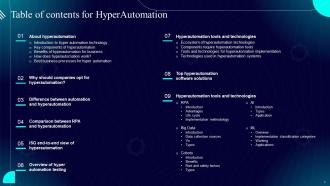
Slide 3: This slide incorporates the Table of contents.
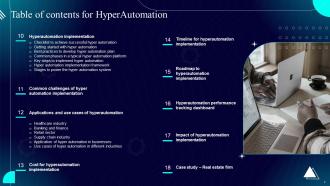
Slide 4: This is yet another slide continuing the Table of contents.
Slide 5: This slide highlights the Title for the Topics to be covered in the upcoming slide.
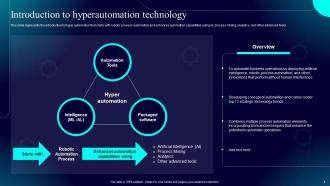
Slide 6: This slide represents the introduction to hyper automation that starts with robotic process automation and enhances automation capabilities using AI, process mining, analytics, and other advanced tools.
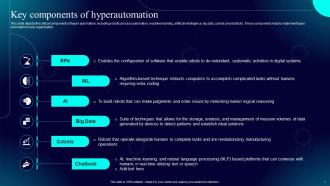
Slide 7: This slide depicts the critical components of hyper automation, including robotic process automation, machine learning, artificial intelligence, big data, cobots and chatbots.
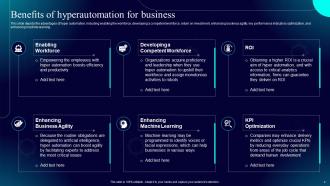
Slide 8: This slide showcases the Benefits of hyperautomation for business.
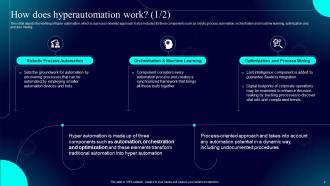
Slide 9: This slide elucidates the working of hyper automation, which is a process-oriented approach.
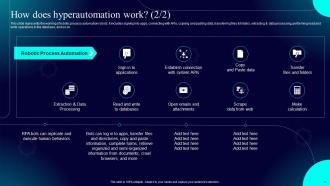
Slide 10: This slide continues the working of robotic process automation robots.
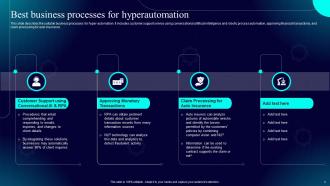
Slide 11: This slide describes the suitable business processes for hyper-automation.
Slide 12: This slide mentions the Title for the Ideas to be discussed next.
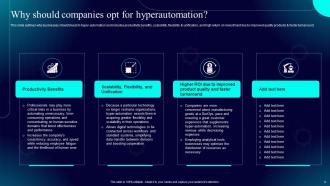
Slide 13: This slide outlines why businesses should invest in hyper-automation and includes productivity benefits, scalability, flexibility & unification, and high return on investment due to improved quality products & faster turnaround.
Slide 14: This slide incorporates the Heading for the Components to be discussed next.
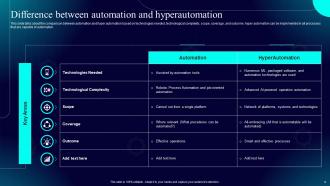
Slide 15: This slide talks about the comparison between automation and hyper automation.
Slide 16: This slide presents the Title for the Topics to be covered further.
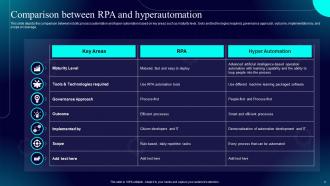
Slide 17: This slide depicts the comparison between robotic process automation and hyper-automation.
Slide 18: This slide elucidates the Heading for the Ideas to be discussed in the following template.
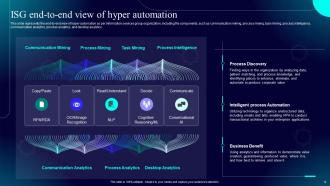
Slide 19: This slide represents the end-to-end view of hyper-automation as per information services group organization, including the components, such as communication mining, process mining, task mining, process intelligence, etc.
Slide 20: This slide highlights the Title for the Contents to be covered next.
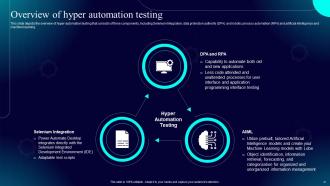
Slide 21: This slide depicts the overview of hyper-automation testing that consists of three components, including Selenium Integration, data protection authority (DPA) and robotic process automation (RPA) and artificial intelligence and machine learning.
Slide 22: This slide incorporates the Heading for the Topics to be discussed further.
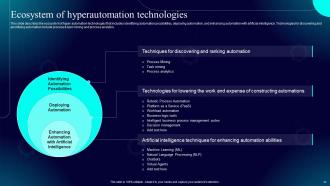
Slide 23: This slide describes the ecosystem of hyper automation technologies that includes identifying automation possibilities, deploying automation, and enhancing automation with artificial intelligence.
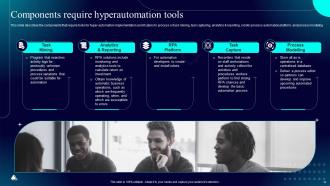
Slide 24: This slide highlights the components that require tools for hyper-automation implementation and it caters to process or task mining, task capturing, analytics & reporting, robotic process automation platform, and process modeling.
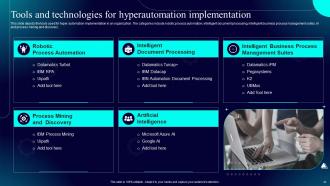
Slide 25: This slide displays the tools used for hyper automation implementation in an organization.
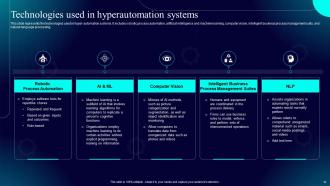
Slide 26: This slide represents the technologies used in hyper-automation systems.
Slide 27: This slide contains the Title for the Topics to be covered further.
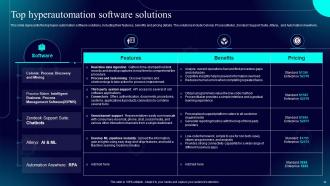
Slide 28: This slide showcases the top hyper-automation software solutions, including their features, benefits and pricing details.
Slide 29: This slide indicates the Heading for the Contents to be discussed next.
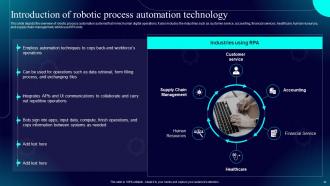
Slide 30: This slide depicts the overview of robotic process automation systems that mimic human digital operations.
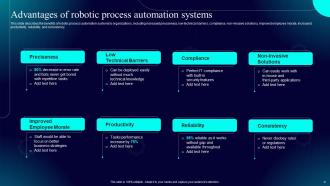
Slide 31: This slide describes the benefits of robotic process automation systems to organizations, including increased preciseness, low technical barriers, compliance, etc.
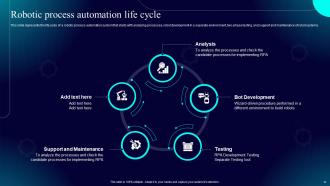
Slide 32: This slide represents the life cycle of a robotic process automation system that starts with analyzing processes, robot development in a separate environment, two-phase testing, and support and maintenance of robot systems.
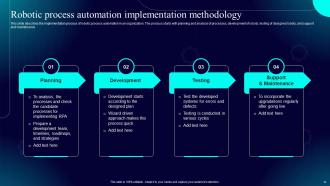
Slide 33: This slide exhibits the implementation process of robotic process automation in an organization.
Slide 34: This slide showcases the Title for the Topics to be covered in the forth-coming template.
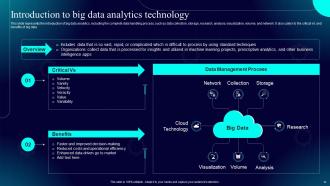
Slide 35: This slide represents the introduction of big data analytics, including the complete data handling process, such as data collection, storage, research, analysis, visualization, volume, and network.
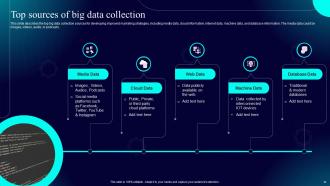
Slide 36: This slide describes the top big data collection sources for developing improved marketing strategies, including media data, cloud information, internet data, machine data, and database information.
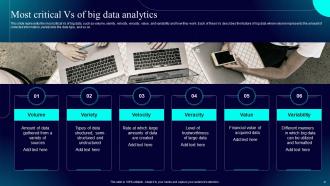
Slide 37: This slide shows the most critical Vs of big data, such as volume, variety, velocity, veracity, value, and variability and how they work.
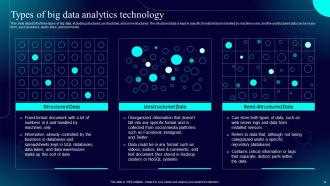
Slide 38: This slide presents the three types of big data, including structured, unstructured, and semi-structured.
Slide 39: This slide reveals the Title for the Components to be covered in the next template.
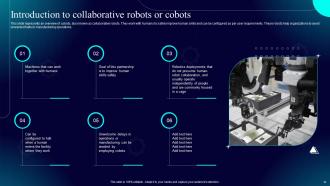
Slide 40: This slide represents an overview of cobots, also known as collaborative robots.
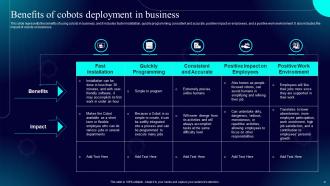
Slide 41: This slide highlights the benefits of using cobots in business, and it includes faster installation, quickly programming, consistent and accurate, positive impact on employees, and a positive work environment.
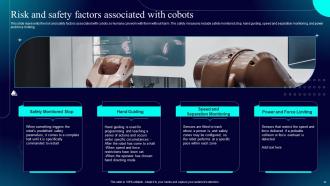
Slide 42: This slide presents the risk and safety factors associated with cobots so humans can work with them without harm.
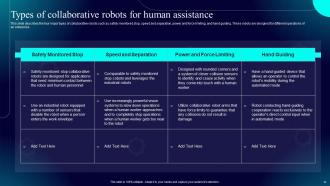
Slide 43: This slide describes the four major types of collaborative robots such as safety monitored stop, speed and separation, power and force limiting, and hand guiding.
Slide 44: This slide elucidates the Heading for the Topics to be discussed further.
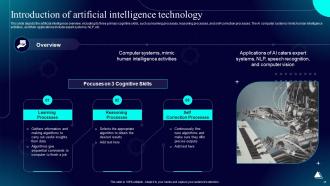
Slide 45: This slide depicts the artificial intelligence overview, including its three primary cognitive skills, such as learning processes, reasoning processes, and self-correction processes.
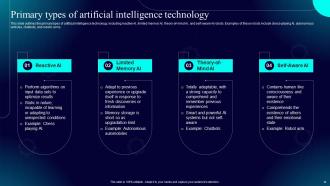
Slide 46: This slide outlines the primary types of artificial intelligence technology, including reactive AI, limited memory AI, theory-of-mind AI, and self-aware AI robots.
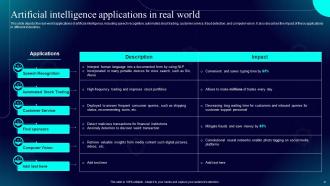
Slide 47: This slide displays the real-world applications of artificial intelligence, including speech recognition, automated stock trading, customer service, fraud detection, and computer vision.
Slide 48: This slide indicates the Title for the Topics to be covered in the upcoming template.
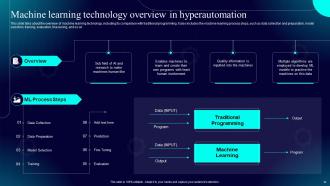
Slide 49: This slide talks about the overview of machine learning technology, including its comparison with traditional programming.
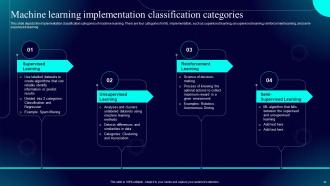
Slide 50: This slide depicts the implementation classification categories of machine learning.
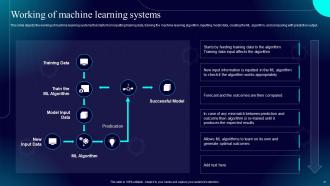
Slide 51: This slide elucidates the working of machine learning systems.
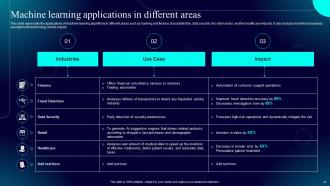
Slide 52: This slide represents the applications of machine learning algorithms in different areas such as banking and finance, fraud detection, data security, the retail sector, and the healthcare industry.
Slide 53: This slide highlights the Title for the Components to be discussed further.
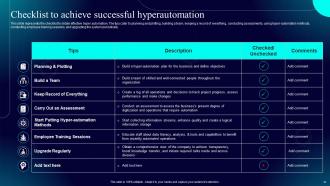
Slide 54: This slide presents the checklist to obtain effective hyper automation.
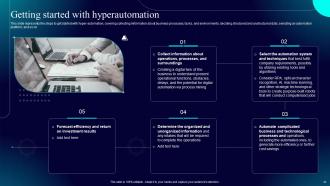
Slide 55: This slide lists the steps to get started with hyper-automation, covering collecting information about business processes, tasks, deciding structured and unstructured data, etc.
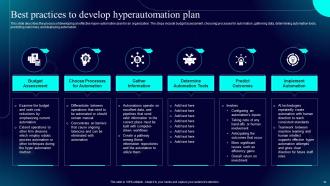
Slide 56: This slide describes the process of developing an effective hyper-automation plan for an organization.
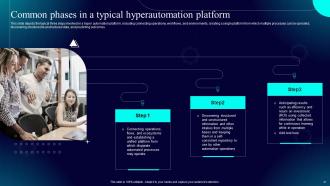
Slide 57: This slide states the Common phases in a typical hyperautomation platform.
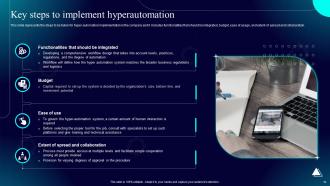
Slide 58: This slide highlights the steps to be taken for hyper-automation implementation in the company and it includes functionalities that should be integrated, budget, ease of usage, and extent of spread and collaboration.
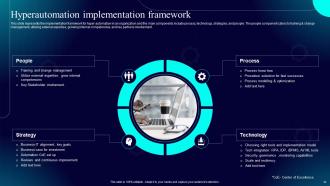
Slide 59: This slide represents the implementation framework for hyper automation in an organization and the main components include process, technology, strategies, and people.
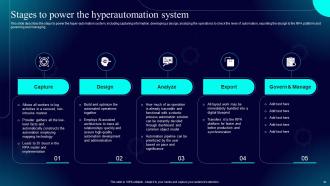
Slide 60: This slide describes the steps to power the hyper-automation system, including capturing information, developing a design, analyzing the operations to check the level of automation, exporting the design to the RPA platform and governing and managing.
Slide 61: This slide indicates the Heading for the Topics to be discussed next.
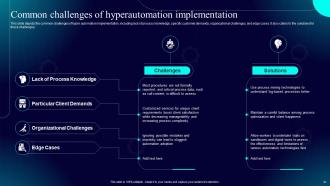
Slide 62: This slide depicts the common challenges of hyper automation implementation, including lack of process knowledge, specific customer demands, organizational challenges, and edge cases.
Slide 63: This slide shows the Title for the Topics to be covered in the forth-coming template.
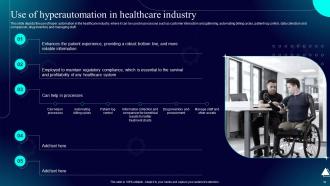
Slide 64: This slide displays the use of hyper automation in the healthcare industry.
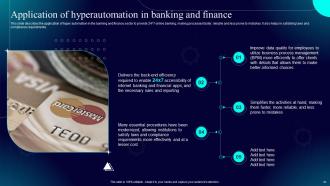
Slide 65: This slide describes the application of hyper automation in the banking and finance sector to provide 24*7 online banking, making processes faster, reliable and less prone to mistakes.
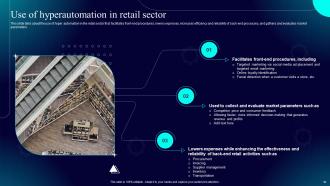
Slide 66: This slide talks about the use of hyper automation in the retail sector that facilitates front-end procedures, lowers expenses, increases efficiency and reliability of back-end processes, and gathers and evaluates market parameters.
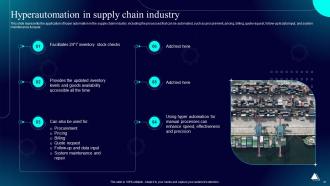
Slide 67: This slide represents the application of hyper automation in the supply chain industry, including the processes that can be automated, such as procurement, pricing, billing, quote request, follow-up & data input, and system maintenance & repair.
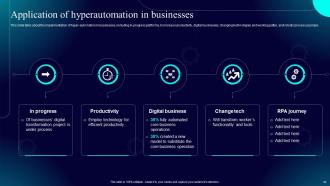
Slide 68: This slide deals with the implementation of hyper-automation in businesses.
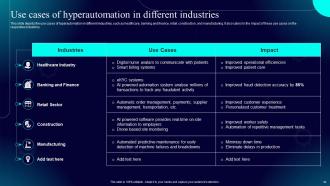
Slide 69: This slide depicts the use cases of hyperautomation in different industries, such as healthcare, banking and finance, retail, construction, etc.
Slide 70: This slide highlights the Heading for the Topics to be covered in the upcoming template.
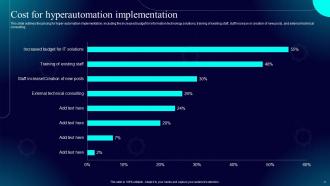
Slide 71: This slide outlines the pricing for hyper-automation implementation, including the increased budget for information technology solutions, training of existing staff, staff increase or creation of new posts, and external technical consulting.
Slide 72: This slide showcases the Title for the Topics to be discussed next.
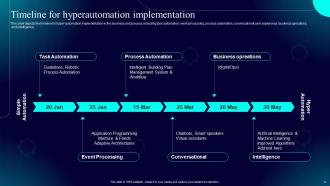
Slide 73: This slide depicts the timeline for hyper-automation implementation in the business and process, including task automation, event processing, process automation, etc.
Slide 74: This slide displays the Heading for the Contents to be covered in the next template.
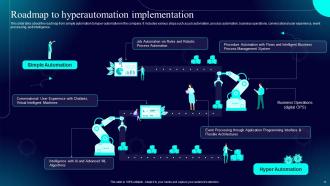
Slide 75: This slide talks about the roadmap from simple automation to hyper-automation in the company.
Slide 76: This slide elucidates the Heading for the Components to be covered in the upcoming template.
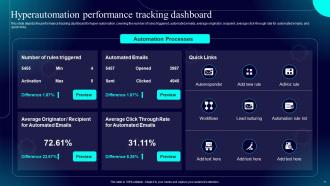
Slide 77: This slide illustrates the Hyperautomation performance tracking dashboard.
Slide 78: This slide highlights the Title for the Ideas to be discussed further.
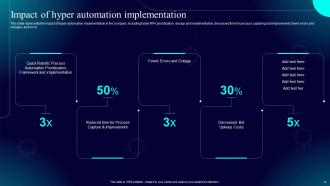
Slide 79: This slide represents the impact of hyper-automation implementation in the company, including faster RPA prioritization, design and implementation, fewer errors and outages, and so on.
Slide 80: This slide showcases the Heading for the Topics to be covered next.
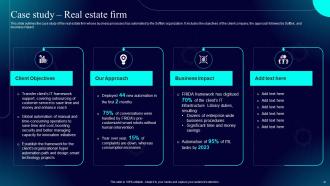
Slide 81: This slide outlines the case study of the real estate firm whose business processes has automated by the Softtek organization.
Slide 82: This is the Icons slide containing all the Icons used in the plan.
Slide 83: The purpose of this slide is to depict Additional information.
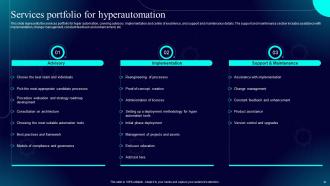
Slide 84: This slide represents the services portfolio for hyper automation, covering advisory, implementation and center of excellence, and support and maintenance details.
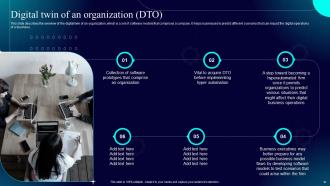
Slide 85: This slide describes the overview of the digital twin of an organization, which is a set of software models that comprises a company.
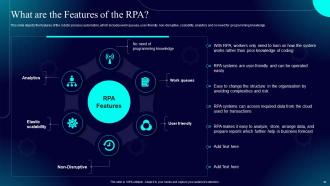
Slide 86: This slide depicts the features of the robotic process automation, which includes work queues, user-friendly, non-disruptive, scalability, analytics and no need for programming knowledge.
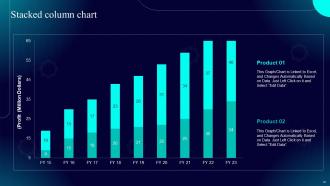
Slide 87: This slide shows the Stacked column chart.
Slide 88: This is the About us slide. State your Company related information here.
Slide 89: This is the Puzzle slide with related imagery.
Slide 90: This is Our team slide for showcasing the information related to the team members.
Slide 91: This slide elucidates the Company Roadmap.
Slide 92: This slide depicts the 30-60-90 days plan for efficient planning.
Slide 93: This is the Thank You slide for acknowledgement.
Hyperautomation IT Powerpoint Presentation Slides with all 98 slides:
Use our Hyperautomation IT Powerpoint Presentation Slides to effectively help you save your valuable time. They are readymade to fit into any presentation structure.































FAQs for Hyperautomation IT
So you're gonna need RPA, AI/ML stuff, process mining, and workflow orchestration - that's your main tech stack. Analytics for monitoring everything, plus low-code platforms so regular business people can actually build automations without coding. The "hyper" part is what matters though - you're linking all these tools together to create smart workflows that handle weird situations and make decisions on their own. Oh, and definitely map out your current processes first before diving in. That'll help you figure out which combo of technologies actually makes sense for what you're trying to do.
So regular automation is pretty basic - it just does one repetitive thing at a time, like sending scheduled reports. But hyperautomation? That's a whole different beast. It uses AI and machine learning to handle entire workflows from start to finish, connecting all your different systems without you having to babysit everything. The cool part is it actually learns and gets smarter over time. Oh, and it can make decisions on its own too. I'd say look at your messiest, most complicated processes first - those are honestly your best bet for getting the most bang for your buck.
Banking's probably your best bet - they're automating loan processing, fraud detection, the whole nine yards. Healthcare's doing great with patient data and scheduling too. Manufacturing has supply chain stuff locked down, and retail's catching up fast with inventory and customer service bots. Oh, and insurance companies are going nuts with claims processing automation. Honestly, I'd dig into those industries first if you want solid case studies. They've been at this longer so you'll find way more real examples to learn from instead of just theoretical stuff.
So AI is what makes hyperautomation actually smart, not just speedy. Machine learning digs into your data patterns and makes real-time decisions. It can even predict when stuff's about to break - which honestly saves so much headache. Natural language processing helps bots understand what people are asking for. Computer vision reads documents and images too. Without AI you're just automating random tasks here and there. With it? You get workflows that actually learn and adapt over time. My advice: look for spots where you need decision-making happening, not just basic task running.
Honestly, just start by looking at what you're already doing - figure out which stuff is boring and repetitive since that's the easiest to automate. Your data better be clean though, otherwise you're just automating mess. Does your team actually know how to use this tech? Training might be expensive but whatever. The thing is, people hate change so expect some pushback when you roll this out. I'd probably pick one department first, see how badly you screw it up (kidding), then expand if it actually works. Way better than diving headfirst into something you don't understand yet.
Honestly, the worst part is dealing with your old systems - they just don't mesh well with new automation stuff. Finding people who get both the business side AND tech? Nearly impossible these days. Governance becomes a nightmare too because without proper oversight, automated processes can go completely off the rails fast. I'd say start with small pilot projects first. Training your team is huge - don't skimp on that. Oh, and set up some solid rules for managing everything before you try scaling. Trust me on this one.
So these hyperautomation tools basically hook up through APIs and pre-built connectors - think of them like universal adapters for your existing systems. Your CRM, ERP, databases? They'll usually play nice together without you having to rebuild everything from scratch. Start by mapping what you're already doing, then the platform spots where things can connect. The smart ones actually watch your workflows and go "hey, you could automate this part." Pretty neat, honestly. But here's the thing - don't go crazy trying to automate your entire operation day one. Pick one workflow, test it properly, then build from there. Trust me on this one.
So you'll want to track both the nuts-and-bolts stuff and the bigger business impact. Start with process metrics - cycle times, error rates, how much more you're getting done. Those show immediate wins. Cost savings and ROI are obvious ones for the executives. Don't forget employee satisfaction though, people get weird about automation replacing them. Customer satisfaction should improve too since things run smoother. Honestly, I'd just pick 3-4 metrics that actually matter to your stakeholders instead of trying to measure everything under the sun. Way easier to stay focused that way.
Honestly? Yeah, hyperautomation will definitely kill some jobs - mostly the repetitive stuff. But the smart companies I've seen don't just let it happen randomly. They're getting ahead of it by retraining people early, moving them into roles that need actual human thinking and creativity. My old boss used to say transparency is everything here - tell people what's coming and invest in training programs before you flip the switch. I mean, it's way better than surprising everyone later. Map out which jobs will change and give people a clear path to grow with the tech instead of getting replaced by it.
Oh man, there's definitely some tricky stuff to think about. Job displacement is huge - people lose their jobs when you automate everything, so you've gotta be upfront about retraining options. Privacy gets messy too since these systems gobble up tons of sensitive data. Then there's algorithmic bias, which honestly trips up way more companies than you'd expect. Your AI will just repeat whatever biases were in the training data if you're not watching for it. I'd say run some ethical impact assessments before you dive in. Trust me, it's way easier than dealing with the fallout later.
So hyperautomation is what actually makes digital transformation happen - it connects AI, RPA, and analytics across your whole business instead of just automating random tasks. You're basically turning those annoying manual processes into one smart, flowing system. It's like going from having separate apps to everything working together seamlessly (which honestly should've happened years ago). No more data stuck in silos. Real-time visibility into what's going on. Start by finding your most painful manual stuff - that's where you'll see the biggest wins.
DHL cut their invoice processing by 75% using RPA with AI document reading - pretty wild numbers. Siemens went big and automated their whole procurement thing, saved 30% on costs. Deutsche Bank's doing loan approvals in minutes now instead of days, which honestly makes sense given how manual that process used to be. The smart move these companies made? They didn't just dump automation everywhere. First they used process mining to spot the worst bottlenecks, then layered in RPA and AI strategically. I'd say pick one process that's driving everyone crazy, prove it works there, then expand from that win.
Honestly, small businesses can totally compete with the big guys using automation - you just gotta be strategic about it. Pick your most annoying, repetitive stuff first. Think invoice processing, getting new customers set up, inventory tracking. That boring stuff that eats up hours. The cool thing is automation tools aren't crazy expensive anymore like they used to be. Start with one process this quarter and nail it completely before jumping to something else. Your team can focus on the creative work that actually matters instead of mind-numbing tasks. That's where you'll beat bigger competitors anyway.
Honestly, don't try to compete with the bots - work with them instead. Critical thinking is huge because you'll need to catch when automation screws up (and trust me, it will). Communication skills are where you'll really shine since you're explaining all this automated stuff to actual humans. Creative problem-solving? That's still our territory. Machines can't think outside the box like we can. Pick up some basic data analysis too. Here's what I'd do - find one automation tool your team already uses and become the expert on it. Start there and build up your confidence with the tech.
So hyperautomation speeds up your customer service by automating stuff like inquiries and order processing. Customers get instant answers instead of waiting around forever. Fewer mistakes too since systems actually communicate with each other properly. The AI can look at customer data on the fly and personalize things - which is honestly pretty cool when it works right. I'd say start small though. Pick whatever's bugging your customers most and automate that first. You don't want to overwhelm yourself trying to fix everything at once.
-
Thank you SlideTeam for such an excellent service.
-
I was really impressed with the presentation I created with their templates. I’ll be using their services moving forward.