

Automation Benefits Powerpoint Presentation Slides





Try Before you Buy Download Free Sample Product
 Impress Your
 Audience
 100%
100% Editable
 Save Hours
 of Time


Automation Benefits Powerpoint Presentation Slides is a virtual tool loaded with informative visuals. Use this PowerPoint slideshow to represent organizational challenges due to the lack of a business process automation. Showcase a range of production expenses incurred like raw materials, labor, etc. for various products. Present per product cost comparison between your organization and other competitors. Employ our PPT templates deck to elucidate losses incurred because of the absence of business automation. Highlight reasons like low productivity, or slow turnaround time that call for automation. Offer a glimpse into labor specialization through the development of equipment to boost efficiency. Outline the simultaneous operations strategy, combined operations strategy, and automation techniques. Use our benefits of business process automation PowerPoint presentation to showcase how to select the most-suitable equipment manufacturers. Also, consolidate the ROI after automation based on sales, profit, cost, and time. Display cost of machinery installation, asset cost analysis, and machinery depreciation. Download this PPT theme to illustrate the BPA implementation plan. Our Automation Benefits Powerpoint Presentation Slides are topically designed to provide an attractive backdrop to any subject. Use them to look like a presentation pro.
People who downloaded this PowerPoint presentation also viewed the following :
Content of this Powerpoint Presentation
Slide 1: This slide introduces Automation Benefits. Mention your Company name.
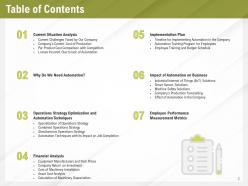
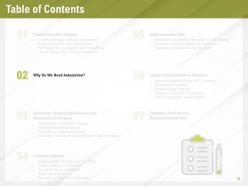
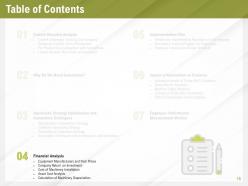
Slide 2: This slide displays Table of Contents.
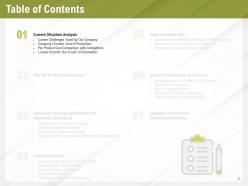
Slide 3: This slide displays Table of Contents.
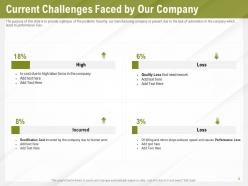
Slide 4: The purpose of this slide is to provide a glimpse of the problems faced by our manufacturing company at present due to the lack of automation in the company which leads to performance loss.
Slide 5: The purpose of this slide is to provide a glimpse of the variety of production expenses incurred in our company such as labor, raw material, operating, etc. Evaluation is made of such costs for different products.
Slide 6: The purpose of this slide is to provide a glimpse of the product cost comparison between our company and the competitors to get an overview of the market.
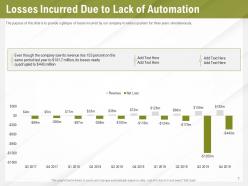
Slide 7: The purpose of this slide is to provide a glimpse of losses incurred by our company in various quarters for three years simultaneously.
Slide 8: This slide displays Table of Contents.
Slide 9: The purpose of this slide is to provide a glimpse of challenges faced by our company such as slow turnaround time, outdated technologies, error rate etc. arises the need for automation.
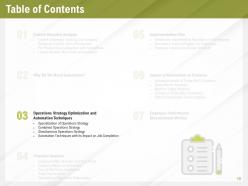
Slide 10: This slide displays Table of Contents.
Slide 11: The purpose of this slide is to provide a glimpse of specialization of operations strategy wherein different types of equipment focuses on a particular operation leading to labor specialization.
Slide 12: The purpose of this slide is to provide a glimpse of the simultaneous operations strategy wherein all the operations are performed at one workstation, thus increases productivity.
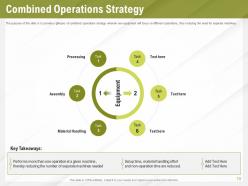
Slide 13: The purpose of this slide is to provide a glimpse of combined operations strategy wherein one equipment will focus on different operations, thus reducing the need for separate machines.
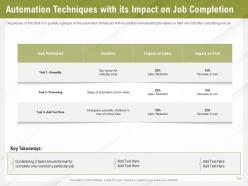
Slide 14: The purpose of this slide is to provide a glimpse of the automation techniques with its solution and evaluating its impact on labor and cost after completing one job.
Slide 15: This slide shows Table of Contents.
Slide 16: The purpose of this slide is to compare various equipment manufacturers and evaluate the prices offered by them to our firm.
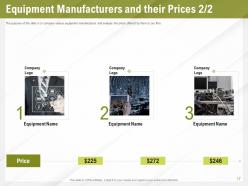
Slide 17: The purpose of this slide is to compare various equipment manufacturers and evaluate the prices offered by them to our firm.
Slide 18: This graph depicts the calculation of return on investment after automation based on sales, profit, cost, and time.
Slide 19: The purpose of this slide is to provide a glimpse of the installation cost of machinery which covers all quantifiable facets of a purchased asset, this is the original cost recorded on the balance sheet.
Slide 20: The purpose of this slide is to provide a glimpse of the asset cost analysis to optimize the company’s asset management which covers costs of depreciation, service, operating, disposal etc.
Slide 21: The purpose of this slide is to provide a glimpse of the machinery depreciation calculation for the next 5 years after automation covering book values, depreciation rate, expenses, accumulated depreciation etc.
Slide 22: This slide displays Table of Contents.
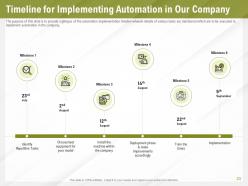
Slide 23: The purpose of this slide is to provide a glimpse of the automation implementation timeline wherein details of various tasks are mentioned which are to be executed to implement automation in the company.
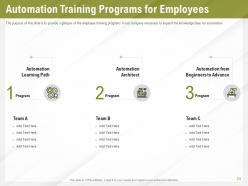
Slide 24: The purpose of this slide is to provide a glimpse of the employee training programs in our company necessary to expand the knowledge base for automation.
Slide 25: The purpose of this slide is to provide complete information about the employee and the training program they are attending including the company’s budget for a particular program.
Slide 26: This slide displays Table of Contents.
Slide 27: The purpose of this slide is to provide a glimpse of the industrial internet of things (IIoT) describes the technologies that connect industrial field devices, such as sensors, cloud.
Slide 28: The purpose of this slide is to provide a glimpse of smart sensor solutions such as multicolor packaging, dark objects detection etc. leads to time and cost-saving.
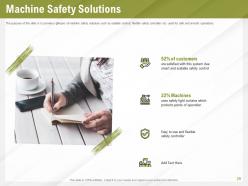
Slide 29: The purpose of this slide is to provide a glimpse of machine safety solutions such as scalable control, flexible safety controller etc. used for safe and smooth operations.
Slide 30: The graph in the slide defines the growth of a company’s production after introducing automation in the company. The main focus is on loss, gain and net values for previous and forecast productivity.
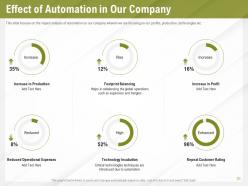
Slide 31: This slide focuses on the impact analysis of automation on our company wherein we are focusing on our profits, production, technologies etc.
Slide 32: This slide displays Table of Contents.
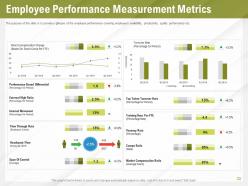
Slide 33: The purpose of this slide is to provide a glimpse of the employee performance covering employee’s availability, productivity, quality performance etc.
Slide 34: This is Automation Benefits Icons Slide
Slide 35: This slide is titled as Additional Slides for moving forward.
Slide 36: This slide displays Business Automation Roadmap
Slide 37: This is 30 60 90 Days Plan slide.
Slide 38: This slide showcases Monthly Timeline with Task Name
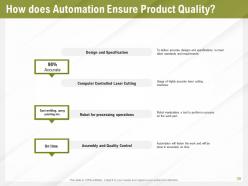
Slide 39: This slide explains How does Automation Ensure Product Quality?
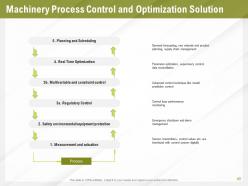
Slide 40: This slide depicts Machinery Process Control and Optimization Solution
Slide 41: This slide explains How Plant Operations can be Controlled?
Slide 42: This slide shows How does Automation Impact the Business?
Slide 43: This slide Cost Benefit Analysis
Slide 44: This slide shows Automation Maturity Model and Transformation Journey
Slide 45: This slide displays Integration of Operations Strategy
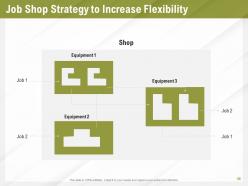
Slide 46: This slide describes Job Shop Strategy to Increase Flexibility
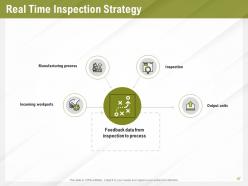
Slide 47: This slide explains Real Time Inspection Strategy
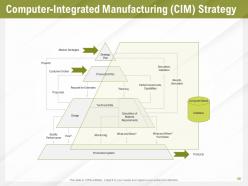
Slide 48: This slide shows Computer-Integrated Manufacturing (CIM) Strategy
Slide 49: This is Thank You slide with Contact details.
Automation Benefits Powerpoint Presentation Slides with all 49 slides:
Use our Automation Benefits Powerpoint Presentation Slides to effectively help you save your valuable time. They are readymade to fit into any presentation structure.
















FAQs for Automation Benefits
Honestly, the speed difference alone will blow your mind. No more human mistakes on boring repetitive stuff, and your team can actually focus on work that matters instead of endless data entry. It never sleeps either - keeps chugging along while you're binge-watching Netflix. You'll see way more consistent results across the board, and here's the kicker: you can grow without constantly hiring more people. ROI hits surprisingly fast too. I'd start by looking at whatever eats up most of your time manually. Those tedious processes? Perfect automation targets.
Look, automation just handles all the boring repetitive stuff you hate doing anyway. Like data entry, routine emails - that kind of soul-crushing work. Set up systems to do it automatically and boom, you've got time for actual thinking work. The best part? Machines don't get tired or make stupid mistakes like we do when we're doing the same thing for the hundredth time. Way more consistent results. I'd start small though - just pick whatever weekly task makes you want to bang your head against the wall and automate that first.
Honestly, automation saves you money in a bunch of ways. The biggest one is cutting labor costs - machines don't need salaries or sick days, right? They also screw up way less than people do (which sounds harsh but whatever, it's reality). So you're not constantly fixing mistakes or redoing stuff. Processing gets faster too. I'd look at whatever takes your team forever to do manually - like data entry or basic calculations. Those repetitive tasks are usually where you'll see savings fastest. Oh, and you can handle more work without hiring a whole new crew.
So basically, automation cuts out all the random human mistakes that happen with manual stuff. Machines don't have bad days or zone out during boring tasks (lucky them). You'll get identical results every time since they just follow their programming exactly. Honestly, repetitive work is where people mess up the most - missing details, fat-fingering numbers, that kind of thing. Error rates usually drop pretty dramatically once you automate those processes. Just make sure you don't automate something that's already broken though, because then you're just making bad stuff happen faster and more consistently.
Honestly, small businesses have a huge advantage here - you don't have to deal with endless corporate red tape like the big guys do. Start with something simple that's already driving you crazy, like customer service or social media posting. Tools like Zapier and HubSpot are pretty affordable and you can set them up in a day instead of waiting months for approval. I mean, why spend hours scheduling posts when you could automate it? Once you get one thing running smoothly, you'll basically have 24/7 support that looks just as professional as the enterprise companies, except you didn't blow your budget on it.
So you've got your heavy hitters like Microsoft Power Automate and Zapier for workflow stuff, plus Selenium if you're doing web testing. UiPath and Blue Prism are solid for robotic process automation. Manufacturing folks go crazy for PLCs and SCADA systems, while marketing teams are obsessed with HubSpot and Marketo. Finance uses MindBridge for auditing, IT runs on Ansible or Puppet - honestly every department has their pet tool now. My advice? Figure out what's actually broken first, then find something that fixes it. Don't just chase whatever's popular this month.
Honestly, when you do automation right, people actually end up happier at work. Nobody wants to spend their day doing the same boring data entry over and over - automation handles that stuff so your team can work on interesting problems instead. Yeah, people get nervous at first (who wouldn't?), but once they realize you're not firing them, just giving them better work to do, morale goes way up. I've seen it happen. The trick is bringing your team into the planning from day one. Makes them feel like they're part of the solution, not just watching changes happen to them.
Honestly, the hardest part is getting your old systems to work with new automation tools - it's like trying to connect a flip phone to your Tesla. Budget for some serious integration headaches there. People will freak out about losing their jobs too, which makes sense. During rollout, expect everything to be chaos for a bit while everyone figures it out. Start with small test runs instead of going all-in. Be upfront with your team about how this stuff will actually make their work easier, not replace them. Oh, and triple your timeline because tech never works as smoothly as they promise.
Oh totally! Automation makes customer service way better. Chatbots handle basic stuff 24/7, orders get processed instantly, and you can send those targeted recommendations based on what people bought before. People are honestly so impatient now - they want everything yesterday. Plus it cuts out those annoying human errors and wait times. Your actual team gets to work on the tricky problems that need real people instead of answering "where's my order" a million times. I'd start with whatever customers ask about most. Works like a charm.
Manufacturing and logistics are seeing insane returns - all those repetitive tasks are perfect for automation. Healthcare's another big one, especially drug discovery and patient monitoring. Finance companies are obsessed with it for fraud detection and trading algorithms that work 24/7. Retail, agriculture, even creative stuff is getting automated now too. Industries with high-volume, predictable processes usually see results fastest. My advice? Map out whatever repetitive tasks eat up most of your time first - that's where you'll probably see the biggest impact. Oh, and don't sleep on the creative applications, they're getting pretty wild lately.
So basically automation just does all the boring stuff for you - data collection, cleaning, processing. No more manual work. Real-time insights pop up automatically and you catch patterns way faster. Honestly, the best part is cutting out human error because let's face it, we all mess up when copying numbers around. These algorithms chew through huge datasets and flag weird stuff you'd totally miss. You end up making better decisions faster and spending way less time staring at Excel (thank god). I'd start with automating whatever report takes you the longest each week.
Look, job displacement is the biggest thing you've gotta tackle - just be straight up with your team about what this means for them. Don't play favorites with which departments get automated either. Privacy stuff gets tricky fast when you're dealing with personal data, so yeah, that whole "break things" startup vibe? Totally wrong approach here. Bias in automated decisions is another nightmare waiting to happen. Oh and definitely loop employees into the planning - people hate being blindsided. Have retraining ready to go before you need it.
Honestly, measuring automation ROI isn't as complicated as people make it seem. Track your obvious wins first - time saved, labor costs cut, fewer screw-ups, faster processing. The softer stuff like happier customers or better employee morale? Way harder to measure but still worth trying to ballpark. Compare all those benefits against what you spent on automation over 12-18 months. Most companies hit positive ROI within year one if they didn't automate something stupid. Oh, and set up your tracking before you flip the switch - trying to measure results after the fact is a nightmare.
Honestly, the automation stuff happening now is wild - it's not just doing boring repetitive work anymore, it's actually making decisions. Hyperautomation is where it's at... basically all your automated stuff talks to each other instead of working in silos. Those no-code platforms are pretty sweet too because your marketing team can suddenly build workflows without bugging IT constantly. Look for processes that cross departments or have multiple steps - that's where you'll see the biggest wins. Oh, and smaller companies actually have an advantage here since they can move faster than big corporations.
Dude, automation seriously saves your butt with compliance stuff. Your processes run the same way every time, so nobody can mess up or skip steps. The documentation it creates is crazy detailed - auditors eat that up. I'd honestly start with whatever your riskiest compliance thing is and automate that first. You can set alerts too, so if something goes sideways you'll know immediately instead of finding out during an inspection. Way less stressful than constantly worrying about whether your team followed protocol correctly.
-
Innovative and Colorful designs.
-
Excellent design and quick turnaround.
-
Excellent products for quick understanding.
-
Nice and innovative design.