

Automation Technology Powerpoint Presentation Slides






Try Before you Buy Download Free Sample Product
 Impress Your
 Audience
 100%
100% Editable
 Save Hours
 of Time


Our Automation Technology Powerpoint Presentation Slides are topically designed to provide an attractive backdrop to any subject. Use them to look like a presentation pro.
People who downloaded this PowerPoint presentation also viewed the following :
Content of this Powerpoint Presentation
Slide 1: This slide introduces Automation Technology. State your Company name.
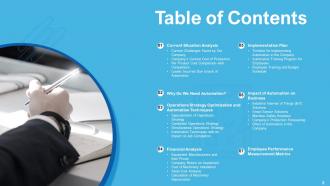
Slide 2: This slide displays Table of Contents
Slide 3: This slide displays Table of Content
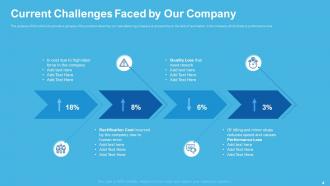
Slide 4: The purpose of this slide is to provide a glimpse of the problems faced by our manufacturing company at present due to the lack of automation in the company which leads to performance loss.
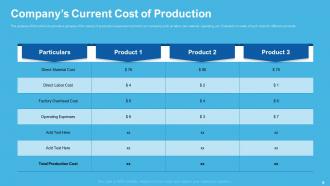
Slide 5: The purpose of this slide is to provide a glimpse of the variety of production expenses incurred in our company such as labor, raw material, operating, etc. Evaluation is made of such costs for different products.
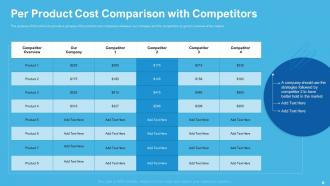
Slide 6: The purpose of this slide is to provide a glimpse of the product cost comparison between our company and the competitors to get an overview of the market.
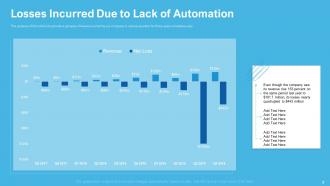
Slide 7: The purpose of this slide is to provide a glimpse of losses incurred by our company in various quarters for three years simultaneously.
Slide 8: This slide displays Table of Contents.
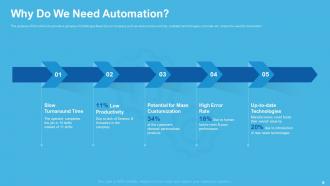
Slide 9: The purpose of this slide is to provide a glimpse of challenges faced by our company such as slow turnaround time, outdated technologies, error rate etc. arises the need for automation.
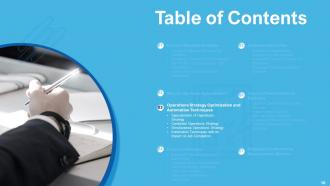
Slide 10: This slide displays Table of Contents.
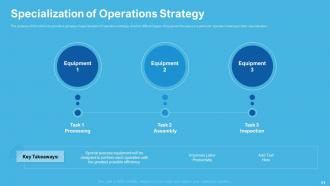
Slide 11: The purpose of this slide is to provide a glimpse of specialization of operations strategy wherein different types of equipment focuses on a particular operation leading to labor specialization.
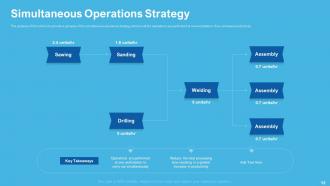
Slide 12: The purpose of this slide is to provide a glimpse of the simultaneous operations strategy wherein all the operations are performed at one workstation, thus increases productivity.
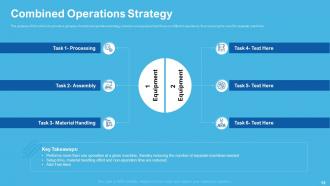
Slide 13: The purpose of this slide is to provide a glimpse of combined operations strategy wherein one equipment will focus on different operations, thus reducing the need for separate machines.
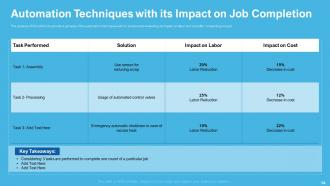
Slide 14: The purpose of this slide is to provide a glimpse of the automation techniques with its solution and evaluating its impact on labor and cost after completing one job.
Slide 15: This slide shows Table of Contents.
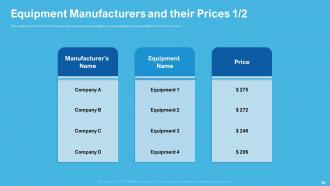
Slide 16: The purpose of this slide is to compare various equipment manufacturers and evaluate the prices offered by them to our firm.
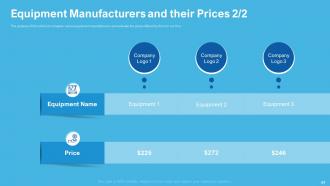
Slide 17: The purpose of this slide is to compare various equipment manufacturers and evaluate the prices offered by them to our firm.
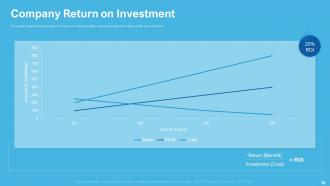
Slide 18: This graph depicts the calculation of return on investment after automation based on sales, profit, cost, and time.
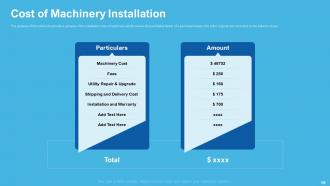
Slide 19: The purpose of this slide is to provide a glimpse of the installation cost of machinery which covers all quantifiable facets of a purchased asset, this is the original cost recorded on the balance sheet.
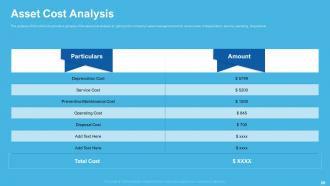
Slide 20: The purpose of this slide is to provide a glimpse of the asset cost analysis to optimize the company’s asset management which covers costs of depreciation, service, operating, disposal etc.
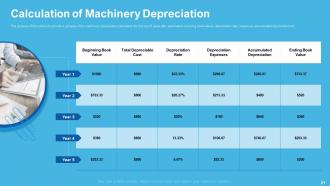
Slide 21: The purpose of this slide is to provide a glimpse of the machinery depreciation calculation for the next 5 years after automation covering book values, depreciation rate, expenses, accumulated depreciation etc.
Slide 22: This slide displays Table of Contents.
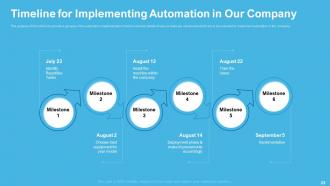
Slide 23: The purpose of this slide is to provide a glimpse of the automation implementation timeline wherein details of various tasks are mentioned which are to be executed to implement automation in the company.
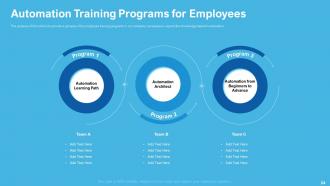
Slide 24: The purpose of this slide is to provide a glimpse of the employee training programs in our company necessary to expand the knowledge base for automation.
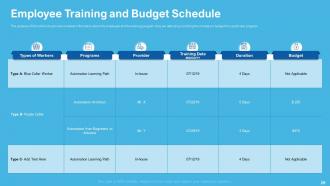
Slide 25: The purpose of this slide is to provide complete information about the employee and the training program they are attending including the company’s budget for a particular program.
Slide 26: This slide displays Table of Contents.
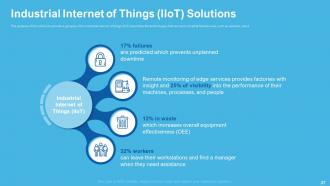
Slide 27: The purpose of this slide is to provide a glimpse of the industrial internet of things (IIoT) describes the technologies that connect industrial field devices, such as sensors, cloud.
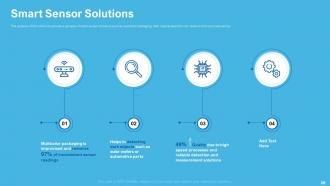
Slide 28: The purpose of this slide is to provide a glimpse of smart sensor solutions such as multicolor packaging, dark objects detection etc. leads to time and cost-saving.
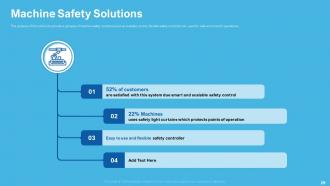
Slide 29: The purpose of this slide is to provide a glimpse of machine safety solutions such as scalable control, flexible safety controller etc. used for safe and smooth operations.
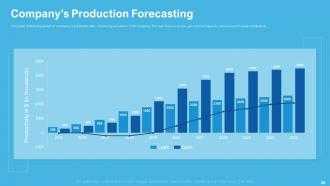
Slide 30: The graph in the slideshow defines the growth of a company’s production after introducing automation in the company. The main focus is on loss, gain and net values for previous and forecast productivity.
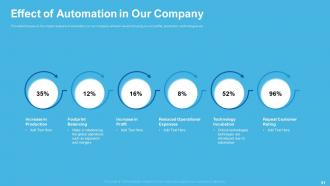
Slide 31: This slide focuses on the impact analysis of automation on our company wherein we are focusing on our profits, production, technologies etc.
Slide 32: This slide shows Table of Contents
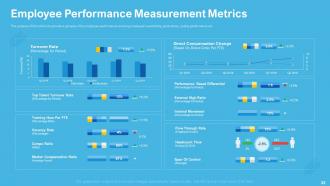
Slide 33: The purpose of this slide is to provide a glimpse of the employee performance covering employee’s availability, productivity, quality performance etc.
Slide 34: This is Automation Technology Icons Slide.
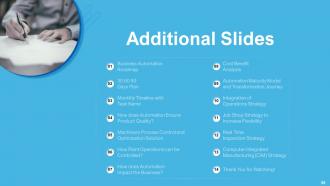
Slide 35: This slide is titled as Additional Slides for moving forward.
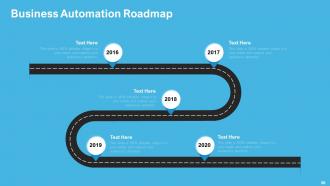
Slide 36: This slide displays Business Automation Roadmap.
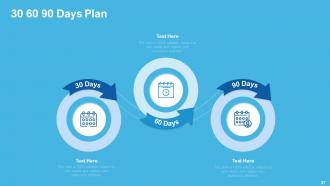
Slide 37: This is 30 60 90 Days Plan slide.
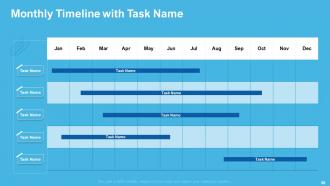
Slide 38: This slide displays Monthly Timeline with Task Name.
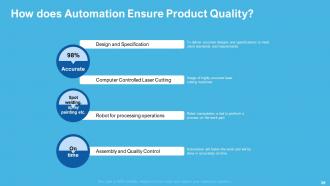
Slide 39: This slide shows How does Automation Ensure Product Quality?
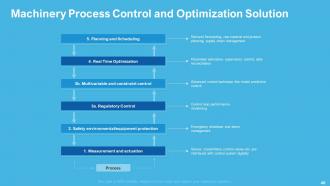
Slide 40: This slide displays Machinery Process Control and Optimization Solution
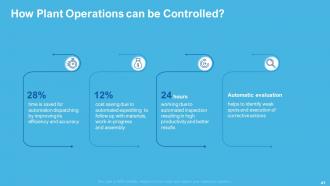
Slide 41: This slide explains How Plant Operations can be Controlled?
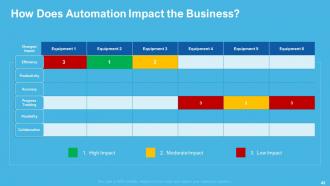
Slide 42: This slide explains How Does Automation Impact the Business?
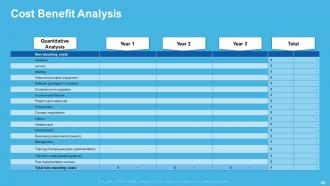
Slide 43: This slide depicts Cost Benefit Analysis
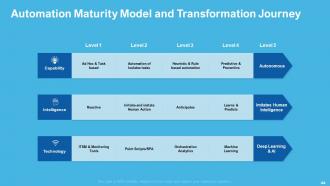
Slide 44: This slide shows Automation Maturity Model and Transformation Journey
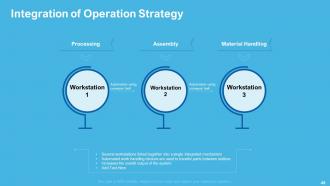
Slide 45: This slide shows Integration of Operation Strategy
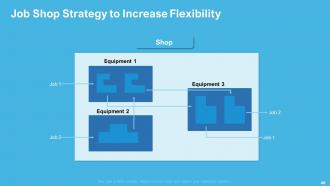
Slide 46: This slide displays Job Shop Strategy to Increase Flexibility
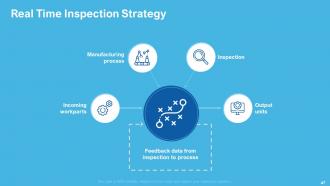
Slide 47: This slide shows Real Time Inspection Strategy
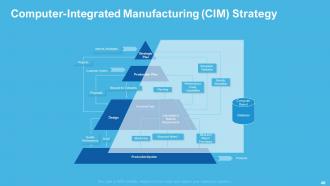
Slide 48: This slide showcases Computer-Integrated Manufacturing (CIM) Strategy
Slide 49: This is Thank you slide with Contact details.
Automation Technology Powerpoint Presentation Slides with all 49 slides:
Use our Automation Technology Powerpoint Presentation Slides to effectively help you save your valuable time. They are readymade to fit into any presentation structure.





FAQs for Automation Technology
Honestly, automation's biggest win is just getting your team out of mind-numbing repetitive stuff so they can actually think strategically. Your accuracy goes way up too - no more typos or missed steps that happen when people are on autopilot. Scales super well as you grow, which is nice. Customers are pretty impatient these days so faster responses help. The data side is cool - you start seeing patterns you'd never catch manually. My advice? Pick one process that's currently destroying someone's day with tedious work. That's where you'll see results fastest.
Honestly, automation's kinda wild - it takes over the boring repetitive stuff but pushes everyone into more creative, strategic work. Some jobs disappear, sure, but new ones pop up in tech management and data analysis. Most of the time it just makes people better at their jobs rather than replacing them entirely. Though I've seen whole departments get restructured, not gonna lie. Your team will definitely need training to keep up. The trick is figuring out what you can automate now so you're not scrambling later. Communication gets weird too since you're basically working with robots half the time.
Dude, manufacturing and logistics are getting completely flipped right now. Amazon's warehouses look like something out of a sci-fi movie - just robots everywhere. Assembly lines are going fully autonomous too. Healthcare's blowing up with surgical bots and AI diagnostics becoming normal. Oh, and finance is automating literally everything from trading to those annoying customer service chats. Even farming got high-tech with drones and automated harvesters, which honestly I didn't see coming. If you're job hunting, I'd look at stuff that works alongside automation instead of trying to fight it.
Start with whatever's driving you nuts - like those same email responses you send 50 times a week. I'd probably tackle that first since it's so mindnumbing. Zapier's pretty solid for connecting different apps so stuff moves around automatically. Chatbots can field the basic "what are your hours" questions while you sleep. Don't overthink it though - even setting up some Excel macros counts if it's saving you time. Social media scheduling, invoicing, appointment booking... there's automation for most of this stuff. Just pick one thing and see what's out there for it.
Honestly, the biggest pain points are gonna be your team freaking out about losing their jobs and your old systems being complete jerks about integrating with new stuff. Communication is everything here - people need to know what's happening. Legacy tech can be a money pit if it doesn't want to cooperate. Oh, and good luck finding people who actually know how to run these automated systems once they're up. I'd say start with something small first, maybe automate one annoying process everyone hates. That way you can show it works before going crazy with it.
Honestly, automation can be a game changer for keeping customers happy. Response times get way faster, and people love having 24/7 support - even if it's just a chatbot handling the basic stuff. Plus fewer mistakes when you're not relying on someone manually entering order details at 2am. But here's the thing - badly designed automation is worse than no automation at all. Nobody wants to get stuck in some endless phone tree nightmare. I'd say use it for the routine questions and tracking updates, but always have real humans ready for anything complicated. Speed matters, but so does not making people want to throw their phone across the room.
Dude, AI is like giving your automation a brain upgrade. Your systems don't just follow basic scripts anymore - they actually learn and make smart calls on their own. Picture this: maintenance that predicts problems before they happen, quality checks that improve over time, robots handling curveballs without freaking out. Honestly, the speed of this tech evolution is kind of insane. Best part? Way less babysitting required from your team while everything runs smoother and more accurately. You should totally scope out which processes could use that intelligent decision-making boost.
Start with encrypting everything - data sitting around and data moving between systems. MFA isn't optional anymore, trust me on this one. Set up tight access controls so random people can't mess with your automation. Keep everything patched (I know, it's annoying but those updates matter). Regular security audits help you find problems before hackers do. Monitor everything and log what's happening so you'll actually notice when something's off. Honestly, just treat these systems like they're as important as they actually are. Good security costs money upfront but saves you way more later.
Dude, automation's creating some real headaches. Millions of people could lose their jobs without getting retrained for new ones - that inequality gap is gonna be brutal. AI hiring systems are super biased too since they learn from crappy historical data. Don't even get me started on privacy - these smart systems are basically data vacuums collecting everything about us. Oh, and companies need way better oversight before they automate entire departments. We desperately need transparency rules and actual worker retraining programs, but honestly? Most places are just winging it right now.
So basically automation helps cut emissions by only running stuff when you actually need it - no more lights blazing all night or HVAC cranking 24/7. Smart systems are pretty good at this. Manufacturing gets way more efficient too since there's less material waste. Honestly, we humans mess up a lot (guilty of leaving machines running myself), so removing that factor helps. The real game-changer though? You can track your carbon footprint in real-time with all the data it collects. I'd start with whatever uses the most energy - that's where you'll see results fastest.
Honestly, figure out exactly what you need before you start shopping around - saves so much headache later. Look at how it'll play with your current setup, whether it can grow with you, and what it costs. The learning curve matters too if your team isn't super technical. Definitely test it small first! I learned that one the hard way. Also worth checking if the company's actually stable - nothing worse than your tool disappearing after a year. Support quality is huge because you WILL need help at some point. Make a little scorecard to compare everything objectively instead of just going with your gut.
Dude, the automation stuff for remote teams has gotten seriously good lately. AI scheduling that actually figures out time zones without making you want to scream. Smart workflow tools pass tasks between teammates automatically now. There's document routing that somehow knows exactly who needs what - honestly pretty impressive how far this has come. Chatbots handle the boring requests, automated status updates kill those endless "quick sync" meetings, and AI can even summarize convos you missed. My advice though? Don't go crazy trying to automate everything at once. Just pick one annoying thing your team does every single day and find a tool for that specific workflow first.
Honestly, AI integration is going to be huge - we're talking automation that actually learns your stuff instead of just following rigid rules. The whole hyperautomation thing is cool too, basically linking different tools to handle complete workflows. What I'm really excited about is no-code automation becoming mainstream. Your team won't need to be coding wizards anymore to set up basic processes. Oh, and predictive features will start catching problems before they blow up. My advice? Pick one simple process first and just mess around with it - way easier than it used to be.
Track both the obvious stuff and the harder-to-measure benefits. The obvious ones are reduced labor costs, fewer mistakes, faster processing - things you can actually put numbers on. But don't ignore the fuzzy stuff like happier employees or better customer experience, even though those are way harder to quantify. Here's the thing though - you absolutely have to document where you're starting from before you change anything. I've seen so many people skip this step and then they can't prove their automation actually worked. Measure again in 6-12 months, factor in what you spent to implement it, and you'll have your real ROI.
Python and JavaScript are your best bets for programming languages. Data analysis skills matter a lot too. You'll spend tons of time troubleshooting stuff, so get comfortable with problem-solving. Here's what caught me off guard though - communication skills are actually super critical. You're constantly having to break down technical automation concepts for people who have zero coding background. Oh, and cybersecurity knowledge is pretty clutch since automation opens up new attack vectors. Start with one language and master it before jumping around. That approach worked way better for me than trying to learn everything at once.
-
Great quality slides in rapid time.
-
Awesomely designed templates, Easy to understand.
-
Much better than the original! Thanks for the quick turnaround.
-
Easy to edit slides with easy to understand instructions.