


Company Automation Powerpoint Presentation Slides




Try Before you Buy Download Free Sample Product
 Impress Your
 Audience
 100%
100% Editable
 Save Hours
 of Time


Company automation is the process of automating various tasks within a company in order to improve efficiency and productivity. This can include automating office tasks, manufacturing processes, or even customer service. Company automation can have a variety of benefits, including reducing costs, increasing accuracy, and improving customer satisfaction. In many cases, company automation can also help to improve employee morale and motivation.If you're looking for a more efficient way to manage your projects and keep all of your stakeholders in the loop, consider using SlideTeam's project management PowerPoint templates. Our templates are easy to use and can be customized to fit your needs. Plus, they're free to download so you can get started right away. So start building better presentations today.
People who downloaded this PowerPoint presentation also viewed the following :
Content of this Powerpoint Presentation
Slide 1: This slide introduces Company Automation. State your Company name and begin.
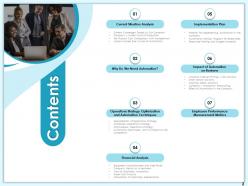
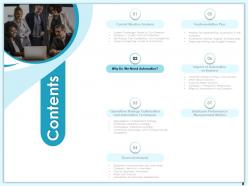
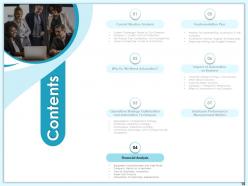
Slide 2: This slide displays Contents.
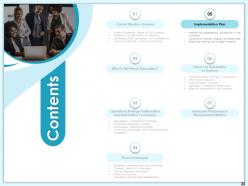
Slide 3: This slide displays Contents of the presentation.
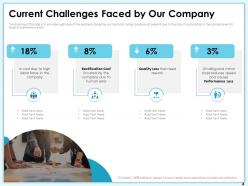
Slide 4: The purpose of this slide is to provide a glimpse of the problems faced by our manufacturing company at present due to the lack of automation in the company which leads to performance loss.
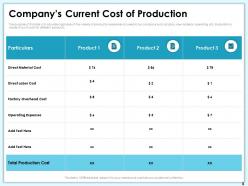
Slide 5: The purpose of this slide is to provide a glimpse of the variety of production expenses incurred in our company such as labor, raw material, operating, etc. Evaluation is made of such costs for different products.
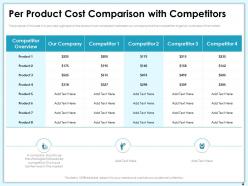
Slide 6: The purpose of this slide is to provide a glimpse of the product cost comparison between our company and the competitors to get an overview of the market.
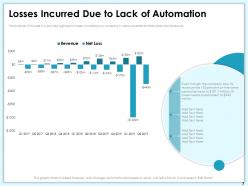
Slide 7: The purpose of this slide is to provide a glimpse of losses incurred by our company in various quarters for three years simultaneously.
Slide 8: This slide displays Contents.
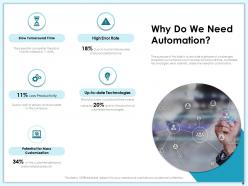
Slide 9: The purpose of this slide is to provide a glimpse of challenges faced by our company such as slow turnaround time, outdated technologies, error rate etc. arises the need for automation.
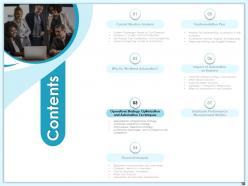
Slide 10: This slide showcases Contents.
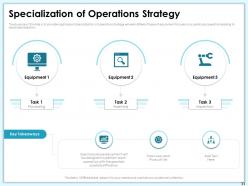
Slide 11: The purpose of this slide is to provide a glimpse of specialization of operations strategy wherein different types of equipment focuses on a particular operation leading to labor specialization.
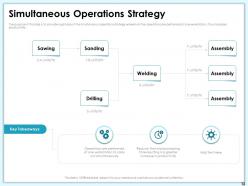
Slide 12: The purpose of this slide is to provide a glimpse of the simultaneous operations strategy wherein all the operations are performed at one workstation, thus increases productivity.
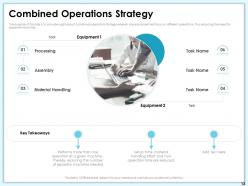
Slide 13: The purpose of this slide is to provide a glimpse of combined operations strategy wherein one equipment will focus on different operations, thus reducing the need for separate machines.
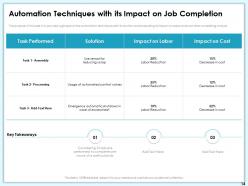
Slide 14: The purpose of this slide is to provide a glimpse of the automation techniques with its solution and evaluating its impact on labor and cost after completing one job.
Slide 15: This slide displays Contents.
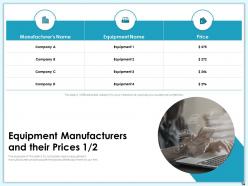
Slide 16: The purpose of this slide is to compare various equipment manufacturers and evaluate the prices offered by them to our firm.
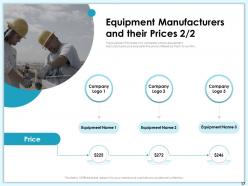
Slide 17: The purpose of this slide is to compare various equipment manufacturers and evaluate the prices offered by them to our firm.
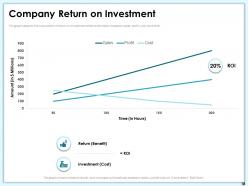
Slide 18: This graph depicts the calculation of return on investment after automation based on sales, profit, cost, and time.
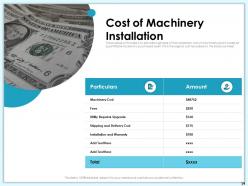
Slide 19: The purpose of this slide is to provide a glimpse of the installation cost of machinery which covers all quantifiable facets of a purchased asset, this is the original cost recorded on the balance sheet.
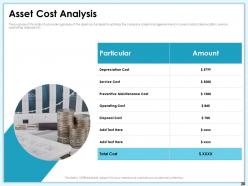
Slide 20: The purpose of this slide is to provide a glimpse of the asset cost analysis to optimize the company’s asset management which covers costs of depreciation, service, operating, disposal etc.
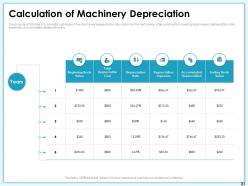
Slide 21: The purpose of this slide is to provide a glimpse of the machinery depreciation calculation for the next 5 years after automation covering book values, depreciation rate, expenses, accumulated depreciation etc.
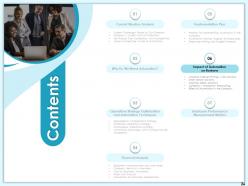
Slide 22: This slide displays Contents.
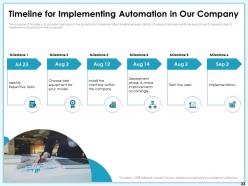
Slide 23: The purpose of this slide is to provide a glimpse of the automation implementation timeline wherein details of various tasks are mentioned which are to be executed to implement automation in the company.
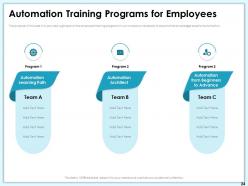
Slide 24: The purpose of this slide is to provide a glimpse of the employee training programs in our company necessary to expand the knowledge base for automation.
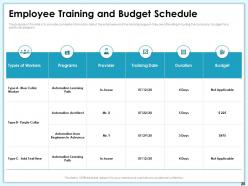
Slide 25: The purpose of this slide is to provide complete information about the employee and the training program they are attending including the company’s budget for a particular program.
Slide 26: This slide displays Contents.
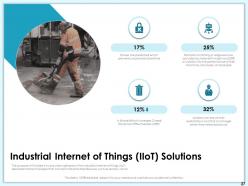
Slide 27: The purpose of this slide is to provide a glimpse of the industrial internet of things (IIoT) describes the technologies that connect industrial field devices, such as sensors, cloud.
Slide 28: The purpose of this slide is to provide a glimpse of smart sensor solutions such as multicolor packaging, dark objects detection etc. leads to time and cost-saving.
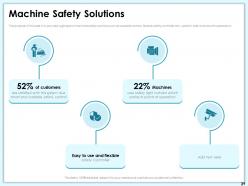
Slide 29: The purpose of this slide is to provide a glimpse of machine safety solutions such as scalable control, flexible safety controller etc. used for safe and smooth operations.
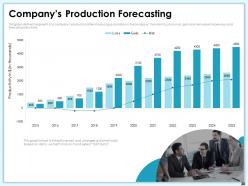
Slide 30: This graph defines the growth of a company’s production after introducing automation in the company. The main focus is on loss, gain and net values for previous and forecast productivity.
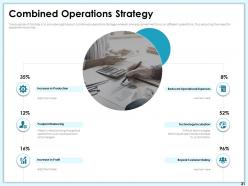
Slide 31: The purpose of this slide is to provide a glimpse of combined operations strategy wherein one equipment will focus on different operations, thus reducing the need for separate machines.
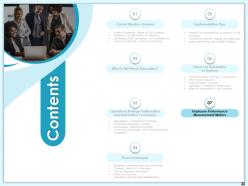
Slide 32: This slide displays Contents.
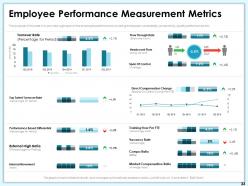
Slide 33: The purpose of this slide is to provide a glimpse of the employee performance covering employee’s availability, productivity, quality performance etc.
Slide 34: This is Company Automation Icons Slide
Slide 35: This slide is titled as Additional Slides for moving forward.
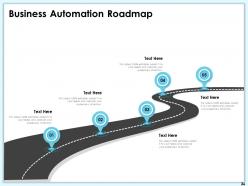
Slide 36: This slide depicts Business Automation Roadmap
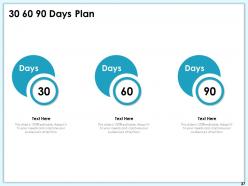
Slide 37: This is 30 60 90 Days Plan slide.
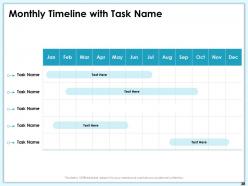
Slide 38: This slide displays Monthly Timeline with Task Name.
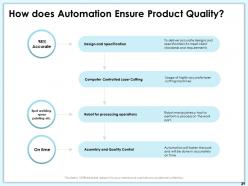
Slide 39: This slide show How does Automation Ensure Product Quality?
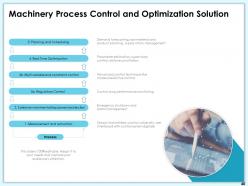
Slide 40: This slide depicts Machinery Process Control and Optimization Solution
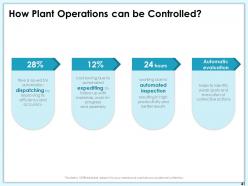
Slide 41: This slide explains How Plant Operations can be Controlled?
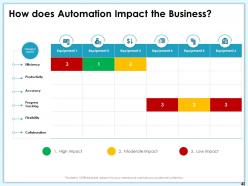
Slide 42: This slide explains How does Automation Impact the Business?
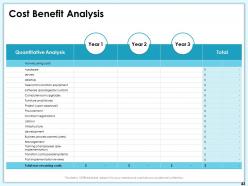
Slide 43: This slide depicts Cost Benefit Analysis
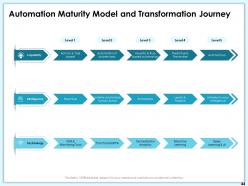
Slide 44: This slide shows Automation Maturity Model and Transformation Journey
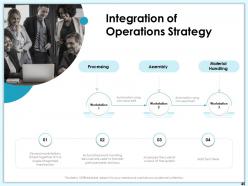
Slide 45: This slide displays Integration of Operations Strategy
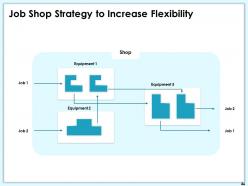
Slide 46: This slide presents Job Shop Strategy to Increase Flexibility
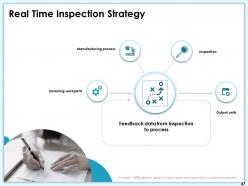
Slide 47: This slide displays Real Time Inspection Strategy
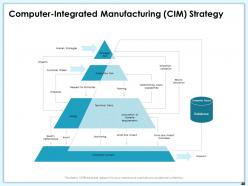
Slide 48: This slide shows Computer-Integrated Manufacturing (CIM) Strategy
Slide 49: This is Thank You with Contact details.
Company Automation Powerpoint Presentation Slides with all 49 slides:
Use our Company Automation Powerpoint Presentation Slides to effectively help you save your valuable time. They are readymade to fit into any presentation structure.



FAQs for Company Automation
Honestly, the time savings alone make it worth it - automation just crushes those repetitive tasks way faster than any human could. Your team gets to ditch the boring stuff like data entry and actually work on things that matter. Costs go down since you're not paying people to do mindless clicking all day. Everything becomes more consistent too, which is nice because automated processes don't have off days like we do. Oh, and there's something weirdly satisfying about watching it all run by itself. Start with whatever's eating up the most hours right now - you'll feel the difference immediately.
Look, automation definitely helps with productivity - your team stops doing the boring repetitive stuff and can actually think strategically. Job satisfaction though? Total mixed bag. Some people are thrilled to ditch the mundane tasks, others freak out about losing their jobs. Honestly, it all comes down to how you roll it out. Don't just flip the switch without explaining what's happening or training people for new roles. That's a recipe for panic. But if you get employees involved from the start and help them level up their skills, they'll see automation as helpful instead of threatening.
Zapier's the go-to for connecting different apps together. Power Automate works great if you're already deep in Microsoft stuff. For the heavy-duty robotic process automation, UiPath is what most people use. Monday.com and Asana handle project workflows pretty well too. Oh, and chatbots - Intercom or Zendesk are both decent. DocuSign's obviously the king for document signing, though PandaDoc's solid too. Honestly? Just pick whatever plays nice with what you're already using. I've seen too many teams get paralyzed trying to find the "perfect" solution when they could've been automating stuff months ago.
Dude, totally - small businesses can compete with automation, you just can't go crazy trying to do everything. I'd hit the boring stuff first: chatbots for customer questions, auto-invoicing (seriously saves so much time), scheduling your social posts ahead of time. Email sequences are huge too. The cool thing is you can actually move faster than big companies since you don't need committee approval for every little change. Pick maybe 2 or 3 things that'll make the biggest difference rather than overwhelming yourself. Those tools basically let you offer round-the-clock service without actually being awake all night.
So AI is what makes automation actually smart instead of just following basic rules. Your systems can handle weird situations and make judgment calls that would break traditional automation. I've seen it work really well for things like predicting customer behavior, chatbots, and supply chain stuff. The cool part? It learns from your data patterns over time. Traditional automation just does the same thing repeatedly - AI adapts when something unexpected happens. Honestly, just pick one process where you're always making the same types of decisions manually and start there.
Chatbots are honestly pretty solid for handling basic FAQs so your actual team can deal with the messy stuff. You'll get 24/7 coverage too, which customers love. Set up automated follow-ups and those email sequences that feel personal - way better than doing it manually every time. There's also predictive stuff that spots problems before people even complain, though I'm still figuring out how well that actually works. The feedback collection part is huge for understanding what sucks. Start with simple bot responses to common questions, then build from there once you see what hits.
Honestly, your biggest headache will be getting old systems to play nice with new automation tools. Half the time you need expensive custom work just to make them talk to each other. People get super weird about it too - everyone thinks automation means they're getting fired. Oh, and if your data's messy now? Automation just makes that mess faster and bigger. The upfront costs hit hard, plus training takes forever. My advice? Pick one small process first, prove it works, then expand from there. Don't try to automate everything at once.
Honestly, you need to track the obvious stuff first - how many hours you're saving, fewer screw-ups, faster turnaround times. That's your easy math right there. The tricky part? Measuring things like happier employees or freeing people up for better work. Hard to put a number on but it matters. Most companies I've seen hit 15-30% ROI in the first year if they don't pick terrible processes to automate. Compare everything against what you spent to build it plus upkeep over 2-3 years. Oh, and set up your tracking before you start automating - trust me on this one. You don't want to be backwards-engineering proof that it worked.
Honestly, manufacturing is getting demolished - robots are everywhere on assembly lines now. Healthcare's changing fast too, with AI doing diagnostics and managing patient records. Finance is automating fraud detection, trading, all of it. Human traders are basically extinct at this point. Retail and logistics? Same story with warehouse bots and AI inventory systems. My cousin works in logistics and even she's had to learn new systems. If you're in any of these fields, you should probably figure out how your job's gonna change instead of just crossing your fingers.
Honestly, automation makes compliance so much easier. You get consistent processes and automatic documentation - regulators eat that stuff up. Finance and healthcare companies are obsessed with it because manual tracking is just... ugh, such a mess. Your systems enforce rules 24/7 without anyone spacing out or taking shortcuts. Build compliance into your automation right from the start though, not later when you're scrambling. I'd map out which regulations hit your specific processes first, before you automate anything. Way less headaches that way.
Honestly, you can't beat automation so work with it instead. Critical thinking is your best friend here - machines crunch numbers but you're the one figuring out what it all means. Don't stress about becoming a coding wizard, but definitely get comfortable with tech. Here's the thing though: your people skills matter more than ever now. Automation can't do empathy or real conversations. Stay flexible because these tools change constantly. Oh, and start playing around with whatever automation stuff your company already has. Ask your manager what's coming next too.
Look, automation is a game-changer for cutting waste and hitting those sustainability goals. Start by checking where you're already hemorrhaging resources - like energy spikes when nobody's around or making way too much product. Smart systems adjust power usage automatically based on what you actually need. Manufacturing gets way more precise, so less material ends up in the trash. Even your shipping routes get optimized to cut emissions. Honestly, watching those efficiency numbers go up is oddly addictive. You'll ditch tons of paper-heavy manual stuff too. Just track your current numbers first, then let the tech do its thing.
Honestly, the worst thing is becoming totally dependent on tech that'll inevitably crash or get hacked. When that happens, everything just stops. You lose all that human gut instinct too - which is huge when weird situations pop up or customers have complicated problems. Automation makes everything feel so robotic from the customer's side. Oh, and people get pissed about losing jobs, so you'll face pushback internally. Experienced folks leave and take all their knowledge with them. My take? Automate the boring repetitive stuff but definitely keep humans handling the big decisions and customer interactions.
So first thing - encrypt everything. I'm talking data at rest, data in transit, all of it. Then lock down access controls tight so random people can't mess with sensitive stuff. You'll want to audit permissions regularly too. Oh and API security! Can't believe how many places ignore this when their whole automation stack depends on APIs talking to each other. Kinda nuts honestly. Get some monitoring tools that'll catch weird activity patterns. Trust me on this one - don't try to add security later. Build it in from the start or you'll hate yourself.
AI stuff is getting crazy accessible now - like, you don't need a whole tech team anymore for basic integrations. Low-code platforms are huge right now, so your regular employees can actually build automations themselves. Hyperautomation is the trendy term everyone's throwing around, but it's basically just connecting different tools to handle full workflows instead of one-off tasks. Job displacement drama is real though, and there's all this bias stuff with algorithms to think about. Honestly, I'd just start by looking at what processes you've got that are still manual and see what makes sense to automate first.
-
Illustrative design with editable content. Exceptional value for money. Highly pleased with the product.
-
Attractive design and informative presentation.