

Intelligent process automation powerpoint presentation slides





Try Before you Buy Download Free Sample Product
 Impress Your
 Audience
 100%
100% Editable
 Save Hours
 of Time


Give them a feel for excellence with our Intelligent Process Automation Powerpoint Presentation Slides.
People who downloaded this PowerPoint presentation also viewed the following :
Content of this Powerpoint Presentation
Slide 1: This slide introduces to Intelligent Process Automation. State Your Company Name and get started.
Slide 2: This is an Our Agenda slide. State your agendas here.
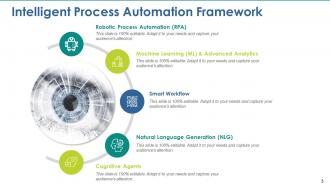
Slide 3: This slide showcases Intelligent Process Automation Framework with the folowing subheadings- Robotic Process Automation (RPA), Cognitive Agents, Natural Language Generation (NLG), Smart Workflow, Machine Learning (ML) & Advanced Analytics.
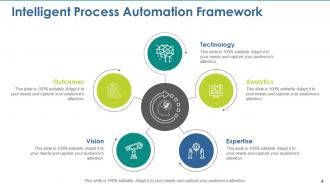
Slide 4: This slide presents Intelligent Process Automation Template with- Technology, Expertise, Vision, Analytics, Outcomes.
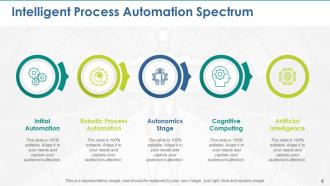
Slide 5: This slide shows Intelligent Process Automation Spectrum with the following points- Initial Automation, Robotic Process Automation, Autonomic Stage, Cognitive Computing, Artificial Intelligence.
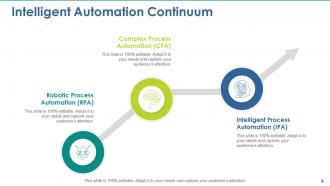
Slide 6: This slide presents Intelligent Automation Continuum with- Intelligent Process Automation (IPA), Complex Process Automation (CPA), Robotic Process Automation (RPA).
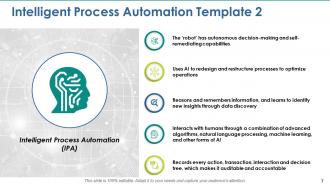
Slide 7: This slide showcases Intelligent Process Automation withthe following content- Intelligent Process Automation (IPA), The ‘robot’ has autonomous decision-making and self-remediating capabilities, Uses AI to redesign and restructure processes to optimize operations, Reasons and remembers information, and learns to identify new insights through data discovery, Interacts with humans through a combination of advanced algorithms, natural language processing, machine learning, and other forms of AI, Records every action, transaction, interaction and decision tree, which makes it auditable and accountable.
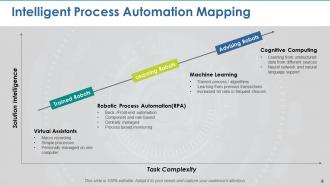
Slide 8: This slide presents Intelligent Process Automation Mapping in terms of Task complexity amd solution intelligence. Virtual Assistants (Macro recording, Simple processes, Personally managed on one computer) Robotic Process Automation(RPA) (Back- /Front-end automation, Component and rule based, Centrally managed, Process based monitoring) Machine Learning (Trained process / algorithms, Learning from previous transactions, Increased hit ratio in frequent choices) Cognitive Computing (Learning from unstructured data from different sources Neural network and natural language support).
Slide 9: This is a Coffee Time break slide. This is a representative image, and can be replaced by your own image.
Slide 10: This slide is titled Additional Slides to move forward.
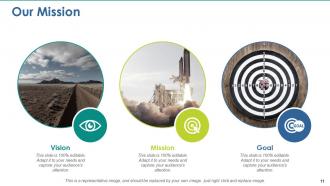
Slide 11: This is Our Mission slide with Vision, Mission and Goal. State them here.
Slide 12: This is Meet Our Team slide with names, designation and text boxes.
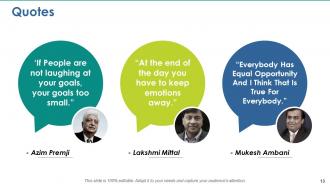
Slide 13: This is a Quotes slide to convey, express or state your beliefs, message etc.
Slide 14: This is a Sticky Notes slide to mark reminders, events or anything important.
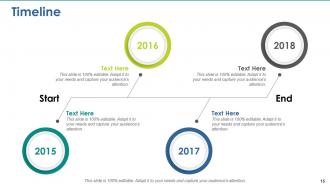
Slide 15: This is a Timeline slide to show company growth, milestones etc.
Slide 16: This is a Bulb or Idea image slide to state information, specifications etc.
Slide 17: This slide is titled Charts & Graphs to move forward.
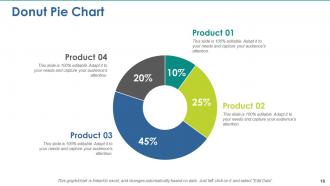
Slide 18: This is a Donut Pie Chart slide to show product comparison, specifications etc.
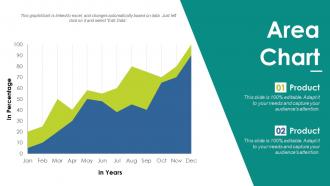
Slide 19: This is an Area Chart slide to show product/entity comparison etc.
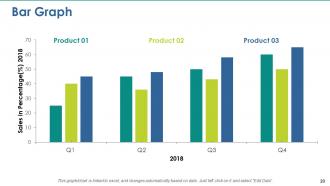
Slide 20: This is a Bar Chart slide to show product/entity comparison etc.
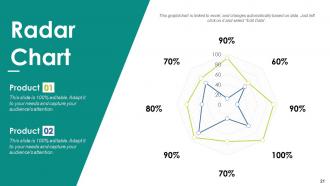
Slide 21: This is a Radar Chart slide to show product/entity comparison etc.
Slide 22: This is a Thank You slide with Address:# street number, city, state, Contact Number, Email Address.
Intelligent process automation powerpoint presentation slides with all 22 slides:
Instill greater awareness with our Intelligent Process Automation Powerpoint Presentation Slides. Inspire folks to be better informed.




FAQs for Intelligent process automation
So there are three main pieces that work together: RPA handles all the boring repetitive stuff, AI/ML does the smart decision-making, and process mining shows you what's actually going on in your workflows. Analytics sits on top - that's how you know if it's working or just eating your budget. Honestly, the magic happens when these components talk to each other instead of working separately. Quick tip though - map out your current processes first before you start automating anything. You can't improve what you don't understand, and I've seen people waste tons of money skipping that step.
So traditional automation is basically like having a really fast robot - it'll do exactly what you tell it but freaks out the second something changes. IPA is different because it actually uses AI to think through complex stuff. It can read messy emails, learn from data, and adapt when processes shift around. Honestly, it's like upgrading from a basic calculator to having a smart assistant that gets better over time. Look for your most complicated processes first - the ones that need actual judgment calls. That's where you'll see IPA blow traditional tools out of the water.
Banks and healthcare companies are killing it with IPA right now. Loan processing that used to drag on for weeks? Done in hours. Same with insurance claims and patient onboarding - it's pretty wild honestly. Manufacturing's catching up fast too, especially for supply chain stuff. The magic happens when you've got tons of repetitive work that still needs someone to make judgment calls occasionally. Look for your biggest time-sucks first - that's where you'll actually see results. Retail's doing interesting things with customer service workflows too, though I'd probably start with the obvious stuff before getting fancy.
So basically AI makes your automation way smarter. Regular automation just follows boring if-then rules, but AI can actually adapt and think through different situations. It reads messy stuff like emails and invoices, learns patterns, handles weird exceptions. The cool part? You can automate complex processes that need actual judgment calls, not just mindless repetitive tasks. I'd honestly start by looking at processes where you currently need humans making decisions - that's where AI shines. Way more possibilities than basic automation.
Look for stuff that's super repetitive and eats up hours - data entry, processing invoices, basically anything where you're just moving info around. I always tell people to start with their biggest time-wasters first. Ask yourself: does this actually need a human brain, or is it just following the same steps every time? If there's no real creativity involved, you've probably found a winner. Oh, and processes where tiny mistakes cause huge headaches? Those are perfect since computers don't get distracted like we do. Just map out what's taking forever and work backwards from there.
Honestly, legacy systems are gonna be your worst enemy - they hate talking to new automation tools. Data silos are another nightmare. Plus your team's probably used to doing everything manually, so good luck with that resistance. Change management is brutal, and sometimes dealing with people is way harder than the actual tech stuff. Oh, and don't get me started on data quality issues when you're trying to connect everything. Here's what worked for me though: pick one small process first. Get a quick win so people actually see the benefits, then slowly expand from there. Way less painful that way.
So IPA gives you real-time insights that help you make decisions way faster. Your automated processes can spot patterns and flag weird stuff before you'd even notice. Honestly, it's pretty cool - like having someone analyze all your historical data 24/7. Instead of waiting around for reports or just winging it, you get actual recommendations based on what the data shows. The AI catches trends most people miss and gives decision-makers clear options. You'll end up making smarter choices that actually improve your workflows. I'd start small though - pick one decision point that could use better data backing.
Look, most people end up doing way more interesting work after automation kicks in. You'll spend less time on mind-numbing data entry and more time actually solving problems or talking to customers. Honestly, the repetitive stuff is soul-crushing anyway. Your company needs to be upfront about how roles will change though - that's huge. Job satisfaction usually goes up because you're using your brain instead of being a human copy machine. Figure out what tasks you do now that could get automated, then think about what skills you'd actually want to learn. The transition works best when you're proactive about it.
Track cycle time first - how much faster is stuff actually getting done? Error rates matter too, that's where you see real quality jumps. Cost per transaction is probably what sold your boss on this whole thing anyway. Don't sleep on employee satisfaction though - I've seen great systems tank because people hated using them. Also watch throughput volumes and how well it handles exceptions. Get your baselines before you flip the switch, then check monthly. Honestly, once the data starts coming in, the wins (or disasters) become pretty obvious fast.
So ML basically makes your automation way smarter - instead of just following rules, it learns from patterns and adapts on its own. Your system starts catching weird invoices or figuring out which customer emails actually need a human to look at. Pretty cool how it gets better over time without you doing anything. I'd honestly just pick one process to start with (don't go crazy at first). You'll see the accuracy improve after like 2-3 months once it has enough data to work with. Way better than the old robotic approach.
Dude, start with end-to-end encryption for everything your bots touch. Role-based access is clutch too - lock down who can see what data. Map out all the sensitive stuff first and classify it, then build your security around that. API security's another big one - proper auth tokens and secure connections. Set up monitoring for weird access patterns and audit your workflows regularly. Oh, and compliance will absolutely wreck you if you don't think about it early. I learned that the hard way on my last project. Trust me, plan for it now or you'll be scrambling later when auditors start asking questions.
Get your team involved right from the start - nobody likes surprises sprung on them at work. Be super transparent about what's happening and why. Focus on how IPA will handle all the mind-numbing stuff so they can do more interesting work. Upskilling is key so people don't panic about being replaced. I'd also create ways for employees to suggest what should be automated next - they know the pain points better than anyone. Oh, and celebrate small wins early! It builds momentum. Show them automation's there to help, not take over their jobs.
UiPath, Automation Anywhere, and Blue Prism are the main RPA players right now. Microsoft Power Automate works well if you're already using their stuff. For AI, IBM Watson and Google Cloud AI are solid choices - Azure Cognitive Services too. New tools keep popping up constantly, which honestly makes it hard to keep track sometimes. I'd pick whatever your IT team already knows how to handle. Trust me, starting with something they're comfortable with will save you so many support tickets later. Maybe run a small pilot first before committing to anything big.
So the biggest thing happening right now is AI making everything way more personalized. RPA tools are getting crazy smart with language processing and computer vision - seriously, some demos blew my mind last week. Instead of just automating random tasks, companies are now connecting whole workflows across different teams. Low-code platforms let regular business people build stuff without bugging IT constantly, which is honestly about time. I'd mess around with some citizen developer tools and maybe test out AI-enhanced processes in your area. Getting a head start makes sense since this stuff's moving fast.
So IPA can really help with customer stuff by handling all those annoying repetitive tasks that drive people crazy. Like instant answers to basic questions, smooth handoffs when people switch from chat to phone, that kind of thing. The AI actually gets smarter over time by picking up on how customers behave - which is honestly pretty neat. Your customers end up getting help faster, more personal service, and someone "available" 24/7 without it feeling super robotic. I'd start by figuring out what's causing the most headaches for your highest-volume issues and automate those first.
-
Understandable and informative presentation.
-
Awesomely designed templates, Easy to understand.