


Sales Automation PowerPoint Presentation Slides




Try Before you Buy Download Free Sample Product
 Impress Your
 Audience
 100%
100% Editable
 Save Hours
 of Time


Our Sales Automation PowerPoint Presentation Slides are topically designed to provide an attractive backdrop to any subject. Use them to look like a presentation pro.
People who downloaded this PowerPoint presentation also viewed the following :
Content of this Powerpoint Presentation
Slide 1: This slide introduces Sales Automation. State Your Company Name and begin.
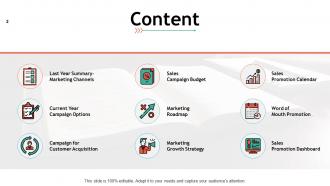
Slide 2: This slide shows Content of the presentation.
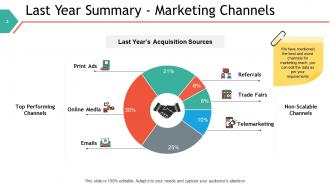
Slide 3: This slide presents Last Year Summary - Marketing Channels which includes- Emails, Referrals, Trade Fairs, Telemarketing, Online Media, Print Ads.
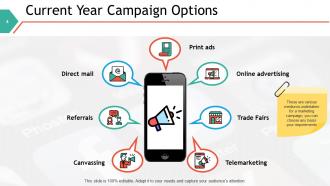
Slide 4: This slide presents Current Year Campaign Options describing- Print Ads, Telemarketing, Canvassing, Trade Fairs, Referrals, Online Advertising, Direct Mail.
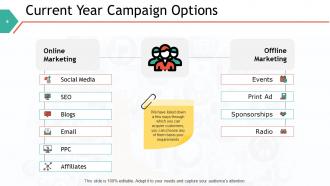
Slide 5: This is another slide on Current year campaign options with online and offline marketing.
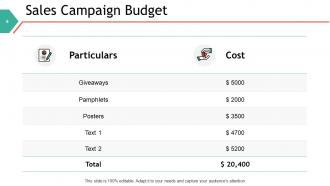
Slide 6: This slide represents Sales Campaign Budget in a table form.
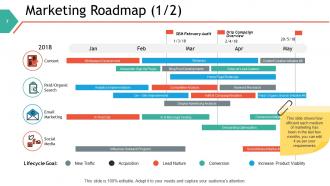
Slide 7: This slide showcases Marketing Roadmap describing- Social Media, Paid/Organic Search, Content, Email Marketing.
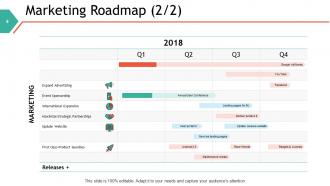
Slide 8: This is another slide on Marketing Roadmap in a table form with categories as- Expand advertising, event sponsorship, update website etc.
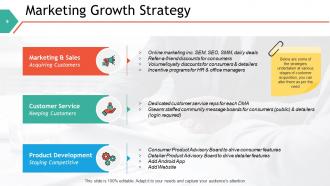
Slide 9: This slide shows Marketing Growth Strategy describing- Marketing & Sales, Customer Service, Product Development.
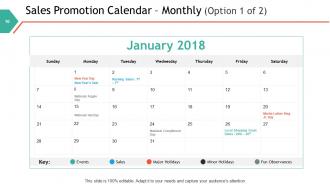
Slide 10: This slide presents Sales Promotion Calendar with- Events, Sales, Major Holidays, Minor Holidays, Fun Observances.
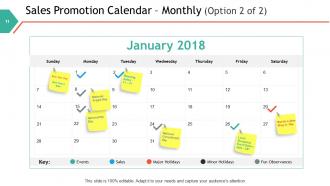
Slide 11: This is an optional slide for Sales Promotion Calendar.
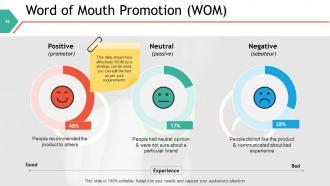
Slide 12: This slide displays Word of Mouth Promotion as positive, neutral and negative.
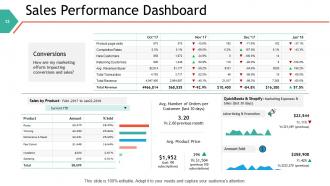
Slide 13: This slide represents Sales Performance Dashboard with graphs and tables to show related information.
Slide 14: This slide shows Sales Automation Icons.
Slide 15: This slide is titled as Additional Slides for moving forward.
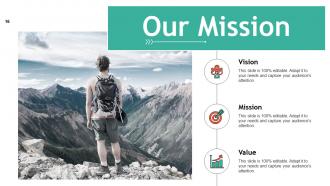
Slide 16: This is Our Mission slide with imagery and text boxes.
Slide 17: This is Our Team slide with names and designation.
Slide 18: This is About Us slide to state company specifications etc.
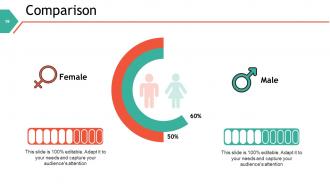
Slide 19: This is a comparison slide to compare between commodities, entities etc.
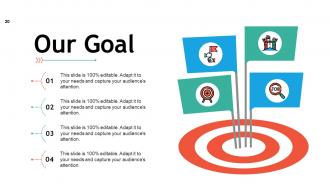
Slide 20: This is Our goal slide. State your important goals here.
Slide 21: This is a Puzzle slide with text boxes.
Slide 22: This is a Bulb Or Idea slide to state a new idea or highlight specifications, information etc.
Slide 23: This slide shows Magnifying Glass with text boxes to show information.
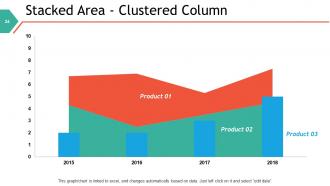
Slide 24: This slide displays Stacked Area-Clustered column chart with three products comparison.
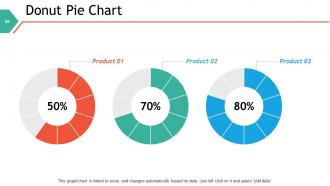
Slide 25: This slide shows Donut Pie Chart with three products comparison.
Slide 26: This is a Thank You slide with address, contact numbers and email address.
Sales Automation PowerPoint Presentation Slides with all 26 slides:
Use our Sales Automation PowerPoint Presentation Slides to effectively help you save your valuable time. They are readymade to fit into any presentation structure.


FAQs for Sales Automation
Honestly, the time savings alone will blow your mind - no more manual follow-ups eating your whole day. Your team can actually sell instead of doing boring admin stuff. Lead scoring happens automatically, so hot prospects don't get ignored while you're chasing dead ends. The data thing is huge too... no more guessing if someone called a lead or not. Everything's tracked properly for once. Pipeline forecasting gets way more accurate since you know exactly what's happening with each deal. Oh, and definitely start with email sequences - that's where you'll see results fastest.
Dude, these tools are honestly game-changers for lead stuff. They'll grab leads from wherever - your website, social, whatever - then automatically score and nurture them while you sleep. Pretty sweet deal. You can set up workflows that move people through your pipeline based on what they actually do, like hitting your pricing page or downloading something. The 24/7 thing is clutch since leads don't just happen during business hours. I'd start with automating whatever boring qualification tasks eat up most of your time. You'll be shocked how much bandwidth it frees up for actual selling.
Honestly, CRM integration is what makes sales automation actually worth it. Without it, you're just juggling a bunch of random tools that don't talk to each other - which is a nightmare. Once your CRM connects to your automation platform, leads flow smoothly between systems, follow-ups happen automatically using real customer info, and triggers actually fire when they should. Your sales team can focus on closing deals instead of updating spreadsheets all day (thank god). I'd start by looking at your current process and finding where you're still doing stuff manually.
Dude, you really need to look at your data - it shows what's actually working vs what's bombing. Track email opens, conversion rates, where people bail out. Your gut might say one thing, but the numbers tell the real story. I check my dashboards weekly (okay, sometimes I forget) and it's crazy how much stuff I thought was working... wasn't. You can fix timing, rewrite sequences, or scrap entire workflows that suck. Without tracking this stuff? You're basically spamming people and hoping for the best.
Honestly, your sales team's gonna hate you at first - they're set in their ways even when those ways suck. Data's probably a mess too, so automation will just make bad info spread faster. Oh, and don't believe what vendors tell you about integration timelines - everything takes like 3x longer to actually connect properly. Training's the real killer though. People need to learn new workflows, not just where to click buttons. My advice? Pick one tiny process first. Get that dialed in before you try to automate everything and create chaos.
Honestly, just grab HubSpot's free CRM and Mailchimp to start - those two will cover most of what you need without breaking the bank. I'd tackle your most annoying repetitive stuff first. You know, lead forms, follow-up emails, those nurture sequences you keep forgetting to send. Don't get sucked into fancy enterprise software yet (trust me on this one). Simple workflows that push prospects through your pipeline work great. Basic email templates for common responses save tons of time too. Pick one thing, get it running smooth, then move on. The whole "start small and build up" thing actually works here.
Honestly, sales automation makes your CRM way better, not worse. All those calls and emails get tracked automatically - no more data entry nightmare. You'll have complete customer histories without lifting a finger. The automated follow-ups keep prospects warm when you're buried in other deals (which, let's be real, is most of the time). I'd start with automating follow-up emails first since that's the biggest time sink. Save your energy for the high-value conversations that actually need your personal touch. Works way better than trying to do everything manually.
Honestly, start small with a pilot group first - saves you from disasters later. Get your sales team involved in picking the system or they'll hate it from day one. Clean up your data before moving anything over, trust me on this one. Training is huge, and you need good documentation because people forget everything immediately. Pick some internal champions who can help when things go sideways (and they will). Don't rush the timeline, and celebrate wins along the way. The whole thing's really more about managing people than the actual tech.
Honestly, the lead prediction stuff is a game changer - you'll know which prospects are actually worth your time instead of chasing dead ends. The email personalization is crazy good now too, like it writes custom messages for hundreds of people that don't sound robotic. Plus it handles all that tedious lead scoring automatically. Your chatbots can qualify people upfront, and it even flags when customers might bail or want upgrades. I probably spend way less time on data entry now. The real win though? You get to focus on actually building relationships instead of drowning in manual follow-ups.
Honestly, start with your biggest headaches and work backwards from there. Demo maybe 2-3 platforms that actually solve those specific problems. Integration is huge - you don't want this thing fighting with your CRM or creating more data chaos. The interface better be something your team won't hate using every day (I've seen too many expensive tools collect dust). Also think about whether it'll handle more volume as you grow. Oh, and definitely test their support before signing anything - trust me on that one. Pricing structures vary wildly, so really dig into what you'll pay long-term.
Basically you're using your prospect data to customize messages without doing it all manually. Segment people by industry, company size, whatever makes sense. Then build email sequences for each group - way more targeted that way. Dynamic fields are clutch here, like dropping in their company name or mentioning their recent funding round. Honestly, the good tools make this pretty seamless. Trigger different follow-ups based on how they interact with your emails too. Just make sure your data's clean first (learned that the hard way). Test 2-3 different sequences this week and see what actually converts better.
Honestly, skip the boring PowerPoint stuff and just let them mess around with the actual tools. Way more effective. Roll things out slowly though - maybe lead scoring first, then email sequences after they've got that down. Nobody retains info when you blast them with everything at once. Find a couple tech-savvy people on your team to be your go-to troubleshooters. Trust me on this one - you'll need backup when things inevitably break. The key is showing them how this stuff actually makes their daily grind easier and helps them close more deals. That's literally all they care about at the end of the day.
So basically it auto-updates your deal stages and logs all the touchpoint stuff without you doing data entry all day. You get real-time visibility into where everyone stands in your pipeline. The forecasting though? That's where it actually gets interesting - way better than those janky spreadsheets we used to rely on. It crunches historical data plus current pipeline health to predict revenue pretty accurately. You'll catch bottlenecks faster and won't look stupid when your boss asks for projections. Oh, and definitely set up those automated stage progression rules first - trust me on that one.
Start with data protection - encrypt everything and set role-based permissions so people only access what they actually need. Third-party integrations are where most companies get burned, so double-check those connectors. Two-factor auth is non-negotiable at this point. Audit your admin users regularly too - you'd be surprised how many ex-employees still have access months later. Oh, and definitely loop in your IT team before rolling out new automation tools. They'll catch stuff you missed.
Honestly, when customer behavior shifts, your whole automation strategy gets thrown out the window. Track how people actually engage with your stuff - if they're ignoring emails but watching videos, you can't keep sending walls of text. I learned this the hard way last year. A/B test different channels and update your triggers based on real data, not what you think should work. Build your automation so it's flexible enough to pivot fast. Oh, and audit your current metrics against recent buyer behavior - that'll show you where you're already behind the curve.
-
Commendable slides with attractive designs. Extremely pleased with the fact that they are easy to modify. Great work!
-
Much better than the original! Thanks for the quick turnaround.
-
Best Representation of topics, really appreciable.