

Automation solutions powerpoint presentation slides




Try Before you Buy Download Free Sample Product
 Impress Your
 Audience
 100%
100% Editable
 Save Hours
 of Time


Benefit from the informative visuals included in Automation Solutions Powerpoint Presentation Slides. Employ our PPT template deck to showcase operational challenges because of the absence of business automation. Represent a variety of production costs like raw materials, labor, and so on, related to different products. Elucidate product-wise expenses incurred by your organization in comparison to other competitors. Use this PowerPoint presentation to demonstrate losses incurred due to a lack of business process automation. Consolidate reasons such as low productivity, or slow turnaround time that require automation. Conveniently present labor specialization and the development of equipment to boost efficiency. Highlight the simultaneous operations strategy, combined operations strategy, and automation techniques. Employ this digital transformation PPT slideshow to explain selection criteria for the most-appropriate equipment manufacturers. Moreover, you can compile the ROI after automation based on sales, profit, cost, and time. Represent the cost of machinery installation, asset cost analysis, and machinery depreciation. Use our PowerPoint theme to demonstrate the BPA implementation plan including details like timeline, training program, and budget. Smash the download icon now and start instant personalization. Our Automation Solutions Powerpoint Presentation Slides are topically designed to provide an attractive backdrop to any subject. Use them to look like a presentation pro.
People who downloaded this PowerPoint presentation also viewed the following :
Content of this Powerpoint Presentation
Slide 1: This slide introduces Automation Solutions. State your Company name and begin.
Slide 2: This slide displays Table of Contents
Slide 3: This slide displays Table of Content
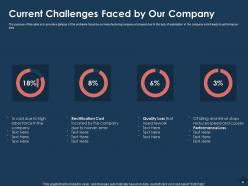
Slide 4: The purpose of this slide is to provide a glimpse of the problems faced by our manufacturing company at present due to the lack of automation in the company which leads to performance loss.
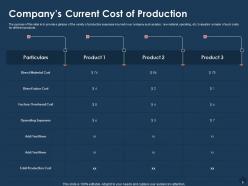
Slide 5: The purpose of this slide is to provide a glimpse of the variety of production expenses incurred in our company such as labor, raw material, operating, etc. Evaluation is made of such costs for different products.
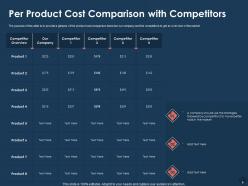
Slide 6: The purpose of this slide is to provide a glimpse of the product cost comparison between our company and the competitors to get an overview of the market.
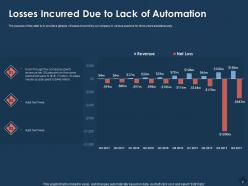
Slide 7: The purpose of this slide is to provide a glimpse of losses incurred by our company in various quarters for three years simultaneously.
Slide 8: This slide displays Table of Contents.
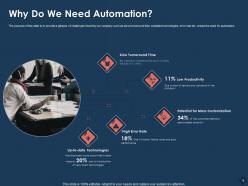
Slide 9: The purpose of this slide is to provide a glimpse of challenges faced by our company such as slow turnaround time, outdated technologies, error rate etc. arises the need for automation.
Slide 10: This slide displays Table of Contents.
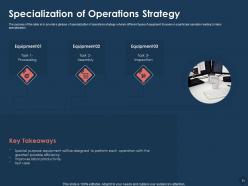
Slide 11: The purpose of this slide is to provide a glimpse of specialization of operations strategy wherein different types of equipment focuses on a particular operation leading to labor specialization.
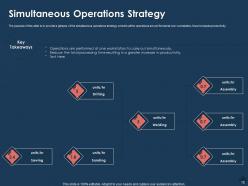
Slide 12: The purpose of this slide is to provide a glimpse of the simultaneous operations strategy wherein all the operations are performed at one workstation, thus increases productivity.
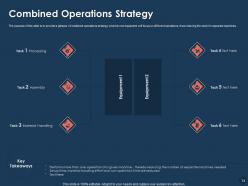
Slide 13: The purpose of this slide is to provide a glimpse of combined operations strategy wherein one equipment will focus on different operations, thus reducing the need for separate machines.
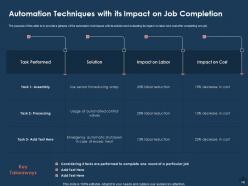
Slide 14: The purpose of this slide is to provide a glimpse of the automation techniques with its solution and evaluating its impact on labor and cost after completing one job.
Slide 15: This slide shows Table of Contents.
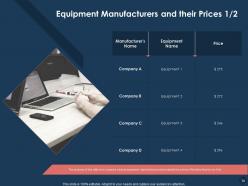
Slide 16: The purpose of this slide is to compare various equipment manufacturers and evaluate the prices offered by them to our firm.
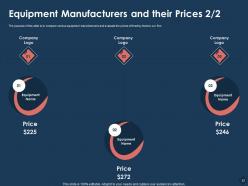
Slide 17: The purpose of this slide is to compare various equipment manufacturers and evaluate the prices offered by them to our firm.
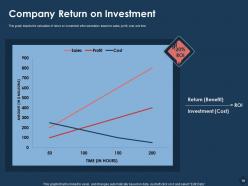
Slide 18: This graph depicts the calculation of return on investment after automation based on sales, profit, cost, and time.
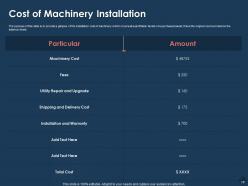
Slide 19: The purpose of this slide is to provide a glimpse of the installation cost of machinery which covers all quantifiable facets of a purchased asset, this is the original cost recorded on the balance sheet.
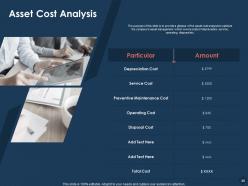
Slide 20: The purpose of this slide is to provide a glimpse of the asset cost analysis to optimize the company’s asset management which covers costs of depreciation, service, operating, disposal etc.
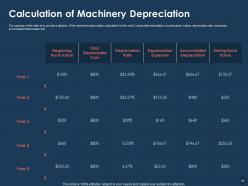
Slide 21: The purpose of this slide is to provide a glimpse of the machinery depreciation calculation for the next 5 years after automation covering book values, depreciation rate, expenses, accumulated depreciation etc.
Slide 22: This slide displays Table of Contents.
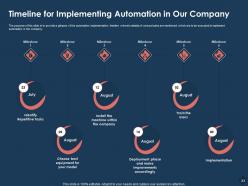
Slide 23: The purpose of this slide is to provide a glimpse of the automation implementation timeline wherein details of various tasks are mentioned which are to be executed to implement automation in the company.
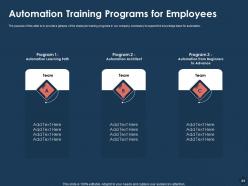
Slide 24: The purpose of this slide is to provide a glimpse of the employee training programs in our company necessary to expand the knowledge base for automation.
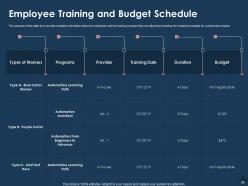
Slide 25: The purpose of this slide is to provide complete information about the employee and the training program they are attending including the company’s budget for a particular program.
Slide 26: This slide displays Table of Contents.
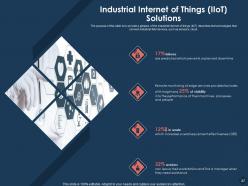
Slide 27: The purpose of this slide is to provide a glimpse of the industrial internet of things (IIoT) describes the technologies that connect industrial field devices, such as sensors, cloud.
Slide 28: The purpose of this slide is to provide a glimpse of smart sensor solutions such as multicolor packaging, dark objects detection etc. leads to time and cost-saving.
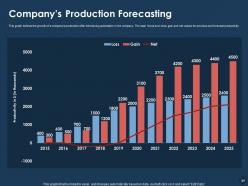
Slide 29: This graph defines the growth of a company’s production after introducing automation in the company. The main focus is on loss, gain and net values for previous and forecast productivity.
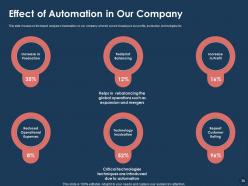
Slide 30: This slide focuses on the impact analysis of automation on our company wherein we are focusing on our profits, production, technologies etc.
Slide 31: This slide displays Table of Content of the presentation.
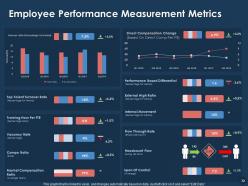
Slide 32: This slide shows Employee Performance Measurement Metrics
Slide 33: This is Automation Solutions Icons Slide
Slide 34: This slide is titled as Additional Slides for moving forward.
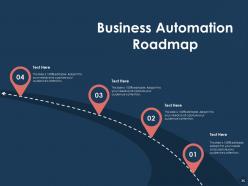
Slide 35: This slide displays Business Automation Roadmap
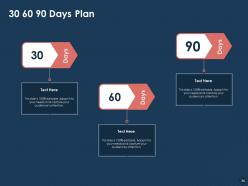
Slide 36: This is 30 60 90 Days Plan
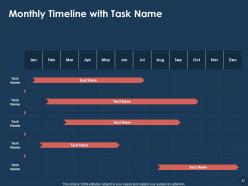
Slide 37: This slide displays Monthly Timeline with Task Name
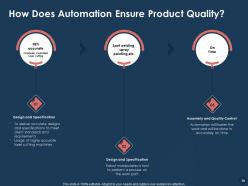
Slide 38: This slide explains How Does Automation Ensure Product Quality?
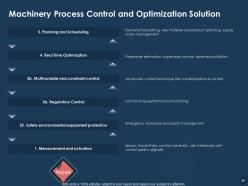
Slide 39: This side presents Machinery Process Control and Optimization Solution
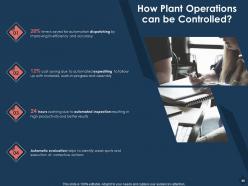
Slide 40: This slide showcases How Plant Operations can be Controlled?
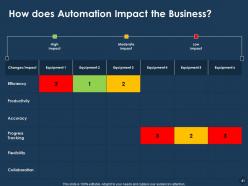
Slide 41: This slide explains How does Automation Impact the Business?
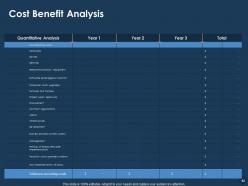
Slide 42: This slide depicts Cost Benefit Analysis
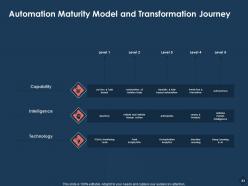
Slide 43: This slide presents Automation Maturity Model and Transformation Journey
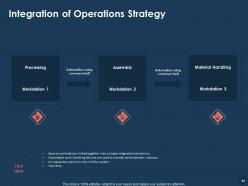
Slide 44: This slide showcases Integration of Operations Strategy
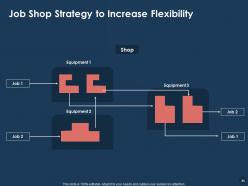
Slide 45: This slide shows Job Shop Strategy to Increase Flexibility
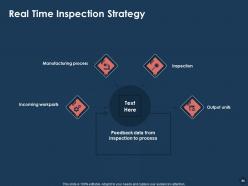
Slide 46: This slide describes Real Time Inspection Strategy
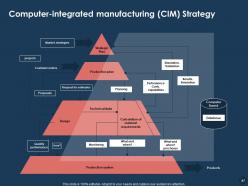
Slide 47: This slide depicts Computer-integrated manufacturing (CIM) Strategy
Slide 48: This is thank You slide with Contact details.
Automation solutions powerpoint presentation slides with all 48 slides:
Use our Automation Solutions Powerpoint Presentation Slides to effectively help you save your valuable time. They are readymade to fit into any presentation structure.








FAQs for Automation solutions
Dude, the efficiency gains alone are worth it - automation just crushes through repetitive stuff way faster than we ever could. Your team gets to ditch the boring tasks and actually work on interesting projects. Accuracy goes up too since there's way less chance for screwups. Honestly? The consistency thing is probably what I love most - same result every damn time. Oh, and the cost savings add up quick once you get rolling. Start with just one process though, see how it goes, then expand. Trust me, you'll be kicking yourself for not doing this sooner.
Look, automation just cuts out all the boring stuff your team hates doing anyway. Fewer mistakes, way faster processing, and people can actually work on interesting projects instead of data entry hell. We've seen it work everywhere - factories speed up their lines, accounting departments stop drowning in invoices, even hospitals cut their admin time in half. Honestly? Pick whatever task makes everyone groan the loudest and start there. Don't overthink it. Once you automate one annoying process and show the savings, it's so much easier to get buy-in for bigger changes.
So AI basically turns your regular automation into something way smarter. Instead of just mindlessly following rules, these systems can actually learn and adapt - which is honestly pretty wild when you see it in action. Predictive maintenance that catches issues before they break? Check. Chatbots that don't suck at understanding what people want? Yep. Manufacturing quality control gets a huge boost too. Oh, and supply chains run way smoother. My advice though - don't go crazy trying to automate everything at once. Pick one process where you've got solid data and start there.
Honestly, people think automation's gonna wipe out jobs overnight but that's not really what happens. It just takes care of the boring, repetitive stuff - which is actually pretty great because then you get to do work that's more interesting. I see this all-or-nothing thinking a lot where people assume it either replaces everything or nothing. Most of the time it just makes what you're already doing easier. Oh, and smaller companies always think it's too expensive or complicated now, but it really isn't anymore. Look at whatever you do most repetitively during your day - start there for quick wins.
Honestly, small businesses can totally compete with automation if you're smart about it. Start with the stuff that eats up your time - email campaigns, social posts, invoicing, following up with customers. Zapier's amazing for connecting different apps, and Mailchimp + QuickBooks are way cheaper than hiring someone new. Here's the thing though - don't go crazy trying to automate everything at once. You'll just stress yourself out. Pick one annoying task this week, set it up, let it run for a bit. Then tackle the next one. I learned this the hard way when I tried doing five automations simultaneously and broke half of them.
Honestly, the upfront costs are gonna hit you hard right away. Your employees will probably freak out about losing their jobs - can't blame them though. System integration is a nightmare too. When you're switching everything over, expect some downtime and cyber risks with all those connected systems. The tech stuff changes so fast you'll constantly be learning new things. Oh, and don't automate everything or you'll lose what makes your customers actually like dealing with you. Start with small test projects first. Get your team involved early so they don't hate you. Have backup plans ready before you change anything major.
Yeah, automation's gonna change things for sure. Some jobs disappear - usually the boring, repetitive stuff nobody wants to do anyway. But new roles pop up around managing those systems. The trick is getting ahead of it and training your people before you roll everything out. Focus on skills that tech can't replace - creative thinking, problem-solving, the human stuff. I'd honestly start mapping out which roles will shift now and build training paths so people can move into better work instead of getting left behind.
Track time savings and error rates first - that's the obvious stuff. But seriously, don't forget employee satisfaction because grumpy workers mean your automation sucks. Cost reduction and ROI matter too, obviously. Oh and process throughput - how much more you're getting done. The trick is measuring everything before you automate so you actually know if it worked. I'd probably check these quarterly? Also accuracy improvements are huge but easy to miss if you're not looking for them. Without baseline data you're just guessing whether it helped.
Honestly, you've gotta start by figuring out what's actually eating up your team's time every day. Map out those current processes first - I know it sounds boring, but it's worth it. Different industries need totally different approaches though. Like, healthcare has way stricter data rules than manufacturing, and retail's all about that customer experience stuff. Don't try to automate everything at once (learned that the hard way). Pick one annoying repetitive task that's creating bottlenecks and find tools that'll play nice with whatever systems you're already using. You don't want to rebuild your whole setup from scratch. Start small, see what works, then expand from there.
Honestly, you've gotta map out what you're doing now before jumping into any tools. I'd pick just one boring, repetitive task first - don't go crazy trying to automate everything (made that mistake once, total nightmare). Your team needs to actually want to use whatever you build, otherwise you'll have this amazing system that just sits there collecting dust. Oh and definitely test it somewhere safe before unleashing it on everyone. The biggest thing though? Document everything and train people properly. Automation should make life easier, not turn into another headache nobody understands.
So IoT basically gives your automation actual eyes instead of running blind. Real-time sensor data means your systems can see what's happening and react smart, not just follow boring scripts. You can catch equipment breaking before it actually does, automatically tweak processes based on real conditions, optimize energy - all without you babysitting it. Honestly, the predictive stuff is where it gets really interesting. Start small though - grab one process you're already tracking and throw in some smart sensors. You'll see how much more responsive everything becomes. It's kind of addictive once you start.
Dude, manufacturing and automotive are absolutely killing it with automation - they've had the biggest head start. Healthcare's catching up fast though, especially with surgical robots and diagnostic stuff. Amazon basically changed the game for warehouse logistics too. Financial services is another big one - fraud detection, algorithmic trading, all that. Honestly the speed of change is kind of insane when you think about it. If you're trying to figure out automation for your field, I'd look at what these industries are doing first. They're like the guinea pigs testing everything before it hits everywhere else.
Honestly, you gotta bake security right into your automation from the start - don't try adding it later like some kind of band-aid. Set up role-based access controls and encrypt everything. I hate audits as much as the next person, but do them regularly or you'll regret it. Your automated stuff should log absolutely everything so you can see what went wrong when (not if) something breaks. Oh, and build compliance checks directly into the workflows themselves. That way violations pop up immediately instead of three months later during some boring quarterly review. Basically treat security like it's part of the actual design.
Honestly, the AI stuff is getting scary good at complex decisions now - way beyond just basic repetitive work. Hyperautomation is where it's at, connecting all your systems so they actually talk to each other. Those low-code platforms are everywhere too, which... I mean, kinda freaks me out job-wise but whatever. Your regular business people can build automations without bothering IT constantly. The predictive stuff is wild - catching problems before they even happen. My advice? Pick one thing and nail it first. Don't go crazy trying to automate your entire operation right away.
Honestly, you'll want to train people on basic programming and data analysis first - even the non-tech folks should get how these systems work. Whatever platforms you're rolling out, make sure everyone gets hands-on time with them. The change management piece is huge though, like seriously half your headaches will be people just resisting new workflows. Critical thinking and troubleshooting skills are key since people won't be doing the same repetitive stuff anymore. Oh, and pair everyone with someone who already gets automation - that mentor approach works way better than just throwing training materials at them. Start small with workshops.
-
Much better than the original! Thanks for the quick turnaround.
-
Very unique, user-friendly presentation interface.