


RACI Matrix To Assign Roles And Responsibilities Financing Alternatives For Real Estate Developers




Try Before you Buy Download Free Sample Product
 Impress Your
 Audience
 100%
100% Editable
 Save Hours
 of Time


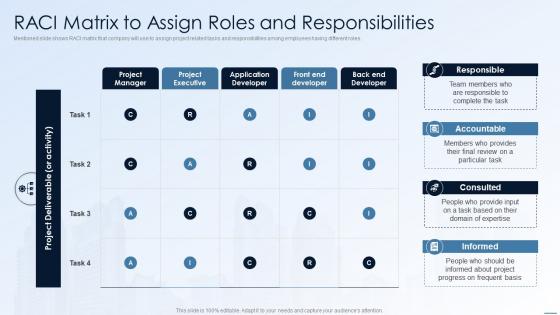
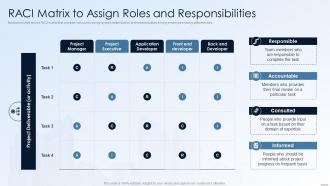
Mentioned slide shows RACI matrix that company will use to assign project related tasks and responsibilities among employees having different roles.
People who downloaded this PowerPoint presentation also viewed the following :
RACI Matrix To Assign Roles And Responsibilities Financing Alternatives For Real Estate Developers with all 6 slides:
Use our RACI Matrix To Assign Roles And Responsibilities Financing Alternatives For Real Estate Developers to effectively help you save your valuable time. They are readymade to fit into any presentation structure.





FAQs for RACI Matrix To Assign Roles And Responsibilities Financing Alternatives For
So RACI is this chart where you assign four roles to each project task: Responsible (actually does it), Accountable (owns the result), Consulted (gives input), and Informed (just needs updates). Honestly, it's such a lifesaver for avoiding that awkward "oh wait, wasn't that your job?" moment. Map out who's doing what for each deliverable. No more confusion about ownership. The clarity you get is wild - stuff stops falling through cracks and people aren't doubling up on work anymore. List your main tasks first, then assign the roles. Trust me, your next project will run way smoother.
Okay so here's the thing - map out who gets which role for each task. One person does the actual work (that's your R), and one person's head rolls if it goes sideways (that's A). C people are the experts you gotta check with before moving forward. I people just get the updates afterward. The trap everyone falls into? Making half the team "Consulted" because it feels safer. Don't do it - you'll never get anything done. Quick test: who's actually rolling up their sleeves, and who's getting blamed if this bombs? Boom, there's your R and A.
So RACI breaks down like this - **R** is who actually does the work (Responsible). **A** is Accountable, basically the person who owns it and signs off. Pro tip: only have one A per task or you'll get decision paralysis. **C** means Consulted - people whose input you need first. **I** is just Informed, so they know what's up but aren't doing anything. Make a grid with tasks on the left, team members across the top. Then just fill each box with R, A, C, or I. Honestly, you'll be shocked how quickly it shows you where responsibilities are either missing or overlapping. Game changer for project clarity.
Honestly, RACI charts are a lifesaver for messy projects with tons of people involved. You know those cross-functional things where nobody knows who's supposed to decide what? Perfect use case. I've watched so many initiatives crash because everyone thought someone else was handling the critical stuff. Organizational changes are another big one - or product launches where you're working with teams you've never collaborated with before. Oh, and use it right at the start during planning. Don't be like me and try to fix the confusion after it's already a disaster!
So basically, a RACI matrix stops that annoying "wait, I thought you were doing this" situation from happening. You assign each person one role per task: Responsible, Accountable, Consulted, or Informed. No more stepping on toes because everyone knows their lane from day one. Honestly, the best part? It forces those uncomfortable ownership conversations upfront instead of during crisis mode. Way less dramatic than scrambling later when deadlines hit. Your communication gets cleaner too - people actually know who to contact about what. Just start by listing your project's main tasks and decisions, then slap those RACI roles next to everyone's name.
Oh man, the classic mistake is putting multiple people as "Accountable" for one thing - you need just ONE person who owns it, period. Otherwise nobody actually takes charge. Also don't pile a million tasks on the same person (learned that one the hard way). Talk to your team while you're building it instead of creating this masterpiece in isolation then dropping it on them. Keep tasks specific enough to be useful but not so granular that it becomes this nightmare spreadsheet. Actually test it out with a couple scenarios first - what seems logical on paper doesn't always work when stuff hits the fan.
So RACI is basically about mapping out who does what - like who's responsible, who signs off, who needs to weigh in, that kind of thing. Pretty straightforward stuff. RAPID and DACI are different beasts though. They're all about decision-making processes - tracking who recommends what, who actually makes the call, who executes it. Way more focused on decisions specifically. Honestly, I'd go with RACI if your team just needs basic role clarity. It's dead simple to set up. The other two are better when you've got messy decision chains that need untangling - like when five people think they're the decision maker but nobody actually is. RACI works great for day-to-day project stuff too.
Look, you absolutely need stakeholder buy-in or your RACI will crash and burn. People will fight back on roles they never agreed to - seen it happen too many times! Get them involved upfront to help define who's Responsible, Accountable, Consulted, and Informed. They know the actual workflow way better than you do anyway. Run a workshop where everyone can hash it out together and negotiate their roles. Way better than just assigning stuff and crossing your fingers. Trust me, the extra time spent collaborating saves you tons of headaches later when people actually follow through instead of ignoring what you created.
Build RACI reviews into your regular project rhythm - don't create it once and abandon it. Quick reviews during sprint planning work great to catch role shifts early. People always assume everyone knows who's responsible (they never do). Make updates visible to the whole team immediately. When scope changes or new people join, update the matrix right away and tell everyone. Oh, and set a monthly calendar reminder or you'll totally forget. Keep it simple so people actually use it instead of ignoring it completely. Honestly, treating it like a living doc saves so much confusion later.
Totally! RACI works great in Agile, just don't expect it to look like those massive waterfall charts. Create them sprint by sprint instead of planning the whole project upfront. Roles shift around more - maybe you're accountable for one story but only consulted on another. Cross-functional teams can get messy with ownership, so it actually helps a ton. Honestly, I've seen too many standups turn into "whose job is this again?" We tried it last quarter and it cut down on confusion. Just make a simple one for your next sprint and see what happens.
Honestly, half the time people are just confused about what "Responsible" vs "Accountable" actually means, so start there. Get everyone to talk through their understanding first. When someone's pushing back, there's usually a real reason - maybe they're drowning in work or don't actually have the authority you think they do. Worth digging into that. If you can't get consensus, the project sponsor (or whoever's really calling the shots) needs to just make the call. Don't let these discussions drag on forever - I've seen RACI meetings turn into black holes. Oh, and test your assignments with a few real scenarios. Sometimes what looks good on paper is completely backwards in practice.
Excel or Google Sheets work perfectly for RACI matrices - most people already know how to use them anyway. Project management tools like Asana and Monday.com have templates built in, which saves time. I've literally watched teams draw them on whiteboards during meetings (you'll digitize later obviously). Visio's great if you want something prettier. The real trick is using whatever tool your team will actually maintain. Seriously, the fanciest template means nothing if nobody updates it. Start with a basic spreadsheet first. You can always move to something more sophisticated once everyone's comfortable with the process.
Here's how I'd check if your RACI matrix is actually working: First, time how fast decisions get made compared to before - should be way quicker now. Track those annoying "wait, who's supposed to do this?" moments (honestly the worst part of any project). Are people still duplicating work or stepping on each other's toes? Projects hitting deadlines more often is another good sign. After a couple months, just ask your team straight up - do roles feel clearer? If they're still confused, the matrix probably needs work. Oh, and team satisfaction scores don't hurt to check either.
Get everyone together in person first - trust me, email chains for this stuff are pure chaos. Each task needs exactly one person who's actually accountable, not three people who are "kinda responsible." Pin that matrix somewhere you'll actually see it during meetings, not buried in Google Drive hell. Here's the thing though - be crazy specific about what each role means for YOUR team. Like, "consulted" could mean a quick heads up or a full presentation depending on who you ask. When people inevitably start doing random stuff outside their lane, just call it out. Oh, and update it when things change!
Honestly, RACI charts are clutch when you've got overlapping roles or people have been pointing fingers before. Software rollouts are perfect for them - developers coding, reviewers checking stuff, managers approving. Marketing teams love them too since everyone's touching the same campaigns. Construction uses them constantly because there's like a million stakeholders and permits involved. Oh, and healthcare projects - that's where they're super critical with patient data on the line. Don't overthink it though. Just map out your main deliverables first and see how it feels.
-
Professionally designed slides with color coordinated themes and icons. Perfect for enhancing the style of the presentations.
-
Best way of representation of the topic.