

Service blueprint template sample blueprint 4 registration ppt slides samples




Try Before you Buy Download Free Sample Product
 Impress Your
 Audience
 100%
100% Editable
 Save Hours
 of Time


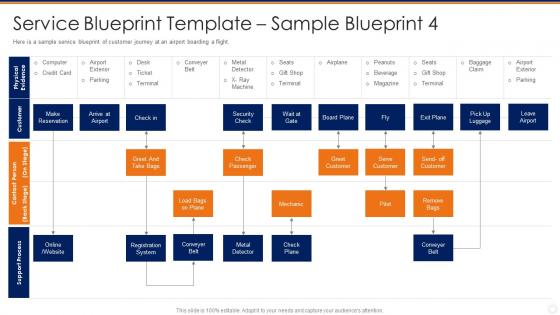
Here is a sample service blueprint of customer journey at an airport boarding a flight.
People who downloaded this PowerPoint presentation also viewed the following :
Service blueprint template sample blueprint 4 registration ppt slides samples with all 6 slides:
Use our Service Blueprint Template Sample Blueprint 4 Registration Ppt Slides Samples to effectively help you save your valuable time. They are readymade to fit into any presentation structure.





FAQs for Service blueprint template sample blueprint 4 registration
So basically you've got these horizontal layers - customer stuff, then what employees do upfront, backstage employee work, and support processes. There's also this visibility line that shows what customers can actually see vs what's hidden from them. Physical evidence goes at the top (like all the tangible things). Oh and don't forget the interaction line for touchpoints. I know it sounds like a lot but honestly once you start doing it, it clicks pretty fast. Just work through each layer step by step so you don't miss any backstage processes that could totally screw over your customers if they fail.
So a service blueprint is way more detailed than a regular flowchart. Flowcharts just show you the basic steps, but blueprints map out everything - what customers do, how front-desk staff interact with them, all the behind-the-scenes work, plus the tech systems running it all. Think of it like seeing a restaurant from both the dining room AND the kitchen at once. You'll spot problems and connections you'd totally miss otherwise. Honestly, once you start using this approach instead of those boring sequential diagrams, you won't go back. It's just so much clearer.
So customer interactions are all those moments where people actually touch your service - calls, website stuff, face-to-face chats, using your app. They go in the top section of your blueprint and map out the whole customer journey. Here's the thing though - you can't be vague about it. Instead of writing "customer uses app," break it down: opens app, searches, adds to cart, whatever. Gets pretty detailed but that's how you catch where things go sideways. I learned this the hard way on a project last year. These specific touchpoints show you exactly where customers hit roadblocks or have those "wow" moments.
So touchpoints are where you start with service blueprints - they're literally every spot your customer interacts with your service. I always tell people to walk through it like you're the customer first. Take coffee ordering - you've got the app, chatting with the barista, grabbing it at pickup. Map all those out step by step. After that, you can figure out what's happening backstage to support each moment. The tricky part is being super thorough upfront because you'll miss stuff if you rush this part. It's honestly the most crucial foundation work you can do.
Dude, service blueprints are seriously underrated. You map out what customers actually experience - plus all the stuff happening behind the scenes they never see. Most teams I've worked with have zero clue how broken their process looks from the outside. Start with just one simple customer journey and you'll immediately spot where people get stuck or confused. Then you can fix those moments before customers start complaining. Your team will finally get how their daily work connects to real people's frustration. Honestly, the problems usually jump out right away once you see everything laid out.
Honestly, service blueprints are perfect for this. They show new hires exactly where they fit in the whole customer experience - like a visual roadmap of every touchpoint and behind-the-scenes process. What's great is people can actually see how departments hand things off to each other. I always use them in role-playing exercises during training. They're also amazing for spotting potential problems, so you can teach staff what to watch for. Makes everyone understand why their specific job actually matters to the customer journey. Way better than just explaining it, you know?
Honestly, the hardest part is getting people to actually care about it - stakeholders either don't see the point or they want to document every microscopic detail. Getting real data is brutal too since everyone describes their dream process instead of what actually happens. Different departments fight over priorities and basically speak different languages. And don't get me started on keeping the thing updated once it's done... such a pain. My take? Pick one customer journey to start with. Loop in your frontline people early - they know what's really going on. Most importantly, make someone the official owner or it'll just sit there unused.
Just add tech as supporting processes under your main service steps. First, map out digital touchpoints customers actually use - your app, website, whatever. Then show the backend systems below the internal interaction line. I like using different colors or icons to separate human stuff from automated processes, makes everything way clearer honestly. Data flows between systems matter too, don't skip those. Oh and identify where tech currently helps (or could help) each customer step first. Then just layer it into your existing blueprint. Way easier than starting from scratch.
Hotels, hospitals, banks - those kinds of places get the most out of service blueprints. Anywhere customers hit multiple touchpoints and deal with different people. They're clutch when you've got front-facing stuff that needs to work perfectly with all the behind-the-scenes chaos. Airlines live by these things, which honestly makes sense when you think about it. Great for catching problems before customers do. If you're dealing with departments passing things back and forth, or your customer experience is all over the place, that's where I'd start mapping things out first.
Honestly, just treat it like your car - needs regular maintenance or it'll break down on you. I block out 2 hours every quarter to review mine (calendar reminders are clutch because I always forget). Chat with your frontline people and customers during these check-ins. They'll tell you exactly where things are falling apart. Update it whenever you roll out new stuff or spot problems brewing. Don't wait for a total disaster to fix things, that's just asking for trouble. Oh and make it part of your normal routine instead of this big scary project you keep putting off.
So swim lanes are your best friend here - put customer stuff at the top, then employee actions customers see, backstage work, and support processes at the bottom. Clean labels and simple icons work way better than trying to make it fancy. Honestly, I've seen some that looked like a toddler got into the craft supplies! The line of visibility between customer-facing and internal stuff needs to be super obvious. Arrows help show how everything connects and flows together. Oh, and definitely test it on someone fresh - if they're confused, you'll know it's too cluttered.
Dude, service blueprints are like having X-ray vision for figuring out where your service totally falls apart. They map out every customer step plus all the behind-the-scenes stuff happening at the same time. So when customers are sitting there forever waiting, you can see it's because your internal handoff is a hot mess. Or maybe they're confused because what they experience doesn't match what your back-office actually does. The visual layout makes bottlenecks super obvious - I swear it's the easiest way to spot which touchpoints piss people off most. Next time something breaks, just trace through your blueprint step-by-step.
So once you've got your service blueprint mapped out, there's actually a ton of stuff you can track. I'd start with the obvious customer metrics - completion rates, where people drop off, satisfaction at each step. The operational side is huge too though. Track how long tasks take employees, delays between departments, resource usage rates. Honestly, the visual aspect makes pain points so much more obvious than just looking at spreadsheets. You can spot bottlenecks where they actually happen vs where you assumed they were. My advice? Don't go crazy - pick maybe 3-4 key metrics that match your biggest headaches and track those consistently.
Yeah, totally! Digital services actually work really well with service blueprints. You've got your frontstage stuff - what users see on the app or site. Then backstage is all your APIs, databases, that whole mess of internal processes. Honestly, digital tracking gives you way better data than physical touchpoints ever could. Map out each screen transition and all the behind-the-scenes data flows. Don't forget potential failure points like server crashes or when forms break (ugh, always the forms). I'd start with the user's full journey and work backwards through the tech stack and people involved.
So basically, a service blueprint maps out what every department does and shows you exactly when they pass stuff to each other. Marketing to sales, sales to support - you get the whole picture. It's honestly pretty eye-opening once you see it all laid out visually. You'll spot where teams are duplicating work or where communication totally breaks down. I'd definitely run a workshop where each team maps their piece together. Sounds cheesy but you'll be shocked at how many wrong assumptions people have been making. The visual aspect makes problems super obvious that you'd never catch otherwise.
-
Graphics are very appealing to eyes.
-
Excellent Designs.