

Service blueprint table chart ppt slides




Try Before you Buy Download Free Sample Product
 Impress Your
 Audience
 100%
100% Editable
 Save Hours
 of Time


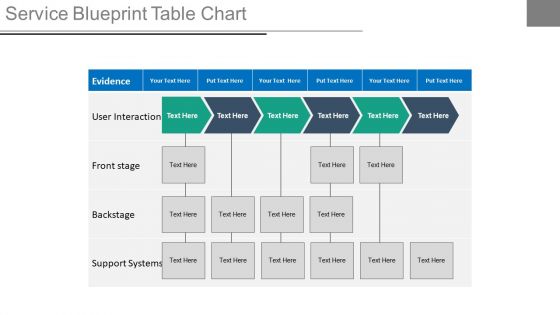
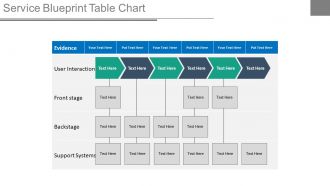
Do you want to create a presentation on the operational tool of your service business? Then use our service blueprint table chart PPT slides which will help in identifying as well as resolving the various issues which affects the operational efficiency of the business. Though this Presentation design you can explain the components associated with this table chart such as line of interaction, line of visibility, line of internal interaction and the physical evidence. Further you can perceptibly represent an important fact with the help of our PowerPoint Slide template that it’s a map that imitate the service system so that all people involved can work and deal with its objectives and also it’s a technique particularly used for services design and for the different stages of service development and innovation. So just start working over this PPT template design for depicting the process, customers contact points and evidences from customer’s point of view for the service.Create a fitting finale with our Service Blueprint Table Chart Ppt Slides. They excel at generating a celebration.
People who downloaded this PowerPoint presentation also viewed the following :
Service blueprint table chart ppt slides with all 4 slides:
Be hailed for your guidance with our Service Blueprint Table Chart Ppt Slides. They will all be eager to greet you.
FAQs for Service blueprint table
So service blueprints have five layers to map out. Customer actions go at the top - basically what people actually do. Then you've got frontstage employee stuff (what customers see) and backstage work (the behind-the-scenes chaos). Support processes like IT systems come next, plus physical evidence at each point. The lines between layers are honestly where things get interesting - they'll show you exactly where stuff breaks down. Oh, and definitely start simple with just one customer journey first. You can always add the other layers later once you've got the hang of it. Way less overwhelming that way.
So basically, process maps just show your internal stuff - how your team handles things from A to Z. Service blueprints are different though. They show the customer's whole journey PLUS everything happening behind the scenes at the same time. Think of it like a restaurant (I'm obsessed with this analogy lol). You see both the dining room experience and all the kitchen madness happening backstage. Front-stage, backstage, supporting systems - it's all mapped out together. That's why they're so useful. You can actually spot where internal breakdowns mess with your customers, not just where processes get inefficient internally.
Honestly, service blueprints are lifesavers for messy processes - like customer onboarding or support escalations where multiple departments are involved. I always recommend starting with your biggest pain point first. They're clutch when launching new stuff too, though most teams wait until everything's already broken (classic mistake). What really makes them worth it? When your front-stage and back-stage people aren't talking to each other, or stakeholders have no clue what actually happens behind the scenes. Oh, and anything with tons of touchpoints where stuff gets dropped constantly.
Dude, service blueprints are actually pretty cool - they show the whole customer experience plus all the messy backend stuff happening behind the scenes. You'll spot problems you never saw before, like why customers are waiting forever because your team's handoff process is totally broken. Pick one service and just map it out. I swear you'll have those "oh THAT'S why" moments immediately. The blueprint reveals which touchpoints actually matter and where tiny operational tweaks can massively boost customer happiness. It's basically X-ray vision for your processes, which sounds dramatic but it's true.
Think of customer personas as your cheat code for service blueprints. Pick 2-3 main ones and literally walk through your whole process from their angle - what pisses them off, where they get confused, all that stuff. Without them you're basically throwing darts blindfolded. They'll help you catch pain points and those make-or-break moments that can totally derail the experience. I've seen companies skip this step and wonder why their service feels off. Map out what each persona thinks and feels at every touchpoint. Trust me, you'll find gaps you never noticed before.
Physical and digital touchpoints both sit in your customer journey, but they work totally differently. When someone walks into your store or chats with staff, you've got way more backstage employee stuff happening. Digital interactions? Those usually plug straight into your systems and processes - honestly, it's mostly self-service with automated wizardry doing the heavy lifting. The real trick is figuring out how customers bounce between both types. That's where you'll spot the biggest gaps and chances to make things smoother.
Start by walking through your service like a customer would - note every single touchpoint, digital or in-person. Customer interviews are gold for this, honestly. Map out a basic timeline first, then mark each interaction point. If you can shadow real customers, do it (super eye-opening). Don't miss the internal stuff either - those backend handoffs often create customer moments you never thought about. The behind-the-scenes chaos always bubbles up somehow. Journey mapping works great too. Once you've got your list, definitely validate it with actual user feedback before calling it done.
So service blueprints are basically like getting X-ray vision for your whole operation. They map out every single touchpoint plus all the behind-the-scenes stuff customers never see. When you lay it all out visually like that, the problem areas just jump out at you - gaps between what customers expect vs what your frontline people can actually deliver, back-office processes that aren't pulling their weight, departments that clearly don't talk to each other. Honestly, it's pretty eye-opening the first time you do it. Walk through some real failure scenarios with your team and you'll spot exactly where things fall apart before they actually do.
Miro's probably your best bet - their free tier has solid service blueprint templates that'll get you started super quick. Mural works great too if you want something collaborative. For more structured stuff, Lucidchart is decent. Honestly though? If you're already using Figma or Sketch, those work fine too - I mean, swim lanes are just rectangles at the end of the day. The main thing is finding something where you can easily add touchpoints and move stuff around without wanting to throw your laptop. I'd just grab Miro's template first and see how it goes.
Service blueprints are like the perfect middleman between all your other design tools. Journey maps show you the key moments, then blueprints help you figure out what's actually happening behind the scenes. Your personas inform how those front-stage interactions should work. Honestly? I've watched teams get way too into blueprinting and lose sight of everything else - classic mistake. But when you use them right, they're gold for connecting strategy to actual execution. The insights flow both ways too - back into research, prototyping, whatever you're working on. My advice: pick one critical moment and map that first. Don't try to blueprint your entire service day one.
Don't overcomplicate it right off the bat - I see people try to map their entire business at once and it's a nightmare. Just focus on your main customer journey first. Get your team involved from day one too, because honestly? Those fancy blueprints nobody helped create just end up forgotten in some folder. Talk to real customers and your front desk people - they know the actual problems better than we think we do. Oh, and this isn't homework you finish once. Keep updating it as things change, which they will.
Definitely get your service staff in on the workshops - don't just study them from the outside. They're living this stuff daily and honestly know where everything falls apart better than management does. Have them actually walk through customer journeys with you and point out the real pain points. Let them map their own backstage work too, since they understand which support systems actually work (and which ones are total garbage). Once you've got a draft blueprint, run it by them again. They'll catch mistakes immediately that would take you forever to spot. Trust me, their perspective is what turns those theoretical diagrams into something useful.
So I'd start with customer satisfaction scores and NPS - that's your bread and butter right there. Process stuff matters too though, like how long things take and error rates. Oh, and don't sleep on employee satisfaction because if your team's happier with the new process, you're probably onto something good. First-call resolution is solid if that applies to your situation. Honestly, the best approach? Pick 2-3 metrics that actually matter for your specific service first. You can always add more later. Just make sure you've got before/after data or you'll be guessing.
Honestly, service blueprints are clutch for onboarding new people. Instead of drowning them in job descriptions, you can walk them through the whole customer journey - front stage and backstage stuff. They'll actually see how their role fits into everything and why it matters. The visual aspect makes it click way faster than explaining it verbally (trust me on this one). During their first week, have them trace through different customer scenarios using your blueprint. Short sentences work. But this approach really helps them connect the dots between departments and understand how their daily tasks affect the actual customer experience.
Honestly, service blueprints are amazing for finding where your processes are completely broken. Map out what you're doing now - you'll spot bottlenecks and all those handoff disasters where things get lost. The visual aspect helps everyone see the mess clearly, which is half the battle. What really gets me is how they show the gap between what customers experience and the total chaos happening behind the scenes. Those disconnects? That's usually where you can make quick fixes that actually matter. Focus on the biggest pain points first, but don't overlook the simple stuff between front and back operations.
-
I discovered this website through a google search, the services matched my needs perfectly and the pricing was very reasonable. I was thrilled with the product and the customer service. I will definitely use their slides again for my presentations and recommend them to other colleagues.
-
Top Quality presentations that are easily editable.