


Project deliverables chart project schedule ppt template




Try Before you Buy Download Free Sample Product
 Impress Your
 Audience
 100%
100% Editable
 Save Hours
 of Time


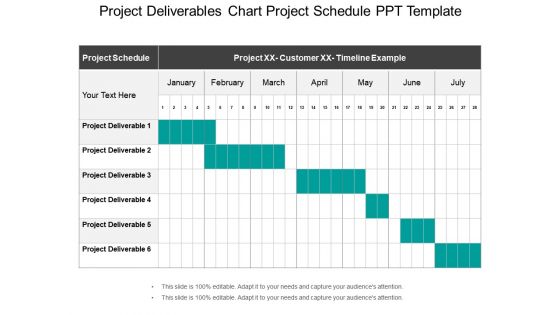
Download our project deliverables chart project schedule PPT template and make flawless project status slides. This project output PPT slide has been crafted by our team of experienced designers. Creating a project deliverable chart schedule is important to improve your performance, boost your credibility and make you stand out among your competitors. Our project schedule Presentation slideshow will help in maintaining a schedule for all your important due dates as well as measurable key performance indicators. You can create the perfect project deliverable chart PPT graphic and then share it with your team so that they can have an estimate about the deadline and completion time of their projects. Similarly, you can ask your team to create project schedule PPT designs for the board meetings and then share it with you. By doing this, you will save your valuable time. This project status PPT diagram slide can also be used to showcase your future project schedules. So, use this awesome project outcome PowerPoint design for your presentation and then share it with your audience. Putting on the perfect presentation can be hard. Flawless Project Deliverables Chart Project Schedule Ppt Template design can help take the pressure off.
People who downloaded this PowerPoint presentation also viewed the following :
Project deliverables chart project schedule ppt template with all 5 slides:
Give eager beavers cause to join with our Project Deliverables Chart Project Schedule Ppt Template. Be able to induct fresh faces.

FAQs for Project deliverables chart project
Look, you need five things locked down for any deliverable. Acceptance criteria first - basically what "finished" means to everyone involved. Then scope boundaries, quality standards, timeline, and who's actually responsible. The acceptance criteria thing is where most projects blow up, honestly. Teams think they're on the same page but they're not even reading the same book. Format matters too, plus any dependencies that might screw you over later. Be stupidly specific about everything. I know it feels like overkill, but trust me - document this stuff now or you'll be in meetings three weeks from now going "I thought we said..." Save yourself the headache.
Get everyone together (Zoom works fine) for a real kickoff meeting where people actually say what they want. Don't let anyone get away with "just make it good" - you need specific acceptance criteria, deadlines, and quality standards written down. I learned this the hard way on a project that went totally sideways because we all thought we agreed but... we didn't. Templates help guide these conversations so you capture both the technical stuff and business goals. Send written summaries after and make people sign off. Honestly, this boring upfront work will save you so much drama later.
Don't wait until the end to test stuff - build checks into every step. Get peer reviews going and schedule regular client touchpoints so nobody's surprised later. Define what "done" actually means upfront (this saves so much drama). Automated testing is clutch for technical work, seriously. Version control and documentation standards? Set those up early or you'll be that person asking "wait, which PowerPoint is the real one?" Make quality everyone's job, not just something you dump on QA at the finish line.
Yeah so deliverables are totally different depending on what industry you're in. IT teams ship software, docs, system rollouts - that kind of stuff. Construction is all physical though - blueprints, actual buildings, permits, inspection paperwork. Marketing's more about campaigns, content, reports, brand guides. Timelines are crazy different too. Construction projects drag on for years while some marketing campaigns wrap up in weeks (honestly construction timelines stress me out). The main thing is deliverable complexity changes big time between industries. You'll want to nail down what "finished" actually means before you start planning anything.
So basically, project documentation is like your insurance policy - it spells out exactly what you're delivering and keeps everyone on the same page. I learned this the hard way on a project that went totally sideways because we skipped the paperwork upfront. Break everything down into measurable pieces, nail down timelines, and get buy-in from stakeholders. When someone inevitably says "wait, that's not what we discussed" (and they will), you'll have receipts. Honestly, scope creep is real and documentation is your best defense. Just do it at the beginning - future you will thank present you.
Break everything down into smaller chunks with actual deadlines and assign owners. Weekly check-ins are a must - but make people report on specific stuff, not just "everything's going fine" BS. I'm obsessed with Asana personally, those little green checkmarks hit different when you're stressed about deadlines. Set up a shared dashboard showing what's done, what's blocked, who's behind. Honestly the biggest thing is just making progress visible to everyone - people work harder when they can't hide behind vague updates. Oh and maybe don't schedule those status meetings for Monday mornings if you can help it.
Ugh, the worst thing you can do is be super vague - like saying "improve customer satisfaction" without defining what that actually means. I learned this the hard way! Also, spell out what's NOT included or you'll get endless scope creep. Dependencies are huge too - map out which deliverables need others finished first, otherwise everything crashes. Each one needs clear acceptance criteria, realistic deadlines, and someone who owns it. Quick test: if you can't explain a deliverable in 30 seconds, break it down more.
So instead of building one huge thing and praying it works, agile breaks everything down into tiny pieces you ship every few weeks. Way less nerve-wracking honestly. You're not sitting there wondering "will they hate this?" because you're getting feedback constantly. Each little chunk has to actually work and add value - not just tick boxes on some project plan. I mean, it takes some getting used to but it's so much better than the old watermelon approach (green on the outside, red disaster on the inside lol). Treat every sprint demo like you're launching something real.
Honestly, Asana or Monday.com are lifesavers for tracking deadlines and who's doing what. Google Workspace is clutch for real-time editing - way better than emailing docs back and forth like it's 2005. Dropbox keeps files organized, though I've been using SharePoint more lately since our company switched. Git's solid for version control if you're dealing with code or complex documents. Jira's good too but can feel overkill sometimes. My advice? Start with one project management tool that doesn't make your team want to revolt, then add other stuff as you figure out what's actually broken in your workflow.
First thing - sort the feedback into must-haves vs nice-to-haves. People love throwing in random requests that aren't even related to the original scope (seriously, happens all the time). Figure out how each change affects your timeline and budget before you agree to anything. Document everything and get written approval for big changes. Those "oh we discussed this" conversations vanish real quick when deadlines hit. Be collaborative but don't let them steamroll you - what they're asking might not even be realistic. Set up a short meeting with key stakeholders to prioritize everything and nail down a new timeline together.
Deliverables are literally what make or break your project. Stakeholders judge everything based on whether you hit those targets. Get them right? You'll have happy clients and smooth approvals. Screw them up and you're stuck in endless revision cycles with awkward meetings about "concerns." Here's the thing though - they actually help keep your team focused since every task should connect back to delivering something concrete. I learned this the hard way on a project last year. Define what you're delivering super clearly from day one. Then use those deliverables to guide every decision you make.
Okay so first thing - write down all your hard deadlines and client stuff. That's the non-negotiable pile. Then look at what's actually gonna move the needle revenue-wise for each project. Everything feels urgent (ugh, I know) but you gotta be ruthless about impact. I do this simple thing: high impact + tight deadline = do it first. Also check if finishing one thing unlocks other work - that matters more than people think. Honestly, just getting it all in one document where you can see everything helps SO much. Priorities will shift anyway, but at least you'll have a clearer view of the chaos.
Start by reminding them what problem you're solving - seriously, people forget context fast. Ditch the tech speak unless they actually need it. I've sat through way too many presentations where everyone just looked confused. Break it down: what you built, the key results, what's next, and what you need from them. Give them space to ask questions and actually listen to their feedback. Oh, and always send a follow-up email with action items afterward. Trust me, half the stuff discussed will disappear into the void otherwise. Keep it simple and in their language, not yours.
Dude, you gotta get super specific about what you're actually building. Like, ridiculously detailed - someone should be able to grab your plan and just run with it. When everyone knows exactly what "done" looks like and the deadline, they can work without bugging each other constantly. Trust me, those "wait I thought YOU were doing that" moments are productivity killers. You'll cut way down on those endless clarification meetings (honestly the worst part of any project). Best part? Stakeholders can't randomly change everything halfway through if you've already locked down the scope. Just write it all out upfront - saves so much headache later.
Pick 3-5 metrics that actually matter for your specific project - don't go crazy tracking everything. Meeting deadlines and budget are obvious ones. Quality standards and performance targets you set upfront matter too. But honestly? User adoption rates and how happy stakeholders are can be way more important than the technical metrics. ROI and cost savings are clutch for showing business impact. Oh, and set these benchmarks early - you don't want to be scrambling later trying to prove your project was successful. The key is choosing metrics that align with what you're actually trying to achieve.
-
Really like the color and design of the presentation.
-
It saves your time and decrease your efforts in half.
-
Excellent template with unique design.
-
Designs have enough space to add content.