

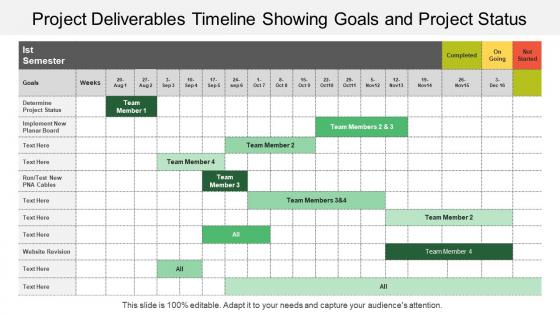
Project deliverables timeline showing goals and project status





Try Before you Buy Download Free Sample Product
 Impress Your
 Audience
 100%
100% Editable
 Save Hours
 of Time


Improve your projects effectiveness with this project deliverables timeline showing goals and project status PowerPoint slide template. This project schedule PPT template results in reducing your business cost and enhances your customer satisfaction rate. An effective project plan further ensures the success of your project. The timeline helps in managing the tasks efficiently so to realize the goals and objectives of your business project. Thus, the main factors affecting the project success can also be described in detail with this project management timeline presentation design. It mainly includes financial factors, quality assurance factor, management factor and the documentation factors. In additional to this, you can also utilize this PPT slide design to build a presentation on the concept related to timeline such as sales timeline, marketing timeline, etc. Also elaborate the significance of scheduling the project status through this professional PowerPoint gant chart for overall growth of your business process and its functions. Thus click on the download link and start working over this exceptional excel timeline template.
People who downloaded this PowerPoint presentation also viewed the following :
Project deliverables timeline showing goals and project status with all 5 slides:
Arrive at correct inferences with our Project Deliverables Timeline Showing Goals And Project Status. Examine events in a chronological fashion.
FAQs for Project deliverables timeline showing goals
Ok so first thing - map out your big milestones, then work backwards to fill in all the smaller stuff. You need realistic time estimates for each task (seriously, everything takes way longer than you think). Figure out which tasks depend on others finishing first, that's crucial. Build in buffer time because Murphy's Law is real lol. Make someone own each piece so nothing falls through cracks. Set up regular check-ins too. Oh and make it visual - like a chart or something where anyone can glance and know if you're behind. The critical path stuff matters but honestly just focus on dependencies first.
Dude, project timelines are a game changer for keeping everyone aligned. No more of that "wait, I thought YOU were doing this" chaos. Your team can actually see who's responsible for what and when stuff's due. The visual part is clutch - you'll spot problems or dependencies way earlier instead of scrambling later. Honestly, I've noticed people get weirdly motivated when they can check things off together as a group. Next time you're in a team meeting, pull up the timeline and see how much easier the discussion gets. Everyone's finally looking at the same thing instead of guessing.
Honestly, Microsoft Project is powerful but way too much unless you're running something massive. Asana and Monday.com hit that sweet spot - decent features without the headache. Trello's timeline view is surprisingly good if you want something visual and simple. Google Sheets works too if you're going bare bones (though it gets messy fast with bigger teams). Actually, check what your team's already using first. Like if you're all on Slack anyway, their timeline stuff might do the trick. Save yourself the hassle of getting everyone on board with yet another tool.
Honestly, it's all about who you're showing it to. Executives just want the big stuff - milestones, major deliverables. They'll zone out if you throw every tiny task at them. Your actual team though? They need way more detail so nobody's confused about what they're doing this week. Here's what I do - keep it high-level but then get super specific for maybe the next month or so. Beyond that, everything changes anyway (learned that the hard way). Just think about who's actually gonna use this thing and adjust from there. Works every time.
Ugh, time estimates are where everyone screws up - including me lol. We're always way too optimistic about how long stuff takes. Plus you forget about all the dependencies where Task B can't start until Task A is done. Buffer time is huge too. Something random ALWAYS pops up. Oh and holidays/vacation days? Yeah, those will mess up your timeline if you don't plan for them. Getting everyone on the same page upfront saves you from scope creep hell later. Honestly, just add like 20-30% extra time to whatever you think it'll take and make sure people actually agree to the plan before you dive in.
Honestly, Gantt charts are perfect when you need to see how tasks connect to each other - like if Task A gets delayed, what else gets screwed? Regular to-do lists don't show you that. They're definitely overkill for simple stuff though. I tried using one for planning my kitchen renovation and it was... a lot. But for work projects with multiple people? Super helpful. You get that visual timeline showing overlaps and dependencies that calendars just can't do. Kanban boards are cool too, but they focus more on "what stage is this task in" rather than timing. Use Gantt when timing relationships matter, not just deadlines.
Honestly, just pad your timelines by like 15-20% from the start - trust me on this one. Something always breaks at the worst possible moment. When chaos hits, figure out what's actually urgent vs what can wait or get cut entirely. Your stakeholders will be way less mad about delays if you tell them early instead of springing surprises on them. Keep your team in the loop too because scope creep has this annoying habit of multiplying during crises. Oh, and start writing down what keeps going wrong so you can see the patterns. Makes planning way easier next time around.
Honestly, timelines are a lifesaver for resource planning. They show you exactly when you'll need designers, developers, whatever - so you can book them way ahead of time. No more "oh shit, everyone's busy when we need them" moments. You can spot conflicts early and either move things around or get extra people lined up. Plus leadership loves seeing specific dates when you're asking for budget approval. I learned this the hard way on a project last year. Just map out your timeline and reserve your resources upfront - trust me, future you will thank you.
You absolutely need to get stakeholder input - they know stuff you don't. Like, marketing needs two weeks for campaign approval, not the three days you thought. Finance goes dark during month-end (learned that one the hard way!). Without talking to them first, you're just making educated guesses. The decision-makers are important, but honestly? Talk to the people who'll actually be doing the work too. They'll spot the bottlenecks and weird dependencies way before anyone else does. It's saved me so many headaches.
Build buffer time in from day one - seriously, this saves your sanity. I tack on like 20-30% extra for big deliverables because something ALWAYS breaks. Set your internal deadlines earlier than the real ones so you've got breathing room. Testing and review phases? Don't rush those, that's where everything falls apart if you're not careful. Oh, and figure out your must-haves vs nice-to-haves right away - you'll thank yourself later when you need to cut stuff. Trust me on this one.
Okay so milestones are like checkpoints for your project - they show you're actually making progress instead of just spinning your wheels. I'd put them at major deliverable points or when you finish big phases. Here's the thing though: without them, you're basically crossing your fingers until the end when fixing problems costs way too much. They're perfect for catching issues early AND giving your team those little celebration moments (trust me, morale matters). It's way better than that sinking feeling of wondering if you're even on track. Set a few key ones and you'll actually know where you stand.
So instead of those big milestone blocks, split everything into sprints - usually 2-4 weeks each. Each sprint gets its own little timeline with specific stuff to deliver. The cool thing? You can totally shift priorities between sprints when things change or you get feedback. Way better than being stuck with some rigid waterfall plan that never survives reality anyway. Your main timeline becomes more like a roadmap showing how sprints connect rather than hard dates carved in stone. I'd map out your first 2-3 sprints properly, then keep everything else loose until you're closer. Trust me, teams burn out fast trying to hit impossible deadlines.
Look at the actual complexity first - how hard is the work really? Your team's skills matter too, plus any dependencies between tasks. Buffer time is crucial because something always goes wrong (learned this the hard way). Testing and review phases get underestimated constantly - probably the biggest mistake I see. Factor in current workload, vendor delays, stakeholder feedback loops... all that fun stuff. Honestly? Take your best-case estimate and slap on 20-30% extra. Sounds excessive but you'll be grateful when timeline hell inevitably hits.
Dude, visuals are a game changer for getting stakeholders on board. People just absorb pictures way faster than boring spreadsheets - it's wild how their brains work. I've literally watched executives glaze over during presentations until someone throws up a Gantt chart. Then boom, they're suddenly asking good questions and actually paying attention. Dependencies and bottlenecks become super obvious when you can see them laid out. Keep it simple though - maybe color-code by department or whatever makes sense for your crowd. Trust me, a clean timeline beats a wall of text every single time.
Check your schedule variance first - basically did you hit those major milestone dates or not? Resource utilization is huge too, like were your people actually busy when they needed to be. Timeline problems always mess with budget so track that variance. Don't forget stakeholder satisfaction though - I've seen projects hit every deadline but people still felt totally out of the loop. Scope creep will murder your timeline faster than anything else, so count those incidents. Oh and definitely document this stuff because future you will thank you when planning the next project. Makes a real difference.
-
Excellent work done on template design and graphics.
-
Unique research projects to present in meeting.