


Project deliverables milestone ppt template




Try Before you Buy Download Free Sample Product
 Impress Your
 Audience
 100%
100% Editable
 Save Hours
 of Time


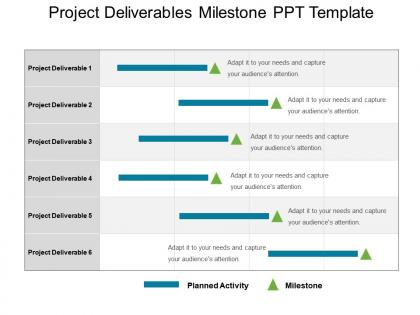
Project deliverables milestones PPt template is a slide for creating presentations that focus on scheduling or planning of essential events. This project milestone PowerPoint template is useful for strategy building and while taking any prominent business decisions. Setting milestones PowerPoint presentation model is ideal to show the critical events or features of a project by the means of a presentation and is also an excellent tool to capture the attention of your audience. Milestone PPT graphic as designed by our team of experts helps to present all the critical points of the project in a quick glance in an easy to comprehend manner. Such presentation templates are a perfect way to display any project components in a chronological order. Every business project requires an adequate amount of planning and preparation to achieve the milestones as shown here. Also in these templates, you can manually add milestones to your convenience. Face your fears in a bold fashion with our Project Deliverables Milestone Ppt Template. It helps avoid a gingerly approach.
People who downloaded this PowerPoint presentation also viewed the following :
Project deliverables milestone ppt template with all 5 slides:
Display information about the criteria with our Project Deliverables Milestone Ppt Template. It helps advertise the jobs.
FAQs for Project deliverables
You'll want to nail down scope definition and specific acceptance criteria first. Timeline with milestones is obvious. Don't forget assigned ownership - someone needs to own this thing. Quality standards matter too, plus any dependencies that could mess things up. Seriously though, I can't stress the acceptance criteria enough. So many projects go sideways because people think they can wing it. Document what format you're delivering - report, software, whatever. Oh, and get stakeholders to actually sign off on all this stuff upfront. Trust me on that one.
Primary deliverables? That's the stuff your client is literally paying you for - the main thing that solves their actual problem. Secondary ones are more like the nice-to-haves that make everything work better. Documentation, training sessions, progress reports, whatever. Here's how I think about it: take away a primary deliverable and your project tanks completely. Remove a secondary one and yeah, things might get messier but you're still good. Plus secondaries tend to pop up as you go along anyway. Honestly, just focus on nailing down your primaries first when you're planning. That's where most of your budget should go.
Project specs are like your roadmap - they tell you exactly what to build, when it's due, and what quality looks like. I can't stress this enough: vague specs will absolutely wreck your project. You'll get scope creep, confused clients, the whole mess. Make sure they cover acceptance criteria, quality standards, format requirements, all that stuff. It's basically your contract showing what "finished" means. I've watched so many projects crash because nobody nailed down the details upfront. Trust me, fight for clear specifications from day one. Your future self will thank you when deliverables actually match expectations.
Honestly, get your stakeholders talking early - like, really early. Have real conversations about what they actually want, not what you think they want. I made this mistake once and built something "amazing" that literally no one needed lol. Document everything and get them to sign off before you dive deeper. Brief check-ins are your best friend here. Show progress regularly so you can catch problems while they're still small. Way better than hoping you're on track and finding out later you're not. Trust me, confirming direction beats guessing every single time.
Honestly, you've gotta set up change control from the start - don't wait. Create a simple template so people know what info to include when they want changes. Before approving anything, check how it'll mess with your timeline and budget. Trust me, those "tiny tweaks" will bite you later! Always get written approval from stakeholders (seriously, verbal promises mean nothing). Once something's approved, update your docs and tell the whole team right away. I learned this the hard way on my last project when a small change snowballed into chaos.
First thing - check if it actually does what you promised it would do. Sounds obvious but you'd be surprised how often people skip this step. Look at completeness, accuracy, whether users can figure it out without wanting to throw their computer out the window. I do this weird gut check where I ask myself "would I feel good presenting this to my boss?" Works every time. Get someone fresh to test it out - they'll catch stuff you missed since you've been staring at it forever. Oh, and decide what "good enough" looks like before you start, not when you're panicking at the deadline.
Ugh, scope creep is the worst - clients always want "just one more feature" halfway through. Also, vague requirements will kill you. Like when they say "make it intuitive" without explaining what that actually means. Unrealistic deadlines are another nightmare, especially since most people have zero clue how long good work takes. Dependencies mess everything up too - one thing gets delayed and suddenly your whole timeline's screwed. Oh and changing priorities every week? Don't even get me started on that headache. Get everything documented upfront and be super specific about what's included. Build in extra time wherever you can.
So basically, your project scope is like a roadmap for what you actually need to deliver. Take a customer portal project - you'd probably need wireframes, code, test results, user docs, that whole thing. Bigger scope means more deliverables, smaller scope means less work (thank god, right?). Here's what I always do: every single deliverable should tie back to something in your scope statement. Can't connect the dots? Then honestly, you probably don't need to make it. I've seen people create stuff just because they think they should, but it just wastes time.
Oh man, there are so many good options! Asana and Trello are pretty solid - I've used both. Monday.com is decent too. Honestly though? I'm totally hooked on Notion right now because you can customize it however you want. Sometimes I probably overcomplicate things with it lol. For smaller stuff, a simple spreadsheet still works great. The main thing is making sure everyone on your team will actually use whatever you pick. I'd definitely try out the free versions first - no point paying for something that doesn't fit your workflow.
Document each deliverable with what it actually is, who owns it, when it's due, and how you'll know it's done. Honestly, I just throw this stuff in a spreadsheet or whatever tool the team's already using - doesn't really matter as long as everyone sticks to it. Version numbers are clutch, and definitely note if one thing depends on another. Otherwise you'll come back in three months wondering what the hell "final report v2" was supposed to include. Be specific enough that someone else could jump in and not be totally lost.
Think of deliverables as your project's proof of life - actual stuff you can point to and say "look, we did this." Big projects feel overwhelming until you chop them into smaller pieces with clear outputs. Stakeholders love seeing progress they can touch or review (beats vague status updates any day). When things go sideways, you'll spot it faster with concrete milestones. Here's what I'd do: nail down exactly what each deliverable looks like before you start. Get everyone to agree on it too - saves you from those fun "but I thought you meant..." conversations later.
Look at what depends on what first - some stuff literally can't start until other pieces are finished. Check your deadlines and see which ones will hold up other people if you're late. Quick tip though - half the things stakeholders call "high priority" really aren't, so rank them by actual business impact. Sometimes it's worth doing a couple easy wins first for momentum instead of diving into the hardest thing. But honestly? Just get your PM and key people to agree on the order upfront. Otherwise you'll be reshuffling priorities every week when someone changes their mind.
Three things that actually work: tell a story first - connect your stuff to real business results because nobody remembers boring bullet points. Clean visuals are huge too. Keep slides simple, make your key numbers pop, don't cram everything on there. For engagement, throw in some questions or polls - honestly this saved me so many times when I could tell people were zoning out. Oh and practice your timing beforehand! I used to always rush the important parts. End with who's doing what next, otherwise nothing happens after.
Honestly, client feedback is like having a GPS for your next projects - shows you exactly where you went wrong or nailed it. I learned this the hard way when I kept brushing off "small" comments. Turns out those tiny adjustments made clients way happier. Document everything, especially patterns you notice. Maybe they always want updates sooner, or your reports are too technical. Don't just wait around for feedback either - actually ask for it. Keep a simple log after each delivery. Both the good and bad stuff matters since you'll want to repeat what works and dodge future disasters.
Dude, incomplete deliverables will absolutely wreck your timeline and budget. Everything starts falling like dominoes - delays everywhere, stuff needs reworking, stakeholders get pissed. Your team's scrambling while clients hold back payments. Future phases can't even start properly. Honestly, the worst part is when you're rushing to fill gaps later and suddenly scope creep becomes this massive headache. I learned this the hard way on a project last year - what a mess that was. Build buffer time from the start and do regular check-ins. Catch problems early before they turn into disasters.
-
Easy to edit slides with easy to understand instructions.
-
Very unique, user-friendly presentation interface.
-
Amazing product with appealing content and design.
-
Nice and innovative design.