


Business milestone timeline template sample of ppt





Try Before you Buy Download Free Sample Product
 Impress Your
 Audience
 100%
100% Editable
 Save Hours
 of Time


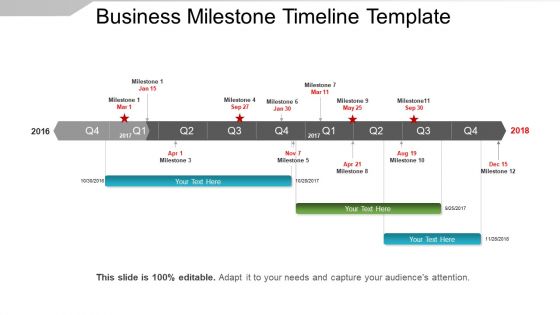
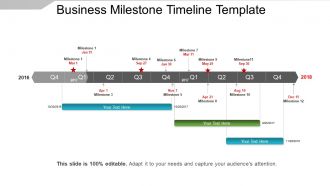
Manage your business projects with our business milestone timeline PPT template. This project management timeline PPT diagram develops the phases of your projects as per the set timeline. This project milestone PPT slide also helps you to simply evaluate the growth of your project completion. It further helps in developing the essential business plans and strategies in accordance to achieve the set milestones. You can also visualize the growth rate of your business future with this company milestone timeline PPT layout. It helps in measuring the overall growth prospects of your company while motivating your business teams to work in accordance to the set timelines. This project milestone PPT diagram also helps in improving the capability level for your organization. And provides value to your customers while improving their customer satisfaction rate. Thus, just download and start working over this professional project timeline PowerPoint design image. Click on the download tap now. Avoid half hearted approaches with our Business Milestone Timeline Template Sample Of Ppt. They give it their full effort.
People who downloaded this PowerPoint presentation also viewed the following :
Business milestone timeline template sample of ppt with all 5 slides:
Turn the tide with our Business Milestone Timeline Template Sample Of Ppt. Get your thoughts going for you.
FAQs for Business milestone timeline template
Focus on the big moments that actually changed your business trajectory. Company founding, first sale, major funding rounds, key hires - especially C-suite people. Product launches that mattered. Revenue milestones. Don't skip the rough patches either - pivots, near-death experiences, major partnerships that saved your ass. Market expansions and regulatory stuff if that's relevant to you. Here's the thing though: be picky. You don't need every tiny win on there. Just the events that genuinely moved the needle and tell your growth story without boring people to death.
Timelines are genius because investors can actually *see* your company moving forward instead of just reading about it. Pick your biggest moments - funding rounds, product launches, major partnerships, revenue milestones. Maybe 6-8 key events max. Mix it up too, don't just list funding rounds (boring). The visual format is way easier to scan than paragraphs of text. Honestly, I'd start by brain-dumping every significant event first, then cut it down to what tells the best story. You want that clear progression from where you started to where you're headed.
Okay so first thing - visual hierarchy is everything. Different milestone types need their own colors or icons so people can actually scan through quickly. Don't cram everything together either, white space literally saves timelines from looking like hot garbage. Make your dates super prominent and keep the descriptions short but clear enough that people get it. Oh and honestly? Start simple with a basic template first. You can always add fancy stuff later if it actually helps, but most of the time clean and simple wins. Use a readable font too - seems obvious but you'd be surprised.
Honestly, just work backwards from your deadline and be realistic about timing. Break it into major chunks first, then estimate how long each actually takes - not the fantasy version where everything goes smoothly lol. I learned the hard way to add like 20-30% extra time because something always goes wrong. Check if any parts depend on others finishing first, that'll affect your timeline. Oh and look at similar stuff you've done before for a reality check. Your team's bandwidth matters way more than you think it will. Don't forget about random external delays either - they're basically guaranteed to happen.
Honestly, I'd just go with Canva first - their timeline templates are solid and way easier than building something yourself. PowerPoint works too if you're already comfortable with it, but the results usually look pretty basic. Google Slides has some decent SmartArt options. Oh, and if you're already using project management stuff like Asana or Monday.com, they have timeline features built in which is convenient. Adobe's obviously great but probably overkill unless you're doing something fancy. I've wasted way too much time trying to make PowerPoint timelines look good when I could've just used a Canva template from the start.
Honestly, just sort them into three buckets - critical stuff that'll kill your project if it fails (like launches or funding), important things that keep you moving but won't end the world if they're late, and then the nice-to-have stuff. That last category? Half the time it's just there to make your timeline look more detailed for whoever's reviewing it. I'd start with your top 3-5 critical ones first - everything else builds around those. Color-coding helps a ton, or use different symbols if that's more your thing.
Dude, visuals totally save your ass on milestone timelines. Nobody wants to read through paragraphs of project updates - that's just torture. Charts and progress bars let people see what's actually happening in like 2 seconds. Color-code different phases and throw in some icons for major deliverables. Trust me, when you're presenting to executives who have zero patience, they'll actually pay attention instead of checking their phones. Oh and bottlenecks become super obvious too. I learned this the hard way after boring a room full of stakeholders to death once.
Set up regular check-ins with your stakeholders - monthly works for most projects, but quarterly's fine for longer ones. When you send them your timeline, ask specific stuff like "Does this delivery date work for you?" or "What dependencies am I missing here?" Most feedback you'll get is about timing, resources, or scope changes (scope creep is basically inevitable, sorry). Keep everything in a shared doc so people can see what's changing and why. Here's the key part though - actually use their input, don't just collect it. Send them a quick "here's what I changed based on your comments" follow-up. Trust me, they'll notice if you ignore them.
Honestly, most people cram way too much into their timelines and get super optimistic about deadlines. Something always goes wrong or takes forever - learned that the hard way! Build in extra time for delays. Also, don't make milestones vague like "improve marketing." Be specific: "launch email campaign to 1,000 subscribers." Your team should help set realistic dates since they actually do the work. Oh, and start with your big milestones first, then figure out the smaller stuff. Way easier than trying to plan everything at once.
Here's the thing - map every milestone back to what you're actually trying to achieve. So if you want 30% revenue growth, your timeline better have real sales targets and product launches that'll get you there. I've watched too many teams just fill calendars with random tasks that look productive but don't move the needle. Each major milestone should answer "how does this get us closer?" Build in check-ins too - you'll want to see if your timeline is working or if you need to pivot. Otherwise you're just keeping busy instead of making progress.
Gantt charts are your best bet - they show everything at once and stakeholders love them. PowerPoint timelines work too, or honestly even a good infographic beats boring spreadsheets any day. Interactive dashboards are cool if you've got the budget, but don't stress about getting fancy. Match your format to who's looking at it though - executives want something they can scan in 30 seconds while project teams need all the nitty-gritty details. I'd say start with whatever tools you already have and just make it clean and easy to read.
Pick 2-3 solid metrics for each milestone that actually connect to your business goals - revenue, new customers, efficiency stuff like that. Honestly, a simple dashboard works best for me. Shows before and after numbers so you can actually see what moved the needle. Some milestones hit right away, others take forever to show results which is kinda annoying but whatever. Track both the quick wins and the long-term changes. Don't overthink it - just stay consistent with measuring the same things each time.
Look, you gotta keep updating that timeline or it'll just sit there looking useless. I'd set up a weekly reminder - bi-weekly if things move slower. Honestly, catching problems early saves you from those nightmare scenarios where everything's falling apart. Your team needs to know what's actually going on, not just the fantasy version from three months ago. Stakeholders hate surprises too, so when they see you're on top of things, they'll trust you way more. It becomes second nature once you get in the habit instead of scrambling when stuff hits the fan.
So you're basically creating visual proof you can actually hit your targets. Customers eat this stuff up - shows them you're legit and not just talking a big game. Investors? They're even pickier about it since they want proof you can execute what you promised. Nobody's handing over cash to companies that miss deadlines left and right. Keep updating it regularly though, and make your wins specific. Like, don't just say "boosted sales" - say you hit $2M ARR or whatever the actual number is. Way more convincing.
Airbnb and Slack are perfect examples - they did 90-day chunks with specific revenue targets and user numbers. Tesla does this too, though Elon's deadlines are honestly kinda ridiculous lol. But their structure works: they connect product launches to manufacturing goals and pre-orders. What's smart is they all build in extra time for the really critical stuff and have Plan B ready. I'd study maybe 2-3 companies in your space first. See how they space things out, then steal their approach but adjust the timing for what you're doing.
-
Appreciate the research and its presentable format.
-
Thanks for all your great templates they have saved me lots of time and accelerate my presentations. Great product, keep them up!