Project Management Timeline With Milestones
Try Before you Buy Download Free Sample Product
Audience
Editable
of Time
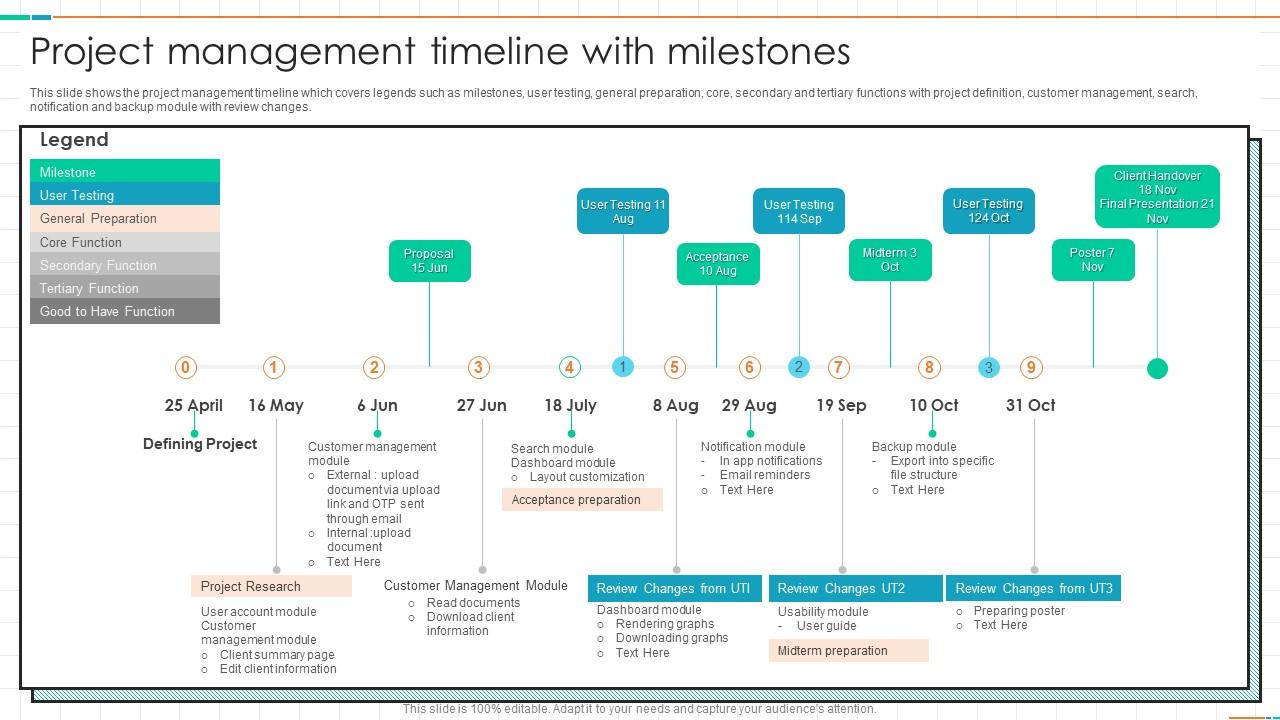
This slide shows the project management timeline which covers legends such as milestones, user testing, general preparation, core, secondary and tertiary functions with project definition, customer management, search, notification and backup module with review changes.
People who downloaded this PowerPoint presentation also viewed the following :
Project Management Timeline With Milestones with all 6 slides:
Use our Project Management Timeline With Milestones to effectively help you save your valuable time. They are readymade to fit into any presentation structure.
FAQs for Project Management
You need clear tasks with actual deliverables and realistic time estimates - plus someone owning each piece. Dependencies are huge though, seriously can't stress this enough. I've watched so many projects crash because nobody figured out what's blocking what first. Build in buffer time too because everything takes way longer than you think it will. Oh, and milestones help you track the big wins along the way. Make it visual so your whole team can actually see what's happening. I'd start by brain-dumping everything that needs doing, then work backwards from your deadline to see if you're being realistic about timing.
Honestly, timelines are lifesavers for keeping everyone on the same page. You'll catch problems before they blow up, and your team won't be scrambling last minute. Resources get allocated better too. Stakeholders love having realistic expectations instead of you just winging it and hoping things work out. There's something weirdly satisfying about crossing stuff off your list as you go - maybe that's just me though. Communication becomes so much clearer when you can point to actual milestones. Oh, and definitely pad your timeline with extra time because something always goes sideways when you least expect it.
So for project timelines - Microsoft Project and Smartsheet are solid if you need all the fancy dependency tracking stuff. Asana's pretty user-friendly, same with Monday.com. Their timeline views aren't bad either. You know what though? I've honestly seen people crush it with just Excel or Google Sheets (gets chaotic fast with bigger projects but whatever works). Trello's timeline power-up is decent for quick visual stuff. My advice? Just start with whatever your team's already comfortable using. You can always switch later if it's not cutting it.
Honestly? Weekly at minimum, but it really depends on your project. If things are moving fast or getting messy, check it every couple days. During crunch time I'm basically updating daily because everything changes. Don't wait for someone to ask for updates - do it whenever you hear about delays or scope creep. A timeline that hasn't been touched in two weeks is pretty much garbage at that point. I learned this the hard way on my last project lol. Just set a calendar reminder so you don't space out on it like I always do.
Okay so basically agile breaks everything into these short 1-4 week chunks called sprints, and you can totally change direction based on what you learn. Traditional is more like - here's the plan, here are all the milestones, we're sticking to it. Agile's great because you're always adjusting priorities every sprint. But honestly? Traditional gives you way better long-term visibility, which stakeholders love for planning budgets and stuff. I'd go agile if your requirements might change (they usually do lol). Pick traditional when you need those rock-solid deadlines for compliance or budget approval meetings.
Set up weekly check-ins from day one - trust me on this. Skip the boring text updates and use charts or dashboards instead (seriously, no one reads paragraph updates). Flag problems early before they blow up. Here's the thing though - different people need different info. Your boss wants big picture stuff, but team leads need all the details. Oh, and always explain WHY things are delayed, not just that they are. Create one main place where everyone can find updates instead of digging through a million emails.
Honestly, the worst thing you can do is guess at timelines without asking your team first - they actually know how long their stuff takes. Most people also forget about dependencies between tasks, which always bites you later. I'd add at least 20% buffer time because approval processes are painfully slow, plus there's always holidays or other projects pulling people away. Don't make those beautiful timelines that look great on paper but totally ignore your actual resources. Oh, and definitely check in weekly with everyone to catch problems before they blow up. Trust me on the buffer time thing - learned that one the hard way!
Okay so first thing - map out exactly when you'll need people and money, then work backwards from your big deadlines. I've watched so many projects completely fall apart because people just assumed the cash would magically appear when they needed it. Spoiler: it won't. Build a chart showing your timeline, how fast you're burning budget, and who's doing what each week. This way you'll catch problems early - like realizing you need your best developer but they're stuck on another project, or you've blown through most of your budget while barely getting started. Oh and always pad in extra time for getting approvals. That stuff takes forever.
Honestly, think of your timeline as like a crystal ball for disasters waiting to happen. Map everything out and you'll start seeing where things might get messy - unrealistic deadlines, bottlenecks, the domino effect when one task goes off the rails. I can't tell you how many projects I've watched completely fall apart because people just winged it instead of planning ahead. Always build in some cushion time too, because something weird always comes up. Oh, and check in on it every week or so - catch the red flags early before they become actual fires.
You want real baselines, not wild guesses - so dig into your past project data. I learned this the hard way after way too many blown deadlines! Look at your last 3-5 similar projects and calculate how long each phase actually took. You'll spot trends, like how testing always runs over or client feedback takes forever (seriously, why do they disappear for weeks?). Match projects with similar scope and team size. Once I started tracking this stuff properly, my estimates got so much better. Short version: past performance beats hopeful thinking every time.
Ugh, timeline delays are the worst. First thing - figure out what's actually late vs what just feels urgent. Sometimes it's not as brutal as you think! Cut the nice-to-haves and focus on must-haves only. Get everyone on the same page right away with new timelines. Don't just silently panic - that never works. You can usually make up time by doing stuff in parallel or throwing more people at it. Honestly, reducing scope is often your best bet though. Weekly check-ins help you spot problems before they explode.
Oh man, dependencies are such a pain! So like, when Task A runs late, Task B can't start on time either since it needs A to be done first. Creates this whole domino thing where delays just keep cascading down the line. The critical path is basically your longest chain of connected tasks - that's what sets your minimum timeline. Delays there are the worst because they push your whole end date back. Sometimes you can run stuff in parallel instead, or just pad your schedule with extra time upfront. Learned that one the hard way lol.
Track schedule variance first - basically are you hitting planned dates or not. Critical path delays will absolutely wreck everything downstream, so watch those like a hawk. I'd also measure how accurate your time estimates actually are compared to reality (spoiler: probably not great at first). Scope creep is another timeline killer worth counting. Budget variance helps too since money problems usually mean schedule problems. Honestly, just pick 2-3 things and check them weekly on a simple dashboard. Don't go crazy with metrics you'll never look at.
Honestly, visuals are a game-changer for timelines. Color-code your different work streams and throw in some icons for major milestones. Progress bars work great too - people get the status instantly without reading paragraphs of text. Different shapes can show priority levels or which team owns what. I swear by a well-done Gantt chart, though I know some people find them overwhelming. The goal is helping stakeholders spot critical paths and bottlenecks in like 5 seconds. Start small - just add 2-3 visual elements to whatever you're using now and you'll see the difference right away.
Honestly, just stick to the big picture stuff - execs don't care about every little task. Gantt charts work great, or even a simple roadmap showing major milestones and when stuff's due. I made this mistake once and totally overwhelmed them with way too much detail... not fun. What they actually want to know: budget impact, resource needs, and when they need to make decisions. Oh, and definitely pad your timelines but don't tell them that's what you're doing - just bake extra time into your estimates. Walk them through which delays will actually screw things up versus the ones that won't matter much.
-
I am extremely pleased with these PPT slides that we used for our event. They were easy to modify and came out great in all aspects!
-
Unique and attractive product design.