

Creating a service blueprint for your organization powerpoint presentation slides





Try Before you Buy Download Free Sample Product
 Impress Your
 Audience
 100%
100% Editable
 Save Hours
 of Time


As customer experience becomes the deciding factor in dominating the service industry, more and more companies are practicing Service Design to ensure that the best service is delivered at each stage of the customer journey from searching to landing to the location to consuming the service and leaving. Here is an efficiently designed Creating a Service Blueprint for your Organization template. Whether you are a local council or a restaurant, service design is a must to deliver a great customer experience and survive in the fiercely competitive business environment. Service Blueprinting is a service design tool to map out how the current service is provided to customers and how it can be enhanced for a better customer experience. Our Service Design and Service Blueprinting PowerPoint presentation is the go-to resource for the companys services team to understand the step-by-step service design process and implement it smoothly in your organization. The PPT contains fully customizable templates on customer journey maps, service blueprints, roadmaps, etc., to effectively shape your ideas. Download it now.
People who downloaded this PowerPoint presentation also viewed the following :
Content of this Powerpoint Presentation
Slide 1: This slide displays title i.e. 'Creating a Service Blueprint for your Organization' and your Company Name.
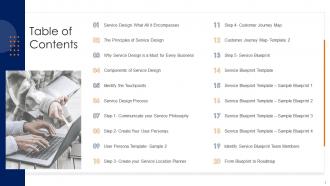
Slide 2: This slide presents table of contents.
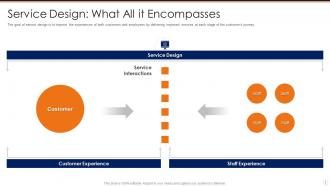
Slide 3: This slide exhibits Service Design: What All it Encompasses.
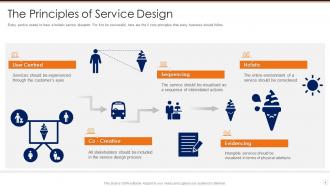
Slide 4: This slide shows The Principles of Service Design.
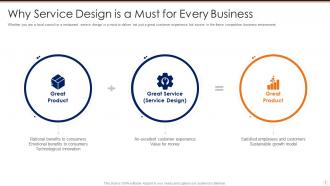
Slide 5: This slide depicts Why Service Design is a Must for Every Business.
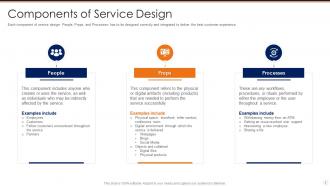
Slide 6: This slide showcases Components of Service Design.
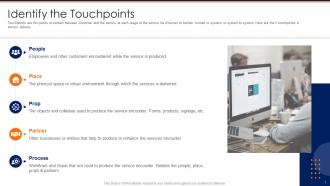
Slide 7: This slide highlights Identify the Touchpoints.
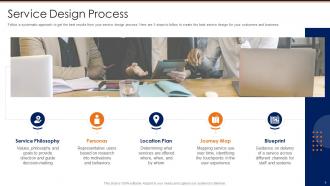
Slide 8: This slide illustrates Service Design Process.
Slide 9: This slide displays Step 1- Communicate Your Service Philosophy.
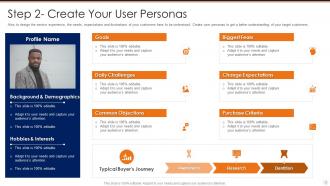
Slide 10: This slide presents Step 2- Create Your User Personas.
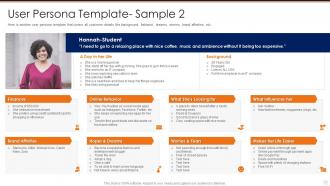
Slide 11: This slide exhibits User Persona Template- Sample 2.
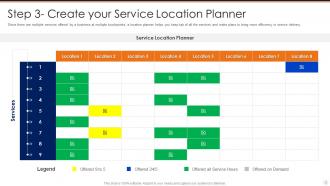
Slide 12: This slide showcases Step 3- Create your Service Location Planner.
Slide 13: This slide depicts Step 4- Customer Journey Map.
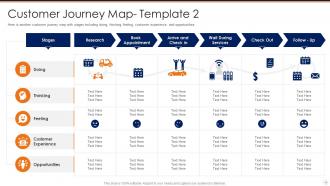
Slide 14: This slide highlights Customer Journey Map- Template 2.
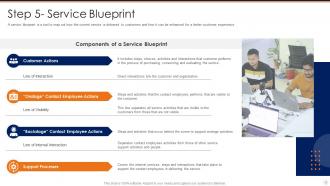
Slide 15: This slide illustrates Step 5- Service Blueprint.
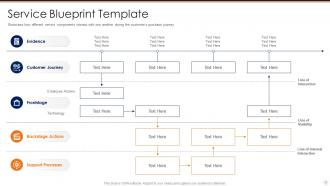
Slide 16: This slide displays Service Blueprint Template.
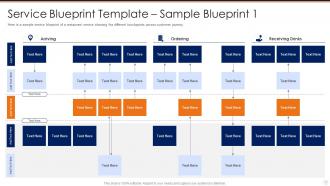
Slide 17: This slide presents Service Blueprint Template – Sample Blueprint 1.
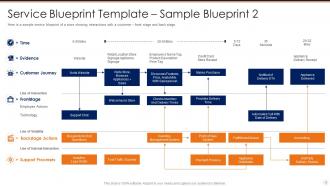
Slide 18: This slide exhibits Service Blueprint Template – Sample Blueprint 2.
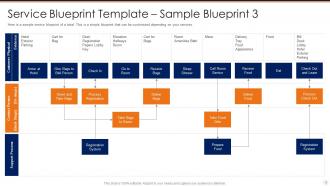
Slide 19: This slide shows Service Blueprint Template – Sample Blueprint 3.
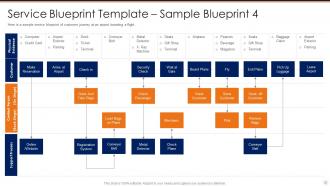
Slide 20: This slide depicts Service Blueprint Template – Sample Blueprint 4.
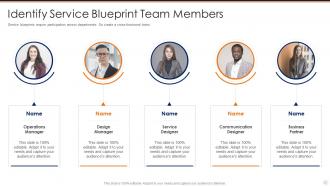
Slide 21: This slide highlights Identify Service Blueprint Team Members.
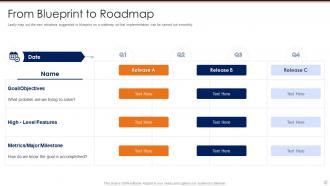
Slide 22: This slide illustrates From Blueprint to Roadmap.
Slide 23: This is the icons slide.
Slide 24: This slide presents title for additional slides.
Slide 25: This slide shows about your company, target audience and its client's values.
Slide 26: This slide presents your company's vision, mission and goals.
Slide 27: This slide highlights goals of your company.
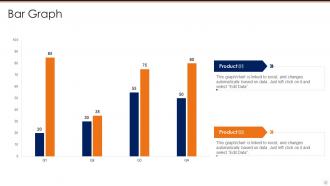
Slide 28: This slide exhibits quarterly bar graph for different products. The charts are linked to Excel.
Slide 29: This slide shows roadmap.
Slide 30: This slide displays Venn.
Slide 31: This slide exhibits yearly timeline.
Slide 32: This slide depicts 30-60-90 days plan for projects.
Slide 33: This slide exhibits ideas generated.
Slide 34: This is thank you slide & contains contact details of company like office address, phone no., etc.
Creating a service blueprint for your organization powerpoint presentation slides with all 39 slides:
Use our Creating A Service Blueprint For Your Organization Powerpoint Presentation Slides to effectively help you save your valuable time. They are readymade to fit into any presentation structure.












FAQs for Creating a service blueprint for your organization
So service blueprinting is like process mapping but way more thorough. Instead of just tracking internal stuff, you're mapping the whole customer experience plus everything happening behind the scenes to support it. Picture it in layers - customer journey up top, then what employees do that customers can see, backstage employee work below that, and all the tech/systems at the bottom. Honestly took me forever to wrap my head around it at first. The cool part? You can spot where internal breakdowns will actually mess with the customer experience, not just your team's workflow. I'd start simple with just the customer journey and build from there.
Okay so there are five layers to map out: customer actions, what employees do in front of customers, behind-the-scenes employee stuff, support systems/tech, and all the physical touchpoints. The lines between sections matter a lot - they show you where things can break down. Honestly, most of the real work happens backstage where customers can't see it. That's usually where problems start too. Start with the customer journey first, then work your way back through each layer. You'll spot gaps pretty quickly once you see everything laid out like that.
So basically service blueprinting shows you where your customer experience falls apart - you map out every touchpoint plus all the stuff happening behind the scenes. Those awkward gaps become super obvious, like when customers are stuck waiting or getting mixed messages from different people. Honestly, it's kind of like detective work for business processes. The cool part is catching problems before customers even complain. You'll find spots where you can actually wow people too. Just pick one customer journey to start with (keep it simple!) and fix the worst stuff first.
Dude, you absolutely need frontline staff involved from day one. They're the ones actually dealing with customers and seeing where stuff breaks down daily. Management usually has no clue what's really happening on the ground - I've watched so many blueprints crash because executives just assumed they knew better. These employees spot the gaps between what customers see and all the behind-the-scenes chaos. They'll call out your bad assumptions too, which honestly saves you tons of headache later. Interview them early and don't just ignore their input once you've got it.
Honestly, service blueprints are amazing for finding pain points! They show your whole process - customer-facing stuff AND the messy backend work. Map out what's happening now first. Then hunt for those awkward spots where customers get stuck or frustrated. You'll spot them where departments don't talk to each other properly, or when people have to repeat their info three times (ugh, hate that). Wait times that drag on forever are dead giveaways too. The visual aspect makes problems super obvious - like, you can actually see where things fall apart between what should work and reality.
Honestly, you're gonna need a mix of methods for this. Customer journey mapping and stakeholder interviews are your starting point - they'll show you the main touchpoints and where stuff goes wrong. Shadow some employees or watch customer interactions happen live. Mystery shopping works great too (maybe don't advertise that one to your team lol). Try experiencing the service yourself - sounds obvious but it's weirdly helpful. Your frontline staff know exactly where things fall apart, so workshop with them. Surveys give you the numbers, focus groups give you the why behind those numbers. That combo should set you up pretty well.
So basically, service blueprints get everyone speaking the same language visually. You map out the whole customer journey and show how departments actually work together behind the scenes - no more of those awkward "wait, that's not our process" moments. Teams finally see where they fit and how their stuff affects everyone else. Honestly, it's way better than those endless email chains trying to figure out who does what. Departments start coordinating on their own instead of just dumping work and running. You should totally try a workshop with people from different teams to kick things off.
Honestly, the worst thing you can do is get obsessed with mapping every tiny detail - I've watched people burn weeks on that stuff. Focus on what actually matters to customers instead. Oh, and don't build this thing in a vacuum! Get your frontline people involved from the start, plus real customers if you can. They'll catch things you'd never think of. Most teams also treat it like homework - create it once and forget about it. That's backwards though. Start basic, loop in the right voices early, then keep tweaking it as you figure out what's really going on.
Honestly, digital tools changed everything for service blueprinting. Miro's my go-to - way better than those endless whiteboard meetings we used to suffer through. Your whole team can jump in and edit stuff live, which is actually pretty cool. Some teams get fancy with IoT sensors tracking real customer behavior (seems overkill to me, but whatever works). Data analytics help too since you're not just guessing where problems are. Start with something simple like Miro though. Don't overthink it - pick whatever your team won't abandon after a week.
Think of service blueprinting as your detective tool for figuring out what's broken. Map out your current process first - you'll spot where customers hit roadblocks and which backend stuff is slowing everything down. The visual layout is honestly genius because your whole team can stare at the same diagram and actually get it. Those front-stage moments? That's usually where people get annoyed. Once you've got your "current state" mapped, sketch out a better version showing your fixes. It's basically X-ray vision for services, which sounds dramatic but it really does work.
Don't just create your service blueprint and call it done - that's a rookie mistake I see all the time. Monthly reviews work best, quarterly if you're really swamped. Your frontline people will spot problems way before you do, so actually listen to them. Same goes for customer feedback. Set up some kind of system where major shifts trigger updates automatically - new competitors, tech changes, whatever. I mean, you don't want to be scrambling when something breaks. Make updating part of your normal routine instead of waiting until everything's on fire.
Yeah, definitely works for both! Physical services are more about mapping stuff like front desk interactions and waiting areas. Digital focuses on user interfaces and backend systems instead. The basic framework stays the same though - customer actions, frontstage, backstage, all that. Hybrid services are actually the most fun to work with since you're dealing with both worlds at once. I'd start with whatever your customers actually see and experience, then trace backwards to figure out what's supporting each touchpoint. The structure adapts pretty easily once you get the hang of it.
Honestly, just ask them directly instead of playing the guessing game. Your team probably has blind spots about what customers actually go through. When I've done this before, there's always some random step or frustration that nobody internally even knew existed. Customers will tell you which touchpoints are broken and which ones work great. They'll also give you ideas you wouldn't think of on your own. I'd start small - maybe 5-8 people from different customer types? Map out what they're really experiencing, not what you assume happens. Way more accurate than internal brainstorming sessions.
Honestly, service blueprints are clutch for onboarding new people. They make it super clear who does what at every customer touchpoint. Way better than drowning someone in policy docs on day one - nobody has time for that. New hires can actually see how their behind-the-scenes stuff affects customers. Walk them through a few real scenarios during their first week. You can also spot where things might go wrong and prep them for damage control. The visual aspect just clicks better than text-heavy training materials.
Start with customer satisfaction and NPS scores - they'll tell you if your blueprint actually works in the real world. Process stuff matters too: cycle times, error rates, how efficiently you're using resources. That's honestly where I've seen most blueprints totally bomb or succeed. Don't forget employee feedback since they're the ones dealing with backstage chaos daily. Track your cost per transaction and resolution times before/after changes. Oh, and pick like 2-3 metrics max that actually relate to your specific problem - you'll go crazy trying to measure everything.
-
Very unique and reliable designs.
-
Designs have enough space to add content.