


Process Of Service Blueprinting And Service Design Service Blueprint Template Sample Blueprint 1




Try Before you Buy Download Free Sample Product
 Impress Your
 Audience
 100%
100% Editable
 Save Hours
 of Time


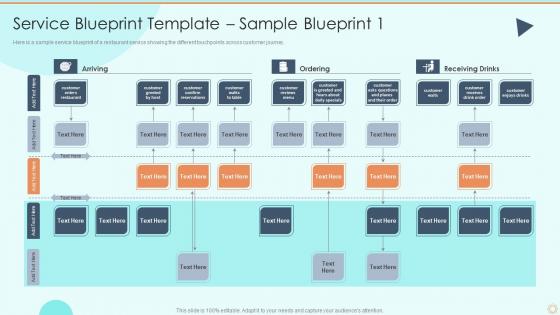
Here is a sample service blueprint of a restaurant service showing the different touchpoints across customer journey.
People who downloaded this PowerPoint presentation also viewed the following :
Process Of Service Blueprinting And Service Design Service Blueprint Template Sample Blueprint 1 with all 6 slides:
Use our Process Of Service Blueprinting And Service Design Service Blueprint Template Sample Blueprint 1 to effectively help you save your valuable time. They are readymade to fit into any presentation structure.





FAQs for Process Of Service Blueprinting And Service Design Service Blueprint Template
So basically you're creating this visual map of your entire customer experience - what they see upfront plus all the behind-the-scenes stuff they don't know about. Super helpful for catching where things break down or where customers get annoyed. I always tell people to start with just one customer journey though, don't try to map everything at once (learned that the hard way). It's like having x-ray vision into your business processes. You'll spot gaps between what customers actually need and what you're delivering internally. Game changer for fixing problems systematically.
Okay so service blueprints are actually way more detailed than regular process maps. Your basic process map just shows the main steps, but blueprints break it down into layers - what customers see vs. what employees do behind the scenes, plus all the supporting tech and systems. It's like an iceberg situation where most process maps only show you the surface level. The cool part is these "lines of visibility" that separate front-stage from backstage work. That's where you'll catch breakdowns you'd never spot otherwise. Honestly, once you see it mapped out this way, improvement opportunities become super obvious. Start with your customer journey first, then add all the behind-the-scenes layers.
Ok so you need five things for your service blueprint to not suck. Customer actions first - basically what people are doing at each step. Then frontstage employee stuff (what customers actually see happening) and backstage actions - all the behind-the-scenes work customers have no clue about. Support processes come next, which is just your systems and tech keeping things running. Physical evidence is the last piece - whatever customers can actually touch or interact with. Map it all left to right chronologically. Honestly, I'd start super basic then layer on complexity later. You can always fix it as you go.
So basically, service blueprinting maps out every single touchpoint your customers hit during their journey with you. It's honestly like getting x-ray vision - you can finally see where they're getting stuck or frustrated, plus all the behind-the-scenes stuff that impacts their experience. Pain points become super obvious when everything's laid out visually. I'd start with your biggest customer journey first (the one that makes or breaks deals, you know?). You'll spot improvement opportunities right away. It beats just staring at internal processes and wondering why customers aren't happy.
Honestly, service blueprints are game-changers for getting teams aligned. You map out every customer touchpoint and all the behind-the-scenes stuff too. Marketing finally sees how their work flows into sales. Operations gets what customer service is actually promising customers. Leadership stops asking for "quick fixes" that aren't quick at all - which, let's be real, happens way too often. The visual aspect is huge because everyone can literally point to where things break down. Next time you're in a cross-functional meeting, throw the blueprint up on screen. You'll be shocked how fast people start actually understanding each other instead of talking past each other.
Ok so first thing - map out your customer journey, that's like your base layer. Add the stuff customers actually see, then all the behind-the-scenes processes, plus your tech systems. Honestly? Get everyone together with sticky notes instead of doing it alone - way better results. Don't forget to mark where things go wrong and the emotional highs/lows. Here's the thing though - you've gotta be real about where stuff actually breaks, not just where you think it might. Then treat it like a living doc to find ways to improve things.
So touchpoints are just all the places customers interact with your business, right? They're huge for satisfaction levels. Mapping them out in a service blueprint lets you catch those annoying friction spots - like when checkout is confusing or staff seem clueless. Honestly, it's crazy how one terrible interaction can wreck everything else you did right. Each moment is your chance to either wow someone or completely blow it. The cool thing about blueprints? You'll see what's happening backstage too. I'd start with your three worst touchpoints and fix those first.
Tech is basically the backbone of your service blueprint now - it enables some touchpoints while blocking others. Map out the customer-facing stuff like apps and websites, then dig into the behind-the-scenes automation and databases. Most services would totally fall apart without their tech stack these days! Short sentences work here. You want to spot where technology creates friction vs where it actually helps the customer journey flow. Don't forget the invisible systems like APIs - they're often where the real optimization magic happens. Both visible and hidden tech matter for finding those improvement opportunities.
Honestly, service blueprints are amazing for this stuff. They show every touchpoint AND what's happening behind the scenes that customers can't see. So you'll catch things like - wait, why are people stuck here for 10 minutes? Or why doesn't our front desk have access to the system the back office uses? The visual aspect is what really sells me on them. Bottlenecks just jump out at you. Map your current process first, then go through and mark every spot where customers probably get annoyed. Boom - there's your to-do list right there.
Oh man, the biggest thing is definitely defining what you're actually mapping first - otherwise you'll just create this useless mess. Start with the customer journey, not backend stuff (I've seen so many people do this backwards, it's painful). Also make sure you're talking to the actual frontline people doing the work, not just their managers who *think* they know what happens. Keep your first version super basic too - like, embarrassingly simple. You can get fancy later but honestly most services aren't as complex as people think they are. Test it with real users first.
Service blueprints are honestly a game-changer for breaking down those stupid departmental walls. They give everyone the same visual map of your customer journey - you can see exactly where front office, IT, operations, whoever touches things. The cool part? You'll catch gaps and miscommunication before customers even notice. I'd definitely run a workshop with your key people (even if some resist at first). Forces everyone out of their corner to actually see the bigger picture. It's like finally getting that bird's eye view of who's doing what and when everything happens.
Start with customer interviews and journey mapping - those'll give you the user perspective pretty quickly. Then talk to employees about what actually happens frontstage and backstage. The backstage stuff is honestly where you'll discover the weirdest gaps. Observational studies are gold too since people say they do one thing but... well, you know how that goes. Process docs and existing analytics help if they're not totally outdated. I'd hit the interviews first for quick wins, then shadow people to see if reality matches what they told you.
Totally! Healthcare, hospitality, and banks get huge wins from service blueprinting. All those industries have crazy complex customer journeys with so much happening behind the scenes. Airlines are probably my favorite example - passengers have no clue about the coordination between gate agents, baggage handlers, maintenance crews. It's wild when you map it all out. Restaurants and hospitals love it too because they're juggling multiple touchpoints constantly. If you're dealing with face-to-face stuff, different service channels, or messy backend processes, blueprinting will show you gaps you didn't even know existed.
Quarterly reviews are usually solid, but it totally depends on your pace. Fast-moving company or constantly shipping new stuff? Check monthly instead. Big changes definitely need updates - new services, process overhauls, or when customers point out something you missed. I learned this the hard way when our blueprints got completely out of sync with reality. They're useless if they don't match what's actually happening. Set those calendar reminders now though - seriously, treat it like you would any other routine maintenance. Don't let them just sit there collecting dust.
Miro's probably your best bet - their templates are solid and the whole team can jump in easily. Mural's similar if you want another option. Lucidchart works too, more structured though. Honestly? I've thrown together decent blueprints in PowerPoint when I needed something quick, but the collab stuff is kinda clunky. Draw.io and Figma are free alternatives worth checking out. Even Google Slides works in a pinch. The main thing is making sure everyone can actually access and edit it without being a pain. I'd just start with Miro's free version and see how it goes.
-
Out of the box and creative design.
-
Delighted to see unique and eye-catching PowerPoint designs that are so easy to customize.