

Service Catalogue Powerpoint Ppt Template Bundles





Try Before you Buy Download Free Sample Product
 Impress Your
 Audience
 100%
100% Editable
 Save Hours
 of Time


Our Service Catalogue Powerpoint Ppt Template Bundles are topically designed to provide an attractive backdrop to any subject. Use them to look like a presentation pro.
People who downloaded this PowerPoint presentation also viewed the following :
Service Catalogue Powerpoint Ppt Template Bundles with all 16 slides:
Use our Service Catalogue Powerpoint Ppt Template Bundles to effectively help you save your valuable time. They are readymade to fit into any presentation structure.
-

Service Catalogue
-
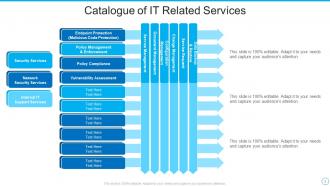
Catalogue of IT Related Services
-
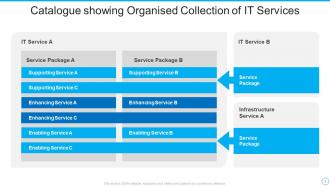
Catalogue showing Organised Collection of IT Services
-
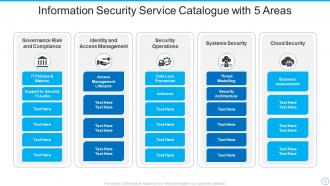
Information Security Service Catalogue with 5 Areas
-
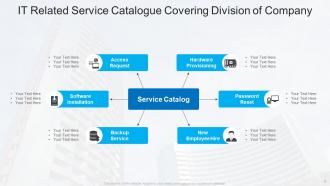
IT Related Service Catalogue Covering Division of Company
-
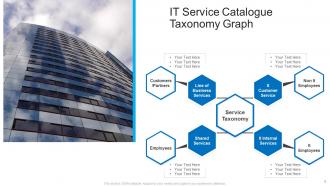
IT Service Catalogue Taxonomy Graph
-
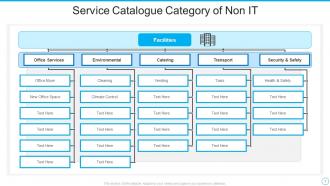
Service Catalogue Category of Non IT
-
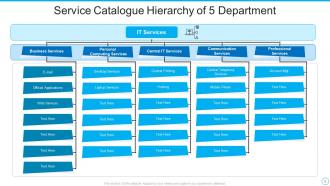
Service Catalogue Hierarchy of 5 Department
-
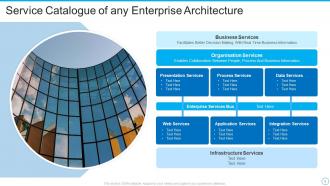
Service Catalogue of any Enterprise Architecture
-
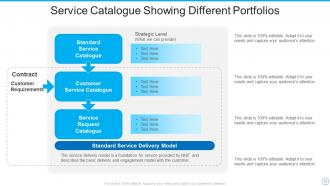
Service Catalogue Showing Different Portfolios
-

Thank You
-

-

-

-

-

FAQs for Service Catalogue Powerpoint
Start with your most popular services - no point burying what people actually need. Write clear descriptions that explain what you DO, not just fancy buzzwords (seriously, nobody cares about "synergistic solutions"). Include pricing, who can use it, and availability hours. Support contact info is crucial too. Oh, and mention any prerequisites upfront - saves everyone headaches later. Keep each description short, maybe 2-3 sentences max. People scan these things, they don't read novels. Make it searchable so folks can actually find what they're looking for instead of giving up and calling you directly.
Think of a service catalogue like a good restaurant menu - customers know what's available without flagging down a waiter. Your clients can browse services, understand pricing, and figure out how to actually request stuff. Honestly, the self-service aspect is huge because nobody wants to play phone tag just to learn what you offer. Clear descriptions matter way more than fancy design. Include your request process so they're not shooting emails into the void. When people can find answers themselves, they get way less annoyed and you'll spend less time explaining the same things over and over.
Start with grouping stuff by department - HR, IT, Finance, whatever makes sense for your company. Most popular services go at the top of each section because nobody wants to hunt around forever. Honestly, alphabetical order is the worst thing you can do here. People don't think that way when they need help. Give everything clear names too - none of that "Service XYZ-2024" garbage that tells you absolutely nothing. Brief descriptions help so much. Oh, and definitely clean house first. Go through what you've got now and toss anything that's old or duplicated.
So basically it's your one-stop shop for all IT services - what's available, pricing, who can get what. Users always bug you for random stuff or bypass everything, right? This stops that by making it all transparent and self-service. Really cuts down on those endless email chains. You can spot demand patterns for better planning, plus it's way easier explaining costs and service levels to business folks. Honestly, just start with whatever people request most - don't overthink it. You'll see results pretty quick.
Think of your service catalogue as translation software between IT and the business. Instead of talking servers and code, you're describing what actually matters to them. This makes prioritizing so much easier - just map services to real business outcomes and boom, you know where to spend your time and money. Those budget meetings? Way less painful when you can show actual value instead of rattling off technical specs. Honestly, most executives' eyes glaze over at that stuff anyway. I'd say review it every quarter or so to keep it relevant, otherwise it'll just collect digital dust.
Dude, you've gotta build in regular check-ins - like monthly or quarterly depending on how crazy your business gets. Set up those automated reminders to verify everything's still right. Assign actual owners to each service so someone's on the hook for keeping their stuff updated. Real talk though, this is where most teams totally fail because it's boring work - but man, it matters. Also get feedback from your actual users. They'll call out what's broken or missing way faster than you will. The trick is making it part of someone's real job, not just crossing your fingers that people remember.
Track how many people actually use your service catalogue vs. just emailing IT directly - that's your biggest tell right there. Adoption rates matter, but so does user satisfaction and request completion times. Are things getting resolved faster? People happy with the process? Also watch for outdated catalogue items because nothing kills trust faster than clicking on something that doesn't work anymore (learned that the hard way at my last job). Time-to-resolution is huge since speed's the whole point. Start with these basics and you'll spot the problem areas pretty quick.
Look, your service catalogue should cut through all that customer confusion about what you actually offer. Customers are always asking for stuff that doesn't exist, right? So put everything upfront - what's included, how long it takes, what it costs. No more "wait, I thought that was part of the package" drama later on. Your team won't have to explain the same things constantly either. They can just point people to the catalogue. Honestly, half the battle is just keeping it updated and somewhere people can actually find it. Makes life so much easier.
Honestly, automation saves you from constantly chasing people down for updates - which is the worst part of catalogue management. You can set it up to sync pricing changes and update service status automatically. No more outdated descriptions sitting there forever. Users get self-service options too, which they love. The accuracy improves since you're not relying on someone remembering to update stuff manually. Here's what I'd do: pick your most annoying repetitive tasks first and automate those. Then you can actually work on the interesting stuff like redesigning services instead of just babysitting data all day.
So basically you'll want to set up different views for different user groups. Like your IT folks see all the technical stuff, but HR only gets employee-related requests - way cleaner that way. Most platforms make role-based permissions pretty straightforward to configure. I'd start by figuring out your main user types and what they actually need access to. Then you can adjust the language too - technical descriptions for tech people, simpler explanations for everyone else. Honestly, mapping out those user groups first saves you tons of headaches later. Build your categories around that and you're golden.
Honestly, the data accuracy thing will drive you crazy. People just stop updating their service info and costs change without anyone looping you in. Before you know it, your whole catalogue looks ancient. Stakeholder buy-in is brutal too - everyone thinks their precious service can't be standardized like everyone else's. Service boundaries get weird when teams overlap, which happens more than you'd think. I'd say start small with just your critical services. Make someone actually own the updates (otherwise it won't happen). Automate whatever you can because manual processes always fall apart eventually.
Build accessibility right into your service catalogue from the start - don't try to add it later, it's such a pain. WCAG guidelines are your friend here: alt text, keyboard navigation, good contrast, screen reader support. Most teams ignore this stuff until someone files a complaint (learned that the hard way). Search and filtering need to be dead simple. Clear descriptions help too. Actually test with real users, especially people using assistive tech - they'll catch things you missed. Oh, and run an accessibility checker on what you've got now. Takes like 5 minutes and you'll probably be horrified at the results.
Honestly, go with ITSM platforms like ServiceNow or Jira Service Management. They've got drag-and-drop builders and handle all the approval workflows automatically. CMDB tools are clutch too - they'll map your services to infrastructure without you doing it manually (which is a nightmare, trust me). If you're just getting started though, something simple like Confluence works fine. We used SharePoint for ages before upgrading. Just make sure whatever you pick actually talks to your other systems. There's nothing worse than having a catalog nobody uses because it's a pain to access.
Honestly, it's a game changer for getting rid of that "who handles this?" confusion that drives everyone crazy. You'll know exactly what services exist, who owns what, and how to actually request stuff without sending 10 emails back and forth. No more reinventing processes every single time or having three departments do the same work. Bottlenecks become super obvious too. Start small though – just document your top 5 most-requested services first. Trust me, you'll see results right away and can actually track how well things are working.
AI-powered service discovery is huge right now - it automatically keeps your catalog updated without manual work. Self-service portals are getting smarter with better search and recommendations too. "Catalog as code" is everywhere now (honestly feels a bit overhyped but whatever). Basically you treat service definitions like infrastructure. API-first approaches are becoming the norm, and there's this big push for real-time health integration so your catalog shows what's actually up, not just what should be. My advice? Look at what manual catalog stuff is killing your team's time first - that's where you'll get the most bang for your buck with these new tools.
-
Colors used are bright and distinctive.
-
Professionally designed slides with color coordinated themes and icons. Perfect for enhancing the style of the presentations.