

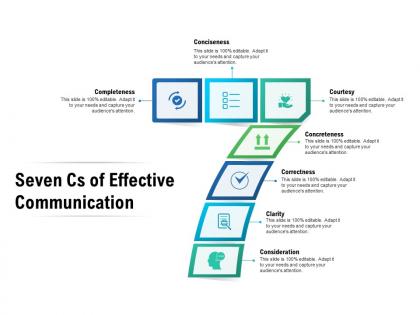
Seven cs of effective communication




Try Before you Buy Download Free Sample Product
 Impress Your
 Audience
 100%
100% Editable
 Save Hours
 of Time


Our Seven CS Of Effective Communication are topically designed to provide an attractive backdrop to any subject. Use them to look like a presentation pro.
People who downloaded this PowerPoint presentation also viewed the following :
Seven cs of effective communication with all 2 slides:
Use our Seven CS Of Effective Communication to effectively help you save your valuable time. They are readymade to fit into any presentation structure.
FAQs for Seven cs
Okay so the Seven Cs are Clear, Concise, Concrete, Correct, Coherent, Complete, and Courteous. Basically your sanity-check list before presenting anything. Clear = ditch the jargon. Concise cuts out rambling (which I'm terrible at btw). Concrete means actual examples instead of fluffy concepts. The others cover accuracy, logical flow, hitting all your points, and not being a jerk to your audience. I've watched so many presentations bomb because people skip these basics! It's like... just run through the list once before you present. Your audience will actually get what you're trying to say.
Honestly, if people can't follow what you're saying, they'll just tune out. Simple language works way better than fancy jargon - I've watched so many speakers lose their entire audience because they're jumping around everywhere. You build trust when folks actually understand you. Here's what I do: state your main point in one sentence first, then get into the details. Works every time. Also avoid those corporate buzzwords that make you sound like a robot. Short sentences hit harder sometimes. When you're organized and clear, people stay locked in instead of mentally wandering off to think about lunch or whatever.
Honestly, people's brains just can't handle too much at once - we've got terrible working memory. I used to ramble in presentations and could literally see people checking out halfway through. Now I stick to 7 main points max and cut anything that doesn't actually matter. Short sentences work better than long ones. Bullet points are your friend. Your audience will remember way more when you're not drowning them in fluff. Plus concise stuff gets processed faster, so it sticks better in their heads. Always ask yourself if each sentence actually adds something useful before keeping it in.
So coherence is what stops your presentation from being a total trainwreck. It's that logical thread connecting everything together. Your audience needs to follow your train of thought, right? Structure your ideas so they actually build on each other. Smooth transitions help too – nobody wants to feel lost halfway through. I always think of it like breadcrumbs leading to your main point. Here's what works: outline your key points first, then check if point B makes sense after point A. Trust me, it'll save you from those awkward "wait, how did we get here?" moments.
Start with your main message - what's the big takeaway you want people to remember? Then just make sure each slide actually backs that up. Don't switch terms halfway through (like saying "revenue growth" then suddenly "profit increases" - pick one and stick with it). Keep your fonts and colors the same too. Honestly, the best trick is reading through everything like it's one long story at the end. You'll catch weird spots where things don't flow. Oh, and write a quick outline first with your key points - saves you from going off track later. I learned that one the hard way after rambling through way too many presentations.
Honestly, storytelling is your best friend here. Open with something that grabs attention - like a weird stat or quick story that actually relates to your point. People's attention spans are basically nonexistent now, so break everything into bullet points or short sections they can scan quickly. Skip the fluffy abstract stuff and give concrete examples instead. Like, if you're talking about customer service, don't just say "be responsive" - tell them about the time someone replied in 2 minutes and won a client. Active voice makes everything punchier too. Oh, and contractions help it sound less robotic. Trust me on this one.
Oh dude, context is EVERYTHING when you're communicating with people. Think about who you're talking to - their background, what they know, what's going on in their life right now. You wouldn't send a cheerful "hey let's grab drinks!" text right after someone got fired, you know? Match your message to their situation and knowledge level. Short and sweet works sometimes. Other times you need more detail depending on who you're dealing with. I learned this the hard way tbh. Just ask yourself: what do they actually need to hear, and how can I say it so it doesn't get lost in whatever chaos they're juggling?
Honestly, most communication problems boil down to being unclear or dumping too much info at once. People also make assumptions about what others already know - huge mistake. Tech issues during important calls are the worst though! My advice? Keep it simple and ask questions to make sure you're on the same page. Written stuff is tricky since tone gets lost, so I always read emails twice before sending. Oh, and start big conversations by saying what you're hoping to get out of it. Saves so much back-and-forth later. The whole "Seven Cs" thing actually works if you don't overthink it.
Oh totally! Good visuals make everything clearer - like when you're explaining something complicated and a simple diagram just clicks for people. They save you from rambling too, since one chart can replace a whole paragraph of boring details. Plus you can actually show what you mean instead of hoping people picture it right. I always throw in more info through visuals than I could fit in text anyway. We all process pictures faster than words, honestly. Just don't use random stock photos that add nothing - I've seen way too many presentations with pointless graphics. Before adding anything, ask if it actually helps your point or if you're just decorating.
Totally! Humor and stories can definitely work with the Seven Cs if you're smart about it. They make complex stuff way more relatable and memorable - that's your clarity right there. Just don't ramble on forever (I've sat through too many meetings where someone tells their entire life story). Pick examples that actually relate to your point and double-check they're appropriate for your audience. You don't want to accidentally offend someone or reference something they won't get. Oh, and here's what I learned - run it by someone you trust first if you're not sure. What cracks you up might totally bomb with others.
Good communication literally pays off - companies with solid internal communication see 47% higher shareholder returns. Look at Southwest Airlines. Their friendly, clear messaging works everywhere, and it keeps customers loyal while employees stay engaged. Zappos does this too, turning their transparent customer service into a huge competitive edge. Netflix gets it right with their error messages - straightforward instead of those annoying tech gibberish ones that make you want to throw your laptop. Honestly, I think most companies overthink this stuff. Clear, consistent communication builds trust, and that trust drives real results for your business.
Honestly, mobile templates are a game-changer because they force you to ditch all the random stuff nobody cares about. You literally can't fit clunky layouts or walls of text on a phone screen. Short bullets, clean headers, visuals that don't take forever to load - that's it. People are scrolling between meetings anyway (I do this constantly), so you've got maybe 3 seconds to make your point. The weird thing is, these constraints actually improve your communication skills. You start picking only the stuff that matters. Pro tip: try keeping bullet points under 6-7 words max. Your message gets so much sharper.
Honestly, feedback is everything when it comes to getting better at presentations. I used to hate asking for it - felt too vulnerable, you know? But it's seriously worth it. Watch how people react during your talk, send out quick surveys after, or just grab a few people you trust and ask what they really thought. Look for patterns in what they tell you. Are you talking too fast? Need better examples? Maybe your structure's confusing. I've learned more from one brutal-but-honest critique than months of just winging it. Take what they say and actually change something next time.
Figure out who you're talking to first - everything flows from there. Build on what they already know instead of starting from zero. I do this "so what?" check for every detail - if it doesn't matter to them specifically, ditch it. Analogies are clutch for making weird concepts stick. You want that sweet spot where they feel smart but aren't overwhelmed. Oh, and definitely test it on someone similar first. Short sentences work. Longer ones with natural rhythm work too. The goal isn't showing off - it's actually helping them get it.
Honestly, just ask 3 people afterward what stuck and what didn't make sense. That'll tell you tons right there. Beyond that, watch for engagement stuff - are people asking questions or just staring blankly? Dead silence during Q&A is never good. If you had any call-to-action, check if people actually did it later. Post-presentation surveys work too, but keep them short. Ask about your main points specifically. The real test though? Follow up in a week or two and see what they remember. Oh, and track weird metrics like how long people maintain eye contact or if they're checking phones constantly. Sometimes the obvious signs are the most telling ones.
-
communication skills ppt
-
communication skills ppt