

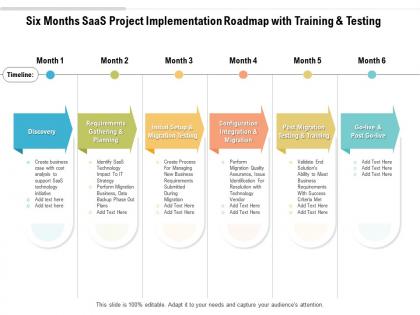
Six months saas project implementation roadmap with training and testing




Try Before you Buy Download Free Sample Product
 Impress Your
 Audience
 100%
100% Editable
 Save Hours
 of Time


The success rate of business plans is hugely dependent on the plan of action, and this editable Six Months SaaS Project Implementation Roadmap With Training And Testing rightly serves the purpose. Encapsulate all the information related to the project in a well structured manner to obtain maximum efficiency by incorporating our stunning PowerPoint theme. State the critical deliverable, steps involved, time frame, workforce allocation, and lots more in an easy to understand manner by utilizing this pre designed roadmap PowerPoint layout. You can also prioritize your tasks and discuss the problem areas with your colleagues by incorporating this tailor made PPT layout. Empower your work plan by employing this professionally designed PPT theme. Entrepreneurs can download Six Months SaaS Project Implementation Roadmap With Training And Testing as a beneficial communication tool that facilitates in collaborating with different tasks and achieve targets.
People who downloaded this PowerPoint presentation also viewed the following :
Six months saas project implementation roadmap with training and testing with all 2 slides:
Give your audience a fulfilling experience. They will find our Six Months SaaS Project Implementation Roadmap With Training And Testing elevating.
FAQs for Six months saas project implementation roadmap with
Honestly, start with figuring out where you are now vs where you want to end up - that's your discovery phase. Vendor selection comes next (ugh, the negotiations). Then you're deep in technical stuff: data migration, integrations, all that. Implementation happens in chunks, plus training everyone. Oh, and change management is huge - I've seen projects tank because they skipped that part. People hate switching systems! Budget way more time than you think you need. These things always drag on longer than planned, trust me.
First thing - document what's actually broken right now. Map out your workflows and figure out where things get messy. Skip the managers and talk directly to people doing the work daily, they'll give you the real story. I usually throw everything into a spreadsheet (super basic, nothing fancy) with must-haves on one side, nice-to-haves on the other. Don't forget integration stuff with whatever tools you're already using. Budget and timeline matter obviously, but honestly? The biggest thing is being realistic about how much change your team can actually handle without losing their minds.
Look, stakeholders will make or break your project - I've watched too many good ideas die because people didn't buy in. Get your executive sponsors locked down first for budget and roadblock removal. End users give you the real requirements (not what management thinks they want). IT handles the tech stuff, obviously. Department heads manage their teams through the changes. You'll want champions in each department who can deal with pushback when it inevitably happens. Map everyone out early and keep them in the loop with regular check-ins. Trust me on this one.
Honestly, just show them what's in it for THEM. Less tedious manual stuff, smoother teamwork, quicker data access - you know, the stuff that actually matters day-to-day. Don't get all technical on them. Instead, do a demo where they can actually mess around with it themselves. Way more convincing than slides, trust me. And yeah, definitely bring up the elephant in the room - they're gonna worry about learning new systems and whether their data's safe. Be real about how long the switch will take. At the end of the day, it's gotta solve problems they actually have, not just be the shiny new thing.
Oh man, data migration is gonna be your worst nightmare - seriously, plan that cleanup way ahead of time. Users will fight you tooth and nail on any change (I swear people would rather die than give up their precious Excel sheets). Integration stuff gets messy too if you don't map everything out first. Here's what actually works though: get your end users involved in picking the system so they can't complain later. Start with whoever's most chill about new tech for your pilot. And yeah, don't cheap out on training or you'll regret it.
Look, you gotta nail three things: what customers actually need, what'll make money, and what's realistic to build. Talk to your users and sales folks first - they know what's killing deals. I score features by how urgent they are and revenue potential, then throw them on a simple effort vs impact chart (boring but works every time). Technical debt will bite you if you ignore it, so factor that in. Here's the hard part though - you have to be absolutely brutal saying no to shiny features that won't actually move anything. Stick to what matters. Check your data every quarter and pivot if needed.
Track the tech stuff first - uptime, load times, how many people actually use it. Business-wise, measure how fast users get their first win and whether you're hitting those ROI goals you promised (stakeholders love that). User satisfaction surveys are clutch too, plus support tickets. Honestly, a weekly dashboard saves so much headache - you'll spot problems before they blow up and have good news to share when things go right. Oh, and engagement metrics matter more than you'd think for long-term success.
Don't wait until the end to think about training - build it into each phase from the start. During your pilot, train key stakeholders first so you can spot what's confusing people and fix it early. Then do role-based sessions that match when each department actually goes live (seriously, the timing here makes or breaks everything). Run separate tracks for super users vs regular users, and let people practice in your test environment. Oh, and get your training stuff done at least two weeks before launch - trust me on this one, you'll thank yourself later when you're not panicking.
Dude, definitely grab a project management tool - Monday.com, Asana, or Jira work great for tracking milestones. I've watched teams completely lose the plot without this stuff, so trust me on that one. Slack or Teams keeps everyone talking to each other instead of working in silos. For visual mapping, Miro's pretty solid (Lucidchart too). Oh, and you'll need somewhere to dump all your documentation - Notion or Confluence are good bets. My advice? Start with what your team already knows. Adding everything new at once just makes people grumpy and confused.
Start with a solid data audit - map everything between your old and new systems first. Most teams totally blow this step by rushing ahead too fast. Test multiple migration runs in staging before you go live, and yeah, encrypt everything in transit and at rest. Having rollback procedures ready is clutch (seriously, you'll actually sleep at night). If you can swing it, run both systems parallel for a while to double-check everything moved over right. Oh and never migrate it all at once - break it into phases and test each chunk before moving on.
Oh man, feedback loops are a game changer. Get input from everyone - users, stakeholders, your team - throughout the whole process, not just at the end. I've watched so many projects crash because nobody talked to actual users until launch day. Bad move. Weekly check-ins with key people will save your sanity later, trust me. When users complain about workflows early on, you can actually fix things instead of scrambling after go-live. It's way easier to tweak configurations and training on the fly than rebuild everything later.
Figure out why people are pushing back first - usually it's fear or they got burned by crappy tools before. Get the complainers involved in picking the new system so they don't feel like you're just shoving it down their throats. Some folks will always hate change (we all know that guy), but most will get on board once they see real benefits. Skip the boring demos and do actual hands-on training instead. Find your natural influencers on each team - they'll convince people way better than any manager can. Oh, and celebrate the small wins loudly. Takes time though, so don't expect miracles overnight.
Okay so first thing - break this into phases with actual deadlines, not just "we'll figure it out as we go." Weekly check-ins are clutch, trust me on this one. Grab something like Asana to track everything because stuff will fall through cracks otherwise. Communication saves projects more than people realize. Get one person to own the timeline completely - someone who'll actually chase people down when things get stuck. Oh and document decisions as you make them (you'll thank yourself later). Build in extra time for testing and training users. They always need more hand-holding than you think.
First thing - figure out your biggest risks: data security, vendor stuff, integrations failing, people not using it. Make a matrix ranking them by how likely they are vs how much they'd screw you over. We totally botched our CRM integration because we didn't do this! Each high-risk item needs its own backup plan - security audits, phased rollouts, whatever. Write it all down and make someone responsible for watching each risk. Oh, and add way more time to your timeline than you think you need. Trust me on this one - everything takes longer.
Look, vendor support can literally make or break this whole thing. During setup, data migration, training - you'll need them constantly. The good ones actually get your business and help you through problems before they explode. Bad support though? Your team will absolutely hate you for picking that vendor. I learned this the hard way once. Check their response times and escalation process upfront. Test how fast they respond during your trial - that's when they're trying to impress you. If they're slow then, imagine after you've signed the contract. Also see if you get a dedicated account person or just get bounced around.
No Reviews