


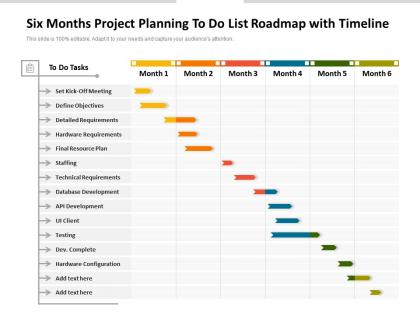
Six months project planning to do list roadmap with timeline




Try Before you Buy Download Free Sample Product
 Impress Your
 Audience
 100%
100% Editable
 Save Hours
 of Time


A well thought out action plan makes execution easier and increases the possibility of success significantly. Ensure hitting all the milestones within the deadlines by introducing our fully customizable Six Months Project Planning To Do List Roadmap With Timeline. Streamline the work related information, budget, timeframe, key deliverable, landmarks, and major steps involved, all in one place to give an organized overview of the project by utilizing our PowerPoint theme. Minimize time lag and increase work efficiency by providing insight into the process with our comprehensively researched roadmap PowerPoint layout. Color coding helps in highlighting the process and grabs the attention of the audience. Download our handy Six Months Project Planning To Do List Roadmap With Timeline to identify the possible problem areas in a much shorter time and propose solutions. Have a productive brainstorming session with your workforce by utilizing our action plan visualization tool.
People who downloaded this PowerPoint presentation also viewed the following :
Six months project planning to do list roadmap with timeline with all 2 slides:
Give your audience a fulfilling experience. They will find our Six Months Project Planning To Do List Roadmap With Timeline elevating.
FAQs for Six months project planning to do list
You'll need project phases, key milestones with dates, and clear deliverables. Also map out who's doing what - seriously, this saves so many headaches later. Dependencies are huge too because they'll sneak up on you if you ignore them. Build in buffer time for each phase and figure out your critical path. External approvals or factors that could mess with your timeline? Get those down too. Oh, and add review checkpoints so stakeholders can actually give input. I always start with the end goal and work backwards - makes it way easier to catch what you missed.
Honestly, visuals are a game changer for timelines. People's brains just eat up visual stuff way faster than walls of text. Color-code your different phases, throw in some Gantt charts for dependencies, or use milestone icons - whatever works. PowerPoint's SmartArt is actually pretty decent for this, or check out Miro if you want something fancier. The whole point is stakeholders can instantly see how everything connects instead of squinting at boring spreadsheets. Trust me, once they spot the critical path visually, those "wait, what comes first?" questions disappear.
Honestly, Microsoft Project is great if you need heavy-duty Gantt charts, but it's way too much for most stuff. Asana and Monday.com are super easy for teams to actually use together. Smartsheet's nice if you're already a spreadsheet person - feels familiar but with timeline features. Oh, and don't sleep on free options! Google Sheets with a timeline template works better than you'd think. ProjectLibre is decent too for basic project management. My advice? Go with whatever your team's already comfortable with. Getting people to actually use the tool is honestly the hardest part.
Start with your critical path - figure out which tasks will actually push back your deadline if they slip. Dependencies are huge too, so anything blocking other work gets bumped up. I'm obsessed with the MoSCoW method (Must have, Should have, Could have, Won't have) because it makes you brutally honest about what's really essential. Resource constraints matter obviously, plus what stakeholders are breathing down your neck about. Honestly, a simple priority matrix works better than fancy tools most of the time. Just review it weekly with your team so you don't drift off course.
Ugh, the worst thing you can do is be way too optimistic about timing. I learned this the hard way! Always add buffer time because literally everything takes longer than you think. Also don't make your dependencies super rigid - stuff gets delayed constantly. Factor in holidays and vacations too, people forget about those. Oh, and definitely get your team involved when making the timeline instead of just deciding for them. They'll push back if it's unrealistic anyway. Start with your absolute must-haves, tack on 20% extra time, then get everyone to agree before you lock it in.
Get everyone in a room and actually listen to what they're saying about timelines - seriously, developers know way better than PMs how long stuff takes. Ask them about roadblocks they see coming and what resources they'll need. Don't just present a finished roadmap and expect buy-in. Instead, run workshops where people can push back and suggest changes. Regular check-ins help since things always shift anyway. The whole point is making them feel like they helped build it, not like you're dropping some master plan on their heads. Trust me, collaborative planning saves so much headache later.
When scope changes happen (and trust me, they always do), your roadmap needs wiggle room built right in. I usually shift milestones around and move resources where they're needed most. Buffer time is your best friend here - seriously, scope creep will find you no matter what. Gantt charts work great if you keep the dates flexible, or you could go with agile sprints for easier pivoting. The moment something changes, loop in your stakeholders immediately. Don't let anyone get blindsided by timeline shifts. Rolling wave planning helps too since you're not locked into every tiny detail upfront.
Look, milestone tracking literally saves projects from disaster. You catch problems early instead of scrambling at the end wondering where everything went wrong. Plus your team actually celebrates small wins instead of just grinding endlessly (which honestly keeps everyone sane). Stakeholders get their beloved progress updates without constantly bugging you. Short sentences work. Longer ones help when you're explaining the bigger picture of how milestones show exactly where things derailed if your project hits a snag. Set clear deliverables and check weekly - you'll thank yourself later when you're not panicking about deadlines.
Arrows and connecting lines are your best bet - super clear way to show which tasks need to wrap up before others can kick off. Gantt charts make this pretty easy if you're using project management software. There's different types too: finish-to-start is the most common one, but you've got start-to-start and finish-to-finish options. I always color-code mine - red for critical path stuff that'll mess up your whole timeline if it gets delayed. Oh, and definitely pad your dependent tasks with buffer time. Seriously, nothing ever goes according to plan and delays just snowball from there.
Dude, color coding is seriously clutch for project timelines. Teams can spot their stuff instantly without digging through everything. I usually go with maybe 3-4 colors to start - one for each major team or phase. Makes bottlenecks super obvious too. Like when you're sitting in some meeting and everyone's staring at the screen, people actually get what's happening right away. Dependencies jump out at you instead of being buried in text. Honestly saved my butt so many times when managers want quick updates. You'll be amazed how much faster everyone processes the info.
Hit up your team through email first, then do a quick meeting to walk through it - some people are visual learners, you know? Dump it in your project management tool or shared drive so they can check it later. Oh, and don't overwhelm stakeholders with tiny details. Stick to the big milestones and dates they actually care about. Things will change (they always do), so give everyone a heads up when timelines shift. Set up regular check-ins to see how you're tracking against the plan.
Honestly, start simple with just 3-4 metrics or you'll drown in data. Schedule adherence is obvious - are you actually hitting milestones? Budget variance too, because going way over sucks. I'm obsessed with velocity tracking though, it shows whether your team's building momentum or just... stuck. Resource utilization rates help catch if people are overloaded. Quick pulse surveys for stakeholder happiness work better than those long formal ones nobody fills out. Oh, and count your timeline revisions - if you're constantly reshuffling your roadmap, your initial planning probably needs work. Scope creep percentage is clutch for catching feature bloat early.
Dude, cultural stuff will mess with your timelines in ways you don't expect. Germans treat deadlines like gospel - miss one and you're basically dead to them. Meanwhile, Japanese teams want everyone on board before moving forward, which takes forever but honestly makes sense. Some cultures care way more about keeping relationships smooth than hitting your precious schedule. I've watched entire projects blow up because one team said "we'll try" and the other heard "definitely yes." Build in extra time from the start. Also figure out how everyone actually communicates about delays before things go sideways.
You NEED buffer time, trust me on this. Projects always hit weird snags - someone gets sick, requirements change, or that "simple" feature turns into a nightmare. Without padding, you're basically gambling with your deadlines. I usually add 15-20% extra time to each big milestone. Sounds like overkill maybe? But you'll look like a hero when you're still on track while everyone else is panicking. It's honestly saved my butt so many times. Your stakeholders will actually respect you more for being realistic upfront instead of promising the impossible.
So agile basically turns traditional project planning upside down. You work in these short 2-4 week sprints instead of planning everything months ahead. Way more flexible when things inevitably change - and trust me, they always do. Break your project into user stories first, then tackle the most valuable stuff early. Your roadmap becomes this living thing that shifts based on feedback and testing. The whole point is shipping working pieces regularly rather than one giant thing at the end. Honestly beats the old waterfront approach where you'd be halfway through and realize you built the wrong thing entirely.
No Reviews