

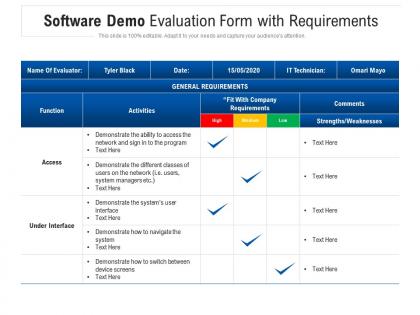
Software demo evaluation form with requirements




Try Before you Buy Download Free Sample Product
 Impress Your
 Audience
 100%
100% Editable
 Save Hours
 of Time


Our Software Demo Evaluation Form With Requirements are topically designed to provide an attractive backdrop to any subject. Use them to look like a presentation pro.
People who downloaded this PowerPoint presentation also viewed the following :
Software demo evaluation form with requirements with all 2 slides:
Use our Software Demo Evaluation Form With Requirements to effectively help you save your valuable time. They are readymade to fit into any presentation structure.


FAQs for Software demo evaluation
Honestly, start with whether it actually fixes your problem - not just sounds fancy. The UI matters way more than people think; if it feels clunky in the demo, you'll hate using it every day. Integration with your current tools is huge too. Watch how they handle tough questions - major red flag if they get dodgy about technical stuff. Don't let them show you their perfect sample data; ask to see messy, real scenarios. Performance speed and customization options matter, but honestly those are secondary. Push for a trial period. You can't know if something works until you've wrestled with it using your actual data.
Watch how easily you can navigate around - if it feels clunky, that's your first warning sign. Pay attention to how many clicks basic stuff takes. The presenter shouldn't be constantly making excuses or explaining weird workarounds (major red flag). Ask them to demo something that actually matches what your team does, not their usual polished script. I always take notes when something seems unnecessarily complicated because trust me, those annoying little friction points will make your users hate it every single day. Oh, and see how smoothly they move through workflows - it should feel natural, not forced.
Watch your response times and how stable everything stays when you're clicking around. Loading speeds matter big time - same with error rates. Memory usage can make or break you (learned this the hard way lol). If you're showing data stuff, throughput's worth tracking too. Get monitoring set up beforehand so you can see everything live during the actual demo. Honestly, practice runs are your best friend here. Do the whole flow a few times with monitoring on so you know what normal looks like before showtime.
Oh definitely - you want someone who actually knows the software inside and out, not just reading from a script. When you throw them a curveball like "how does this work with our old accounting system?" they should handle it without breaking a sweat. But here's the thing - avoid the super techy presenters who get obsessed with every tiny feature. You need someone who gets both the software AND your industry. I'd honestly ask upfront about their background and request someone who's worked with similar companies. Makes a huge difference in getting useful answers.
Honestly, don't fall for those polished demos that only show perfect scenarios. Vendors conveniently skip the messy stuff you'll deal with daily. Push them to use YOUR actual data and workflows instead of their cherry-picked examples. Integration and data migration? Yeah, that's where things get ugly - make them walk through it properly. Bring your real users too, because they'll catch interface problems you totally missed. Oh, and ask about customization limits right away before you get too excited. The volume testing thing is crucial - their sample data probably has like 10 records while you've got thousands.
Before you even hop on that demo, figure out exactly what problems you're trying to solve. I'd write down 3-5 specific scenarios from your actual work - stuff like "can this handle our messy 3-person approval process?" Don't get sucked into shiny features you'll never touch (guilty as charged on that one). Ask about bulk updating records if that's your reality. Pay attention to anything that feels wonky during the walkthrough - trust me, if it's confusing now, it'll be a nightmare when you're under pressure. Also check if it plays nice with whatever tools you're already using.
Honestly, don't sleep on the customer support thing - it'll totally make or break your experience down the road. During demos, they're basically on their best behavior trying to win you over, so that's your chance to really test them. See how fast they respond, whether they actually get what you're trying to do, or if they're just robotically following some script. Here's my move: ask them something totally off-the-wall during the demo and watch how they handle it. That's gonna tell you everything about what support looks like once you've already signed on the dotted line.
Don't just let them show you generic API docs - make them walk through YOUR actual setup. Have them demo connecting to your CRM, whatever database you're using, all that stuff. Seriously, I've watched too many "seamless integration" promises completely crash and burn once you get into the real details. Make them show data flowing both ways, ask about how authentication works. Can they handle your data formats without a ton of custom work? If they're fumbling around with mock versions of your systems or can't demo it properly, that's when you know there's gonna be problems later.
Ask them to actually show you the customization options during the demo - don't just take their word for it. Can you tweak the UI, add your branding, set up workflows that make sense for your team? What about custom fields and user permissions? The integration thing is huge too because you'll definitely need something they don't support yet. I learned this the hard way at my last job. Get specific examples, not just "yeah it's super flexible" BS. Short sentences work. Also check out their reporting features - some platforms are weirdly limited there.
During the demo, ask specific questions about load testing and what happens when user traffic spikes. Most vendors should have performance dashboards or screenshots ready to show you - if they don't, that's already a red flag. Don't just believe their theoretical limits though. I learned that lesson the hard way! Ask about their database setup and what server requirements you'd need for scaling. Also push them to show realistic data volumes that match your expected usage. Get concrete examples of their biggest current clients and what actual breaking points they've hit.
Start with navigation and how fast people can actually get stuff done - those are the dealbreakers. Test if users can find what they need without getting lost in your interface. Honestly, I've seen plenty of ugly apps that people love because they just work smoothly. Error messages are huge too - nobody wants to sit there wondering if something broke or if they screwed up. Time some basic tasks while you're at it. Oh, and obviously check mobile if your team uses phones for this stuff.
Just ask them straight up about their security stuff during the demo - seriously, don't hold back. Get them to show you the authentication methods, encryption, access controls, all that. SOC 2 or ISO 27001 certifications? Ask to see proof. How do they handle breaches? Most vendors are totally used to these questions by now, so they won't freak out. Oh and definitely check out their user permissions setup if that matters for your situation. Honestly, make them actually demonstrate this stuff instead of just throwing fancy slides at you. Words are cheap.
Definitely ask about their release schedule and what features they're actually working on next. Get specifics for the next 6-12 months, not just "we're always improving" nonsense. How often do they push updates? Some companies are monthly, others... well, you'll be waiting ages. See if they have a public roadmap or user forum where you can actually see what's happening. The big thing is making sure their direction matches where you're headed - last thing you want is being stuck with software that's going completely sideways from what you need.
Yeah, demo environments are basically highlight reels - they're set up to make everything look perfect. Clean data, no real users slowing things down, handpicked scenarios that show off the best stuff. It's like test driving a car on an empty road versus actually dealing with rush hour traffic, you know? Once you're using it for real, you'll hit messy datasets, actual user loads, and random glitches. Honestly, most sales demos are pretty misleading that way. Ask them to show you how it handles realistic data volumes and what happens when multiple people are actually using it.
Okay so after the demo, time to get into the messy details they definitely skipped over. What's the real timeline for getting this thing running? How much training does your team actually need? And costs - not just the pretty licensing price but all those sneaky fees that pop up later. I learned this the hard way with our last software purchase, ugh. You'll want specifics on data migration too, plus their security setup. How fast do they actually respond when stuff breaks? Get some references from companies like yours. But honestly? Push for a trial period where your people can mess around with it using real data. That's the only way you'll know if it actually works for you or if the demo was just smoke and mirrors.
No Reviews