

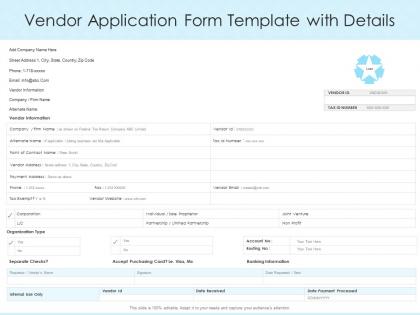
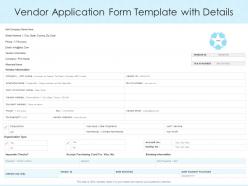
Vendor application form template with details




Try Before you Buy Download Free Sample Product
 Impress Your
 Audience
 100%
100% Editable
 Save Hours
 of Time


Our Vendor Application Form Template With Details are topically designed to provide an attractive backdrop to any subject. Use them to look like a presentation pro.
People who downloaded this PowerPoint presentation also viewed the following :
Vendor application form template with details with all 2 slides:
Use our Vendor Application Form Template With Details to effectively help you save your valuable time. They are readymade to fit into any presentation structure.
FAQs for Vendor application form
Start with the obvious stuff - company name, contacts, tax ID, business licenses. Get their service list, client refs, and financial docs too. Insurance coverage is huge (learned that one the hard way). Compliance pieces like certs and background checks will save you headaches with legal down the road. Pricing structure and payment terms are pretty critical. Oh, and ask about subcontractors they work with. Throw in diversity certifications if your company cares about that. Don't make it crazy long though - good vendors won't bother if it's a novel.
Oh man, you NEED a vendor application template - seriously saves your sanity. No more chasing people down for basic info over like 15 different emails. Everyone fills out the same form upfront: company details, references, insurance stuff, payment terms. Makes comparing vendors so much easier when the info's in the same format. Your approval process flies by since nothing's missing either. I learned this the hard way last year lol. Just start with the basics and add whatever else you need as you go.
Get liability and indemnification clauses in there first - plus insurance requirements. Seriously, vendors mess up the insurance thing constantly. They swear they're covered but half the time they're not. Ask for licensing proof and certifications upfront. Data protection stuff is huge if they're touching your sensitive info. IP rights, confidentiality agreements - all that needs to be locked down. Oh, and don't skip termination conditions because you'll need an exit strategy eventually. Dispute resolution clauses save headaches later. Have legal look it over before you roll it out.
So basically, customizable fields are amazing because you get exactly what you need from vendors. No more generic forms where half the stuff doesn't even apply. You can tailor questions by industry or vendor type - like, why ask a catering company about their software security protocols, right? Skip the irrelevant bits entirely. When vendors actually fill out forms properly instead of writing "N/A" everywhere, you'll get way better data. Plus if your needs change later, just update the fields. I'd start by figuring out what info matters most for each type of vendor you work with, then build from there.
Your form is basically the first thing vendors see, so don't mess it up. Cluttered layouts will make people bounce immediately. Group related fields together and add progress bars - nobody wants to wonder if they're halfway done or barely started. Clear instructions are huge too. Mobile design isn't optional anymore since everyone's filling these out on their phones while waiting for coffee or whatever. Honestly, the best thing you can do is test it with real vendors first. Watch where they pause or look confused. Those spots? Fix them before you launch.
Honestly, I'd check it every 6 months instead of waiting a full year. Business needs shift way faster than we expect, and compliance stuff changes constantly - it's annoying but true. Your procurement team probably has good feedback on what questions actually help versus what's just busy work. Also keep tabs on what competitors are asking for these days. If everyone's requesting sustainability metrics or cybersecurity certs and you're not, you could miss red flags. Oh and definitely set a phone reminder because otherwise you'll totally forget.
Keep your vendor form short - nobody wants to fill out a novel. Skip the vague "tell us about your capabilities" questions because you'll just get rambling nonsense that's impossible to compare. Save the heavy financial stuff for later when you're actually serious about someone. Basic legal requirements like insurance? Yeah, include those upfront. Test the damn thing before sending it out - broken forms are embarrassing and you'll lose good vendors. Honestly, I've seen so many companies mess this up. Focus on what you actually need to make a decision and you'll get responses worth reading.
Dude, digital signatures are a game changer for vendor stuff. Your vendors can sign forms instantly online instead of all that printing and mailing back and forth - seriously saves so much time. You can see who's signed what in real-time, and it automatically kicks off the next approval steps without you having to babysit everything. They're totally legal too, same as regular signatures. Oh and set up those auto-reminders for people who haven't signed yet - trust me on this one. You'll probably cut your onboarding time in half and keep everything neat digitally.
Honestly, these templates are lifesavers for catching sketchy vendors before you get stuck with them. The form lets you dig into their finances upfront - credit checks, references, all that stuff. You'll also spot compliance issues early by asking about certifications and insurance. Business continuity plans tell you if they'll actually survive a crisis (learned that one the hard way). Plus you look way more professional than scrambling for documents later. The standardized questions mean you won't forget important stuff like data security or whether they outsource everything to random subcontractors. Total game-changer for avoiding vendor nightmares.
Check their financials first - get bank info and recent statements so they don't bail halfway through. References are clutch, especially from companies like yours who've actually worked with them. How long have they been around? Look into their key people and what happens if things go sideways. Oh and definitely call those references - I learned that one the hard way when I just skimmed the list once. Insurance and certs depend on what you need them for. Their operational setup matters too since you want someone who can actually handle your workload without falling apart.
So first thing - map out your current approval process, then build triggers into your vendor template that mirror those exact steps. Someone submits the form? It automatically routes to the right people and sends acknowledgment emails. No more email ping-pong, which honestly saves so much sanity. You can set up auto-scoring too based on stuff like financial stability or certs. The whole thing just moves applications through your pipeline without you having to babysit every handoff. Oh, and don't forget automatic status updates - people love knowing where they stand in the process.
So when you're looking at vendor apps, hit these key things: financial stability first - you don't want them folding mid-project, trust me on that one. Technical skills matter obviously, plus check if they've done similar work before (references are huge). Compliance stuff depends on your industry but don't skip it. Oh, and honestly? See if you actually gel with their team because working with jerks sucks no matter how good they are. Make a simple scoring system so you're not just picking whoever sent the prettiest PDF. Keeps things fair and way less headache later.
Dude, getting stakeholder feedback on your vendor forms is huge. Procurement, legal, finance - they'll all catch stuff you missed. Like finance might be like "wait, where's the tax info?" and you're sitting there like oh shit, didn't think of that. The vendors will tell you straight up which sections suck or make zero sense. Different departments see different problems too. I'd ask them specific questions about what's broken, then test any changes with maybe 3-4 vendors first before you roll it out to everyone. Way better than finding out later that half your form is garbage.
Honestly, you should totally do this. A checklist catches all the missing stuff upfront - tax docs, insurance papers, whatever - instead of playing email tag later. Vendors actually appreciate knowing exactly what you want rather than shooting in the dark. Makes you look way more professional too. Your team will thank you since everyone's reviewing apps the same way, no confusion about requirements. Oh and definitely put it at the very top of the form so they see it before diving in. Trust me, it'll save you so many headaches down the road.
Honestly, tailored templates are a game changer because they cut straight to what matters for your specific industry. Construction vendors need to show safety certs and equipment specs - food service companies care about health permits and supply chains. Why waste everyone's time with random questions that don't apply? Vendors actually love it too since they get to highlight what they're actually good at instead of filling out some boring generic form. I'd start by figuring out the 3-4 biggest deal-breakers for your industry and build everything around those. Makes the whole process way smoother.
-
Understandable and informative presentation.
-
Out of the box and creative design.