


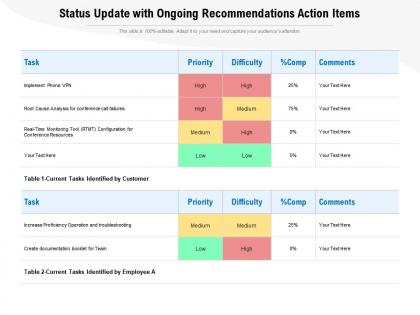
Status update with ongoing recommendations action items




Try Before you Buy Download Free Sample Product
 Impress Your
 Audience
 100%
100% Editable
 Save Hours
 of Time


Our Status Update With Ongoing Recommendations Action Items are topically designed to provide an attractive backdrop to any subject. Use them to look like a presentation pro.
People who downloaded this PowerPoint presentation also viewed the following :
Status update with ongoing recommendations action items with all 2 slides:
Use our Status Update With Ongoing Recommendations Action Items to effectively help you save your valuable time. They are readymade to fit into any presentation structure.
FAQs for Status update with ongoing
**INPUT**: What recent trends in presentation design are shaping the way templates are created? **OUTPUT**: Recent presentation design trends include minimalist layouts, interactive elements, data visualization integration, mobile-responsive formats, and AI-powered customization features. These approaches streamline content creation by enhancing visual clarity, enabling real-time audience engagement, and delivering seamless cross-platform experiences, with many organizations finding that modern templates significantly reduce preparation time while improving audience retention. [Word count: 54 words]
User feedback enhances presentation templates through direct reviews, usage analytics, feature requests, A/B testing results, and customer support insights. These feedback mechanisms streamline template optimization by identifying design preferences, content gaps, and functionality improvements, with many organizations finding that incorporating user-driven enhancements ultimately delivers more relevant templates and improved customer satisfaction.
Users most commonly request customizable color schemes, editable data visualization charts, professional icon libraries, flexible layout options, and industry-specific content sections in presentation templates. These features enable organizations to maintain brand consistency while streamlining content creation, with many businesses finding that comprehensive template customization significantly reduces preparation time and enhances presentation quality across teams.
Mobile compatibility significantly enhances presentation template usability by enabling seamless access, editing, and sharing across devices, ensuring consistent formatting, and supporting touch-based navigation. With increasingly mobile workforces, professionals can deliver presentations, make real-time updates, and collaborate remotely, ultimately streamlining workflow efficiency and maintaining professional standards regardless of device or location.
Color psychology significantly influences template design by affecting user emotions, attention, and decision-making through strategic hue selection, contrast optimization, and brand alignment. In presentations and marketing materials, colors like blue enhance trust and professionalism while red drives urgency and action, with many organizations finding that thoughtful color schemes increase audience engagement and message retention by up to 80%.
Template diversity accommodates different learning styles by offering visual infographics for visual learners, text-heavy formats for reading-focused audiences, interactive elements for kinesthetic preferences, and structured layouts for analytical minds. Organizations across education, corporate training, and consulting find that providing multiple template options enhances audience engagement, improves information retention, and delivers more effective communication outcomes.
Templates stand out through compelling visual design, comprehensive customization options, strategic content frameworks, user-friendly functionality, and clear value propositions. These elements work together by addressing specific business needs, streamlining workflow processes, and delivering professional outcomes, with many organizations finding that templates combining aesthetic appeal with practical utility ultimately enhance their competitive positioning and operational efficiency.
Presentation templates should be updated every 3-6 months to maintain visual relevance and align with current design trends, brand guidelines, and business messaging. Organizations across sectors like consulting, healthcare, and financial services find that regular template refreshes enhance professional credibility, streamline content creation, and ultimately deliver more impactful client presentations while reducing preparation time.
Visual storytelling techniques significantly enhance template effectiveness by creating emotional connections, simplifying complex information, improving retention rates, and guiding audience focus through strategic design elements. These approaches streamline communication by combining compelling narratives with visual hierarchy, data visualization, and cohesive branding, with many organizations finding that strategic visual storytelling delivers more persuasive presentations and measurable engagement improvements.
Accessible presentation templates incorporate high contrast color schemes, readable fonts, alternative text for images, proper heading structures, and keyboard navigation compatibility. These design elements enable users with visual, auditory, or motor impairments to engage with content effectively, while organizations benefit from broader audience reach and regulatory compliance, ultimately delivering more inclusive communication experiences.
**INPUT**: What metrics can be used to evaluate the performance of a presentation template? **OUTPUT**: Performance metrics for presentation templates include audience engagement rates, completion rates, content retention scores, time-to-delivery, and feedback quality ratings. These measurements enable organizations to streamline their presentation processes by identifying high-performing designs, optimizing content flow, and reducing preparation time, with many companies finding that data-driven template optimization ultimately delivers faster stakeholder communication and improved business outcomes.
Cultural differences significantly influence presentation template design through color symbolism, reading patterns, hierarchical structures, and visual aesthetics preferences. While Western templates often emphasize individualistic achievements and left-to-right flow, Asian markets favor collective success narratives and vertical information hierarchy, with many multinational organizations finding that culturally adapted templates enhance audience engagement and deliver more effective cross-cultural communication outcomes.
Common pitfalls include overcrowded slides with excessive text, inconsistent fonts and colors across templates, poor visual hierarchy that confuses audiences, and generic designs lacking brand alignment. These issues undermine professional credibility and audience engagement, with many organizations finding that streamlined, brand-consistent templates significantly enhance message clarity, reduce preparation time, and ultimately deliver more impactful presentations.
Incorporating multimedia elements enhances templates by improving visual appeal, increasing engagement rates, and facilitating better information retention through diverse learning styles. These elements streamline complex data presentation, enable dynamic storytelling, and deliver more compelling user experiences, with many organizations finding that multimedia-enhanced templates significantly boost audience comprehension and presentation effectiveness.
Collaboration tools can be integrated through real-time editing capabilities, comment systems, shared workspaces, version control features, and cloud-based access across devices. These integrations streamline team workflows by enabling simultaneous contributions, tracking changes seamlessly, and centralizing feedback collection, with many organizations finding that collaborative templates reduce project timelines while enhancing creative output and stakeholder alignment.
No Reviews