

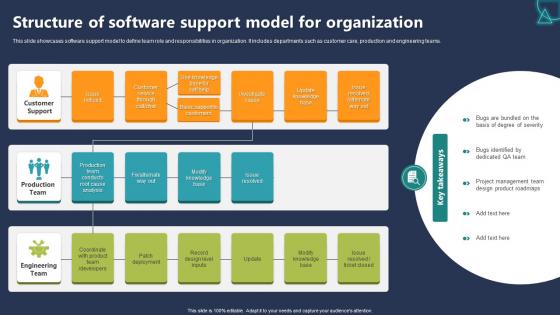
Structure Of Software Support Model For Organization




Try Before you Buy Download Free Sample Product
 Impress Your
 Audience
 100%
100% Editable
 Save Hours
 of Time


This slide showcases software support model to define team role and responsibilities in organization. It includes departments such as customer care, production and engineering teams.
People who downloaded this PowerPoint presentation also viewed the following :
Structure Of Software Support Model For Organization with all 6 slides:
Use our Structure Of Software Support Model For Organization to effectively help you save your valuable time. They are readymade to fit into any presentation structure.





FAQs for Structure Of Software Support
Start by mapping out what you've got now and where things break down - that'll show you what to fix first. You need tiered support (L1, L2, L3) with clear escalation paths, plus decent documentation so people aren't constantly asking the same questions. SLAs and incident tracking are obvious musts. The big thing though? Make sure support and engineering actually talk to each other. That disconnect is brutal when you're trying to solve real problems. Set up feedback loops so you're learning from patterns instead of just reacting to whatever's on fire today. Oh, and don't skimp on training your team.
Map your support tiers to what actually drives revenue first. Honestly, so many companies mess this up - they'll prioritize some random internal tool over customer-facing stuff that's bleeding money. Check your SLAs against real business impact, not just "how broken is it technically." Your critical systems need faster response times, obviously. Staff them that way too. Enterprise clients aren't the same as smaller accounts - they'll expect different treatment. Quick gut check: does your current setup match what you actually care about? If not, move resources where they'll make the biggest difference. Sometimes it's that simple.
Honestly, customer feedback is like your cheat sheet for figuring out what's actually broken. Look for patterns in complaints and suggestions - they'll show you where your support is failing vs. where it's working. Sometimes the feedback stings, but that's usually when it's most valuable. Use what you learn to fix response times, update your knowledge base, or train your team on stuff that keeps coming up. Oh, and don't forget the positive feedback too - it shows what you shouldn't mess with. If you're not collecting feedback systematically yet, start now and actually do something with it.
Dude, it's basically reactive vs proactive support. Old school was just waiting for stuff to break, then you'd submit a ticket and sit there forever. Now? They actually try to catch problems before they happen with monitoring tools and those AI bots (some are decent, others are still pretty useless tbh). You've got way more options too - chat, video calls, forums instead of just calling and being on hold for ages. Oh and self-service portals are actually helpful now. Just make sure whoever you pick actually knows how to use this stuff properly, not just throwing around buzzwords.
Honestly, automation is a game-changer for support teams. Your bots can handle the boring stuff - routing tickets, basic troubleshooting, status updates. Response times get way faster since these systems never sleep. Meanwhile, your actual humans can tackle the tricky problems instead of doing password resets all day (seriously, such a waste of talent). Just make sure you nail your knowledge base setup first - that's what makes everything else work. Look at your most common simple tickets and automate those bad boys right away.
Honestly, start simple with like 3-4 metrics or you'll drown in data. Response times and resolution times are obvious ones. Customer satisfaction scores too - though those can be hit or miss depending on how you ask. Track your escalation rates because that's where things get expensive fast. I'd also watch ticket volume trends and maybe tickets per agent, but don't get too obsessed with individual productivity numbers. One thing people miss? Knowledge base usage stats. Tells you if customers are actually finding answers themselves or just giving up and calling anyway. The goal is fixing things quickly without creating repeat tickets for the same issues.
Honestly, just throw support requests right into your backlog like they're regular user stories. During sprint planning, prioritize them alongside your dev work - don't let them live in some separate world. Assign support tasks to team members the same way you'd handle features. I've seen too many teams where support feels like this invisible burden that nobody talks about. Bring it into your standups, discuss critical bugs next to new features. The whole point is making support part of your actual sprint ceremonies instead of letting it randomly mess with your velocity later.
Focus on three main things: product knowledge, customer service skills, and your internal processes. Most companies go overboard with theoretical tech training when people learn way better by actually doing stuff. Get them hands-on with troubleshooting real problems and knowing when to escalate. Obviously they need soft skills for dealing with angry customers too. Don't skip training on your ticketing system and SLAs - that's where things fall apart fast. Pair newbies with experienced reps for a few weeks. They'll pick up on actual scenarios way quicker than sitting through more PowerPoints.
Here's what's worked for me - do quarterly surveys and actually read the damn things. Track your usual stuff like response times and satisfaction scores, but here's the key: review everything monthly with your team. So many places just collect feedback then ignore it completely. Also, after any big screw-ups, sit down and figure out what went sideways. The best part though? When your support people start suggesting fixes based on what they're seeing every day. That's when you know you've got something good going.
Respond to complaints super fast - like within a few hours even if you don't have answers yet. Don't get defensive when they're venting (hardest part honestly). Try to figure out what's actually broken instead of just slapping band-aids on everything. Write it all down in your system so your team can spot trends. If someone's really pissed, escalate immediately - don't make them wait while you fumble around. Oh and definitely check back after you "fix" things. Half the time there's still weird stuff happening. A quick survey works great for catching that.
Oh this is actually smart - basically you route people to the right person from the start instead of making them suffer through generic help desk hell. Level 1 tackles the easy stuff super fast. Complicated problems go straight to specialists who won't waste your time asking "have you tried turning it off and on again" for the millionth time. Honestly, I've been on both ends of bad support and it's the worst. When it's set up right though, customers don't get bounced between departments and everything just flows better. Takes way less time too.
Start with a ticketing system - Zendesk or Jira Service Management work great. Then grab monitoring tools like Datadog or New Relic so you catch issues before customers start complaining. Trust me, you'll also want a solid knowledge base because answering the same question 50 times gets old fast. Slack's pretty much mandatory for team communication, plus you need screen sharing software for when things get messy. Oh, and don't forget remote access tools and something to aggregate your logs. The ticketing system's your foundation though - build everything else around that.
Honestly, you gotta make your support setup flexible from day one. Cross-train everyone constantly - I can't stress this enough. Too many companies get trapped with ancient ticketing systems that break the second they try adding new tools (learned this the hard way at my last job). Automation is huge, but pick tools that can grow with you. Think of your whole support thing like code that needs regular updates, not some dusty manual nobody reads. Quick audit of what's broken right now? Start there and fix your worst bottlenecks first.
Dude, remote work totally flipped support on its head. People can't just wander over to IT anymore, so you're gonna need solid self-service stuff - knowledge bases, chatbots, the works. Response times matter way more now too. Screen-sharing tools became absolutely essential (learned that the hard way). Your support team's probably scattered everywhere now, which honestly makes documentation even more crucial. Oh, and automation actually got easier to justify to management since everything's digital anyway. The whole thing forced everyone to get their processes together. No more winging it when you can't tap someone on the shoulder.
Honestly, people hate change - that's your biggest headache right there. Your team's gonna resist because they already know how to do things the current way. Skills gaps are brutal too since everyone needs training on whatever new system you're bringing in. Oh, and good luck juggling resources while you're running two systems at once (been there). Different teams stop talking to each other during these transitions for some reason. My move? Pick a small group first, get them really good at it, then let them sell everyone else on why it's worth the hassle.
-
One word for SlideTeam–Versatile!
-
Easily Editable.