

Technical It Support Request Process Workflow




Try Before you Buy Download Free Sample Product
 Impress Your
 Audience
 100%
100% Editable
 Save Hours
 of Time


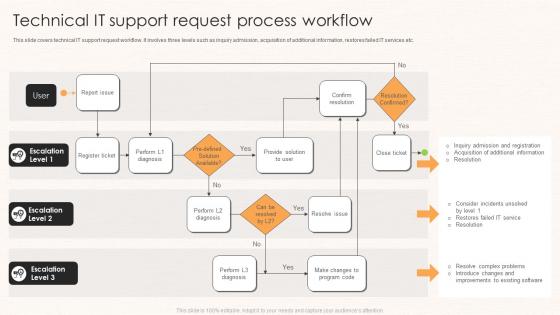
This slide covers technical IT support request workflow. It involves three levels such as inquiry admission, acquisition of additional information, restores failed IT services etc.
People who downloaded this PowerPoint presentation also viewed the following :
Technical It Support Request Process Workflow with all 6 slides:
Use our Technical It Support Request Process Workflow to effectively help you save your valuable time. They are readymade to fit into any presentation structure.





FAQs for Technical It Support
So here's the basic flow: log the ticket first, then figure out how urgent it actually is - trust me, this part prevents total mayhem down the road. After that you assign it to whoever knows that stuff best and isn't already swamped. They troubleshoot and fix it. Once the user's happy, close it out and document what worked. Oh, and definitely track everything in your system because you'll start seeing weird patterns emerge that help you fix things faster next time.
Dude, automation is a total lifesaver for IT support. You can set it up to handle all the boring stuff - password resets, ticket sorting, basic troubleshooting. I'd start with something simple like auto-categorizing tickets by keywords. Honestly saves so much time it's ridiculous. Your team stops wasting hours on routine requests and can actually focus on the tricky problems that need real thinking. Set up rules to route tickets to the right people automatically. Trust me, once you see those time savings you'll wonder why you waited so long to do it.
Think of ticketing software as your IT help desk's brain - it catches every support request so nothing gets lost. You can sort urgent stuff first, hand tasks to whoever's best at fixing them, and keep notes on everything. My old job was chaos before we got one! Short sentences work great, but you'll also want to track patterns in problems and see how fast your team actually works. The trick is setting up priority levels that make sense and getting everyone to use it properly - that's where most places screw up, honestly.
Track your resolution times and customer satisfaction scores first - those tell you the most. Agent productivity and escalation rates are super important too since they show where things get stuck. CSAT can sting sometimes but it's honest feedback! Also watch for repeat tickets on the same issues, that's usually a dead giveaway something's broken in your process. Oh and first-call resolution rates, almost forgot that one. Do a monthly check against your targets and tweak things as needed. The data doesn't lie!
Honestly, most of the time it's prioritization being a total mess - nobody knows what's actually urgent. Then you've got those knowledge silos where Sarah's the only one who understands the legacy system, but she's always swamped. Manual handoffs kill you too. Track where stuff sits for over 24 hours first, that'll show you the real problem spots. Document solutions somewhere everyone can actually find them (not buried in Slack). Cross-train people so you're not screwed when someone's out. Set clear escalation rules and automate the boring repetitive stuff. It's amazing how much time that frees up.
Dude, collaboration tools are honestly a lifesaver for IT teams. Everyone can jump into the same chat channels or dashboards to see what's happening with tickets in real time. No more endless email chains or hunting people down for updates. When something urgent hits, you just throw it in Slack or Teams and boom - multiple people can tackle it together. The searchable history thing is clutch too, even though I forget to use it half the time. Next time a similar problem comes up, you can actually find how you fixed it before instead of reinventing the wheel.
Honestly, you'll save yourself so much headache if you document your processes now. I made the mistake of not doing this when our best tech quit - left us scrambling to figure out how he fixed everything. Start with the stuff that comes up constantly, then expand from there. Your team will actually know what they're doing instead of winging it every time. New hires pick things up way faster too. Oh, and you'll spot where things get stuck in your workflow - super helpful for fixing bottlenecks. Trust me on this one.
Yeah, training users is honestly a game-changer for ticket volume. You'll stop getting those basic "help I forgot my password again" requests every day. Instead you get the actually interesting problems that need real troubleshooting skills. Some people will still call you for literally everything though – I swear some users would ask us to click their mouse for them if they could. But most catch on pretty quick. The trick is looking at your most common tickets and making simple guides from those. Way better than doing the same password reset walkthrough fifty times a week.
Start with first-call resolution and response times - those are your bread and butter metrics. Customer satisfaction scores matter too, obviously. Track how many tickets you're getting each week so you can spot trends early. Agent utilization is key because you don't want people sitting around doing nothing OR completely swamped (been there, it sucks). Escalation rates tell you if your Level 1 folks need more training - shouldn't be punting everything upstairs. Weekly reports work best for catching issues before they blow up. These basics will give you a solid picture of what's actually happening.
Honestly, start with a solid ticketing system and focus on self-service stuff. Remote workers can't just pop by your office, so async communication is huge. Build out your knowledge base articles for common problems - saves everyone time. Video calls beat phone support every single time for troubleshooting, no question. Remote desktop tools are lifesavers too. Survey your remote folks about what breaks most often, then create automated fixes around those issues. Oh, and don't forget clear escalation paths since everything takes longer when people aren't in the same building.
Focus on three things: good documentation, staying ahead of problems, and actually figuring out why stuff breaks. Build a knowledge base that doesn't suck - make it searchable with clear step-by-step fixes people can actually follow. Keep users in the loop about known issues and changes coming down the pipeline. Here's the big one though: when you fix a ticket, don't just close it and move on. Dig into why it happened. I'd track repeat issues every month to catch patterns early. Trust me, fixing root causes beats playing whack-a-mole with the same problems over and over.
Stop tracking just "time to resolution" - that's pointless. Map your IT tickets to real business impact instead. Downtime hurting sales? That's priority one. Email signature problems? Bottom of the list, honestly. Your SLAs should reflect what actually matters - revenue-generating systems get white-glove treatment. Track stuff leadership cares about: user satisfaction, uptime during busy periods, cost per incident. Then sit down with stakeholders regularly to show how your support work drives business results. It's way more convincing than spreadsheets full of ticket numbers.
Don't wait until you're completely stuck - escalate early and be upfront about it. Document everything you've tried first though, because nobody wants to play detective with some vague ticket. I used to think escalating made me look stupid, but honestly? Letting issues drag on is way worse. Set clear expectations with users about timing and next steps. When you do escalate, make sure it's going to the right team with all the context - error messages, what you tested, the whole deal. Oh and here's the thing - know your limits upfront instead of struggling alone for hours. It'll save everyone time.
Dude, customer feedback is gold for fixing workflows. We used to just guess at what needed improving and honestly? Total waste of time. Now when people keep bitching about slow response times or confusing processes, that tells you exactly where to focus first. Track the complaints monthly and you'll start seeing clear patterns of what's actually broken. Plus you can tell if your fixes are working or if you're still screwing something up. It's way better than flying blind and hoping for the best.
Honestly, AI is where it's at right now. The ticket routing stuff is getting insanely good, and chatbots can handle most basic troubleshooting without breaking a sweat. There's also some cool AR/VR tools for walking people through fixes remotely - though I haven't tried those yet. Predictive maintenance is another big one, catches problems before they explode. Cloud platforms make scaling way easier too. If you're just getting started, I'd mess around with AI ticket classification first. It's probably your quickest win and doesn't require a huge investment to test out.
-
I discovered this website through a google search, the services matched my needs perfectly and the pricing was very reasonable. I was thrilled with the product and the customer service. I will definitely use their slides again for my presentations and recommend them to other colleagues.
-
“As you have innovative ideas and they are all customizable, this saves a huge chunk of your time to prepare well-read presentations.”