

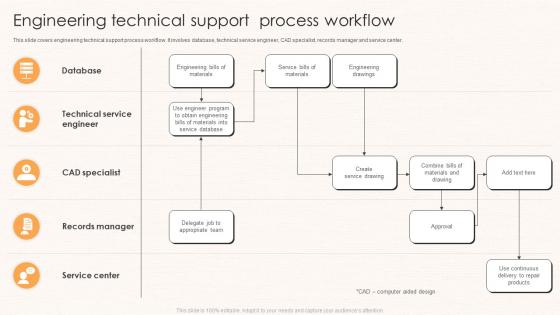
Engineering Technical Support Process Workflow




Try Before you Buy Download Free Sample Product
 Impress Your
 Audience
 100%
100% Editable
 Save Hours
 of Time


This slide covers engineering technical support process workflow. It involves database, technical service engineer, CAD specialist, records manager and service center.
People who downloaded this PowerPoint presentation also viewed the following :
Engineering Technical Support Process Workflow with all 6 slides:
Use our Engineering Technical Support Process Workflow to effectively help you save your valuable time. They are readymade to fit into any presentation structure.





FAQs for Engineering Technical
Start with ticket intake and basic triage - that's where you sort and prioritize everything. Then investigate to find the actual root cause (not just the obvious stuff). After that, implement your fix and document what happened. Honestly, most teams totally bomb the triage part. They just throw tickets around randomly instead of matching them to people who actually know that area. Set up clear handoff points between each stage so nothing gets lost. Oh, and definitely map out what you're doing now first - you'll probably find some obvious bottlenecks where things are just sitting there forever.
Honestly, automation's been a lifesaver for support tickets. I'd start with auto-routing - just set up keywords so tickets go to the right team automatically. Chatbots handle the basic FAQ stuff pretty well now. What really changed things for me though was setting up escalation rules. Urgent stuff gets bumped up without me watching every single ticket like a hawk. Oh, and automated follow-ups are clutch. You'll get way better data on response times too, which helps you spot patterns. My advice? Don't go crazy at first - maybe just automate how you categorize tickets, then expand once you see what actually works.
Honestly, customer feedback is like having a reality check for your workflow. You might think everything's running smoothly, but customers will tell you exactly where things suck. Surveys help you find those annoying bottlenecks and see which changes actually made a difference (spoiler: sometimes they don't). The thing is, we're too close to our own processes to see them clearly. Customers experience the messy parts we miss completely. Use their complaints to figure out what needs fixing first - though I'd focus on the stuff that comes up repeatedly. Then check back in with them after you make tweaks.
Just embed the KB search right into your helpdesk - saves you from juggling a million tabs. Most platforms like Zendesk will auto-suggest articles based on your ticket keywords, which is honestly a lifesaver. Make sure your team can quickly update articles when they spot outdated stuff. The trick is connecting your KB to ticket tags so relevant solutions just pop up automatically. Oh, and don't make it feel like extra busywork - that's where most teams mess up. Keep it seamless and your agents will actually use it.
Honestly, you need to watch both speed and quality - can't just pick one. Response times and ticket volume show if your team's keeping up, but customer satisfaction scores tell you if they're actually fixing stuff properly. First-call resolution is huge too. Escalation rates are super telling - if everything keeps getting bumped upstairs, something's broken in your process. Agent utilization helps spot workflow issues. Don't try to track everything at once though, that's overwhelming. Pick 3-4 metrics that actually matter to your goals first, then add more once you've got the hang of it.
Honestly, the biggest thing is mapping out who handles what and when stuff gets bumped up. Set hard criteria - like if it's been 30 minutes or involves a VIP customer, it goes to tier 2. Period. The worst part is tickets sitting around because no one knows whose job it is! When you do escalate, pass along everything - what you tried, error messages, the whole story. Nothing's more annoying than starting over from zero. Oh and definitely build in some way for senior folks to loop back with tips. That way your team actually gets better instead of just... passing problems around forever. Start by timing your current process though - you'll probably find some obvious bottlenecks.
Honestly, start with a good ticketing system - Zendesk or Freshdesk will save your sanity. Nothing worse than losing track of customer issues. Then grab some screen sharing software like TeamViewer because explaining tech stuff over email is painful. Your team needs a solid knowledge base too, otherwise everyone's googling the same problems constantly. Internal chat tools help coordinate who's handling what. Oh and set up canned responses for the stuff you answer a million times - I used to hate them but they're actually clutch. Build it piece by piece based on where you're bleeding the most time.
Honestly, training is a game-changer for your support team's speed. Your agents will troubleshoot way faster when they actually know the product inside out. Less bouncing tickets around, fewer escalations - the whole thing just flows better. I've seen teams drop their handle time by like 30% after good training, which is pretty wild. Oh, and fewer mistakes means way less cleanup work later. Start with the bread-and-butter issues everyone deals with daily. You can tackle the bizarre edge cases after that - though those always seem to hit right before closing time, don't they?
Ugh, the biggest workflow killers are when customers have to repeat their whole story every time they get transferred. Super annoying for everyone. Don't create a million approval layers either - slows everything to a crawl. Your team needs clear escalation paths, and honestly? Ditch those rigid scripts. Real problems need flexible solutions, not robotic responses. Knowledge sharing between shifts is huge too - can't tell you how many cases just disappear during handovers. Map out where your tickets currently get stuck or ping-ponged around. That's your starting point.
Okay so first thing - get a unified ticketing system where everything funnels in. Email, chat, phone calls, even social media complaints (ugh, those are the worst). Map out when customers actually use each channel because people are weirdly predictable about this stuff. Your team needs to know their stuff inside and out so customers don't get wildly different answers depending on who they talk to. Set realistic response times for each channel. Then actually hit those deadlines - nothing pisses people off more than broken promises about getting back to them.
Start with detailed scripts and decision trees for your common issues - that's your foundation. Have new agents shadow experienced ones because honestly, they pick up way more from watching real calls than sitting through PowerPoints. Quality scorecards keep everyone consistent, and do calibration sessions where supervisors review the same stuff together. Weekly team meetings work great for discussing weird cases that came up. Oh, and make sure your knowledge base is actually easy to find things in - can't tell you how many places mess that up. Clear escalation paths are huge too.
So you'll want to look at ticket patterns - when do most come in? What issues keep popping up? Staff your busy hours better and automate responses for the stuff that happens constantly. Track which fixes actually work fastest for different problems, then teach your team those methods. Honestly, predictive stuff is pretty cool for catching issues early before they blow up. Just heads up though - cleaning your data is gonna be a pain (always is). Start simple with basic resolution times by category, see what actually helps, then expand from there.
Oh man, documentation is such a game changer - seriously can't stress this enough. Your team will thank you when they're not constantly asking "wait, how did we fix this last time?" Start with whatever issues pop up most often, you'll notice the difference right away. It speeds everything up because people aren't starting from scratch every single time. Also saves your butt when Sarah's out sick and you're staring at a ticket thinking "she definitely handled this before." Makes training new people actually bearable too. Trust me on this one - good docs keep everyone on the same page instead of doing their own random thing.
Honestly, remote support tools are a game changer. You can literally see their screen instead of doing that awkward "no, the other button" dance over the phone. TeamViewer's pretty solid, or most systems have something built-in now. Takes like 30 seconds to connect and boom - you're diagnosing the actual problem instead of guessing. Sometimes I'll just watch and walk them through it, other times I'll grab control if they're cool with it. Way faster than trying to explain where things are. Just don't be that person who takes over without asking first.
Honestly, the best thing you can do is set up different support levels and train people across multiple areas - saves your butt when things get crazy. Auto-replies work great for the basic stuff everyone asks about. I'd definitely look at your past data to figure out when the chaos usually hits, then staff up accordingly. We got slammed during our last launch because I didn't plan ahead properly, ugh. Oh and priority queues help too - VIP customers first, that kind of thing. Self-service options are clutch if people can actually find answers themselves. Just don't wait until you're drowning to figure this out.
-
I can say with full confidence that all your business, academic, or professional work requirements will be sufficed with SlideTeam. Their gallery is as rich as 2Million+!!
-
I am not the best at presentations but using SlideTeam’s PPT template made it easier for me. Thank you SlideTeam!