

Team Canvas Powerpoint Ppt Template Bundles




Try Before you Buy Download Free Sample Product
 Impress Your
 Audience
 100%
100% Editable
 Save Hours
 of Time


Our Team Canvas Powerpoint Ppt Template Bundles are topically designed to provide an attractive backdrop to any subject. Use them to look like a presentation pro.
People who downloaded this PowerPoint presentation also viewed the following :
Team Canvas Powerpoint Ppt Template Bundles with all 17 slides:
Use our Team Canvas Powerpoint Ppt Template Bundles to effectively help you save your valuable time. They are readymade to fit into any presentation structure.





FAQs for Team Canvas Powerpoint
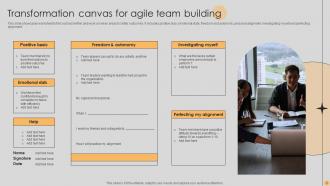
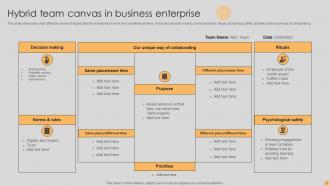
So basically a Team Canvas gets everyone aligned on project goals, roles, and how you'll actually work together. It's this one-page visual thing that maps out your team's purpose, who the key players are, success metrics, risks - all that stuff. Honestly, it's like having your team's entire brain on one sheet. Super clutch when new people jump in mid-project or when scope starts going sideways (and let's be real, it always does). Takes maybe an hour to fill out but saves you from so much headache later. Definitely try it at your next kickoff - you'll be surprised how much clearer things get.
So basically a Team Canvas puts all your shared goals, roles, and how you work together in one visual spot. Teams always assume stuff or work against each other - this stops that. You're forced to have those uncomfortable conversations about who's doing what and how you'll actually communicate. The visual part makes it super easy to catch when responsibilities overlap or there are gaps. Honestly, it's a lifesaver when conflicts pop up later because you can just point to it. Try making one at your next meeting and stick it somewhere visible. Trust me on this one.
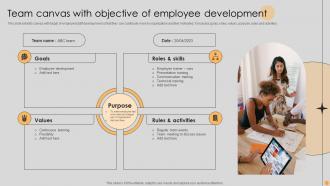
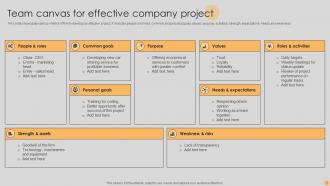
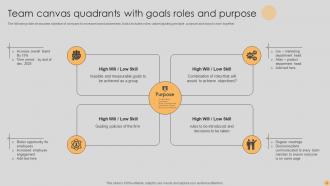
So for your Team Canvas, you'll definitely need the basics: purpose/mission, everyone's roles, goals with actual success metrics. Communication norms are huge too - like, are we Slack people or email people? Decision-making processes matter way more than you'd think. Oh, and individual strengths plus working styles - seriously such a game changer for figuring out how people operate. Some teams throw in stakeholders or risks if that's relevant. The whole thing should be visual and collaborative so everyone can jump in during the session. Start simple, then customize based on what your team actually needs to get aligned on.
Oh, Team Canvas is actually pretty cool - basically you get everyone in a room and map out your goals, values, all that stuff visually. No more guessing what people think you're working toward. The whole point is having those conversations about priorities that usually just live in people's heads, you know? Once it's up on the wall, you can point to it when someone's like "wait, why are we doing this again?" Honestly beats those endless alignment meetings. Short sentences work great here. Keeps everyone focused on the same target instead of wandering off in different directions.
So the Team Canvas is basically like a values workshop but way more visual and less boring. You gather everyone to hash out what your team actually stands for - not the corporate BS that looks good on paper, but real stuff you'll actually follow. Think of it as group therapy for work teams (minus the crying, hopefully). It walks you through discussions about your shared purpose, how you want to work together, and what winning looks like. Honestly, I've seen too many teams just wing their culture and wonder why things get weird. You'll end up with something concrete to reference when decisions get tough.
The Team Canvas is honestly a game-changer for catching problems early. You throw everything onto one visual - who does what, team goals, how people communicate, where the tension might be. Patterns become super obvious that you'd totally miss just talking. I remember one team discovering they were basically working toward different priorities the whole time! The best part isn't even the final canvas - it's all the stuff that comes up while you're filling it out together. People finally say what they've been thinking. Update it whenever things shift or new drama pops up.
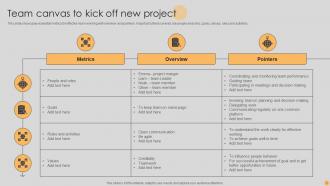
Honestly, I'd kick things off with "People & Roles" - it's the least controversial and gets everyone talking. Timebox each section to like 10-15 minutes or you'll end up debating word choices all day (trust me on this one). Have people write ideas on sticky notes before sharing out loud. Stops the loudest person from hijacking everything and actually gets your quiet teammates involved. Get someone outside the team to facilitate if you can. When you're stuck on priorities, just do dot voting. Don't waste time perfecting every single word during the session - you can clean it up later. Save something fun for the end so you finish strong instead of everyone checking out.
Quarterly works for most teams, but honestly it really depends on how much stuff is changing. New people joining? Priorities shifting around? Then monthly makes way more sense. I've watched teams completely ignore theirs for like 6 months and then act surprised when everyone's confused about direction lol. Just treat it like a living thing instead of some document you create once and forget about. Quick 15-minute check during regular meetings works great - you'll catch what needs tweaking. Oh and definitely set a calendar reminder or you'll totally forget.
Team Canvas is a game-changer for accountability, honestly. It forces everyone to nail down exactly who's responsible for what upfront. No more "oh I thought Sarah was handling that" excuses later. You get all the roles, goals, and team values written down in one spot - super helpful when someone tries to wiggle out of something they committed to. The visual aspect makes it stick better too. I'd bring it up in your weekly meetings to keep people honest. Works way better than just hoping everyone remembers what they signed up for!
Oh totally, virtual Team Canvas sessions work great! We used Miro last time and honestly the quiet people on our team contributed way more than usual. Break it into shorter chunks though - like 90 minutes max because screen fatigue is real. Everyone can drop sticky notes and vote on stuff together, which is pretty satisfying actually. Just make sure you're not scheduling it at like 6am for half your team (learned that one the hard way). Save it somewhere everyone can find later. Short sessions beat those marathon meetings every time.
Don't rush through it just to say you did one - you'll get bland, useless answers. Watch out for the loudest voices drowning everyone else out too. Push the quiet people to actually share, not just nod along with whatever sounds "right." Honestly, the worst thing is treating it like homework you never touch again. I've seen so many teams nail the initial session then completely forget about it. Your team changes, priorities shift - the canvas needs to reflect that. Set up quarterly check-ins or you're basically making expensive wall decoration nobody cares about.
Honestly, Team Canvas is all about the people stuff - how you actually work together. Traditional project tools? They're just tracking tasks and deadlines. Sure, Gantt charts are fine for checking off deliverables, but they totally miss the relationship dynamics. With Team Canvas, you're having real conversations first. Like what does "winning" mean to everyone? How do we actually want to give each other feedback without it getting weird? It's basically figuring out the team chemistry before you dive into all the timeline madness. Worth trying at your next kickoff - way better than jumping straight into tasks.
Honestly, Team Canvas works pretty much anywhere people need to collaborate. Tech companies love it, consulting firms swear by it, and I've seen healthcare teams use it too. Works amazing for remote teams since you can't just grab coffee and hash things out anymore. Use it when you're starting new projects, bringing people together, or when nobody knows who's supposed to do what. Remote onboarding is where it really shines though - saves you from those awkward "wait, I thought you were handling that" moments three weeks in. Super helpful for any project-based work where roles get messy.
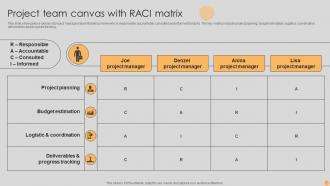
So take those Team Canvas insights and actually DO something with them - update your sprint planning with those goals you clarified. Communication issues? Set up new check-ins or change how you share updates. That roles section is perfect for fixing job descriptions or making RACI charts (those things are surprisingly helpful). Pick 2-3 concrete changes and get them rolling in the next couple weeks. Then circle back to see what's actually sticking. The whole exercise is pretty much worthless if nothing changes after, you know?
Dude, Team Canvas actually works pretty well. Spotify cut their early project confusion by around 40% using it when teams first form up. Microsoft says their engineers and designers finally started understanding each other after doing canvas sessions - which honestly makes sense since those groups usually might as well speak different languages. ING Bank tried it during their agile switch and team speed improved. The thing is, you get that clarity on roles and purpose right away instead of spending weeks figuring it out the hard way. Worth doing a 90-minute session at your next kickoff.
-
My search for complete decks ended with SlideTeam. Such a surplus collection of HD PowerPoints. Moreover, their standard and widescreen formats have helped me in delivering bullseye presentations.
-
I loved the hassle-free signup process. A few minutes and, I had this giant collection of beautiful designs.