

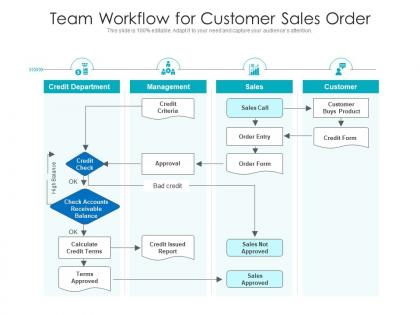
Team workflow for customer sales order




Try Before you Buy Download Free Sample Product
 Impress Your
 Audience
 100%
100% Editable
 Save Hours
 of Time


Our Team Workflow For Customer Sales Order are topically designed to provide an attractive backdrop to any subject. Use them to look like a presentation pro.
People who downloaded this PowerPoint presentation also viewed the following :
Team workflow for customer sales order with all 2 slides:
Use our Team Workflow For Customer Sales Order to effectively help you save your valuable time. They are readymade to fit into any presentation structure.
FAQs for Team workflow for
Okay so first things first - you need Slack or Teams for messaging, and Asana or Monday for tracking projects. Miro's great for when you need to brainstorm visually together. Yeah, Zoom meetings are exhausting but you can't avoid video calls entirely. Pick one tool for each thing and actually stick with it - I swear switching between five different apps will drive you insane. Oh and definitely get a shared workspace like Google Drive or Notion so everyone can find stuff. Start with messaging and project management, then see what else is annoying your team. Tool overload is worse than not having enough tools, trust me.
Honestly, visual templates are game-changers because your whole team can instantly see who's doing what and when stuff's due. No more of those annoying "hey what's the status on..." messages every five minutes. Bottlenecks become super obvious, and you'll catch priority changes before they derail everything. The best part? Way fewer miscommunications when everyone's staring at the same board. I'd start with a basic Kanban setup - nothing fancy. Your standups will actually be useful for once instead of just... existing. Trust me on this one.
Honestly, accountability is what keeps teams from turning into a total mess. When everyone knows what they're responsible for, you don't get that annoying thing where tasks just... disappear into the void. People actually follow through on deadlines. Your teammates can plan their stuff around what you promised to deliver, which is huge. Look, when someone screws up (and we all do), owning it early means the team can adjust instead of panicking last-minute. My biggest tip? Make it crystal clear who's doing what from day one. Sounds obvious but you'd be surprised how often teams skip this step.
Grab everyone and map out your workflow with sticky notes - trust me, it's weirdly satisfying. Hunt for spots where work just sits forever or piles up like crazy. Usually it's because handoffs are messy, someone's drowning in tasks, or there's some pointless approval step that nobody really needs. My old job had THREE people signing off on expense reports under $50 - ridiculous. Try redistributing work, automating the boring stuff, or just cutting steps entirely. Give it a few weeks and see what sticks. Some fixes work, others don't, but you won't know until you try.
Honestly, just get people talking to each other more - that's like 90% of it. Set up some Slack channels for your projects and do quick weekly syncs. Miro or Figma work great since everyone can jump in and mess around with ideas visually. The time zone thing is annoying but try rotating meeting times so it's not always the same people getting screwed over. Oh, and actually make your shared docs accessible (shocking concept, I know). Start small with one project first. See what clicks with your particular group before going all-in on some fancy system.
Look, project templates basically just match your team size. Small teams? You want those simple workflows without tons of approval steps. Bigger teams need the complex stuff with multiple people signing off on everything. Agile templates work perfectly for those 5-8 person cross-functional groups. But if you've got 20+ people spread across departments, you need enterprise templates - honestly, the names give it away. "Simple Project" vs "Multi-Phase Enterprise Initiative." My advice? Pick what actually fits your team size, not what sounds impressive. I've seen too many small teams get bogged down in overly complex templates they didn't need.
Look, you catch problems way before they blow up when you're getting regular feedback. Everyone stays on the same page about what matters. Bottlenecks become obvious quickly, people can fix stuff without waiting forever, and honestly? Projects don't implode at the last second like they usually do. It's kinda like having GPS - you don't end up driving into a wall for three hours straight. Keep it simple though. Weekly 15-minute check-ins work great, or just toss updates in Slack if your team's into that. Don't overthink it.
Honestly, you'll want some solid guardrails for the big stuff - deadlines, check-ins, decision-making. But don't micromanage the daily grind. I've watched teams crush it when they nail down non-negotiables like weekly updates and project docs, then let people pick their own tools and workflows. The trick? Be super clear about what's set in stone versus what's totally flexible. People need to know where they can freestyle and where they can't. It's kinda like... giving everyone the same playbook but letting them run their own plays, you know?
Honestly, I'd pair new people with someone experienced right away - like a workflow buddy they can bug with all those "wait, how do we actually do this?" questions. Keep your process docs simple and visual too. Nobody reads those massive instruction manuals anyway, let's be real. Give them smaller tasks at first so they can get the hang of your team's rhythm. Oh, and definitely do regular check-ins their first month. Catching confusion early saves everyone headaches later.
Look, tech is honestly a double-edged sword in crazy work environments. Slack and Teams can make decisions happen way faster - but they'll also blow up your phone with notifications if you don't set boundaries. Real-time project tools are actually pretty clutch for keeping everyone on the same page when deadlines get brutal. The trick is picking the right stuff and making sure people know how to use it properly. Otherwise you just end up drowning in more apps and chaos instead of getting anything done faster.
Start with cycle time - that's how long tasks actually take from beginning to end. Throughput matters too (basically how much you're cranking out). I'd add lead time since it shows the whole customer experience, request to delivery. Oh, and don't fall into the trap of tracking stuff that just looks good on paper but doesn't help anyone. Quality metrics like defect rates? Super helpful. Work in progress limits keep you sane. Pick maybe 2-3 that actually connect to what your team's trying to accomplish. Track 'em for a month, then tweak things based on what you're seeing. Simple as that.
Honestly, visual aids are a game changer for explaining workflows. People's brains just work better when they can see the connections between steps instead of trying to follow along with verbal instructions. Flowcharts, process maps, those swimlane diagrams - they all help your audience actually get it. Nobody wants to sit through walls of text about complex processes (I sure don't). When you sketch things out, people ask way fewer confused questions like "wait, what happens next?" Simple arrows showing handoffs between teams work wonders. Your explanations will land so much better. Trust me on this one.
Ugh, cross-functional teams are such a pain because everyone's priorities are totally misaligned. Marketing's rushing to launch while engineering's like "wait, we need three more weeks for testing." Then you've got the classic problem where nobody owns the handoffs - everything just sits there while people point fingers. Different departments use completely different tools and timelines too, which makes coordination a nightmare. Honestly, the worst part is when your two-week sprint crashes into finance's monthly reporting cycle. Best fix I've seen? Pick one person from each team to be the "workflow champion" who can actually make decisions when things get stuck between departments.
Honestly, it's all about figuring out how your team actually communicates. Direct feedback works great for some people, but others need you to be way more diplomatic about it. Time zones are the obvious pain point, but here's what's tricky - different cultures have totally different takes on deadlines and meetings. Like, some people think jumping into conversations shows they're engaged, others find it super rude. I'd just ask your team straight up what would help them do better work. Maybe try different communication tools, switch up meeting styles. Regular check-ins help too so you're not guessing what's working.
Honestly, leadership makes or breaks workflow optimization. You're like the conductor keeping everyone in sync. First thing - map out your current processes with the team and ask where they're hitting walls. Your job is spotting bottlenecks and clearing roadblocks so people aren't spinning their wheels. Set communication standards and show them what good process looks like. I've watched teams completely implode when leadership checked out (not pretty). Stay involved enough to catch inefficiencies but don't breathe down everyone's necks. The sweet spot is being hands-on without micromanaging - easier said than done though.
-
Excellent template with unique design.
-
Qualitative and comprehensive slides.
-
Top Quality presentations that are easily editable.
-
Editable templates with innovative design and color combination.
-
Use of different colors is good. It's simple and attractive.