

Sales process mapping plan for acquiring customers




Try Before you Buy Download Free Sample Product
 Impress Your
 Audience
 100%
100% Editable
 Save Hours
 of Time


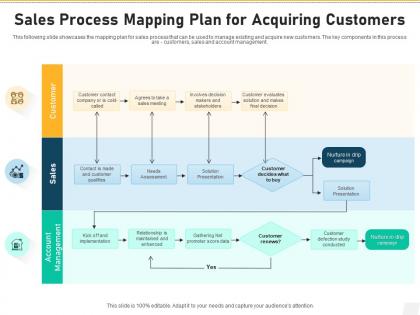
This following slide showcases the mapping plan for sales process that can be used to manage existing and acquire new customers. The key components in this process are customers, sales and account management.
People who downloaded this PowerPoint presentation also viewed the following :
Sales process mapping plan for acquiring customers with all 2 slides:
Use our Sales Process Mapping Plan For Acquiring Customers to effectively help you save your valuable time. They are readymade to fit into any presentation structure.
FAQs for Sales process mapping plan
Start by watching what your best salespeople actually do - forget the theoretical stuff for now. You need the basics covered: finding prospects, qualifying leads, discovering their real needs, presenting solutions, handling objections, then closing. Map out every step with specific actions and tools. Honestly, most deals die during team handoffs, so nail those transitions between marketing and sales. Set clear criteria for when to move prospects forward or cut them loose. Each stage needs defined exit points so nobody's spinning their wheels on dead leads.
Honestly, sales process mapping is clutch because it gets everyone seeing the same picture. No more "wait, I thought you were doing that" disasters. You map out who handles what at each step, and suddenly those handoff screwups become way less frequent. Plus your team can actually spot where things get stuck instead of just guessing. The best part? Everyone stops operating on assumptions and random tribal knowledge - which, let's be real, causes most of our headaches anyway. Just get the whole team in a room and map your current process first. You'll probably laugh at how differently everyone interprets the exact same steps.
Don't overcomplicate it from day one - that's the killer mistake. Your sales team needs to be in on building this thing, otherwise you'll create some fantasy map that has zero connection to reality. I learned this the hard way lol. Map what actually happens, not your ideal world. Different deal sizes need different approaches too, so don't force everything into one flow. Honestly, the simple main process should come first. You can always add the messy details later. Test it on a couple real deals before you make everyone use it - trust me on this one.
Oh man, industry makes a HUGE difference in sales process design. B2B tech needs these crazy complex maps with tons of stakeholder meetings, but retail? Maybe 3 simple steps. Healthcare throws in all these compliance hoops you've got to jump through. Financial services is all about building trust first - those buyers are super cautious. Manufacturing takes forever because of procurement cycles. I once tried copying a SaaS process for a manufacturing client and it was a total mess lol. You really can't just grab some random template. Study how your industry actually buys stuff, then build around that flow instead of fighting it.
So customer feedback is like your wake-up call for sales process mapping - shows you where things actually fall apart with real people. Collect feedback at every step to spot where prospects get lost or bail out. Teams always think their process is bulletproof until customers point out glaring issues they somehow missed. Honestly, it happens more than you'd think. The feedback tells you what needs fixing, what you can ditch completely, and where you need better support. Just make it routine - survey recent prospects and keep tweaking your map based on what they tell you.
Honestly, tech makes sales process mapping so much easier than it used to be. Your CRM already tracks every customer touchpoint automatically - no more trying to remember what happened when. I'm a huge fan of tools like Lucidchart for the actual mapping part since your whole team can jump in and edit remotely. Analytics will show you exactly where people are dropping off (which is sometimes painful but super helpful). The best part? Everything updates in real-time as your process changes. Oh, and if you've got AI tools, they'll actually predict what needs fixing next. Just start with whatever CRM data you have and build from there.
Honestly, it's a game changer because you'll actually see where people are bailing on you. Like, maybe they're getting stuck waiting for callbacks or zoning out during those marathon qualification calls we all hate. Your whole team stays on the same page too - no more random approaches that may or may not work. The real magic happens when you use actual data instead of just guessing what prospects want. You'll figure out which steps actually move people forward (and which ones are basically useless). Then you can focus on the stuff that works and ditch the rest.
At minimum? Every quarter. But honestly, monthly is better if things are moving fast with your team or market. When conversion rates start tanking or customer complaints shift - that's when you need major updates. Don't wait until everything's obviously falling apart though. Small fixes beat massive overhauls every single time. Here's what I'd do: set a monthly reminder to check your key numbers and actually talk to your sales people. They're dealing with this stuff day in and day out, so they'll know what's working and what isn't way before the data shows it.
Honestly, conversion rates at each stage are your best friend here - they'll show you exactly where things are falling apart. Track how long your sales cycle is taking too. Activity stuff matters - calls, emails per stage, that kind of thing. Win rates and deal size are obvious ones. But here's what kills me - so many people ignore lead response time and wonder why prospects go cold. Sales velocity gives you the big picture of whether your funnel's actually working. Start with these basics, then you can get fancy with other metrics once you see where the real problems are.
Honestly, the easiest way is setting up stage-based workflows in your CRM. Each time a deal moves - like from "qualified" to "proposal" - it automatically triggers stuff like task assignments or email templates. No manual work needed. Map your process steps to specific CRM fields first, then build automation rules around those. I learned this the hard way after losing track of deals for months. Short sentences work better than complex ones here. Your pipeline stages should mirror your actual sales process exactly. This way you'll spot bottlenecks fast and nothing gets forgotten. Start by auditing what stages you currently use.
Honestly, stick with basic shapes that mean something - rectangles for tasks, diamonds for decisions, circles for start/end stuff. Arrows show which way things flow, obviously. Swimlanes are clutch for separating team roles (sales, marketing, whatever). I never use more than 2-3 colors or it looks like a rainbow threw up. Brief text works better than paragraphs, and give everything room to breathe. Here's what I always do: grab someone who doesn't know your process and walk them through it. If they're lost, you need to cut more stuff out. It's kinda brutal but works every time.
Think of sales process mapping as your cheat sheet for training newbies. You're basically giving them step-by-step instructions instead of making them wing it - which honestly saves everyone a headache. New hires can see exactly what to do during each part of the sales cycle, from finding prospects to sealing deals. They'll know what questions to ask and which tools to grab. The best part? It connects all the dots so they actually understand how everything fits together. Walk them through it their first week and you'll see the difference right away.
Definitely get your sales reps in on this from the start. Interview them one-on-one first - you want their actual workflows, not whatever's gathering dust in the official handbook. Bring both your stars and newbies into group sessions since they'll see things totally differently. Let them hash it out and tweak the steps together. Honestly, half the battle is just making them feel like they have a voice instead of getting something dumped on them. Oh, and run a small pilot with whoever's game first. Those early wins will help convince the holdouts later.
Pull your CRM data and check conversion rates between each stage - that's where you'll spot the biggest drop-offs. Time spent per stage matters too, plus win rates. Honestly, most companies are shocked when they actually see this stuff mapped out visually. Compare what your top performers do versus everyone else. There's usually a clear pattern. Focus on activities that actually move deals forward instead of random busy work (we all know there's tons of that). The bottlenecks become pretty obvious once you start tracking where prospects consistently fall off.
Dude, templates are a lifesaver. Your team won't spend forever figuring out how to format everything differently - I swear I've watched people burn entire weeks on that nonsense. Everyone stays consistent across products and regions too. Way easier to compare processes and catch gaps when everything follows the same structure. New hires can actually hit the ground running instead of trying to decode whatever random system each person created. Oh, and sharing best practices between reps becomes simple. Just start basic with your main stages, then tweak it as needed.
-
Perfect template with attractive color combination.
-
Topic best represented with attractive design.
-
Very unique, user-friendly presentation interface.
-
Informative presentations that are easily editable.
-
Appreciate the research and its presentable format.