

Technology solutions template presentation deck






Try Before you Buy Download Free Sample Product
 Impress Your
 Audience
 100%
100% Editable
 Save Hours
 of Time


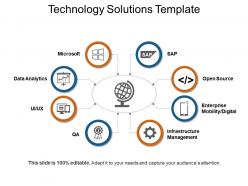
Get this Technology Solutions Template Presentation Deck to address your business problem. A technical problem can be solved by the integration of software, hardware, networks, and telecommunications. Boost your business outcome by designing, developing and installing customized systems. Inform your clients you provide technological services related to consultation, management and web and graphic design. These include UI/UX, SAP(systems, applications and products), data analytics, infrastructure management, etc. You can create or modify existing applications using the IT services PPT template. Manage your company’s financials, logistics, human resources, and other business portfolios with proper data analysis. With technology templates for PowerPoint diagram, discuss all the features required to render a technology solution. Use this information technology services PPT slide as a tool to harness technology to achieve marketing goals and objectives. Enhance the way your presentation looks with our easy to understand as well as visually appealing PPT design. Reduce your time to prepare an effective presentation with this ready to use information technology services and support PPT template.
People who downloaded this PowerPoint presentation also viewed the following :
Technology solutions template presentation deck with all 5 slides:
Give every conceivable angle due importance with our Technology Solutions Template Presentation Deck. Cater for all consequences.
FAQs for Technology solutions
So you'll need the usual suspects: problem statement, your solution, tech requirements, timeline, budget, and how you'll measure success. Honestly, nail the problem section first - if that's fuzzy, everything else is pointless. When you write tech requirements, be super specific so developers don't come back asking a million questions. Don't do that "robust system" BS nobody can actually use. Oh, and definitely include risks plus how you'll handle them. Just grab a basic template online and tweak it for your audience instead of starting from zero.
Honestly, customized presentations just hit different. You're literally showing them how your solution fixes *their* exact problems instead of doing some boring generic walkthrough. People tune out when you're just running through standard features - but when you're talking about scenarios they deal with every day? That's when they actually pay attention. Discovery questions upfront are clutch for this. Then you can build your whole demo around their real situations instead of... I don't know, whatever example you usually use. When stakeholders see their industry challenges and integrations that actually matter to them, they get it immediately. Way more compelling than cookie-cutter stuff.
Healthcare and finance are crushing it with tech templates because they're always rolling out the same stuff across different locations. Manufacturing too - they repeat processes constantly. Basically any industry drowning in compliance requirements jumps on these. Government agencies, retail chains, education - they all need standardized deployments but want flexibility to tweak things. Which totally makes sense. Here's the thing though - look at your own industry first. How often do you see similar tech projects getting repeated? That's where templates actually pay off. I mean, why rebuild the wheel every single time, right?
Honestly, visuals are everything when it comes to tech templates. Clean layouts and good color choices mean people actually stick around instead of clicking away immediately. Dense paragraphs about API stuff? No thanks. Charts and diagrams save you here - they make complex concepts way easier to digest. I've noticed icons and visual hierarchy basically control where someone looks first. Oh, and don't underestimate white space - it's weirdly powerful for readability. Put some effort into design upfront because it's the difference between a boring tech document and something people might actually read through.
Honestly, go mobile-first since everyone's on their phones constantly now. AI stuff is pretty much expected - users want those smart suggestions built in. I'd definitely prioritize cloud compatibility too (trust me, desktop-only is dead after what happened with our project last year). Real-time collaboration is non-negotiable these days. Multiple file formats? Yeah, that's basic table stakes. But here's the thing - don't just chase every shiny feature. Actually talk to your users first about what they're struggling with. Build something flexible enough that it won't feel ancient in a few months, you know?
Honestly, templates are game-changers for data stuff. You know how you stare at those endless spreadsheets feeling totally lost? Templates fix that - they're basically pre-made structures where you just drop your numbers in. Dashboards, report layouts, chart frameworks, whatever. Way better than starting from nothing every time. I always pick ones that match who I'm presenting to first, then tweak them. Saves me hours on formatting so I can actually focus on finding the good insights. It's like having training wheels but for grown-ups who deal with data.
Dude, storytelling is what separates good tech presentations from total snoozefests. Don't just rattle off features - nobody cares about specs. Paint a picture instead. Show them their problem, then boom - your tech swoops in to save the day. I always start with something like "Picture this..." or share what actually happened with another client. The trick is making THEM the hero of the story, not your product. Trust me, I've watched too many presentations bomb because they read like instruction manuals. People connect with stories, not bullet points.
So basically, in-person presentations let you get away with smaller fonts and cramming more stuff in since people can actually see the screen properly. Virtual ones though? Totally different game. Make everything bigger and simpler because screen sharing quality is usually trash - I swear half the presentations I sit through look like they were filmed with a potato. Also throw in more interactive bits for online sessions since people zone out way faster when they're at home. Oh, and build in pauses too. I'd make two versions of your template and actually test them out to see what lands better.
Don't just grab a template and call it done - that's the worst thing you can do. Customize it for what you actually need. Also, double-check those technical specs aren't ancient. Seriously, I watched one team blow three weeks because nobody updated the version numbers from like 2019. Yeah, the stakeholder review part is boring but you gotta do it. Oh and here's the thing - just because there's 50 sections doesn't mean you need them all. Start simple with your main requirements. You can always add the fancy stuff later if it makes sense.
Okay so feedback is basically how you stop your templates from becoming those useless files everyone ignores. People will tell you what's confusing or missing, and you'll start seeing patterns - like everyone skipping the same section or getting stuck on certain fields. I learned this the hard way when I made what I thought was the perfect template and literally nobody used it right. Set up something simple, maybe a quick survey after they use it. Then you can actually fix the stuff that doesn't work instead of just guessing what people need.
Don't just slap your logo on there and call it branded. Build your colors and fonts right into the template's bones from the start. Header and footer spots work great since they'll show up everywhere. Just make sure your brand colors actually work with charts and graphs - I've seen some gorgeous brand palettes that make data completely unreadable, which is painful. Your brand voice should come through in the placeholder text too. Test the whole thing with real content before you launch it. The goal? Anyone should be able to tell it's yours even when the content changes.
Dude, colors are huge for tech stuff - way more than people think. You know how IBM and Microsoft stick with blues and grays? That's because it screams "we're reliable, don't worry." But if you go with orange or green, suddenly your platform feels fresh and approachable instead. I've literally watched good products tank because they picked crappy colors that made everything look amateur. Enterprise clients? They love dark themes - makes them feel sophisticated. Consumer apps work better with lighter stuff though. Here's the thing: your color choice is selling for you before anyone even reads what you wrote. So pick based on your vibe - trustworthy, cutting-edge, whatever.
Honestly, cloud tools are a game changer. You can access your stuff from anywhere and everything syncs automatically - no more working on the wrong version by accident. Real-time collaboration is huge too, cuts down on all those annoying email chains. Built-in backups mean you won't lose everything if your computer decides to die (learned that one the hard way). The infrastructure is way more reliable than whatever's running on your laptop. I'd start with Notion or Airtable - both are pretty solid for getting your feet wet.
So templates are basically like giving everyone the same foundation - nobody's presentation looks wildly different from the next person's. Consistent branding, layouts, all that stuff just happens automatically. Honestly? It's a lifesaver when you're scrambling before a client meeting and don't have time to make things look decent. Your whole team ends up looking way more professional too since everyone's using the same visual style. I'd start with maybe 2-3 templates for whatever presentations you do most often, then just throw them in a shared folder where everyone can grab them.
Track engagement stuff first - how many questions they asked, if people actually participated, that kind of thing. But honestly? The real gold is in what happens after. Meeting requests, demo bookings, actual proposals coming your way. The follow-up emails are where you'll really see if people were genuinely interested or just nodding along to be nice. Also worth tracking how fast they make decisions and what kind of feedback you get back. Oh, and set up some basic tracking sheet beforehand - trust me, trying to remember all this stuff later is a nightmare. Makes the whole analysis thing so much cleaner.
-
Excellent design and quick turnaround.
-
Designs have enough space to add content.