

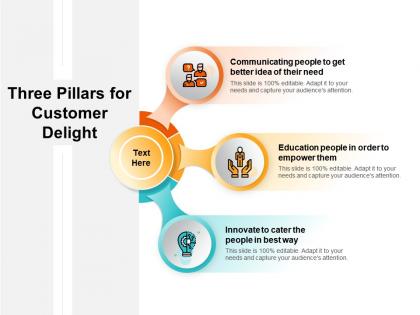
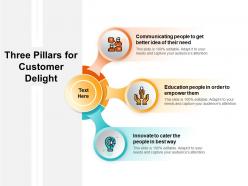
Three pillars for customer delight





Try Before you Buy Download Free Sample Product
 Impress Your
 Audience
 100%
100% Editable
 Save Hours
 of Time


Hail your cause with our Three Pillars For Customer Delight. Prove what a genuine devotee you are.
People who downloaded this PowerPoint presentation also viewed the following :
Three pillars for customer delight with all 2 slides:
You have evolved a process to improve diagnosis. Inject it into the system with our Three Pillars For Customer Delight.
FAQs for Three pillars
Honestly, templates are a game-changer for keeping clients happy. Your slides look way more professional when everything matches - same fonts, clean layouts, that whole polished vibe. Clients immediately think "okay, this person knows what they're doing." You'll save tons of time too since you're not messing around with design stuff. I used to waste like 30 minutes just picking colors, which is ridiculous. Templates also force you to organize your thoughts better, so clients can actually follow what you're saying. Get 2-3 good ones for different meeting types. Trust me on this.
Oh man, design is literally everything when it comes to looking legit. Clients will judge you in like 2 seconds based on how your stuff looks. I learned this the hard way lol. Clean fonts, consistent spacing, and colors that actually work together - that's what screams "I know what I'm doing." Messy layouts are such a credibility killer. You want polished but not like you're trying too hard, you know? Pick maybe 2-3 fonts tops and stick with a simple color palette. Trust me, making everything look intentional is way harder than it sounds but it's so worth it.
Honestly, customizing your presentation templates is a game changer for client satisfaction. They instantly see you put in real effort when their logo and brand colors are built right in. Generic pitches just scream "lazy" to me. You'll want maybe 3-4 solid base templates that you can tweak fast - different visuals, their industry lingo, relevant examples. Makes such a difference. Start with one template for each major type of client you work with. Takes a bit of setup time but clients notice when you speak their language instead of using the same boring deck for everyone.
Honestly, post-presentation surveys work pretty well - just ask clients to rate clarity and visual appeal on a 1-10 scale. Follow-up calls are even better though, people say way more over the phone than they'll ever write down. Try A/B testing different templates with similar client types too. Track your conversion rates and see which templates actually bring clients back for more work. I set up quarterly reviews of all this data - sounds boring but you'll spot patterns fast. Oh, and don't overthink the rating system, keep it simple so you'll actually use it.
Dude, visuals are a game changer - customers remember like 65% more info compared to boring text slides. Think about it: people only retain 10% of what they hear, but add some charts or images? Boom, 65%. I learned this the hard way after bombing a presentation once with nothing but bullet points. Your brain processes visual stuff way faster than reading paragraphs. Just don't go overboard with random graphics that don't actually relate to what you're saying. Try throwing in some simple charts next time - you'll see people actually paying attention instead of checking their phones.
Dude, the worst thing you can do is cram tons of text onto slides - it's like visual vomit. Your audience will tune out instantly. Inconsistent fonts and crappy low-res images make you look super amateur too. I've seen people use like 5 different colors that don't even match their brand. Honestly, stick to one key point per slide with lots of white space. Clean design beats busy every time. Your customers should be focused on what you're saying, not playing detective trying to read microscopic bullet points. Less is definitely more here.
Oh totally, it's like each industry has its own obsession. Tech bros are all about those engagement numbers and how many people actually use their stuff. Healthcare and banks? They're paranoid about trust metrics because nobody wants their doctor or bank screwing up. Retail lives and dies by repeat customers and NPS scores. Manufacturing gets weird about defect rates - which makes sense I guess. The trick is figuring out what your audience actually cares about before you walk in there. Don't show engagement data to a manufacturer, you know?
One main point per slide - trust me on this one. Focus on their actual problems instead of listing your product features, because nobody cares about specs until they know you get their pain points. Real case studies work way better than made-up examples that sound like they came from a textbook. I'd ask questions as you go rather than saving everything for the end. White space is your friend - cramped slides are the worst. Oh, and definitely practice your main points out loud beforehand so you're not fumbling around trying to remember what's next while also trying to read how they're reacting.
Honestly, good templates are everything for keeping clients happy. I've watched solid presentations completely bomb just because the slides were a mess to follow. Your clients need to focus on what you're saying, not struggle to figure out where to look next. Clean visual flow matters way more than people think. Consistent formatting helps too - sounds boring but it works. Oh, and make sure text is actually readable (you'd be surprised how often this gets overlooked). Put in the work upfront designing something logical and you'll definitely see better engagement during your pitches.
Stories in templates work so much better than boring bullet points. People actually remember them! I started adding quick customer examples to mine - like this one client who went from chaos to organized in two weeks. Makes everything click for people reading it. You can paint those "day in the life" scenarios too, or just drop in a mini success story. Honestly, it's wild how much more people engage when there's an actual human story vs. dry facts. Try swapping one template first - you'll notice the difference right away.
Yeah so delivery speed definitely affects how happy your customers are - the faster you get templates to them, the better they feel about working with you. People hate waiting around for stuff they need to finish their projects, you know? But don't sacrifice quality just to be fast because sloppy work will piss them off way more than waiting an extra day would. I learned this the hard way once. You want to hit that sweet spot where you're quick but still thorough. Track how long your deliveries take and see what customers say - that'll help you figure out the right timing for your specific crowd.
Here's what I'd track: conversion rates from presentation to closed deal are huge - that's your main number right there. Post-presentation surveys give you direct feedback, though getting people to actually fill them out is always annoying. Look at how long customers take to make decisions after seeing your templates. Shorter is usually better. NPS scores help if you're already doing customer check-ins. During presentations, I'd note engagement stuff like questions asked and meeting length. Oh, and retention rates tell you if people stick around after working with you. Honestly, just throw it all in a spreadsheet and check monthly for patterns.
Here's what I've learned - track what actually worked in your past presentations, not what you hoped would work. Check your meeting notes and feedback to spot patterns. Which slides got questions? What confused people? I used to go crazy with animations thinking they looked professional, but honestly clients just wanted cleaner charts they could actually read. Survey responses are gold for this stuff. Once you see the trends, bake those insights right into your template. Maybe it's ditching busy layouts or sticking to colors that don't strain eyes. Build what your audience responds to, not what looks cool.
Honestly, matching your branding in presentations makes such a huge difference for customer trust. People notice when your slides look professional and everything matches - the colors, fonts, messaging. It shows you've got your act together. Think of it like dressing nicely for an interview, you know? When stuff looks thrown together or inconsistent, customers start wondering if you're actually legit. Can't blame them really. Your message gets through way clearer too when there aren't visual distractions everywhere. Pro tip - just keep a branded template saved so you're not frantically trying to remember your exact brand colors at 11pm before a big presentation.
Honestly, visuals are a game changer for showing your value. Customers can instantly see their ROI and progress instead of slogging through boring reports. Nobody has time for that anymore. I learned this the hard way - used to send these massive text documents that probably went straight to their spam folder. Now I just throw the key metrics into clean charts and graphs. Suddenly they're like "oh wow, you actually delivered." It's wild how much perception changes. Pick your most important customer metrics first, then build simple visual templates around those. Way more effective than walls of text.
No Reviews