

UX Strategy Guide User Experience And Human Computer Interaction Strategy SS




Try Before you Buy Download Free Sample Product
 Impress Your
 Audience
 100%
100% Editable
 Save Hours
 of Time


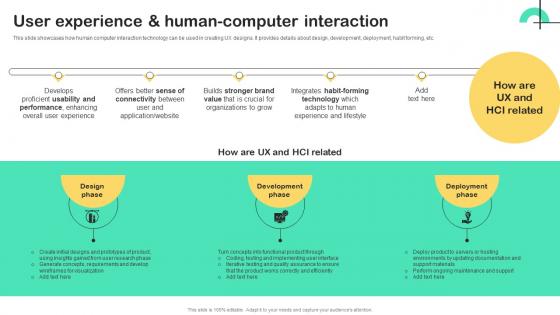
This slide showcases how human computer interaction technology can be used in creating UX designs. It provides details about design, development, deployment, habit forming, etc.
People who downloaded this PowerPoint presentation also viewed the following :
UX Strategy Guide User Experience And Human Computer Interaction Strategy SS with all 9 slides:
Use our UX Strategy Guide User Experience And Human Computer Interaction Strategy SS to effectively help you save your valuable time. They are readymade to fit into any presentation structure.









FAQs for UX Strategy Guide User Experience And Human Computer
Okay so you'll need four main things for a solid UX strategy. Business goals that actually match what users want, solid research on your users (like real personas, not made-up ones), metrics to track success, and a roadmap to get there. But here's the thing - stakeholder buy-in is huge. I've seen so many good strategies just... die in endless meetings because leadership wasn't on board. The sweet spot is when you can show how fixing user problems directly helps the business hit its numbers. I'd start by looking at what you already have, figure out the biggest holes, then go after those first.
First thing - figure out what your company actually cares about. Revenue goals? Getting new customers? Keeping the ones they have? Once you know that, connect your UX work directly to those numbers. Say they're worried about people canceling - focus on fixing onboarding instead of redesigning buttons for the millionth time. Honestly, executives tune out the moment you start talking about "user delight" without backing it up. Show them data. When you report back, always connect your UX improvements to their bottom line metrics.
Look, user research is literally the backbone of good UX - you need to know what problems you're solving and who you're solving them for. Otherwise you're just guessing based on what you and your team think, which... yeah, that usually goes badly. Research shows you real user needs and pain points so you can build the right stuff. Plus it's super helpful when your boss questions your design choices - you've got actual data to back yourself up. Oh, and start by figuring out what you don't know about your users, then pick whatever research methods will fill those gaps fastest.
So data analytics is basically your backup when you're making UX decisions - it shows you the hard proof of where users are actually getting stuck. Heat maps reveal click patterns, analytics catch those sneaky drop-off points, and A/B testing proves whether your design ideas actually work. It's honestly like x-ray vision for user behavior (sounds dramatic but it's true). User interviews are great, but they don't always catch everything. The trick is matching those numbers to real user needs and business goals. Just pick your key metrics first, then use that data to figure out which UX fixes will make the biggest difference.
Dude, prototyping is a lifesaver for testing your UX assumptions without blowing your budget. Start low-fi to nail down the big strategy stuff first. You'll catch pain points super early, and stakeholders actually get excited when they can click through real flows instead of staring at wireframes. Honestly? There's nothing more humbling than watching someone completely butcher your "brilliant" user journey - but that's the point! Your team stays aligned around actual experience instead of just talking in circles about concepts. Then bump up the fidelity as you go.
Start with whatever user research you've got - surveys, interviews, analytics. MoSCoW method works great for ranking stuff (Must have, Should have, etc.) or just do a simple impact vs effort matrix. Stakeholder workshops are honestly where the magic happens because everyone finally agrees on priorities instead of guessing what users want. User journey mapping helps too for spotting pain points. Oh, and always back everything up with real data, not hunches. First step though? Audit what research already exists, then figure out what's missing. Way easier than starting from scratch.
Honestly? Cross-functional collab is everything for UX strategy. Working in silos means your research gets buried and designs clash with what's actually feasible. But get product, engineering, and marketing talking regularly - total game changer. Everyone brings their expertise early instead of playing cleanup later. Your solutions become way more realistic and actually ship. I've seen teams completely transform just by doing weekly cross-team check-ins. Sounds simple but it works. The difference in outcomes is wild once everyone's aligned from the start.
Honestly? Most people skip user research and just guess what users want - huge mistake. Focus on max 2-3 user goals or you'll spread yourself too thin (I've watched so many teams do this). Your strategy needs to connect to business goals too, otherwise good luck getting anyone to care. Oh, and make it measurable! Not some vague "improve user experience" nonsense. Actually test one main assumption with real users first before you go crazy building out everything else. Trust me on this one.
Honestly, build in regular check-ins with users and don't ignore your data. I'd do quarterly reviews where you look at feedback, analytics, market changes - whatever's relevant. Teams get way too attached to old strategies (guilty of this myself). Your research needs to be agile too. Like, maybe ditch those long interviews for quick surveys when things move fast. Oh, and set up alerts for competitor stuff so you're not blindsided. The foundation should be solid but tactics? Those need to adapt. Short answer: stay flexible but grounded.
You'll want both behavioral stuff (task completion, time spent, error rates) and business numbers. Revenue metrics like conversion rates matter obviously, but honestly? Support ticket volume is super underrated - tells you so much about friction. Don't go crazy tracking everything though. Pick maybe 3-5 that actually connect to what you're trying to achieve. Session duration and retention are solid for engagement. Customer lifetime value if you're thinking bigger picture. Oh and measure beforehand! Otherwise you're just guessing if your changes worked.
Accessibility is honestly a game-changer for your whole UX approach. You'll end up with clearer navigation and better contrast that works for everyone - not just people with disabilities. It's weird how designing for accessibility actually makes things more intuitive across the board. The trick is building it in from day one instead of scrambling to fix things later (been there, done that). Run some accessibility audits on what you've got now. Then just make it part of your regular design reviews. You're missing out on a huge audience otherwise, and it really does make everything better.
Honestly, personas are like having a compass for your design decisions. They stop you from just guessing what users actually want (which always ends badly, trust me). Your whole team stays on the same page about who you're building for instead of everyone having different ideas. Features become way easier to prioritize when you know your users' main pain points. Design arguments get settled faster too - just ask "what would Sarah the busy mom do here?" Plus you won't fall into that trap where you design for yourself. Been there, it's awkward. Start basic though - even simple personas with key goals will change how your team thinks about problems completely.
Turn your research data into actual stories people can relate to. Like instead of "users want faster checkout," paint the picture of Sarah frantically trying to order birthday gifts on her lunch break - way more impactful than boring bullet points, honestly. Map user journeys like mini narratives with real emotions and struggles. Drop these stories into presentations and design reviews. Makes users feel like actual humans instead of spreadsheet entries. Oh, and stakeholders eat this stuff up way more than dry stats. Pick your most common scenario and story-fy it today.
Ugh, I learned this the painful way - speak their language, not UX jargon. Business outcomes are everything. Don't mention card sorting or personas (trust me on this one). Instead, show how your strategy boosts conversions or cuts down support tickets. Real data works way better than theory. User quotes are gold too. Make a simple one-pager that connects your UX priorities directly to their KPIs. Honestly, executives care about numbers, not your wireframe process. It's all about proving UX moves the needle on what they're measured on.
Honestly, you've gotta build feedback into every part of your UX process from day one. Don't just bolt it on later. Monthly user interviews are gold, plus keep your analytics running constantly and throw in quick surveys after you ship stuff. Here's the thing though – I've watched so many teams gather all this feedback and then... do absolutely nothing with it. That's actually worse than ignoring users completely. Create a real rhythm where what you learn this week changes what you build next week. Oh, and always tell users when their suggestions made it into the product – they love seeing that impact.
-
“Easy to use. I always wanted to have a quick search for products and SlideTeam has helped me have it.”
-
“I required a slide for a board meeting and was so satisfied with the final result !! So much went into designing the slide and the communication was amazing! Can’t wait to have my next slide!”
-
SlideTeam was so customer-centric and quick service-provider that I doubted the amount I was paying and literally re-checked the transaction.
-
SlideTeam, Please don’t stop sharing discount coupons! I love your occasional discounts and tend to buy your products around that corner.