

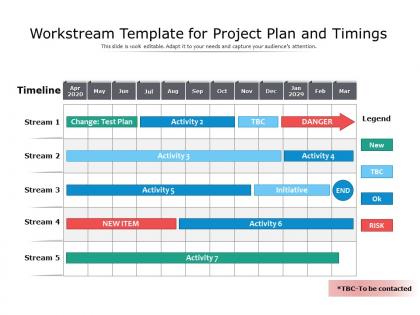
Workstream template for project plan and timings




Try Before you Buy Download Free Sample Product
 Impress Your
 Audience
 100%
100% Editable
 Save Hours
 of Time


Our Workstream Template For Project Plan And Timings are topically designed to provide an attractive backdrop to any subject. Use them to look like a presentation pro.
People who downloaded this PowerPoint presentation also viewed the following :
Workstream template for project plan and timings with all 2 slides:
Use our Workstream Template For Project Plan And Timings to effectively help you save your valuable time. They are readymade to fit into any presentation structure.
FAQs for Workstream template for project
Okay so definitely start with your objectives and what you're actually delivering - that's the foundation. Then map out who's doing what with a RACI matrix (saves so much confusion later). Timeline's obviously crucial, plus I'd add a risks section because honestly, when does anything go perfectly? Communication protocols are key too - like how often you're checking in and who to bug when things go sideways. Don't forget your budget constraints and how you'll measure success. Oh, and build in regular checkpoint dates from the start. You can always tweak the template once you see what works for your team.
So basically, workstream templates get your whole team aligned right from the start. No more "wait, who's handling this again?" moments. Everyone knows their role, when stuff's due, and what they need to deliver. The cool thing is people can actually see how their work fits with everyone else's - makes handoffs so much less painful. Plus it standardizes how you track progress and communicate, so if someone needs to jump in and help, they're not totally lost. Honestly? I was skeptical at first, but try it on your next project. You'll cut those endless alignment meetings in half.
Honestly? People just won't use the damn thing consistently - they always go back to their messy old habits. You'll get pushback from teammates who think it's too controlling or doesn't match how they work. Some folks really hate being told how to organize stuff, which I kinda get. Templates are tricky too - make them too detailed and people get overwhelmed, too basic and they're useless. Oh, and good luck keeping it updated when projects change! Start with something simple though. Get your team involved in picking it out so they actually care about using it. Be ready to tweak things based on what actually works.
So basically you just tweak the phases, tasks, and timing to fit whatever project you're working on. Like if it's software dev, throw in some sprints and testing stuff. Marketing? Focus more on creative work and launch prep. Start with whatever template feels closest to what you need - seriously saves so much time. Then mess around with the task order, drop in your specific milestones, maybe adjust who's doing what. Oh and most tools let you save your tweaked version as a brand new template. Super handy once you've got a few go-to versions for your usual project types.
Honestly, I'd go with Asana, Monday.com, or ClickUp - they're made for exactly this kind of thing. Microsoft Project is solid but way too much unless you're juggling crazy complex stuff. For basic templates, Google Sheets or Notion work great too. The real trick is picking whatever your team won't ignore after week one. I always tell people to start with what you already know, then switch later if you need fancier features. Just make sure you can actually save and copy templates without jumping through hoops - learned that one the hard way!
Honestly, workstream templates are a game-changer for keeping projects organized. They give you the same framework every time - standardized milestones, clear deliverables, defined roles. No more of that awkward "wait, I thought you were doing this" back-and-forth we've all experienced. Everyone knows their piece and when it's due. The best part? You can actually spot where things are getting stuck before they become real problems. I mean, I wish I'd started using these sooner - would've saved me so many headaches. The way everything connects becomes way more obvious too. Definitely try one on your next project and you'll see what I mean about accountability.
Honestly, visual design can make or break whether people actually use your templates. I've watched teams completely ignore messy ones while jumping on well-organized versions immediately. Clean layouts with consistent headers help people scan quickly instead of drowning in text chaos. Color coding different task types is clutch too - plus lots of white space so it doesn't look overwhelming. When things are visually clear, your team won't waste time figuring out what goes where. They'll just... actually get stuff done. Trust me, spending 10 minutes on decent formatting upfront saves hours of confusion later.
Set up quarterly reviews where you actually talk to the people using these templates. Find out what's broken or confusing. Someone needs to own this stuff - can't just create templates and walk away, you know? Track which parts teams always skip or change, that's your red flag right there. The forgotten templates are always the orphaned ones nobody feels responsible for. Oh, and when people give you feedback? Actually do something with it. Simple feedback loop beats fancy systems every time.
Dude, automation is a total game changer for workstream templates. I usually start with task assignments - set up triggers so work gets distributed automatically based on project type. Reminders for deadlines, status updates as things move along, all that happens without you touching it. The dependency thing is clutch though - tasks just fire off when the previous one's done. Oh and reports generate themselves which is honestly amazing. I probably save like 2-3 hours weekly just on status stuff alone. Maybe I'm lazy but who has time for all that manual work anymore? Start with your most common assignments first - you'll see results right away.
Here's the thing - workstream templates are basically like giving everyone the same cheat sheet. Marketing, engineering, sales... they're all following the same format for updates and timelines. No more guessing what the other team means or missing stuff during handoffs. Honestly, it's one of those boring things that actually makes a huge difference. You know how status meetings can be a total mess? Templates fix that. Everyone's literally speaking the same language. Try it on your next cross-team project - I bet those weekly check-ins will suddenly make way more sense.
Track the obvious stuff first - adoption rates, how fast teams finish projects, satisfaction scores. But honestly? The soft metrics tell you more. Are people actually less stressed during kickoffs? Teams complaining less about missed deadlines? Quality matters too. More consistent deliverables across teams is a good sign your template's working. Here's what I'd do - send out a quick survey after each project wraps. Nothing fancy, just "what sucked and what didn't?" That feedback will help you tweak the template over time. Sometimes the small fixes make the biggest difference.
After each project, get everyone together for a quick feedback session while it's all still fresh. Make a simple form - what worked, what sucked, suggestions for next time. Here's the thing though: you actually have to DO something with their feedback or people will just stop caring. Pick the biggest complaints first and tackle one small fix per round instead of changing everything at once. Oh, and definitely show them what you changed based on their input - otherwise it feels like you're just going through the motions, you know?
Get everyone together for hands-on practice - don't just explain the template, make them actually fill it out. Use a real project as your example so they can see how everything connects. People learn way faster when they're doing it themselves, trust me. Explain the "why" behind each section too. Once they get the purpose, they'll actually use it right. Oh, and pick someone on each team to be your go-to person for questions - saves you from being the bottleneck later. Do quick check-ins the first couple weeks to catch problems early.
Build your template around async work from the start. Map out what needs real-time collab vs. what can happen solo - honestly, most stuff doesn't need everyone online together. Add sections for decision logs, handoff notes, and each person's preferred communication style. Don't forget timezone windows! I'd include async check-in schedules too since you can't just pop by someone's desk anymore. Make everything visible and trackable. Short version: assume people won't be available at the same time and plan accordingly.
Yeah totally! So basically you just tweak the templates for whatever industry you're in. Healthcare needs all those compliance checkpoints and privacy stuff built in. Manufacturing? Safety protocols and quality gates are huge. Financial companies have to add risk assessments and regulatory approvals - that stuff's non-negotiable. Tech teams get super picky about their sprint cycles and code reviews (honestly they can be pretty intense about it). Retail's more about seasonal planning and inventory milestones. Just figure out what your industry absolutely can't skip and build those steps right into the template structure.
No Reviews