

Weekly timeline of project management process




Try Before you Buy Download Free Sample Product
 Impress Your
 Audience
 100%
100% Editable
 Save Hours
 of Time


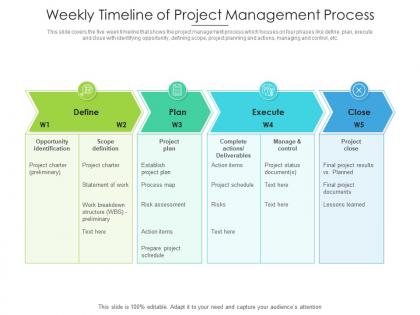
This slide covers the five week timeline that shows the project management process which focuses on four phases like define, plan, execute and close with identifying opportunity, defining scope, project planning and actions, managing and control, etc.
People who downloaded this PowerPoint presentation also viewed the following :
Weekly timeline of project management process with all 2 slides:
Use our Weekly Timeline Of Project Management Process to effectively help you save your valuable time. They are readymade to fit into any presentation structure.
FAQs for Weekly timeline of
So you need the basics first - milestones, deadlines, who's doing what. Task dependencies are huge too, like what can't start until something else wraps up. Always add buffer time because honestly, I've never seen a project go perfectly to plan lol. Map out your critical path early - that's the chain of stuff that'll delay everything if it goes sideways. Work backwards from your big deadlines, then fill in the smaller pieces. Don't forget external stuff like vendor deliveries or waiting on client feedback. Oh, and actually assign people to tasks - sounds obvious but you'd be surprised how often that gets missed.
Honestly, Gantt charts are a game changer for messy projects. They show all your tasks as horizontal bars so you can actually see what's happening when. No more drowning in spreadsheet hell! The cool part is spotting those "oh crap" moments early - like when you realize Task B is just sitting there waiting for Task A to wrap up. Your boss will love them too since they're super easy to read at a glance. I always tell people to start with just the big milestones first, then add details later. Makes the whole thing way less overwhelming.
Here's what I'd do - work backwards from your end goal and mark actual deliverables, not just busy work. Like "design signed off" instead of "spent 3 weeks designing." Space them maybe 2-4 weeks apart? Your team should help decide what makes sense since they're doing the actual work. Each milestone needs to be something you can clearly check off - none of that vague "making progress" stuff. I made this mistake before and it was a mess trying to figure out where we actually stood. Make sure everyone's on the same page about what "done" looks like for each one.
Honestly, timeline management is what keeps projects from completely imploding. You'll catch problems before they snowball, figure out where to put your people, and actually give stakeholders dates that make sense. Without it? You're basically just crossing your fingers and hoping for the best. The real game-changer is mapping out how tasks connect - when one thing gets delayed, you won't be blindsided by everything else that depends on it. Oh, and always pad your estimates. I learned this the hard way, but there's literally always some random thing that goes sideways. Buffer time saves your sanity.
Honestly? Asana and Monday.com are solid if you need something heavy-duty, but I've seen teams crush it with just Google Sheets. Sometimes the simple stuff works better than all the bells and whistles. Microsoft Project's good too if you're into that. The real trick is finding something everyone will actually update - otherwise you're screwed. Gantt charts look super professional for stakeholders (Smartsheet's great for this, or even PowerPoint if you're being scrappy). Just make sure whatever you pick has decent sharing so people aren't working off old versions. That's the worst.
Okay so first, figure out what actually changed and how it messes with your timeline. Don't just panic and move everything around - I did that once and it was a disaster. Focus on the tasks that are genuinely affected, not the ones that just feel scary right now. Can you move people around? Run some stuff at the same time? Maybe cut scope somewhere? Tell everyone what's happening ASAP. People would rather hear "this'll take two extra weeks" than have you promise something impossible. Oh and write this stuff down - you'll need it later when someone asks why things shifted.
Honestly, good stakeholder communication is like having a crystal ball for your project. You'll catch scope creep before it murders your timeline, and people won't randomly dump new requirements on you halfway through (the worst, right?). Regular check-ins help you spot problems early too. I swear, even just sending quick weekly updates makes stakeholders feel way more involved - then they're actually helpful when you need timeline changes instead of fighting you on everything. Set up those regular touchpoints from day one. Trust me on this.
Oh man, methodologies totally flip your timeline game. With Waterfall you get those neat, predictable milestones - works great until something changes (spoiler: something always changes). Agile's more like constant pivoting every sprint based on what you figure out. Kanban doesn't even care about dates really, just flow - which is weirdly liberating but also kinda stressful? Scrum keeps you grounded with regular check-ins. Honestly, just match whatever method fits how unpredictable your project is, then build your timeline around that instead of trying to jam everything into the wrong box.
Honestly, the worst thing you can do is be way too optimistic about timing. I learned this the hard way lol. Never schedule things back-to-back because something will definitely run over. Dependencies are huge too - map those out first or you'll be scrambling later. Buffer time is your best friend, especially for approval cycles and when Karen from accounting suddenly needs something "urgent." Oh, and actually ask your team how long stuff takes instead of just guessing. Resource availability always bites people too. Start with dependencies, then pad everything.
Look at your old projects and track how long stuff actually took vs what you thought it would. I swear I'm always way too optimistic with my initial guesses! Build a simple spreadsheet comparing estimated vs real times for different project types. Pay attention to where you hit roadblocks consistently - like waiting for approvals or whatever. Also factor in seasonal stuff that might slow things down. Once you start seeing patterns in your team's actual speed, you can build in realistic buffer time. It's honestly been a game-changer for my planning.
Honestly, start with the basics - track how long tasks actually take versus what you estimated. Schedule variance is your friend here. Also watch your milestone hit rate and whether you're sticking to the critical path (that's where things get messy fast). Resource stuff matters too - when people aren't available, everything falls apart. Compare your original timeline against what actually happened and look for the biggest gaps. Oh, and definitely start tracking this on whatever project you're doing now so you'll have real data to work with next time instead of just guessing.
Honestly, just throw everything into Asana or Monday - those project management tools are lifesavers. When you update deadlines or mark tasks complete, everyone gets pinged automatically. No more of those weekly "here's where we're at" emails that nobody reads anyway. Google Sheets works too if you're being cheap about it. The real game-changer? Everyone sees the same current version instead of passing around random PDFs. I'd set up weekly reports to send themselves - basically the timeline updates itself while you're doing actual work. Just pick one tool and make sure people actually use it consistently.
Honestly, timelines are a game-changer for spotting who's drowning vs who's bored. Like, you'll see Sarah's completely swamped next week but Tom's just sitting there twiddling his thumbs - perfect time to move stuff around. The budget thing is huge too. Can't tell you how often I've caught expensive contractors just... waiting around for no reason. Definitely check yours weekly though, not whenever you remember (guilty as charged). Things change so fast that last month's plan is basically useless. Once you get in the habit, resource juggling becomes way less stressful.
Honestly, weekly check-ins are your best friend here - make everyone report actual progress against milestones. Always pad your timeline with buffer time because something will definitely break (learned this the hard way). Project management tools help you spot where things are getting stuck. The second delays pop up, deal with them immediately. Don't just cross your fingers and hope they magically fix themselves. When stuff goes wrong - and it will - just adjust the timeline instead of pretending everything's fine. Oh, and track planned vs actual progress from the start so you'll know where you typically mess up.
Dude, get everyone on the same collaboration tool and you'll actually see what's happening with your projects in real time. No more digging through endless email threads to figure out where things stand. When deadlines change or someone hits a roadblock, you'll know immediately instead of three weeks later. The notifications keep people honest too - can't really ignore a task when it's staring at you in Slack all day. My team uses our project manager connected to whatever chat app we're already glued to anyway. Honestly saves me from so many "wait, what's the status on this?" conversations. You'll spot problems way earlier.
-
Unique design & color.