

Yearly Work Plan Powerpoint Ppt Template Bundles





Try Before you Buy Download Free Sample Product
 Impress Your
 Audience
 100%
100% Editable
 Save Hours
 of Time


Our Yearly Work Plan Powerpoint Ppt Template Bundles are topically designed to provide an attractive backdrop to any subject. Use them to look like a presentation pro.
People who downloaded this PowerPoint presentation also viewed the following :
Yearly Work Plan Powerpoint Ppt Template Bundles with all 17 slides:
Use our Yearly Work Plan Powerpoint Ppt Template Bundles to effectively help you save your valuable time. They are readymade to fit into any presentation structure.

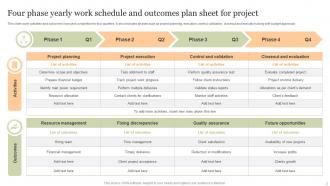
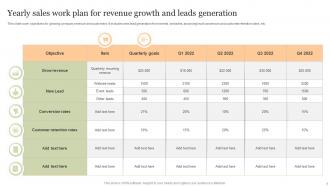
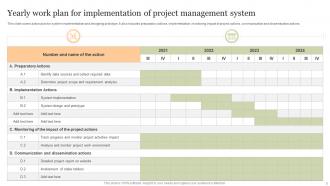






FAQs for Yearly Work Plan Powerpoint
Honestly, start with your biggest goals and work backwards from there. Break everything into quarterly chunks with actual deadlines - not just "Q2" but like specific dates. Don't forget the budget part (I always space on that initially). You'll need to map out what resources you actually have and spot any dependencies that could mess things up. Success metrics are crucial or you'll just be flying blind all year. Oh, and build in quarterly check-ins because priorities always shift. The timeline should stretch your team a bit but not be totally unrealistic.
So here's what works for me - take those big strategic goals and chop them into actual doable projects for the year. Quarter planning is huge (seriously, timing can make or break a project). Make sure someone owns each initiative and you've got the resources lined up. The main thing? Every major project should tie back to at least one strategic goal. Otherwise you're just spinning your wheels looking busy. I learned this the hard way at my last job - we were constantly "productive" but going nowhere. Check in quarterly to see if you're still on track. Things shift, priorities change.
Honestly, there's so many good options it kinda depends on what vibe you're going for. Asana and Trello are solid for breaking big yearly goals into smaller pieces - I personally love Trello's card system. Monday.com works great too if your team's into that. Microsoft Project gets heavy with the Gantt charts but some people swear by it. Or you could just stick with Google Sheets if you want something simple that everyone already knows how to use. My friend actually runs her whole business planning through one crazy detailed Notion page and it works perfectly. Pick whatever your team will actually stick with - that's honestly the biggest factor.
Honestly, I'd check it monthly if you can swing it - just like 15 minutes to see where you're at. Quarterly reviews are the bare minimum but monthly feels way more manageable somehow? Do deeper dives every quarter where you actually mess with timelines and budgets. People who wait until mid-year are basically asking for trouble lol. Things change constantly - team stuff, money gets moved around, priorities flip. I learned this the hard way when I ignored mine for like 6 months straight. Set a calendar reminder right now or you'll definitely forget.
Honestly, the biggest mistake is being way too ambitious - like thinking you can overhaul your entire business model by March. Most plans are also stupidly vague, which makes them completely useless when you're actually trying to make decisions. Build in buffer time because random stuff always comes up (trust me on this one). Your team needs to be part of the planning process from the start. Otherwise they'll just ignore whatever you come up with. Oh, and don't set it and forget it - check in every quarter to see if you're still on track.
Honestly, you've got to assign one person to own each big goal - otherwise everyone assumes someone else is handling it. Monthly check-ins work best in my experience. Track stuff that actually moves the needle, not just random busy work that makes you feel productive. Here's the thing though - people need to know they'll be asked about their progress regularly. That expectation alone changes everything. Throw together some simple status updates or a shared tracker so the whole team can see what's happening. Oh, and start your next meeting by picking one section of the plan to review together.
Honestly, just pick 3-5 metrics that actually matter for your goals - don't go crazy tracking everything. I'd focus on the obvious stuff like goal completion rates, whether you hit deadlines, and budget variance. Revenue growth and customer retention are no-brainers too. But here's the thing - numbers only tell half the story, so throw in some team satisfaction surveys or stakeholder feedback. Process improvements are solid to track as well. Oh, and definitely do monthly check-ins so you can pivot if things go sideways. I learned that one the hard way lol.
Honestly, visuals are a game-changer for yearly plans. Charts and graphs let people see progress instantly instead of getting lost in endless spreadsheets. I always color-code different departments - makes everything so much cleaner. Icons help break up those massive text blocks that nobody wants to read anyway. Timeline visuals are probably the most useful though, especially for showing how projects connect. Oh, and keep your colors consistent throughout or it'll look messy. Trust me, your team will actually want to look at it instead of avoiding it like the plague.
Look, stakeholder input is make-or-break for your work plan. Without it, you're basically planning in a vacuum and hoping for the best. I made that mistake once - skipped the stakeholder calls and got completely blindsided in Q3. Total mess. What you want to do is grab 15-minute chats with key people early on. They'll tell you their priorities, budget constraints, what's actually realistic timeline-wise. Plus they know about dependencies you'd never think of. Yeah, it feels like extra work upfront, but trust me - it's way better than spending months redoing everything because you missed some critical piece. Short conversations now = way less pain later.
Honestly, quarterly check-ins are a game changer - build those right into your plan from day one. When COVID hit in 2020, it totally wrecked our goals, but we learned to treat plans like living documents instead of stone tablets. Reserve about 15-20% of your timeline as buffer space (trust me on this). Here's the thing though - stay laser focused on WHAT you want to achieve, just be flexible on HOW you get there. Markets shift, priorities change, whatever. Review every three months and don't be afraid to move resources around between projects rather than throwing everything out.
Honestly, SMART goals are a game-changer because they turn those fuzzy "I want to do better" thoughts into something you can actually measure. Your work plan without them? Just another document nobody looks at again. They make you get super specific about what "done" looks like and when you need to finish. Plus they help you figure out what resources you'll actually need - which I always forget to think about upfront. When priorities inevitably shift (because they always do), you can pivot way easier. Just ask yourself "how will I know when this is complete?" That question alone changes everything.
So basically each department submits their goals, budgets, and big projects for next year. HR does hiring plans and training stuff. Finance handles the money side - budgets and where to cut costs. Marketing lays out their campaign timeline, operations focuses on improving processes. IT always gets way too excited about their new tech toys and system upgrades (honestly they live for that). The trick is collecting all this info early - like 2-3 months ahead - so you can catch overlaps and figure out who needs what resources. Otherwise you'll have departments fighting over the same budget or people.
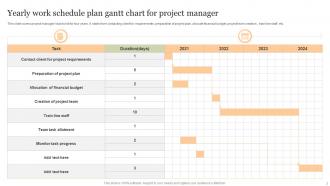
Honestly, go with a Gantt chart for your yearly planning. They're way better than basic timeline formats because you can actually see how everything connects - dependencies, when projects overlap, potential bottlenecks down the road. I mean, timeline formats work but they're pretty limited once things get complicated. What's cool about Gantt charts is you can zoom into specific months or quarters without losing sight of the bigger picture. Most project management tools will build them automatically from your task lists anyway, which saves time. Just grab a simple template and tweak it for however your team actually works.
Oh totally, go dig up last year's feedback first - it's basically free intel on what went wrong. I used to skip this and just repeated the same dumb mistakes every time. Check what goals you actually missed and why, plus which timelines were way too optimistic (we're all guilty of that). Also look for where communication broke down or things got stuck. Then when you're planning this year, you can build in extra time and fix those problem areas. Honestly, just finding last year's notes is half the battle sometimes.
Honestly, turn it into something interactive instead of just another doc people will scroll past. Do quarterly check-ins where everyone shares their wins and what's blocking them - way better than solo admin work. Visual progress tracking helps too, and definitely celebrate when you hit milestones. I learned this the hard way after watching so many plans just... disappear into the void. Connect people's daily tasks back to why it actually matters for the bigger goal. Updates should feel like a team thing, not homework. Short version: make it feel alive, not like paperwork.
-
I took a chance with SlideTeam. I never looked back. Great products and great service.
-
Been using SlideTeam for some time now…can’t imagine why I wasted all that time in front of the screen trying to make the perfect presentation.