

HR Annual Report Powerpoint PPT Template Bundles





Try Before you Buy Download Free Sample Product
 Impress Your
 Audience
 100%
100% Editable
 Save Hours
 of Time


Our HR Annual Report Powerpoint PPT Template Bundles are topically designed to provide an attractive backdrop to any subject. Use them to look like a presentation pro.
People who downloaded this PowerPoint presentation also viewed the following :
HR Annual Report Powerpoint PPT Template Bundles with all 17 slides:
Use our HR Annual Report Powerpoint PPT Template Bundles to effectively help you save your valuable time. They are readymade to fit into any presentation structure.
-

HR Annual Report
-
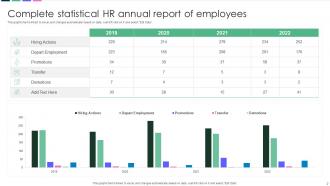
Complete statistical HR annual report of employees
-
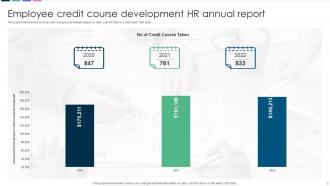
Employee credit course development HR annual report
-
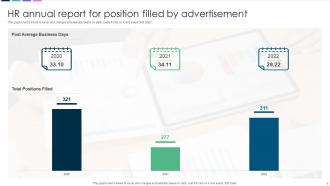
HR annual report for position filled by advertisement
-
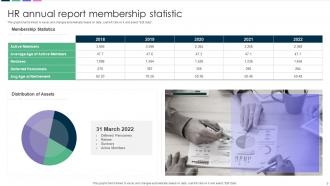
HR annual report membership statistic
-
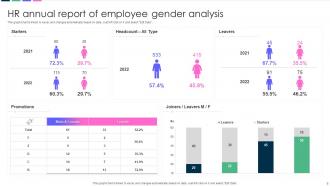
HR annual report of employee gender analysis
-
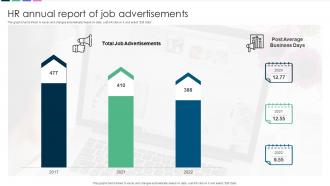
HR annual report of job advertisements
-
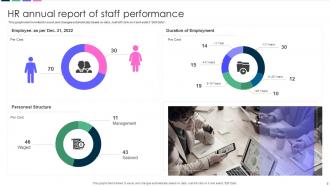
HR annual report of staff performance
-
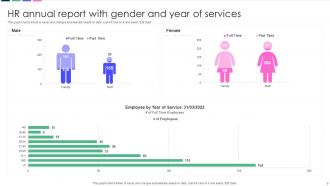
HR annual report with gender and year of services
-
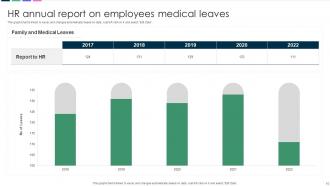
HR annual report on employees medical leaves
-
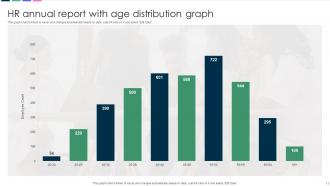
HR annual report with age distribution graph
-
HR Annual Report
-

-

-

-

-

FAQs for HR Annual Report Powerpoint
Start with the basics - turnover rates, time-to-fill positions, and training completion rates. Engagement survey results are gold because executives actually pay attention to those. Performance review scores matter too. Honestly, diversity metrics and promotion rates tell you way more about company culture than people realize. Don't skip absenteeism patterns either. If finance will share it, revenue per employee is probably your strongest number. Just pick 6-8 metrics though - nobody's reading a 20-page data dump, trust me.
Ditch the boring spreadsheets and go visual - charts, graphs, infographics work way better. Break things down by department and include actual employee quotes from surveys (trust me, those quotes make everything feel authentic instead of just cold numbers). Show year-over-year stuff and briefly explain what caused the changes, like new programs or whatever challenges hit. Oh, and don't just highlight the wins - be honest about problem areas too. Leadership appreciates that transparency. End each section with concrete next steps so they know you're thinking ahead strategically, not just reporting random data.
Honestly, visual design can make or break your HR report. Nobody's gonna read pages of dense text about enrollment stats - trust me on that one. Clean layouts help a ton, plus consistent branding makes you look professional. Charts and infographics are your best friends for breaking up boring blocks of text. The whole point is guiding people through your key metrics smoothly. Even leadership pays more attention when stuff looks good. Don't cheap out on templates or design tools. Oh, and make sure everything flows logically - you want readers following your story, not getting lost halfway through.
Honestly, sprinkle those D&I numbers throughout instead of dumping them in one section. Hit the basics - hiring percentages, retention by demographic, pay equity stuff. But here's what really matters: those employee survey results about belonging and inclusion. That's where you get the real story, not just dry stats. Track promotions across groups too, maybe throw in ERG participation rates. The trick is tying it back to your values with something like "Our 15% bump in diverse leadership directly backs our inclusive excellence goal." Don't just report the data though - explain what it actually means and what you're doing about it. Otherwise it's just numbers on a page.
Honestly, your HRIS is where I'd start - it's got all the good stuff like headcount and turnover data. Pull from your performance management system too, plus any employee surveys you've run. Exit interviews are clutch if you have them. Oh, and grab training completion rates from your LMS and recruiting numbers from the ATS. If you're missing sentiment data, maybe do a quick pulse survey? People actually like being asked their opinion directly. Pro tip: set up a spreadsheet early to track everything. Trust me, you don't want to be hunting down data sources the night before your deadline.
Stop drowning people in spreadsheets! Real employee stories are what make HR reports actually readable. Open each section with someone like Sarah using the wellness program or Marcus getting promoted through leadership training. Data's important, but hook them first with the story, then back it up with numbers. Before-and-after scenarios work great too - honestly, executives remember stories way better than charts. Let employees share their wins in their own words when possible. The whole "story → data → results" structure just flows better. Your reports will go from snoozefest to something leadership might actually finish reading.
Start with the basics: turnover rates, how long it takes to fill jobs, and what you're spending on training. Salary benchmarks are huge - trust me, people will jump ship fast if your pay sucks compared to competitors. I'd also track engagement scores and absenteeism rates. SHRM and Glassdoor have solid data for comparisons, plus whatever industry reports you can find. Honestly though, pick maybe 5-6 metrics that actually move the needle for your business. Don't get lost trying to measure everything - that's just analysis paralysis waiting to happen.
Okay so here's the thing - you gotta speak their language, which is basically just money. Take your retention program and show them it saved $500K in turnover costs. Leadership training? That boosted productivity 15%. I learned this the hard way, but executives literally don't care about "improved company culture" unless you've got numbers. So when you do culture work, prove it led to 20% higher engagement scores and 30% fewer sick days. Everything needs to connect back to revenue, cost savings, or making operations run smoother. It's annoying but that's how you get their attention.
Start strong with your wins and key numbers right at the top - executives love that stuff. Then go chronological: hiring, development, retention, comp & benefits, compliance updates. Honestly, I'd put your best charts and data right in the middle where people actually focus instead of skimming. Each section should tell the story of outcomes, not just "we did this activity." Show how HR moved the business forward. Oh, and definitely end with what you're planning for next year so they know what's coming down the pipeline. Templates are fine but tweak them for what your leadership team actually cares about.
So instead of just counting heads for your annual report, HR analytics actually shows you what's going on. Think turnover patterns, engagement trends, diversity breakdowns - the real stuff. The dashboards are pretty sweet now, they'll create charts that actually make sense of your workforce data. You'll catch things you'd never see in Excel, like which teams are bleeding people or weird hiring spikes. Oh and seasonal patterns too - that was a game changer for us. Figure out what story you want to tell first, then dig into the data to prove it.
Ugh, data collection is such a nightmare - every department does their own thing and nothing matches up. Metrics are all over the place. Plus these reports always creep up way faster than you think they will. What I'd do is get your data framework sorted early, like January early. Make templates that people will actually want to use (not some complicated spreadsheet from hell). Standardize how teams measure stuff so you're not trying to compare apples to motorcycles later. Oh and do quarterly check-ins - trust me, you don't want to be that person frantically emailing everyone in December.
So grab 2-3 solid examples that show real results - like how your mentorship thing helped someone snag a promotion or your wellness program actually cut down sick days. Stories beat boring data every time, trust me. Throw in some quotes and before/after stuff with actual numbers. Just make sure you get permission from people first (learned that the hard way once). Then drop these stories right after the sections they relate to. It's way more convincing than just listing accomplishments. Oh, and pick cases where you can actually measure what happened - makes everything more legit.
You absolutely need employee feedback in there! Leadership gets real data about how people actually feel instead of just boring numbers. When employees see their voices heard at the executive level, it builds serious trust. Plus you'll spot engagement trends and culture problems way easier. Honestly, most companies skip this part and wonder why morale sucks. Make sure you don't just cherry-pick the good stuff though - include the constructive criticism too. That balanced approach is what actually drives change. Your workforce will respect the transparency, and executives get the full picture they need.
Figure out who actually needs this thing first - leadership, department heads, board members, maybe the whole company if you're that type of place. Email's obviously the go-to, but throw it on your intranet too. Here's the thing though: nobody reads these reports unless you make them care. Don't just dump a PDF in their inbox. Write a summary email that hits the big wins and important numbers upfront. That's what gets attention. If the data's really significant, you'll probably want to do some face-to-face presentations with leadership afterward.
Focus on remote work flexibility and how AI's changing jobs - that's what execs actually care about right now. Mental health support is huge too, don't sleep on that. Skills-based hiring matters because everyone's scrambling for talent. DEI and sustainability aren't trendy anymore, they're just expected at this point. Internal mobility programs are smart since people want growth opportunities. Honestly, career development stuff always looks good on reports. Rather than cramming everything in, pick like 2-3 trends that actually fit your company's direction and go deeper. Leadership wants to see you're thinking ahead, not just checking boxes.
-
I am not the best at presentations but using SlideTeam’s PPT template made it easier for me. Thank you SlideTeam!
-
The design is very attractive, informative, and eye-catching, with bold colors that stand out against all the basic presentation templates.