

1114 editable thermometer graphic powerpoint presentation




Try Before you Buy Download Free Sample Product
 Impress Your
 Audience
 100%
100% Editable
 Save Hours
 of Time


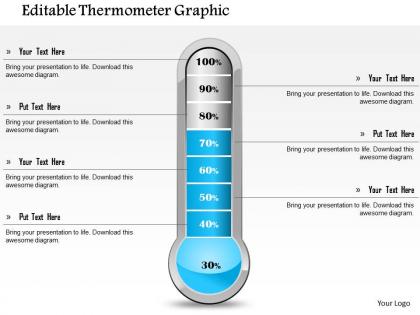
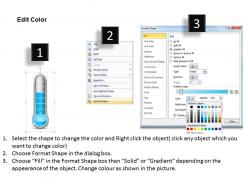
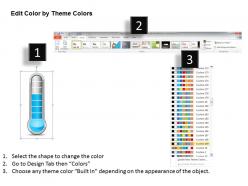
Do you want to design an effective presentation? Then use our editable thermometer graphic PowerPoint presentation. This PowerPoint template slide has been crafted with the graphic of a thermometer. This PPT contain the concept of measurement of temperature. Use this Ppt for your science and technology related topics. This Ppt slide is editable so you may put your data in this Ppt slide and make personal presentations based on your data. These visuals are crafted by the team of creative and innovative designing experts after complete research and analysis of the subject. Success requires audacity if you have the courage to take the right step without any fear of failure then you can easily manage it in a wise manner. Text boxes visible here allows you to write a brief about the topic in concern and provides information to the viewer. This is the most convenient way of modeling and constructing your process of information flow. So, get ready for a classic experience with our excellent design. Direct them on the course to follow with our 1114 Editable Thermometer Graphic Powerpoint Presentation. Establish your authority at the helm.
People who downloaded this PowerPoint presentation also viewed the following :
1114 editable thermometer graphic powerpoint presentation with all 5 slides:
Don't allow big gatherings to deter you with our 1114 Editable Thermometer Graphic Powerpoint Presentation. The crowd is bound to get behind you.
FAQs for 1114 editable thermometer
Honestly, thermometer charts are clutch because everyone instantly knows what they're looking at. Like, we've all seen those fundraising posters since we were kids, right? Your brain just gets it without any explanation. During meetings you can update the numbers live when someone asks "what if we hit 85% instead?" - super useful. I usually do red for stuff we're behind on, green when we're killing it. Way better than those boring bullet point slides that put everyone to sleep. Plus they actually look professional compared to basic bar charts.
You know how nobody actually reads those boring spreadsheets? Editable thermometer graphics fix that problem instantly. They show progress visually - like 75% project completion or quarterly targets - so people get it at a glance. Way more engaging than data dumps. Colors and labels are totally customizable too, which is clutch for matching your brand or whatever story you're telling. I've started using them for KPI dashboards and milestone tracking. Honestly, your audience will actually look at the numbers for once instead of just scrolling past them.
Honestly, just go with Canva if you want something quick and decent-looking. They've got a bunch of thermometer templates already made, and you can mess around with colors and fonts pretty easily. Takes like 10 minutes max. Adobe Illustrator's obviously way more powerful if you're into that kind of thing, but it's overkill unless you need super specific customizations. PowerPoint works too - I know it sounds weird but it's actually not terrible for basic stuff like this. Start with Canva though. You can always upgrade later if you hate it, but honestly most people don't need anything fancier.
Thermometer graphics are perfect for tracking progress toward specific targets - fundraising campaigns, sales goals, that kind of stuff. Everyone instantly gets how they work since we all know thermometers, so no confusing your audience with complicated charts. Use them when "filling up" actually makes sense for your data. They're great for dashboards where people need to quickly check if you're hitting targets. One thing though - make sure your goal is realistic. Nothing's more depressing than a thermometer that barely moves! The visual metaphor of "heating up" as you get closer really works for most people's brains.
Colors totally change how people read your thermometer chart. Red screams danger or urgency - blue feels chill and calm. Green's your best bet for progress tracking since it feels positive and "go." Yellow works for warnings or middle-ground stuff. Match the vibe you want, basically. Fundraising progress? Go green. Risk levels? That red-yellow-green traffic light thing everyone knows. Oh, and different cultures see colors differently, so there's that too. I'd probably stick with the obvious choices unless you've got a specific reason not to.
Yeah, definitely! Thermometer graphics work really well with other stuff - charts, timelines, infographics, whatever. I've seen people pair them with before/after comparisons that hit pretty hard. The trick is not letting your thermometer steal the whole show, you know? Make it the main focus with supporting visuals around it, or build it into a dashboard-style thing. Honestly, I think they look best when everything feels clean but not too sterile. Just don't overcrowd the space or you'll lose the impact.
Honestly, the biggest trap is making your fill area super complex - just use basic rectangles or simple shapes. Otherwise your progress bar will be janky as hell when it updates. Also don't hard-code the scale values into the actual graphic, that's kind of defeating the point of making it editable in the first place. Leave tons of white space around your text too! Can't tell you how many times I've seen numbers get chopped off when the values change. Oh and test your color contrast - especially if someone might print this thing in black and white later. Try it with different data ranges before you call it good.
Okay so basically you want it big enough that people in the back can actually see the numbers without squinting. I'd say shoot for like 30% of your slide height if it's your main graphic. Too small and everyone's leaning forward trying to read it - super annoying. But don't go crazy huge either or it'll just look weird and take over everything. Oh and if you're doing it virtually, you can get away with slightly smaller since people are right up on their screens anyway. Quick test: stand across the room from your laptop. Can you read it clearly? If not, make it bigger. Trust me, I've sat through way too many presentations where I literally couldn't see the chart from my seat.
Make your labels big enough to actually read - I can't tell you how many tiny, squished thermometers I've seen that are completely useless. Round numbers work best, like every 10% or 25% intervals depending on what you're tracking. Don't cram too many data points on there or it'll look messy. Oh, and definitely make your target goal super obvious - that's the whole point, right? If you've got different threshold levels, throw some color-coding in there. One last thing: check how it looks on mobile since that's probably where most people will see it anyway.
Dude, those animated thermometer graphics are honestly pretty genius for keeping people engaged. Instead of boring static charts, you've got this visual progress thing happening that builds actual suspense. People watch that mercury climb and they're genuinely curious where it'll end up. Works great for fundraising, sales targets, project updates - basically anything with a goal. The movement breaks up your presentation too, which is clutch because let's face it, most presentations are a snoozefest. Pro tip: update it live while you're presenting if you really want to blow their minds.
Definitely use bold progress indicators and make those numerical scales super clear - you don't want people squinting at tiny numbers. The fill color needs to pop against the background, and I'd throw in some percentage markers next to the temperature values. Space for a title is obvious, but also think about target indicators that stand out visually. Honestly, the worst thermometer designs I've seen have cramped, illegible text. Keep everything vector-based so it scales properly, and make text fields editable. Test it at different sizes because what looks good large might be unreadable when shrunk down.
So keyboard navigation is your starting point - let people tab through and use arrow keys to adjust temps. ARIA labels are clutch here since screen readers need to know what's happening. Oh, and don't go red/green for indicators - colorblind folks can't tell the difference. Audio feedback when values change is pretty nice too. Honestly, color contrast matters way more than people think. Skip relying just on visual stuff like color changes. Add some text alternatives. Before you call it done, actually test with real screen reader software because that's where you'll catch the weird edge cases.
Oh, nonprofits and political campaigns use these constantly - makes total sense for showing donation progress. Sales teams are obsessed with them for quarterly targets too. Project managers throw them on everything for milestones. You'll see healthcare orgs using them for vaccination rates and stuff like that. Honestly, thermometer charts work anywhere you need that "we're almost there!" vibe. Though I'd probably start with whatever number your audience actually cares about first - no point making it pretty if they don't care about the goal, you know?
Oh totally! Canva's probably your best bet - super easy to use and they've got tons of thermometer templates you can mess around with. PowerPoint actually has decent chart tools too if you want to build one from scratch. Freepik's another good option, just gotta credit them which isn't a big deal. Sometimes Unsplash has vector ones you can edit. Honestly I'd just start with Canva since you can export however you need and their interface doesn't make you want to throw your laptop out the window lol. Google Slides works too if you're already in there.
User feedback is seriously the best way to make your thermometer graphics actually work. I'd suggest doing quick surveys or just watching people's faces when they look at your designs - you'll catch so much stuff you missed. Can't tell you how many times I've seen designers create these elaborate graphics that nobody understands. Ask specifically about colors and whether the progress thing makes sense. Sometimes what looks obvious to you is totally confusing to everyone else. Take their input and tweak your templates until they actually click with people.
-
Graphics are very appealing to eyes.
-
Excellent work done on template design and graphics.