

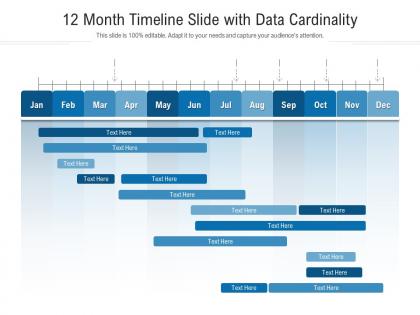
12 month timeline slide with data cardinality infographic template




Try Before you Buy Download Free Sample Product
 Impress Your
 Audience
 100%
100% Editable
 Save Hours
 of Time


Our 12 Month Timeline Slide With Data Cardinality Infographic Template are topically designed to provide an attractive backdrop to any subject. Use them to look like a presentation pro.
People who downloaded this PowerPoint presentation also viewed the following :
12 month timeline slide with data cardinality infographic template with all 2 slides:
Use our 12 Month Timeline Slide With Data Cardinality Infographic Template to effectively help you save your valuable time. They are readymade to fit into any presentation structure.
FAQs for 12 month timeline slide with data
Start with your main dates and events - that's basically your foundation. I'd go horizontal for the timeline since it's easier to read, but vertical looks pretty slick if you want something different. Add brief descriptions for each milestone, toss in some stats if you have them, and use consistent markers like dots or little icons. Connect everything with clean lines so it flows logically. Color coding different themes is a game changer - seriously makes it so much easier to follow. Keep descriptions short but clear enough that anyone can quickly get what happened. Oh, and definitely run it by someone else first. If they're confused about the order, simplify more.
So basically, timeline infographics take your boring data and turn it into something people actually want to look at. Instead of rows and columns, you're showing progression and cause-and-effect stuff visually. Way better than bullet points, trust me. The chronological flow guides people through naturally - like breadcrumbs for your story. You can spotlight turning points and trends that'd get totally lost in spreadsheets. Oh, and definitely lead with your most interesting data point. Hook them from the start. Makes such a difference when people can follow along without their eyes glazing over.
Honestly, I'd start with **Canva** - it's ridiculously easy and has a bunch of timeline templates already made. Just plug in your data and you're good to go. **Adobe Illustrator** is amazing if you want something super polished, but fair warning, it'll take forever to learn if you haven't used it before. **Lucidchart** and **Venngage** are pretty decent too, especially for team stuff. Oh, and **Timeline JS** is free if you're dealing with historical data - I used it once for a school project and it worked great. Start simple with Canva, then maybe upgrade later once you figure out your style.
Honestly, chronological order is your best friend here - go left to right or top to bottom so people don't get lost. Pick like 2-3 colors max and actually stick with them (I'm guilty of going overboard with this). Make sure people can read your text without squinting - seriously, readability matters more than you think. Give everything room to breathe with proper spacing. Oh, and definitely make your big moments pop with size or bold colors. Random thought: I always show mine to my roommate first since she has zero context - if she gets it, you're golden.
Colors totally mess with how people read timeline data! Red automatically screams "bad" - even when you're showing something good like crime dropping. I learned this the hard way on a project last year. Sequential colors are perfect for showing progression, contrasting ones help separate different categories. But honestly? The worst thing is when bad color choices hide the actual story. People completely miss the point. My advice - go with intuitive associations and definitely test it on a few friends first. You'll spot problems way faster than staring at it alone.
Timelines work great for anything that happens in order - like project deadlines, monthly sales numbers, product launches, that kind of stuff. You want data where the timing actually matters, not just random facts thrown together. I've totally seen people jam non-chronological info into timelines and it looks so awkward. Your readers should be able to follow from left to right without getting confused. Think events, processes, historical stuff, trends over time. Quick test: does your data tell a story with a clear before-and-after? If yes, you're golden. If not, maybe try something else.
Interactive timelines are way more engaging because people can actually control what they're seeing. Click to expand details, filter stuff by topic, zoom into periods they care about - you know? Makes users feel like they're exploring rather than just scrolling through everything. Hover effects and smooth animations help too (though don't go crazy with those). Date sliders are pretty cool for jumping around quickly. I'd honestly start with basic click-to-reveal features first. See what people actually use, then add the fancier comparison tools later. It's like the difference between a boring textbook and something interactive.
Oh, healthcare and finance use these all the time - hospitals track patient treatments, banks show loan processes. Project management too, obviously. Construction companies map out their milestones, tech companies show product development cycles. I've seen them used for tracking legal cases which is pretty smart actually. Manufacturing loves them, marketing teams use them for campaign rollouts. Really any industry with step-by-step processes works. If you're dealing with stuff that happens in sequence over time, timeline infographics are honestly your best bet. Way easier than trying to explain it all in paragraphs.
Definitely think about your audience's cultural background when making timeline infographics. Reading patterns matter - Western folks scan left-to-right while Arabic and Hebrew readers go the opposite way. Colors can trip you up too; red screams danger to us but means good fortune in China (learned that one the hard way). Don't forget people use different date formats and calendars depending on where they're from. Some cultures even think about time differently - more cyclical than our straight-line approach. Quick research beforehand will save you from looking clueless or worse, accidentally insulting someone. Trust me, it's worth the extra effort.
Typography can make or break your timeline - seriously, I've seen beautiful designs ruined by bad font choices. Make your dates the biggest and boldest since that's what people scan for first. Then event titles slightly smaller, descriptions smallest. Don't use more than 2-3 font weights or it gets messy fast. The key is creating enough contrast so someone can quickly spot the major milestones without reading every word. Oh, and do the squint test - if you can't pick out the important stuff when squinting, neither can your readers.
Timeline infographics just make sense, you know? People can actually follow the story instead of getting lost in spreadsheets. Think of it like giving someone a map with clear landmarks versus just rattling off street names. Start with your biggest moments first - those are your anchors. Then you can sprinkle in the smaller details around them. The cool thing is different people will pick up different pieces depending on what they need. I always think the visual flow does half the work for you, honestly. Way better than dumping a bunch of numbers on someone and hoping they'll figure it out.
Always cite your sources first - stick with recent, solid datasets. I learned this the hard way when one typo completely destroyed my credibility. Double-check everything before you visualize it. Don't mess with your axes to make trends look more dramatic than they are. Keep timeline scales consistent and use clear labels. Cherry-picking date ranges is sketchy and people notice. When you're dealing with estimates, throw in confidence intervals or error bars. Be transparent about your methodology - honestly, if someone can't recreate your work from what you've provided, you're doing it wrong.
Focus on your biggest data points first - make them stand out with size, color, or smart placement. Don't dump everything on there though. Spacing and colors should feel consistent so people can follow along easily. White space is clutch for this stuff; nobody wants to squint at cramped text. Icons work way better than long paragraphs too. Here's what I'd do: grab someone who knows nothing about your project and see if they get it right away. If they're confused, you've probably packed in too much. Sometimes the coolest-looking timelines are actually the simplest ones.
Don't cram everything onto one timeline - seriously, it'll look like a mess. Watch your time scales too. Jumping from months to years confuses people unless you mark it clearly. Make sure some stuff stands out more than others, otherwise it's just visual noise. Label your axes! I can't tell you how many times I've stared at unmarked timelines trying to figure out what's even happening. Keep colors simple with good contrast. Oh, and figure out your main point first, then design around that story.
Timeline infographics are clutch for social media - especially LinkedIn and Instagram. Show off your company's big wins, track industry changes, or map out how customers find you. Honestly, people eat this stuff up because it feels like uncovering a story piece by piece. They're super shareable too, but only if your data actually means something. Don't just throw random numbers together. I'd start with your industry's last 10 years - that always gets good engagement. Oh, and they work because scrolling through timelines just feels natural to us now.
-
It saves your time and decrease your efforts in half.
-
Great product with highly impressive and engaging designs.
-
Top Quality presentations that are easily editable.
-
Unique design & color.