

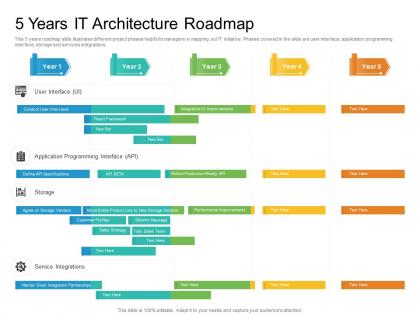
5 years it architecture roadmap timeline powerpoint template




Try Before you Buy Download Free Sample Product
 Impress Your
 Audience
 100%
100% Editable
 Save Hours
 of Time


Our 5 Years IT Architecture Roadmap Timeline Powerpoint Template are topically designed to provide an attractive backdrop to any subject. Use them to look like a presentation pro.
People who downloaded this PowerPoint presentation also viewed the following :
5 years it architecture roadmap timeline powerpoint template with all 2 slides:
Use our 5 Years IT Architecture Roadmap Timeline Powerpoint Template to effectively help you save your valuable time. They are readymade to fit into any presentation structure.
FAQs for 5 years it architecture roadmap
You need four things: where you are now, where you want to go, what's missing between those points, and a timeline with milestones. Honestly, most roadmaps fail because people skip stakeholder buy-in at the start - learned that the hard way. Also include resource needs, risks, and how different projects depend on each other. Make it visual though, not some massive document everyone ignores. I'd start with a simple one-page thing executives can actually digest. Oh, and dependencies are tricky - they'll bite you if you don't map them out early.
First thing - map out what tech you've got versus what the business actually wants to accomplish. Revenue stuff, better customer experience, whatever their main goals are. Talk to the business people regularly (seriously, I've watched IT teams build incredible things that literally no one wanted). Build a roadmap showing how each tech investment ties to actual business results. Include timelines and how you'll measure success. Oh, and review this whole thing every quarter because priorities change fast. Business folks are always shifting direction.
Look, cloud computing is basically running the show for most tech roadmaps now. It's shaping your scalability, costs, flexibility - pretty much everything. Your infrastructure picks, security setup, data strategy? All tied to cloud decisions. First thing you need to nail down is whether you're going hybrid, multi-cloud, or just diving in cloud-first. That choice impacts your migration timeline, what skills your team needs, and obviously your budget. Oh, and don't try to move everything at once - figure out which workloads should go first. Makes the whole planning process way less overwhelming.
Start by picking one specific problem you want to solve - maybe automating some boring task or getting better insights from your data. Your data situation matters way more than people think, so check if it's actually clean and organized first. Don't go crazy with a massive rollout right away (seen too many companies burn money that way). Figure out who's gonna build and maintain this stuff because finding good AI people is rough right now. Build things in pieces so you can add more later without breaking everything. Honestly, just pick one simple use case and build a small test version - you'll learn more from that than any planning session.
Honestly, the worst part is getting everyone on the same page - business teams want everything done yesterday while IT's over here explaining why that's impossible. Scope creep will kill you too. You're constantly juggling quick wins versus long-term stuff, and then requirements change anyway so your roadmap needs to bend without breaking. Oh, and legacy systems? They'll mess with your plans every single time. Set up some kind of governance structure early on and do regular check-ins. Sounds boring but it actually saves your butt when things start going wrong.
Start with what makes or breaks the bank - revenue generators and anything that'll crash your whole system. I do this impact vs effort matrix thing, works pretty well. Some projects sound amazing but are just way too huge to start with, you know? Dependencies matter too - boring foundation stuff usually has to come first before the cool features. Business timelines are key, especially around product launches. Oh and here's the thing - make stakeholders actually pick their top priorities instead of that "everything's urgent" nonsense they always pull. Trust me on that one.
Track both tech stuff and business impact to see if your architecture's actually working. Performance, uptime, integration - is everything talking to each other properly? For business metrics, look at cost savings, faster feature releases, user satisfaction scores. Here's the annoying part though - some benefits won't show up for months, so don't freak out if nothing changes immediately. I'd set up a monthly dashboard to track the key stuff. Review it regularly with stakeholders so everyone stays on the same page about what's working and what isn't.
So basically an IT roadmap stops all your departments from working against each other. Marketing won't randomly demand a new CRM while IT's upgrading the servers, you know? Everyone sees the same timeline for tech changes and can actually coordinate their planning. Think of it like a shared Google calendar but for company tech stuff. Sales knows when integrations are happening, operations sees what's getting updated when. No more surprise "we need this yesterday" requests that mess everything up. Honestly, just bring your current roadmap to the next team meeting - I bet those planning discussions get way less chaotic once everyone's looking at the same picture.
Look, the trick is getting them invested from day one. Bring stakeholders into the actual planning - ask what's driving them crazy right now and what they really need fixed. Skip the tech speak completely and focus on how each phase solves their daily headaches. I can't tell you how many roadmaps I've watched crash because they were all about the technology instead of the business impact. Keep checking in with regular updates so they stay engaged. Oh, and be real about timelines - nobody likes getting promised the moon when you know it'll take twice as long. Honesty beats hype every time.
Quarterly reviews are your sweet spot - learned this the hard way watching teams stick to yearly updates while everything changed around them. Business priorities shift fast, and waiting a year to adjust your roadmap is basically asking for trouble. That said, don't go crazy and pivot every few weeks or you'll never actually ship anything (trust me on this one). Start with every three months, then tweak based on how chaotic your environment gets. If you're in a stable industry, maybe stretch it longer. High-growth startup? Might need monthly check-ins.
So for frameworks, TOGAF or ArchiMate are solid starting points - they'll give you good structure. Lucidchart and Draw.io are my go-tos for visualization. Don't laugh, but I've seen people create killer roadmaps in PowerPoint of all things. BiZZdesign and Sparx Enterprise Architect are worth it if you've got budget. Value stream mapping helps connect your business processes to the actual tech stack. Here's the thing though - pick whatever your team will consistently use. Fancy tools mean nothing if they collect dust. Start simple with what you already have, then level up once you get into a good rhythm.
Don't make the same mistake I've seen everywhere - treating security like something you slap on later. Start by figuring out what you're actually protecting and who might want to mess with it. Map those security needs to each piece of your architecture as you plan it out. Get your security folks involved in design reviews from day one (trust me, they'd rather help shape things than fix them later). Budget for security tools and training right alongside your other infrastructure stuff. Build those compliance checks into your timeline too. Honestly, security should feel like a planning partner, not some annoying checkpoint you have to get through.
So short-term roadmaps are basically your 6-18 month survival plan - security patches, bug fixes, stuff that's actively breaking. Long-term is where you get to plan the cool stuff over 2-5 years. Major migrations, new tech stacks, all that fun architecture work. Here's the thing though - don't let your quick fixes paint you into a corner later. I've seen teams rush a bandaid solution that completely screws their bigger plans down the road. It's like fixing a leaky pipe with duct tape when you're planning to renovate the whole bathroom next year. Keep the lights on, but make sure you're not accidentally blocking your own path to that dream setup.
Start by mapping out your legacy systems - which ones actually matter vs. the ones people just ignore hoping they'll disappear. Sort them into three piles: dump, replace, or keep and connect. For anything you're keeping, build APIs or bridge connections to link them with newer stuff. The temptation is ripping everything out fast, but trust me, that'll bite you later. Pick the low-hanging fruit first while you plan the messier integrations. Oh, and some of those "critical" systems might not be as critical as everyone thinks once you dig in.
Honestly, good documentation is what keeps your roadmap from turning into complete chaos. You'll need it to track where things stand, update stakeholders on changes, and get new people up to speed quickly. Otherwise you end up with this weird situation where the "roadmap" only exists in random people's memories - and we all know how that goes. Plus it helps when you need to defend your decisions later (trust me on this one). Just don't stick it somewhere nobody can find it. Keep that stuff updated and actually accessible.
-
Great quality slides in rapid time.
-
Very unique and reliable designs.
-
Use of icon with content is very relateable, informative and appealing.
-
Visually stunning presentation, love the content.
-
Commendable slides with attractive designs. Extremely pleased with the fact that they are easy to modify. Great work!
-
Thanks for all your great templates they have saved me lots of time and accelerate my presentations. Great product, keep them up!
-
Really like the color and design of the presentation.
-
Awesomely designed templates, Easy to understand.
-
Wonderful templates design to use in business meetings.
-
Designs have enough space to add content.
-
Page:
- You're currently reading page 1
- Page 2
-
