


7 elements of goal icon powerpoint images




Try Before you Buy Download Free Sample Product
 Impress Your
 Audience
 100%
100% Editable
 Save Hours
 of Time


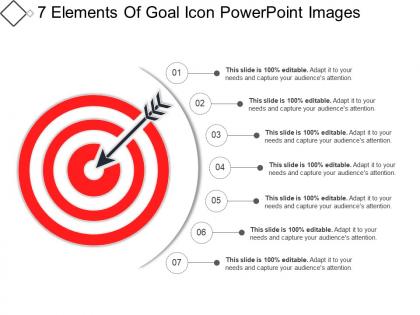
Set your targets and goals using this readily available 7 Elements Of Goal Icon PowerPoint Images. The graphics of dartboards are widely used as a metaphor for achieving professional or personal targets. Set the marketing and sales target with the help of this dart board PPT template. The PowerPoint template is useful in conveying ideas like the target market, customers, or financial goals of the company. Depict the short term and long term goals of your organization with this professionally designed PPT slide. This PPT presentation layout is perfect for business discussions like success, performance, objectives, and strategies. Therapists, coaches, physiologists can use this PowerPoint slide. Download this slide now and focus on the crucial things that relate to the fulfillment of targets in the long run.
People who downloaded this PowerPoint presentation also viewed the following :
7 elements of goal icon powerpoint images with all 5 slides:
Brief the interns with our 7 Elements Of Goal Icon Powerpoint Images. Guide them on how to act at the first instance.
FAQs for 7 elements of goal
SMART goals basically give your presentations actual structure instead of just winging it. You need all five parts: Specific, Measurable, Achievable, Relevant, and Time-bound. Like, don't just say "I want to present well." That's useless. Try "I'll deliver a 20-minute sales pitch that gets me 3 solid leads by Friday." See the difference? Now you've got something concrete to work toward. The measurable part is honestly my favorite because you'll actually know if you crushed it or bombed. No more guessing whether it went "okay" or whatever. Just write out your next presentation goal using all five components. Sounds boring but it actually makes prep way easier.
Honestly, templates are lifesavers because they force you into a logical flow that actually makes sense to your audience. Like, executives want the big picture stuff - metrics and deadlines. Your team needs the nitty-gritty action items. Starting with the same structure every time saves you from scrambling around trying to remember what to include (been there, it's painful). I'd go with something basic first - objective, timeline, key metrics, what resources you need. Then just adjust based on who you're talking to and how long their attention span is. Trust me, it beats winging it every single time.
Honestly, visuals are a game-changer for presentations. People's brains just process images way faster than text blocks. Timelines work great for showing milestones, and charts help break down those overwhelming big objectives. Before-and-after shots are my personal favorite though – there's something about seeing that transformation that really clicks with people. Progress bars keep everyone focused on the journey ahead. Color coding makes everything easier to scan too. Oh, and definitely pair each goal with a simple graphic that tells the whole story in like 3 seconds. Makes such a difference.
Okay so first thing - you've gotta break down your audience into segments. Like, what kills it with Gen Z on TikTok is gonna fall flat with boomers scrolling Facebook, right? Each group needs totally different success metrics based on where they actually spend time and what gets them to interact. Younger crowds? Go for shares and comments. Older users might be more about clicks or email signups - honestly depends on what you're selling too. Instead of some generic "boost engagement" goal, get specific for each segment. I'd start by digging into your current audience data and pick your top three groups to focus on.
Honestly, you can't set good presentation goals without feedback - you're just guessing otherwise. Get input when you're planning your goals AND after you present. Like if you wanted to "engage the audience," how do you even know if people were actually interested or just being nice? I always run my goals by a colleague first to make sure they're not totally unrealistic. Then afterward, ask specific questions about whether you actually hit what you were aiming for. It's kind of like... you wouldn't cook a new recipe without tasting it, right? Same concept here.
Honestly, just throw some visual timelines right into your slide templates - way better than boring bullet points. I'm obsessed with gantt charts for this stuff, or even those simple roadmap graphics that show milestones and progress bars. Your template should have key dates and deadlines that light up when you hit them. Mix short-term weekly stuff with your bigger quarterly goals so you can actually see the full picture. Oh, and make sure it's visual enough that literally anyone walking into the room gets where you stand versus the original plan. Game changer.
Don't be vague - "increase sales" means nothing to your audience. They'll check out instantly. Pick 3-5 specific, measurable goals instead of cramming 15 objectives on one slide (been there, done that). Skip the corporate buzzwords too. Just say what you're actually trying to do and when you'll do it. Here's the thing though - each goal needs a real action plan behind it. Otherwise you're basically just making expensive wishes. Oh, and honestly? If you can't explain your goal in one clear sentence, it's probably too complicated.
Think of it like telling a story - start with what's broken right now, then show them what awesome looks like, then map out how to get there. People actually care about stories way more than boring charts (shocking, I know). Use real examples they can picture, not some vague corporate speak. Make them feel like the main characters who actually DO stuff, not just sitting there listening. Oh, and try starting with "Imagine if..." next time. It's cheesy but honestly works. The trick is helping everyone see how their piece fits the bigger puzzle.
Okay so first thing - chop those big goals into smaller wins and actually celebrate them out loud. People love following progress. Tell stories about what winning looks like, but don't sugarcoat the hard parts either. Honestly, the messy reality is what hooks people way more than perfect success tales. Connect everything back to what they actually care about right now. Run polls, ask questions, share updates - make it feel like you're all figuring this out together instead of just talking at them. Oh and this part's crucial: show them their exact role in making it happen. Their success = your success.
You know how you mentioned wanting to track your goals better? Visual stuff in presentations actually makes a huge difference. Like, instead of just saying "boost sales 20%," throw in a progress bar or chart that shows exactly where you are vs where you need to be. Your brain processes that visual gap way faster than numbers on a slide. Plus people actually pay attention when there's something to look at - I learned this the hard way in boring meetings. Templates with built-in tracking charts are perfect because they update automatically when you hit milestones. Seriously, try adding one simple progress visual next time.
Honestly, the magic is in being urgent but not crazy overwhelming. Say "start today" or "take the first step this week" - it gets people moving without freaking them out. Your call-to-action needs to be super specific though. Don't just say "work toward your goals." Tell them "write down three action steps before you leave this room." Way more powerful. I've watched so many motivational talks crash and burn with that vague "go get 'em" nonsense. People walk out pumped and then... nothing. The ones that actually work? They tell you exactly what to do and when. Plus accountability helps - "find someone to check in with by Friday" beats hoping they'll magically follow through alone.
Oh man, this is so true from my own experience! Different cultures totally change how you present goals. Americans love personal achievement stuff and competitive metrics. But collectivist cultures? They're all about team success and group harmony instead. Some want super specific targets, others prefer broader ideas - learned that one the awkward way in a few meetings lol. High-context cultures need way more background info and relationship building first. Low-context ones just want the facts straight up. Honestly, just ask your diverse teams upfront what communication styles work for them and what actually motivates each group.
Mix hard numbers with the softer stuff - like completion rates and deadlines, but also team morale or customer feedback. Executives are weirdly obsessed with visuals, so throw in a chart or progress bar. Makes your wins pop. Don't forget to mention any roadblocks you're watching - shows you're thinking ahead instead of just cheerleading. I'd stick to maybe 3-4 key things max though. Information overload kills these reports.
Okay so after you do your presentation, you'll need something to actually track everything. I'd go with Asana, Trello, or Monday.com - they're solid for breaking goals into real tasks. Notion is honestly my current obsession though, it does literally everything. If you want something simpler, Google Sheets or Airtable work fine too. The main thing? Pick ONE and stick with it. I've seen too many people hop around between apps and never actually get anywhere. Just go with whatever doesn't make you want to scream when you open it.
Honestly, sharing your own messy stories is what makes goal advice actually stick. Nobody wants to hear "follow these five steps" – that's boring as hell. But tell them about the time you totally face-planted trying to reach some goal? Now they're listening. Your failures and weird breakthroughs prove that everyone struggles with this stuff. Plus it shows success is actually doable, not just some fantasy. Share that specific moment when everything felt impossible, then what finally clicked for you. That's the good stuff right there.
-
Appreciate the research and its presentable format.
-
Helpful product design for delivering presentation.