

Action Item List PowerPoint Ppt Template Bundles




Try Before you Buy Download Free Sample Product
 Impress Your
 Audience
 100%
100% Editable
 Save Hours
 of Time


Our Action Item List PowerPoint Ppt Template Bundles are topically designed to provide an attractive backdrop to any subject. Use them to look like a presentation pro.
People who downloaded this PowerPoint presentation also viewed the following :
Action Item List PowerPoint Ppt Template Bundles with all 16 slides:
Use our Action Item List PowerPoint Ppt Template Bundles to effectively help you save your valuable time. They are readymade to fit into any presentation structure.







FAQs for Action Item List PowerPoint
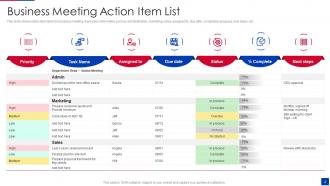
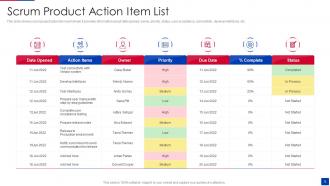
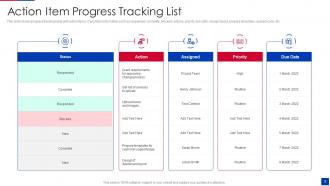
So you definitely need task description, owner, due date, and priority - can't skip those. I always throw in a status column too (not started, in progress, done) plus notes for random updates or when things go sideways. The owner thing saves so much drama because nobody can play the "I thought Sarah was doing it" game anymore. Oh, and write descriptions detailed enough that if Jim calls out sick, anyone else can actually figure out what the hell needs to happen. Learned that one the hard way last quarter.
Honestly, action item lists are game-changers because they stop that whole "wait, what was I supposed to do again?" mess. Everyone knows their stuff, when it's due, and what matters most. No more awkward meetings where people just stare at each other wondering why nothing happened. Short sentences hit different sometimes. When your team can actually see what's getting done in real time, it keeps everyone on track without you having to be the nagging project manager (which nobody wants to be). Just pick one format and stick with it - you'll notice things running way smoother pretty much right away.
Start basic with "Task," "Owner," "Due Date," and "Status" columns. Color code priorities - red for urgent, yellow medium, green low. Don't go crazy with fancy stuff right away, it just confuses people. White space is your friend so things aren't cramped together. Font size 11pt minimum or you'll have people squinting at their screens. Checkboxes work great for status updates. Honestly, I'd rather have something simple that actually gets used than some overcomplicated masterpiece that sits there looking pretty. You can always jazz it up later once everyone's comfortable with the basics.
You'll want to tweak those templates based on what your team actually deals with daily. Software folks usually add sprint numbers and story points. Healthcare teams throw in compliance checkboxes - that patient safety stuff is no joke. Construction gets messy with all the permit tracking (honestly those approval chains are insane). Manufacturing focuses more on quality stages and supplier dependencies. Start basic, then just add fields as you notice what's missing. Like if everyone keeps asking "what phase are we in?" - boom, add a phase column. Don't overthink it at first.
Ugh, the worst thing you can do is be super vague with action items. Like writing "improve website" - what does that even mean?? Nobody's gonna know what to actually do. Be specific instead: "Sarah updates homepage banner copy by March 15th." Also, people constantly forget to assign owners or set realistic deadlines. Then they're shocked when nothing happens! Make sure every task has a person's name on it and an actual date. Oh, and follow up regularly - I learned this the hard way when my team just... didn't do anything for weeks.
Honestly, digital action lists are a game changer - they handle all the annoying reminder stuff automatically. You can assign tasks straight to people and actually get pinged when deadlines hit. No more wondering if Mike ever did that thing from last month, you know? Everything's searchable too, which beats digging through old emails or random sticky notes. Real-time updates mean you see progress as it happens instead of playing guessing games. Just make sure everyone on your team actually uses whatever tool you pick, or you'll end up doing double work with both digital and paper lists.
Honestly, prioritization is what saves your action items from turning into a total mess. I usually go with high/medium/low rankings, but numbered lists work too. Color-coding is amazing - way easier to scan quickly than plain text. Here's the thing though: if you don't rank stuff, everything feels urgent and you waste time on random tasks that don't actually matter. Your brain tricks you into thinking busy work is productive. Make sure the really critical items stand out when you look at your list. Try ranking what you've got right now and see what should actually get your attention first.
Honestly, action item templates are game-changers for teams. Everyone knows who's responsible for what and when stuff's due - no more of those awkward "wait, wasn't that your thing?" moments in meetings. It keeps everyone aligned without the usual back-and-forth confusion. Plus you can spot when someone's drowning in tasks and needs help. The transparency thing is huge too. I've seen teams waste so much time just figuring out status updates. You should definitely try it for your next project - even just a simple shared doc works wonders.
Definitely add owner names and deadlines to your template - that's the bare minimum. I throw in a "Date Assigned" field too because people somehow get way more responsible when there's a timestamp staring at them. Status columns work great - "Not Started/In Progress/Done" or whatever makes sense. Comments sections are clutch for updates. Oh, and build in some review dates if you can. The whole point is making everything super visible so stuff doesn't just... disappear into the void, you know? Transparency kills procrastination.
Just bake the follow-up stuff right into your template - add columns for "Next Check-in" and "Follow-up Notes." Status columns are clutch too. You can spot what's dying on the vine instantly. Make it filterable by dates and assign follow-ups to specific people (not always the same person doing the original task). That's honestly where most people mess up. The whole point is making it feel automatic instead of this thing you constantly forget about. I do a quick scan every week and fire off status check texts - takes like 10 minutes max.
Honestly, Gantt charts are amazing for showing timelines if you're into that visual stuff. Kanban boards work too - great for seeing workflow. I'm obsessed with color-coding everything by priority or team member, makes scanning so much faster. Those red/yellow/green status dots? Total game-changer for quick meeting updates. Progress bars are pretty straightforward for tracking completion. If you're dealing with complicated multi-step stuff, flowcharts might help, or just throw deadlines on a simple calendar view. Really depends on how your team's brain works - some people are super visual, others just want lists.
Add a "lessons learned" column to your action item template - fill it out when stuff gets done. Trust me, I started this after my team kept making the same dumb mistakes over and over. Monthly reviews are clutch too. Look for patterns like which tasks always go over deadline or need way more resources than expected. The trick is making reflection mandatory, not some nice-to-have thing people skip. Have your team actually discuss what they learned and tweak future items based on those insights. Honestly, it's kinda annoying at first but saves so much headache later.
So basically, static lists are like taking a photo - they freeze everything at one moment and get stale fast. Dynamic templates? They actually move with you and your team. Here's the thing - static lists are such a pain. You're constantly copy-pasting or starting from scratch every time something changes. Which it always does, right? Dynamic ones let you shift due dates, move tasks around, add stuff on the fly. Everyone sees the same updated version instead of working off like five different copies floating around. Way less chaos. Honestly, unless you're doing something super simple that never changes, dynamic is the way to go.
Make those deadlines impossible to ignore - that's the key. I always use a "Due Date" column with consistent formatting. YYYY-MM-DD works great since it sorts itself, but honestly whatever your team actually uses is fine. Color coding saves lives here. Yellow for this week, red for overdue stuff. Include both your real deadline AND any buffer time you've built in (trust me on this one). A "Days Remaining" column that auto-calculates is pure gold - nothing gets people moving like seeing "2 days left" glaring at them. Just make sure everyone knows your date format upfront so there's no confusion later.
Set up weekly reviews (or every two weeks if things move slower). Go through each item - is it still needed? Update deadlines, dump the dead tasks. Seriously, I've watched so many lists become task graveyards where stuff just sits there forever. Make sure someone owns each item too. Quick 5-minute scan before meetings works great. Oh, and treat it like it's actually alive - constantly tweaking and updating. None of that "write it once and pray" approach that never works.
-
“Ample and amazing variety of templates available, really helpful for making professional PPT for day to day workings.”
-
“Thanks to SlideTeam. Now I can make smart presentations in a fraction of time without any hassle.”