

10 List Powerpoint Ppt Template Bundles




Try Before you Buy Download Free Sample Product
 Impress Your
 Audience
 100%
100% Editable
 Save Hours
 of Time


Our 10 List Powerpoint Ppt Template Bundles are topically designed to provide an attractive backdrop to any subject. Use them to look like a presentation pro.
People who downloaded this PowerPoint presentation also viewed the following :
10 List Powerpoint Ppt Template Bundles with all 17 slides:
Use our 10 List Powerpoint Ppt Template Bundles to effectively help you save your valuable time. They are readymade to fit into any presentation structure.
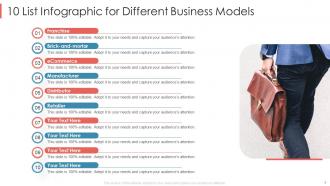
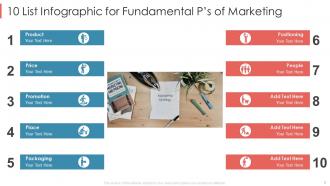
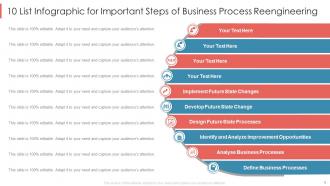
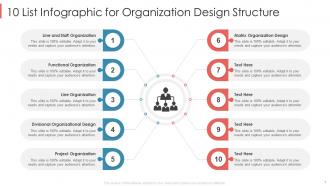





FAQs for 10 List Powerpoint
Bundles are honestly a game-changer for consistency - no more franken-presentations with clashing fonts and colors. Way cheaper than buying templates individually too. Everything matches automatically, which saves me so much time. Decision paralysis is totally a thing when you're scrolling through endless single templates at 2am before a big presentation (been there). Most bundles cover different presentation types - pitch decks, training stuff, reports. I'd grab one that fits your industry first, then branch out if you need more variety later.
Dude, template bundles are a lifesaver. You get all these pre-made slides that already look good - title pages, charts, bullet points, whatever. Just swap in your content and you're done. I swear the formatting is always what kills me with presentations anyway. They're designed to match each other too, so your whole thing looks put-together without trying. Way better than staring at a blank slide wondering why your fonts look terrible. Pick one that fits your topic and customize from there. Saves you hours honestly.
Most PowerPoint bundles have the usual stuff - business presentations, pitch decks, educational slides, project reports. Startup pitches and quarterly reviews are super common. Training materials too. You'll also find social media strategy templates, which is kinda random but whatever. Some bundles get really specific with industry focuses or event types. Honestly, the multipurpose business ones are your best bet since they work for pretty much anything corporate. Look for bundles with both light and dark themes. Charts and data visualization layouts are clutch too - you never know when you'll need those.
First thing - grab your brand colors, fonts, and logo and swap them into the templates before your team even sees them. Templates are super generic on purpose, so you gotta make them yours. Replace their random color scheme with your actual hex codes, update the fonts to match what you normally use, and definitely get your logo on those master slides. Honestly, this step saves so much time later. When people need to make presentations, they'll automatically be working with the right brand stuff instead of having to remember to fix it every single time.
Honestly, start with variety - you'll want templates for pitches, reports, data stuff, whatever you might need. Check if you can easily swap in your brand colors and fonts without fighting the formatting (trust me on this one). Icons and graphics should come included because searching for those separately is annoying as hell. Preview the actual slide count too. Some bundles look amazing but only give you like 10 basic layouts, which is pretty useless. If they let you download a sample, definitely test it in your PowerPoint version first. Nothing worse than buying something that doesn't work right.
Honestly, I'd say every 6-12 months is a good rule of thumb, or whenever your branding shifts. I've totally seen people stick with the same boring template for like 3 years straight - no wonder their presentations feel dead! But here's the thing: sometimes you need to update sooner. Maybe your industry's moving fast, your audience changed, or competitors just dropped some really slick decks. Visual fatigue is real for everyone involved. My move? Set a quarterly reminder to actually look at your templates with fresh eyes. Do they still match what you're trying to say? Still feel current? If not, time for a refresh.
Yeah totally! You can swap colors, fonts, images, your logo - basically everything. Most bundles use master slides which is clutch because change your brand colors once and it updates everywhere. Delete slides you don't want, copy ones you like, even mix elements between different templates. I always start with the master slides first then tweak individual ones. Only real limit is you're stuck with their general design vibe, but honestly that's usually fine since the whole point is saving time anyway.
Think of visual hierarchy like a roadmap for people's eyes - you want them looking at your main points first, then the details. Good template bundles nail this with consistent font sizes and smart spacing. Your audience's brain naturally follows bigger text to smaller text, so don't fight it. I've seen too many slides that are just... everywhere, honestly. Nobody knows where to look first. Hunt for templates that keep heading styles consistent and use plenty of white space. Makes following along way easier, plus you'll look more put-together across all your presentations.
Oh totally! Healthcare and finance companies buy these like crazy - they're always presenting to clients and need to look super professional. Real estate agents are goldmines too for property showcases. Tech startups constantly pitch investors, so they eat up presentation bundles. Teachers and corporate trainers? They present literally every day, so they're perfect customers. Honestly, consulting firms might be your best bet since their whole business revolves around client presentations. The trick is finding people who present weekly instead of like once a month. Those are your money makers right there.
Okay so template bundles are basically made for different crowds. Corporate ones have clean layouts and professional colors - perfect for boring office meetings. Educational bundles? Way more fun with interactive stuff and infographics that actually keep students awake. Creative ones go wild with bold fonts and crazy colors, which I love for pitches. You get like 20-50 slides that all match instead of mixing random templates that look terrible together. Just pick whatever fits your audience and you're basically done. Oh, and the creative bundles are honestly my favorite - they're so much more interesting than the corporate stuff.
Start with your brand colors - you'll want everything looking consistent. Get a template bundle with 3-4 color options so you're not rebuilding from zero each time. Good contrast is huge because squinting at slides sucks for everyone! I'd test colors on different screens if you can since projectors do weird things sometimes. Your audience matters too - corporate people usually stick with safe blues and grays, but creative teams? They can totally handle the bold stuff. Just make sure 2-3 schemes in the bundle actually work for what you normally present.
Honestly, template bundles are a game changer because everything actually matches. You're not stuck piecing together random slides that look terrible next to each other. Your audience won't get distracted by weird formatting or colors that clash - they'll focus on what you're saying instead. Most bundles give you different layouts too, like for charts or quotes or whatever. The polished look makes you seem more credible, which sounds shallow but it's totally true. Oh, and find ones that match your brand colors first. Trust me on this one.
You know how those busy, cluttered slides were everywhere a few years ago? They look super outdated now. Clean, minimal designs with tons of white space are totally dominating right now. Dark mode versions are basically a must-have since everyone's presenting in dim conference rooms or whatever. Interactive elements and animation-ready templates are getting really popular too, especially for virtual stuff. Oh, and there's this big shift toward more diverse imagery - makes sense with global audiences and all. If you're updating your collection, definitely go for bundles that include both light and dark versions. Keeps your branding consistent across everything.
So template bundles are actually pretty great for accessibility stuff. They come with high contrast colors and fonts that don't make your eyes hurt. Screen readers can navigate the heading structures way easier too. Alt-text placeholders are included for images (though honestly most people ignore those). The layouts have good white space and follow a logical order, which helps people with visual or cognitive issues follow along. Oh, and the reading flow makes sense – unlike some presentations I've sat through! Just grab an accessible template and you're doing better than like 90% of presenters.
Don't just grab a template and call it done - you'll look like everyone else. Test those crazy animations first too, some are way too much. I always see people stuffing slides with text just because there's room... ugh, it hurts to watch. Replace the stock photos with something that actually makes sense for your topic. Oh and spend like 10 minutes switching the colors to match your company's brand. Makes a huge difference! Those placeholder images are dead giveaways you didn't put in effort.
-
Content of slide is easy to understand and edit.
-
Enough space for editing and adding your own content.