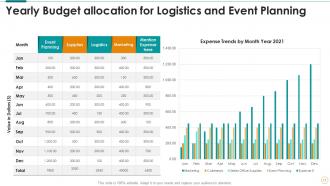
Budget Powerpoint Ppt Template Bundles

Rating:
90%
Budget Powerpoint Ppt Template Bundles
Slide 1 of 17
Favourites Favourites

Try Before you Buy Download Free Sample Product

Audience Impress Your
Audience
Editable 100%
Editable
Time Save Hours
of Time
The Biggest Sale is ending soon in
0
0
:
0
0
:
0
0
Rating:
90%
Engage buyer personas and boost brand awareness by pitching yourself using this prefabricated set. This Budget Powerpoint Ppt Template Bundles is a great tool to connect with your audience as it contains high-quality content and graphics. This helps in conveying your thoughts in a well-structured manner. It also helps you attain a competitive advantage because of its unique design and aesthetics. In addition to this, you can use this PPT design to portray information and educate your audience on various topics. With tweleve slides, this is a great design to use for your upcoming presentations. Not only is it cost-effective but also easily pliable depending on your needs and requirements. As such color, font, or any other design component can be altered. It is also available for immediate download in different formats such as PNG, JPG, etc. So, without any further ado, download it now.

FAQs for Budget Powerpoint

Get bundles with at least 20-30 different slide types - title pages, charts, timelines, all that stuff. Make sure you can actually edit them without everything falling apart (seriously annoying when that happens). I'd go for ones with multiple color schemes so you're not stuck with the same boring look every time. Check if they work with your PowerPoint version first - made that mistake once. Oh, and see what file formats you get. Some bundles are PPTX only, others include Google Slides too. Icon sets are a nice bonus if they're thrown in.

Honestly, those template bundles are worth it. You'll get slides that actually look professional instead of like you threw them together in 5 minutes. The formatting stays consistent, which saves you tons of time - and let's be real, most of us suck at design anyway. I love having different options for different situations too. Your quarterly review needs a totally different vibe than a client pitch, you know? People focus on what you're saying instead of getting distracted by wonky layouts. Just find one that matches your content and swap in your own stuff.

Startups and small businesses are probably your biggest market - they need slick presentations but can't drop serious cash on custom design. Real estate agents and consultants are goldmines too since they're always pitching something. Even big corporations use these for internal stuff when they don't need fancy branding. My cousin's accounting firm basically lives off PowerPoint templates, honestly. If you're presenting regularly, the math just works out way better than building everything from scratch. Educational groups love them too - teachers and nonprofits especially since their budgets are usually pretty tight.

Oh totally! Minimalism is everywhere right now - like, everyone's doing the white space thing with simple fonts and those soft, muted colors. Bold typography's really in too. Geometric shapes are super popular since they're easy to customize without needing design skills. Actually, it's kinda perfect timing because these clean styles are way cheaper for template makers to pull off. I'd definitely hunt for bundles labeled "modern minimal" or "clean corporate" - you'll get that current look without spending a fortune. The flat design elements are pretty forgiving too if you need to tweak anything.

Yeah, budget PowerPoint bundles are definitely lower quality than the expensive ones, but the difference isn't huge tbh. You'll get simpler animations and fewer custom graphics. Premium ones have better fonts and more polished design stuff. But like, unless you're presenting to super important clients or your boss's boss, cheap bundles work fine. I always tell people to start with a budget one first - see how much you actually use it. Then if you're constantly making presentations and need fancier designs, upgrade later. No point dropping $100 right away, you know?

Budget template bundles are actually pretty decent for customization. Most let you change colors, fonts, and layouts across different slide designs. Swapping images and tweaking text boxes is usually no problem either. The main thing is they might not have as many master slide options as the expensive ones, but honestly? That's not a huge deal for most people. Just double-check that it has the slide types you need before you buy - learned that one the hard way. Adding your own branding is straightforward with most of them.

Dude, those template bundles are honestly genius. You just dump your content into pre-made slides instead of building everything from zero. All the colors and layouts match automatically, which saves me so much headache. When I'm scrambling to meet a deadline, I don't want to mess around with fonts and spacing - I just want to focus on what I'm actually saying. Having a whole bundle gives you different options too, depending on what kind of presentation you're doing. My advice? Start collecting templates you actually like so you're not hunting around last minute.

Ugh, the worst thing you can do is cram way too much text on each slide - budget templates don't have much room to work with. Stick with whatever color scheme comes with the template too, even if it's boring. Trust me on this one. When people start mixing random colors it looks like a hot mess. Also make sure your images aren't all pixelated and gross looking when you project them. Oh and don't be that person who uses like three different template styles in one presentation - pick one and stick with it! Sounds obvious but you'd be surprised how often people do this.

So there's a few things to check when you're picking budget templates. Color contrast is huge - cheap ones usually have terrible readability. Pick fonts that don't suck (nothing too fancy or tiny). Add alt text to images so screen readers work properly. Structure stuff with clear headings too. Oh and test if it sounds weird when read out loud - you'd be surprised how many don't flow right. Most fixes are pretty quick though, which is nice since you're already trying to save money. Just make it part of your process before you start actually designing anything.

Honestly, bundles are such a better deal - you'll save like 40-60% vs buying individual templates. I made that mistake once and spent way more on three separate ones than I would've on a whole 20-template bundle, ugh. The variety is clutch too since you can match different presentation vibes instead of using the same style every time. Design elements stay consistent across the bundle which helps your brand look put-together. Sure, you won't use every single template, but the savings totally make it worth it. I'd peek at a few different bundles first to see what matches your usual presentation style.

Honestly, it's all over the place. Most creators do it every 3-6 months, but some are way more on top of it and update quarterly. Design trends change and they get feedback, so that usually triggers updates too. The inconsistent ones drive me crazy though – like, commit to your product! But here's the cool part: when you buy a bundle, you typically get future updates for free. I'd definitely stalk their social media first to see how often they actually post new stuff. Oh, and check their update history before buying. Trust me on that one.

Yeah, totally! Those budget bundles work for pretty much anything - I've used the same one for work presentations and then later for a school thing. Most come with different slide layouts and color schemes you can mix around. Honestly, the variety is what makes them worth it. You might use the clean chart slides for business stuff, then grab the flashy ones for marketing. Just peek at what's actually in the bundle first since some are weird and niche. I'd start with the basic layouts and tweak from there - way easier than starting from scratch.

Honestly, just buy a template bundle instead of making yourself crazy designing from scratch. Creative Market and Envato have solid collections for like $20-50 - way cheaper than your time is worth. Etsy's got some cute ones too, though the quality's hit or miss. You could also try Canva premium or PowerPoint's designer thing if you've got Office 365. I'd probably go with Creative Market first since their stuff tends to look more professional. Just double-check that whatever you pick works with your brand colors so you don't have to redo everything later. Trust me on this one.

Honestly, just dive straight into the user reviews - that's where you'll find out if templates actually work or just look pretty in screenshots. Skip anything under 4 stars, trust me on this one. Check if people complain about customization being weird or files not opening right. Recent reviews matter more since updates can totally break older template packs (learned that the hard way). Also peek at what they say about customer support - some budget sellers basically ghost you after purchase. I usually sort by highest rated first, then get pickier from there. Oh, and make sure the designs still look professional after people edit them!

Look, colors can make or break your budget template. People expect certain things - green/blue for good numbers, red for bad ones. Don't fight that instinct. I've watched so many presentations crash because someone went wild with like 8 different colors. Seriously, it's painful to watch. Just pick 2-3 colors that work together and stick with them. Make sure there's good contrast so people can actually read your numbers. The whole point is helping your data tell its story clearly. Oh, and consistency matters - use the same scheme throughout the whole thing.

Ratings and Reviews

90% of 100
Review Form
Write a review
Most Relevant Reviews
  1. 80%

    by Charles Peterson

    Design layout is very impressive.
  2. 100%

    by Edgardo Chapman

    Very unique and reliable designs.

2 Item(s)

per page: