

All About Instagram Threads Powerpoint Presentation Slides AI CD




Try Before you Buy Download Free Sample Product
 Impress Your
 Audience
 100%
100% Editable
 Save Hours
 of Time


Instagram Threads is a text-based conversation application developed by Meta. Check out our professionally designed All about Instagram Threads PowerPoint is a great platform to stay connected with close friends and share updates about what is going on in your life. This Social network deck offers details about its developing company, Meta. Moreover, Text-based posts highlight critical features related to the platform regarding characters or post limit, account privacy, messaging interface, etc. Furthermore, the Social Conversations app template renders potential use cases of Threads, including expressive communication, branding or marketing, diverse future, content personalization, instant audience, etc. Also, the Blog post presentation showcases details about how to download the platform, how it works, best practices associated with it, public vs. private profiles, tools, and techniques used. Lastly, Messaging app PPT provides a detailed comparative analysis of Threads and its rival Twitter on various parameters such as app privacy, user engagement, etc. Download our 100 percent editable and customizable deck to know more in detail.
People who downloaded this PowerPoint presentation also viewed the following :
Content of this Powerpoint Presentation
Slide 1: The slide introduces All about Instagram Threads.
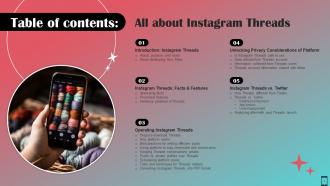
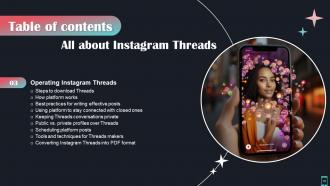
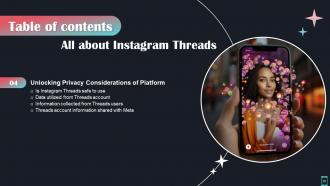
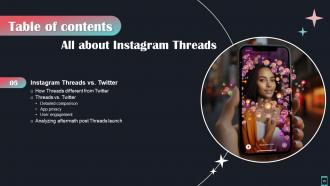
Slide 2: The slide displays Table of contents.
Slide 3: The slide again renders Table of contents.
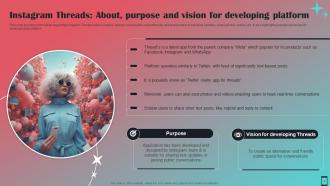
Slide 4: This slide provides information regarding Instagram Threads which enables users to connect with closed friends.
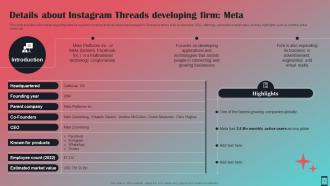
Slide 5: This slide contains information regarding Meta as a parent company that has developed Instagram Threads.
Slide 6: The slide displays Title of contents further.
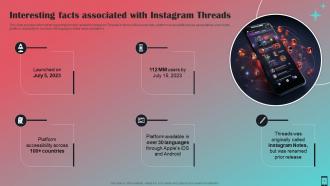
Slide 7: This slide gives information regarding fun facts related to Instagram Threads.
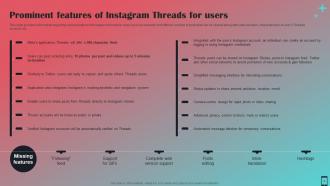
Slide 8: This slide illustrates information regarding various features of Instagram threads for users.
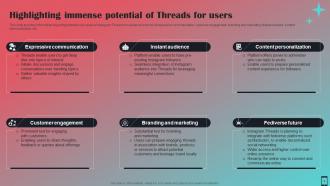
Slide 9: This slide provides information regarding potential use cases of Instagram Threads.
Slide 10: The slide highlights title of contents which is to be discussed further.
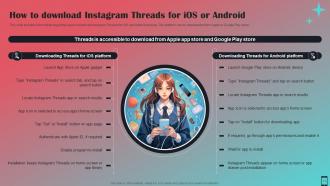
Slide 11: This slide exhibits information regarding ways to download Instagram Threads for iOS and Android devices.
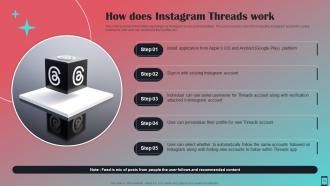
Slide 12: This slide highlights information regarding how Instagram works post installation.
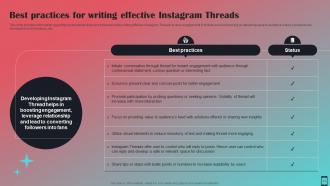
Slide 13: This slide represents information regarding best practices that can be followed while writing effective Instagram Threads.
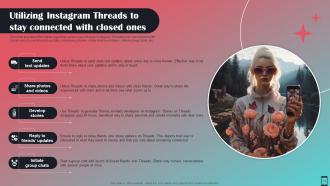
Slide 14: This slide presents information regarding various ways through Instagram Threads users can connect with closed ones.
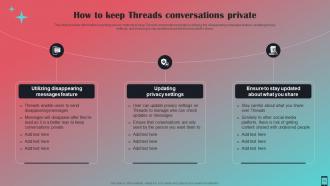
Slide 15: This slide contains information regarding various methods to keep Threads conversations private.
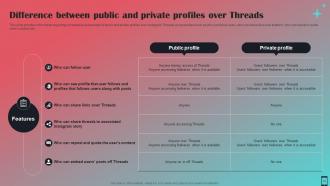
Slide 16: This slide shows information regarding comparative assessment of public and private profiles over Instagram Threads on parameters.
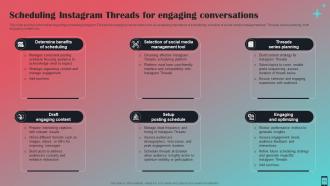
Slide 17: This slide presents information regarding scheduling Instagram Threads for engaging conversation.
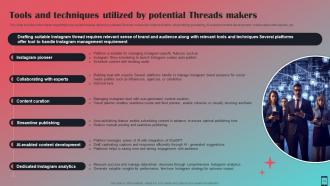
Slide 18: This slide highlights information regarding tools and techniques utilized by suitable Threads makers.
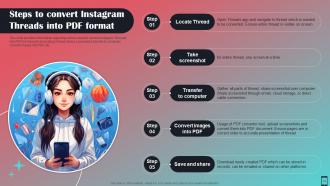
Slide 19: This slide exhibits information regarding various steps to convert Instagram Threads into PDF format.
Slide 20: The slide contains another title of contents.
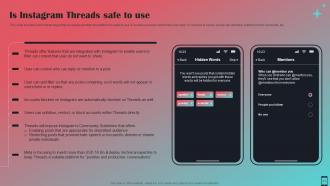
Slide 21: This slide provides information regarding assessing whether the platform is safer to use.
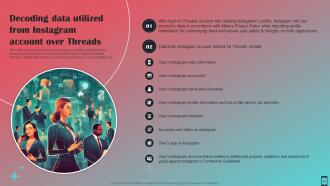
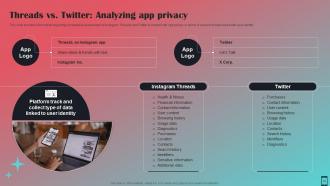
Slide 22: This slide presents information regarding types of data utilized from the Instagram account over Threads.
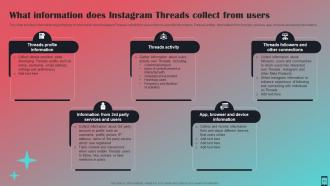
Slide 23: This slide describes information regarding type of information does Instagram Threads collect from users.
Slide 24: This slide renders information regarding various ways through information is shared with Thread’s parent company, Meta.
Slide 25: The slide exhibits title of contents further.
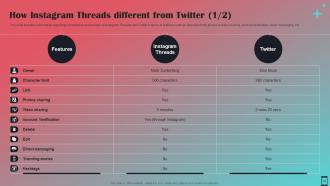
Slide 26: This slide provides information regarding comparative assessment of Instagram Threads and Twitter in terms of features.
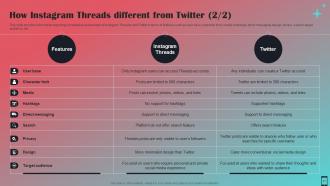
Slide 27: This slide exhibits information regarding comparative assessment of Instagram Threads and Twitter in terms of features.
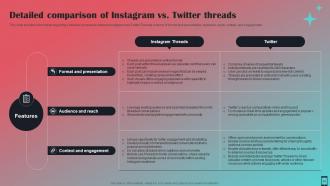
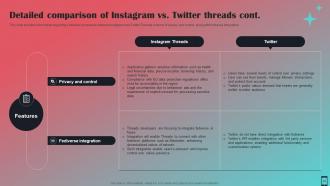
Slide 28: This slide displays information regarding a detailed comparison between Instagram and Twitter Threads.
Slide 29: This slide presents information regarding a detailed comparison between Instagram and Twitter Threads.
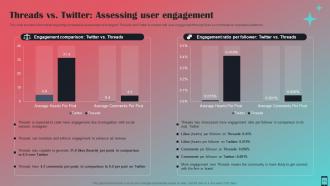
Slide 30: This slide provides information regarding comparative assessment of Instagram Threads and Twitter.
Slide 31: This slide showcases information regarding comparative assessment of Instagram Threads and Twitter.
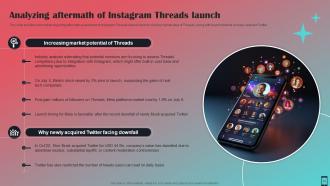
Slide 32: This slide describes information regarding aftermath assessment of Instagram Threads launch.
Slide 33: This slide shows all the icons included in the presentation.
Slide 34: This slide is titled as Additional Slides for moving forward.
Slide 35: This is About Us slide to show company specifications etc.
Slide 36: This slide provides 30 60 90 Days Plan with text boxes.
Slide 37: This is a Comparison slide to state comparison between commodities, entities etc.
Slide 38: This slide shows Post It Notes. Post your important notes here.
Slide 39: This is a Quotes slide to convey message, beliefs etc.
Slide 40: This slide contains Puzzle with related icons and text.
Slide 41: This is a Thank You slide with address, contact numbers and email address.
All About Instagram Threads Powerpoint Presentation Slides AI CD with all 46 slides:
Use our All About Instagram Threads Powerpoint Presentation Slides AI CD to effectively help you save your valuable time. They are readymade to fit into any presentation structure.









FAQs for All About Instagram Threads Powerpoint Presentation
So Threads is basically Meta's answer to Twitter, but it connects to your Instagram account which is pretty smart honestly. You get 500 characters for posts instead of Twitter's limit, can share photos, and do the whole conversation thing. Your Instagram followers can find you automatically which saves time. The feed works like Instagram's algorithm rather than just showing everything chronologically - not sure how I feel about that yet but whatever. It's way less of a dumpster fire than Twitter these days. Definitely grab your username now while it's still new.
Honestly, Threads makes Instagram feel more like actual conversations instead of just pretty photo dumps. The threaded replies are so much better than trying to follow random comments under posts - way less chaotic. I love that it's text-first too, so you don't need some perfect aesthetic shot just to share a random thought. Takes the pressure off, you know? People check it throughout the day since it moves fast, not like regular Insta where you scroll once and you're done. Try posting the same question on both and you'll see what I mean - Threads gets way more real responses.
Threads is way more casual than regular Instagram, so just be real with your storytelling. Behind-the-scenes stuff works great - employee spotlights, company culture moments, whatever's happening with product development. The character limit is actually helpful because it makes you get to the point fast. Honestly, most brands overthink text platforms and it shows. Break longer stories into connected posts using the threads feature, and actually respond to people when they comment. I'd start with maybe one authentic post per week and see what hits. Don't stress about it being perfect - that's kind of the whole point.
So from what I've noticed, text posts definitely get way more replies and actual conversations going. Photos and videos? They'll get likes and shares but people don't really engage as much in the comments. Threads isn't really built for super polished content anyway - it's more like Twitter where your random thoughts do better than anything you spent hours crafting. Keep your text posts short, maybe just a sentence or two. Ask questions if you want people to actually respond. Honestly, I'd just post whatever comes to mind and see what sticks.
Honestly, privacy settings on Threads make a huge difference in how the whole app feels. You can go private so only people you approve see your stuff, or stay public if you want more reach. There's also controls for mentions and replies - way less annoying than Twitter tbh. I'd mess around with the settings right away because they basically control whether you're having chill convos with friends or shouting into the void. It really shapes your entire feed experience once you get it dialed in.
Threads is way more chill than regular Instagram - think less polished, way more conversational. I'd share random thoughts, behind-the-scenes stuff, maybe some hot takes about your day. The algorithm loves when you actually stick around and chat with people instead of just posting and disappearing. Reply to comments fast, ask questions, jump into other people's conversations. It honestly reminds me of early Twitter vibes? Your followers will eat up that personal side. Oh and don't overthink it - those back-and-forth conversations are where you'll build real connections.
Yeah, Threads analytics are pretty weak right now tbh. You can see basic stuff like likes and replies on your posts, plus view counts if you turn those on. If you've got a business account, Instagram Insights shows some Threads data too - but it's nothing to write home about. Some third-party tools like Hootsuite are adding Threads tracking, though I haven't tried them yet. Right now I'd just manually track your engagement rates and watch how your follower count changes. Not ideal, but that's kinda where we're at with Meta's newest baby.
Threads is great for real-time stuff - quick updates, behind-the-scenes posts, jumping on trends that might be too casual for your main Instagram. Basically like Twitter but your Instagram followers actually see it. I've noticed brands sharing industry news there and having more natural conversations. Honestly, the engagement feels less forced than other platforms. Cross-promote between your main feed and Threads to get traffic flowing both ways. Start by throwing some of your Twitter content over there and see what hits. Oh, and repurpose what's already working - no need to reinvent everything.
Honestly, Threads is pretty solid for finding niche stuff. The hashtag search works well, and their algorithm actually gets decent at showing you relevant conversations once it figures out what you're into. Way better than Twitter ever was at surfacing those random communities you didn't know existed. Plus the threading format means people can have actual discussions instead of just surface-level hot takes. Oh, and following specific accounts in your hobby helps too - the "For You" feed learns fast. Just search hashtags for whatever you're obsessed with and you'll probably find people already talking about it.
Okay so formatting is honestly huge on Threads. Break up your text with line breaks - creates way more white space. Throw in some emojis but don't go crazy with it (nobody wants that emoji soup situation). Bullet points work great for lists or tips. Bold stuff for emphasis too. Since Threads is still pretty text-heavy compared to other apps, decent formatting actually makes you pop in people's feeds. Short paragraphs hit better than walls of text. Honestly, just try spacing things out intentionally on your next post - you'll probably notice the difference in engagement pretty quick.
Honestly, just be yourself on there. Don't try to sound all perfect and polished - people can tell when you're being fake. Write how you actually talk, admit when you mess up or don't know something. Share random behind-the-scenes stuff, ask questions you're genuinely curious about. I swear the algorithm probably rewards authentic content anyway. If you're naturally sarcastic, don't tone it down. If you're more of a sincere person, go with that. The main thing is staying consistent with whatever your actual personality is, you know?
Honestly, you're gonna be starting from zero audience-wise, which kinda sucks. Your Instagram followers won't automatically follow you there, so it's back to square one with building up your numbers. The algorithm is all over the place too - sometimes your stuff gets seen, sometimes it doesn't. There's barely any creator tools either - no scheduling posts ahead of time, analytics are pretty basic, and forget about making money from it yet. I'd say just mess around with it for now and see what happens, but don't put all your eggs in that basket. Way too early for that.
So Threads basically shows you stuff from accounts you actually interact with, plus whatever's blowing up with early likes and comments. Honestly feels like Instagram's feed with a Twitter twist. Your posts do better when people jump on them fast. Reply conversations seem to get pushed more than random standalone thoughts too - which makes sense I guess? If you want more eyeballs, post things that'll get people talking back to you. And actually engage with other people's stuff instead of just dropping your own content and disappearing. Way better than shouting into the void.
Here's what I've noticed works really well on Threads: jump on trending topics with quick commentary, share messy behind-the-scenes stuff from your work, and drop those hot takes about your industry. It's got Twitter vibes but more visual. Ask your audience real questions - people love jumping into conversations there. Those carousel breakdowns are money too, where you split bigger ideas across connected posts. Honestly, the algorithm seems to hate anything that sounds too "corporate marketing." I'd just take your best Twitter content and test it out first. See what hits, then you'll get the feel for it.
Threads is perfect for that casual customer service vibe you can't really pull off on Instagram. Quick polls work great there, plus behind-the-scenes stuff that doesn't need fancy photos. I'd start by just jumping into conversations where people mention your brand - but like, actually be helpful, not salesy. The whole platform feels way more chill than other socials, which customers seem to dig. You can address product issues fast, ask what features they want, or just chat without stressing about perfect content. Real-time responses hit different there too.
-
The templates are the best in class. Very clear and innovative graphics! I am excited to explore and download more presentations.
-
Requested a complete pitch deck. Delivered immediately and with high quality well researched content.