


Ai powerpoint presentation slides






Try Before you Buy Download Free Sample Product
 Impress Your
 Audience
 100%
100% Editable
 Save Hours
 of Time


Delve into the exciting world of robotics using these content ready Artificial intelligence PPT. Utilize the robotics PowerPoint slides to demonstrate the core areas of artificial intelligence including Sensory AI, Physical AI, Cognitive AI, General AI, etc. Take the assistance of this content ready machine intelligence PowerPoint complete deck to reveal reasons for using AI such as elimination of repetitive tasks, automated reporting, etc. Discuss the numerous sectors that have invested in AI like education, transportation & logistics, consumer durables, entertainment, gaming, financial services amongst others. Illustrate the value chain elements of AI like data capture, automation of raw data, solution deployment, training and creation of the ML model using the machine learning PowerPoint presentation. Expound the logic-based and pattern-based AI approaches, in brief, with the help of AI PPT layouts. Showcase the uses of machine learning and counter various challenges in the adoption of AI. Thus download our robotics process automation PPT slideshow and implement leading AI techniques.
People who downloaded this PowerPoint presentation also viewed the following :
Content of this Powerpoint Presentation
Slide 1: This slide introduces AI. State your company name and begin.
Slide 2: This slide displays the Outline of Artificial Intelligence.
Slide 3: This slide displays the introduction of Artificial Intelligence.
Slide 4: This slide showcases Artificial Intelligence Objectives.
Slide 5: This slide showcases Artificial Intelligence Components.
Slide 6: This slide showcases Artificial Intelligence Components.
Slide 7: This slide displays the Artificial Intelligence Key Statistics.
Slide 8: This slide displays the Reasons for Using Artificial Intelligence.
Slide 9: This slide displays the Survey on Adoption of Emerging Technologies.
Slide 10: This slide displays the Artificial Intelligence & Investment by Sector.
Slide 11: This slide showcases the Artificial Intelligence in Various Sectors.
Slide 12: This slide displays the Driving Force Behind Artificial Intelligence Maturity.
Slide 13: This slide showcases the Core Areas of Artificial Intelligence such as- Sensory AI such as Internet of Things, Physical AI like Industrial Automation, Cognitive AI such as Worker Training, General AI, High Precision Learning from Small Data Sets, Research on New Algorithms.
Slide 14: This slide showcases Artificial Intelligence Value Chain Elements.
Slide 15: This slide showcases Artificial Intelligence Development Phases.
Slide 16: This slide displays Artificial Intelligence Themes.
Slide 17: This slide showcases Artificial Intelligence Approaches.
Slide 18: This slide displays the Logic & Rules-Based Approach.
Slide 19: This slide describes Machine Learning.
Slide 20: This slide displays the Machine Learning Description.
Slide 21: This slide showcases Machine Learning Process.
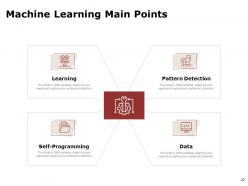
Slide 22: This slide displays the Machine Learning Main Points such as- Learning, Self-Programming, Pattern Detection, Data.
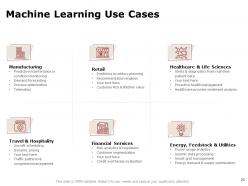
Slide 23: This slide presents Machine Learning Use Cases such as- Travel & Hospitality, Aircraft scheduling, Dynamic pricing, Traffic patterns & congestion management, Manufacturing, Predictive maintenance or condition monitoring, Demand forecasting, etc.
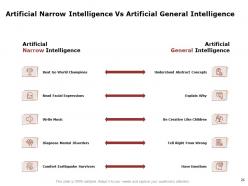
Slide 24: This slide showcases Artificial Narrow Intelligence Vs Artificial General Intelligence.
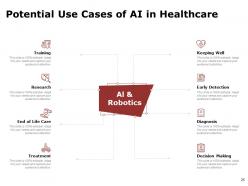
Slide 25: This slide depicts Potential Use Cases of AI in Healthcare such as- Training, Research, End of Life Care, Treatment, Keeping Well, Early Detection, Diagnosis, Decision Making.
Slide 26: This slide displays the Challenges in adoption of Artificial Intelligence.
Slide 27: This slide displays the time for Coffee break.
Slide 28: This slide is titled as Additional Slides for moving forward.
Slide 29: This is AI Icons Slide.
Slide 30: This is Our Mission slide with related imagery.
Slide 31: This is Meet Our Team slide with names and designations.
Slide 32: This is About Us slide with company specifications.
Slide 33: This is Comparison slide.
Slide 34: This is Financial slide. Showcase finance related stuff here.
Slide 35: This is Idea Generation slide to highlight ideas, information etc.
Slide 36: This is Thank You slide with address, email address and contact number.
Ai powerpoint presentation slides with all 36 slides:
Generate a binding force with our AI Powerpoint Presentation Slides. Folks will begin to act in collaboration.
-

AI
-
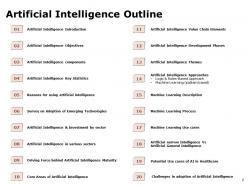
Artificial Intelligence Outline
-
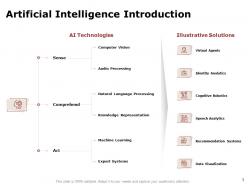
Artificial Intelligence Introduction
-
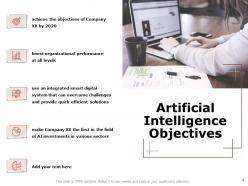
Artificial Intelligence Objectives
-
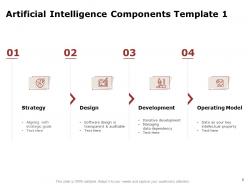
Artificial Intelligence Components Template 1
-
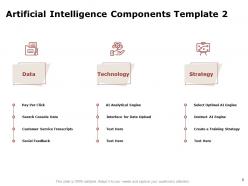
Artificial Intelligence Components Template 2
-
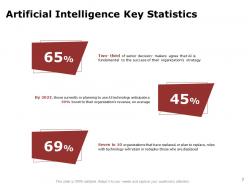
Artificial Intelligence Key Statistics
-
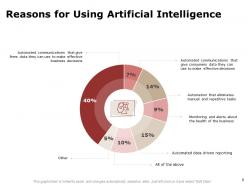
Reasons for Using Artificial Intelligence
-
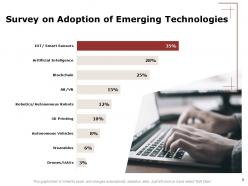
Survey on Adoption of Emerging Technologies
-
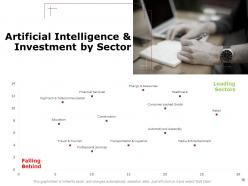
Artificial Intelligence Investment by Sector
-
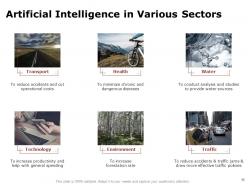
Artificial Intelligence in Various Sectors
-
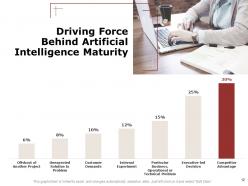
Driving Force Behind Artificial Intelligence Maturity
-
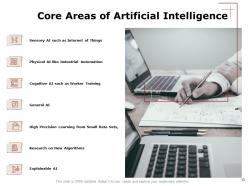
Core Areas of Artificial Intelligence
-
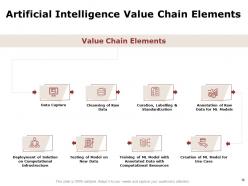
Artificial Intelligence Value Chain Elements
-
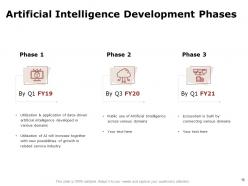
Artificial Intelligence Development Phases
-
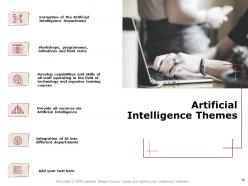
Artificial Intelligence Themes
-
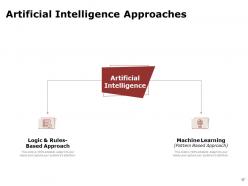
Artificial Intelligence Approaches
-
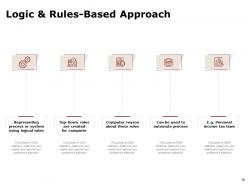
Logic Rules Based Approach
-
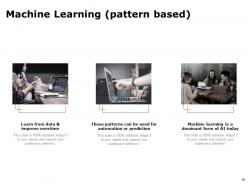
Machine Learning pattern based
-
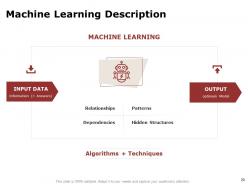
Machine Learning Description
-
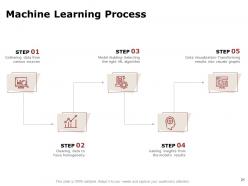
Machine Learning Process
-
Machine Learning Main Points
-
Machine Learning Use Cases
-
Artificial Narrow Intelligence Vs Artificial General Intelligence
-
Potential Use Cases of AI in Healthcare
-
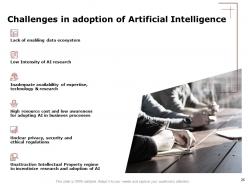
Challenges in adoption of Artificial Intelligence
-

Coffee Break Slide
-
Additional Slides
-
AI Icons Slide
-

Our Mission
-
Meet Our Awesome Team
-

About Us
-
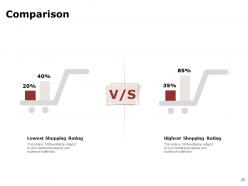
Comparison
-
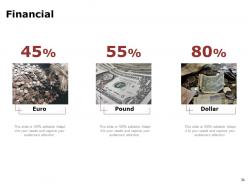
Financial
-
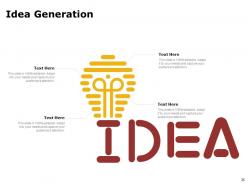
Idea Generation
-

Thank You
FAQs for Ai
Honestly, the speed alone is worth it - I can bang out a full deck in like 10 minutes now instead of spending my whole afternoon on it. No more staring at blank slides wondering what the hell to put first. The AI basically handles all the design stuff and throws out content ideas based on your topic. Super clutch when you're scrambling before a deadline. Plus everything looks way more polished than my usual train wreck presentations, even though I have zero design skills. The content suggestions are actually pretty decent too, just tweak them so they don't sound robotic. Seriously, just start with AI and edit from there.
Honestly, these AI design tools are kind of a game-changer for presentations. They'll suggest color combos that don't make your eyes bleed and fonts that actually fit your vibe. The layout suggestions are solid too - no more slides that look like a hot mess or totally bare. What's cool is they catch those little design fails we always miss. Oh, and they're weirdly good at picking icons and images that support your point instead of just random stock photos. Just upload your messy draft and let it work its magic. Worth trying at least once.
So AI does all the grunt work for you - just give it a topic and it spits out full text, bullet points, even suggests how to structure everything. Some tools automatically grab relevant data and images too, which honestly feels like cheating but in a good way. The trick is being super specific with what you tell it. Don't just say "marketing slides" - mention your audience, what you're trying to accomplish, how long you need to present for. Makes a huge difference in getting stuff that's actually useful instead of generic fluff.
So basically, you can feed AI info about who you're presenting to and it'll automatically tweak your whole deck. Like, it'll use simpler language for executives but get technical with engineers. It suggests which slides to focus on or skip entirely based on your audience. Pretty cool how it picks up on stuff like industry background and pain points. Your opening, case studies, even the call-to-action - it adjusts everything. I'd start by writing up a quick profile of your audience first, then let it work its magic. Way easier than manually customizing everything yourself.
Definitely go for something with smart content generation - turns your messy ideas into actual slides. Templates matter too, find ones that don't look ancient. Real-time collab is clutch so your team isn't constantly emailing versions back and forth. Auto-formatting will save your sanity with layouts and fonts. Oh, and make sure it plays nice with PowerPoint or Google Slides since you're probably stuck with those anyway. Test the AI writing first though - some sound like robots had a stroke. Honestly just grab a free trial and see if it fits how you work.
Dude, just throw your raw data into an AI tool first - seriously saves so much time. It'll pick the right charts automatically and suggest colors that actually look good together. You know those hours you waste making bar charts look decent? Gone. The cool part is it spots patterns you'd totally miss and knows whether to use heat maps, scatter plots, whatever works best. Plus it considers who you're presenting to, which is honestly something I forget half the time. Way better than starting from scratch in Excel or whatever.
Oh totally! AI's surprisingly decent for story structure stuff. You can get it to brainstorm killer openings or map out your main narrative arc. Some tools will actually analyze your content and spit out suggested structures - kinda wild honestly. But here's the thing: you still gotta bring the real connection and authenticity. Think of AI as giving you the bones, then you add all the good stuff that makes people actually care. Oh, and try asking it to help find your "so what?" moment. That one's been super helpful for me.
Honestly, just be upfront about using AI - people can usually tell anyway. Always fact-check whatever it spits out because these tools love making things up that sound totally believable. Don't claim AI work as your own, that's just sketchy. Also heads up, AI can be weirdly biased sometimes, especially with images. I learned that the hard way lol. Really though, treat it like having a research assistant who's helpful but not always reliable. You still gotta use your brain and make the final calls on everything.
So basically, AI tools can look at your presentation and tell you where to put stuff for better readability. Like, it'll suggest moving your text or images around so people actually pay attention. Some of these tools (Gamma, Beautiful.AI) will even rearrange things automatically as you're adding content, which is honestly kind of trippy to watch. They think about spacing, font sizes, how slides connect to each other. Oh, and they're pretty good at telling you when you've crammed too much onto one slide - you know how we all do that. Worth checking out if you hate designing slides as much as I do.
Oh definitely try Gamma first - it's free and honestly pretty impressive. Just give it a prompt and boom, whole slide deck. Tome's cool too, more focused on storytelling if that's your vibe. Canva jumped on the AI bandwagon recently but it's more like design suggestions than doing everything for you. Beautiful.ai will auto-fix your layouts as you go, which is nice I guess. Start with Gamma though - if you hate it, then check out the others. Way easier than building slides from scratch like some kind of masochist.
So basically these AI tools look at your brand colors, old presentations, and content to suggest layouts and fonts that actually match your vibe. After a few decks, it gets weirdly good at knowing what you like - honestly kind of freaky how spot-on it becomes. The cool part? It'll switch up designs depending on whether you're pitching investors or just updating your team. No more staring at those awful blank templates for 20 minutes. Oh, and definitely try letting it throw out some options first before you start designing from scratch.
So there's actually some pretty cool tech that can read your audience during presentations. Cameras pick up on facial expressions and body language to see if people are engaged or zoning out. Chat feedback gets analyzed for sentiment too. Voice tone analysis happens during interactive parts, which honestly feels a bit Big Brother-ish but whatever. You'll also get data on participation rates and how people interact with your slides. The whole point is adjusting on the fly - maybe slow down if you're losing people, or dive deeper if they're hooked. I'd start with basic sentiment tools first since they're not overwhelming and actually give useful feedback.
Honestly, AI is a game-changer for slides. You know how you normally sit there staring at that blank PowerPoint for like 20 minutes? Skip all that. Just dump your main points into an AI tool and it'll spit out a whole outline, write your content, even find visuals. I was skeptical at first but some of these tools are actually legit now. Takes maybe 5 minutes to get a decent first draft. Then you can spend your time making it look good instead of wrestling with where to even start. Way better use of your brain power, trust me.
Honestly, AI design tools are super hit-or-miss. They pump out these cookie-cutter slides that all look the same - you know the vibe. Context is where they really fall short too. Like, they can't figure out which data point you actually want to highlight or adjust things for your specific audience. Most have pretty limited customization options, which is annoying. But here's the thing - they're actually solid for rough drafts. Gets you 70% there fast. I'd say start with AI, then go ham on customizing it afterward. Otherwise you'll end up with slides that scream "I used AI for this."
Dude, NLP tools are like having a really good editor who actually pays attention. They'll catch grammar mistakes and suggest better ways to phrase stuff when you're scrambling to finish your deck. What's cool is how they pick up on jargon that might fly over people's heads - plus they'll push you toward shorter sentences and stronger words. Your slides end up way more consistent too, which honestly makes a huge difference in flow. I started using one recently and was shocked at how much tighter my presentations got. Worth trying on your next deck for sure.
No Reviews