

Social Media Content Calendar For Apparel Product




Try Before you Buy Download Free Sample Product
 Impress Your
 Audience
 100%
100% Editable
 Save Hours
 of Time


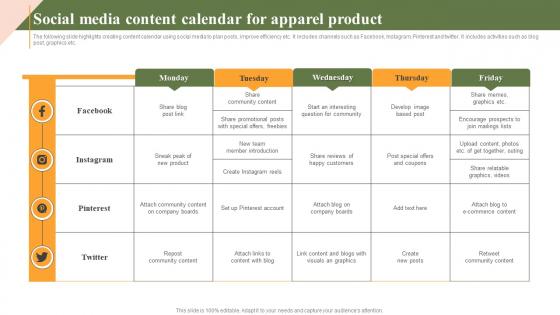
The following slide highlights creating content calendar using social media to plan posts, improve efficiency etc. It includes channels such as Facebook, Instagram, Pinterest and twitter. It includes activities such as blog post, graphics etc.
People who downloaded this PowerPoint presentation also viewed the following :
Social Media Content Calendar For Apparel Product with all 9 slides:
Use our Social Media Content Calendar For Apparel Product to effectively help you save your valuable time. They are readymade to fit into any presentation structure.








FAQs for Social Media Content Calendar
So basically you want posting dates/times, what platforms you're hitting, and the actual content - captions, images, all that stuff. Content themes are huge too. I always add approval status because honestly, last-minute scrambling is the worst. Don't forget hashtags and any weird formatting requirements each platform has. Are you doing videos? Carousels? Stories? Map that out too. The whole point is knowing exactly what you're posting so you're not panicking tomorrow morning. Oh and tagging requirements - some brands are super picky about that. Start with a simple spreadsheet, then build from there.
Honestly, each platform is like a different crowd at a party - you gotta switch up your vibe. LinkedIn loves that professional stuff during work hours, obviously. Instagram's all about pretty visuals when people are mindlessly scrolling at night or weekends. Twitter? Good luck keeping up with that chaos, but jump on trending stuff fast. Facebook's weird now but longer posts still do okay there. Just look at what's already worked for you on each one first - that'll save you time. Then plan accordingly: carousels for Insta, articles for LinkedIn, quick hot takes for Twitter. Don't try to post the same thing everywhere.
Honestly, start with free stuff first - Google Sheets or Trello work great for planning content. Once you get the hang of it, Buffer and Hootsuite are pretty solid for scheduling posts. Later's good too, especially for Instagram. Sprout Social costs more but the analytics are actually useful if you're serious about tracking performance. Oh, and Canva plays nice with most of these for making quick graphics. I made the mistake of jumping straight into paid tools before I even knew what I needed - total waste of money. Figure out your workflow first, then upgrade when you know what features you'll actually use.
So honestly, it depends on your platform. Instagram and Facebook work best with 1-2 posts daily, Twitter you can get away with 3-5 tweets, and LinkedIn is more like 1-3 posts weekly. But here's the thing - don't go overboard right away. Quality beats quantity every single time. I'd rather see you post solid content 3x a week than burn out trying to hit some daily quota. Start small with whatever you can actually stick to, then ramp up once you've got your rhythm down. Oh, and definitely track what gets engagement - that's how you'll know if people actually care about what you're posting.
Focus on stuff that actually moves the needle for your business - product launches, services, events. But here's the thing: people will unfollow if it's all sales all the time. Mix in educational posts that show you know your stuff, some behind-the-scenes content so you don't seem like a faceless company, and definitely reshare customer posts since that's way more convincing than anything you'll write about yourself. I'd go maybe 60% helpful content, 40% promotional? Oh and plan this mix out ahead of time - you don't want to be posting random filler just because you forgot it was Tuesday.
Honestly, just grab a spreadsheet and mark down holidays 3 months out. But here's the thing - skip the ones that don't make sense for you. Like, if you're selling accounting software, maybe don't stress about Valentine's Day content? Pick holidays that actually fit your vibe and audience. I always do themed series around the big ones - gift guides before Christmas, back-to-school stuff in late July. The trick is staying authentic instead of forcing every random holiday. Trust me, your audience can tell when you're just jumping on trends. Having everything mapped out saves you from that last-minute panic scramble.
Make yourself some brand guidelines first - voice, visuals, messaging, all that stuff. I keep a simple doc with colors, fonts, and tone examples (total lifesaver tbh). Don't create totally different content for each platform - just adapt your core messages to fit the format. Like Instagram's more visual, LinkedIn's buttoned-up, but your brand personality should still come through. Oh, and templates are your friend! Set them up so anyone on your team can just plug in content without everything looking random. Honestly makes such a difference once you get it all organized.
Honestly, just pick specific days for UGC and stick to them - I do "Feature Friday" but whatever works. Block out maybe 2-3 slots weekly because that stuff is actually gold when you use it right. Keep a running folder of approved content so you're not panicking at the last second trying to find something decent. Oh and write captions ahead of time since you'll need to tag people properly. The whole thing falls apart if you just randomly post UGC whenever you remember it exists. I'd start by going through what you already have, then build those slots into next month's calendar from there.
Start with engagement stuff - likes, comments, shares, saves. That's how you know if people actually care about your posts. Reach and impressions tell you how many eyeballs you're getting. Click-through rates matter big time if you're sending people to your website or whatever. I know everyone says follower count is just vanity, but honestly it still helps with credibility. Don't forget to check if you're actually posting consistently - I'm terrible at this lol. Pick maybe 3-4 metrics max that match what you're trying to do. Otherwise you'll go crazy analyzing everything. Just review weekly and you're good.
Honestly, I always leave about 20-30% of my content calendar open on purpose. Life happens, right? When something blows up online or there's breaking news, you can pause anything that might look weird and drop in something more relevant instead. I totally bombed this during that Twitter chaos last year - learned my lesson! Having a few people who can approve stuff quickly makes all the difference. Oh, and keep some basic evergreen posts handy. They're lifesavers when you need to buy time while figuring out your next move.
Honestly, audience research is like the backbone of your whole content strategy. You've gotta figure out who your people are - their demographics, what keeps them up at night, where they actually spend time online. Without it, you're basically throwing spaghetti at the wall and hoping something sticks (spoiler: it won't). Once you know your audience, you can match your content to what they actually care about. Time your posts when they're scrolling. Pick the right vibe for each platform too - LinkedIn's different from TikTok, obviously. Start with your current analytics, then maybe send out a survey to fill the gaps.
Templates with good visuals are seriously a game-changer for content calendars. Color-coding different content types makes everything so much easier to scan. Icons for each platform help too - way better than staring at endless spreadsheet cells (which honestly makes my brain shut off). Charts from templates can show your posting patterns across platforms pretty clearly. When you're showing stakeholders, it looks way more professional than basic text. Short sentences work great. Grab a template with decent colors first, then just adapt those visual tricks to whatever calendar format you're using. Trust me on this one.
Ugh, the worst thing you can do is over-plan everything and make your calendar super rigid. You'll totally miss out on trends and stuff that's actually happening right now. I learned this the hard way - don't batch create months of content because it ends up feeling so stale. Also check what else is going on before you post! Holidays, company launches, industry drama, whatever. I've seen people accidentally post happy promotional stuff during like... really bad news cycles. So awkward. Keep some wiggle room and review your upcoming posts every week to make sure they still make sense.
Honestly, a shared content calendar is like having mission control for your whole team. Everyone can see what's going live and when. You assign tasks to specific people, set deadlines, track responsibilities - bye bye "I thought YOU were posting that" confusion. What I love most? Comment sections where people can give feedback or catch problems before stuff goes live. Trust me, it saves you from those frantic last-minute fixes that always seem to happen at 5pm on Friday. Just make sure everyone can edit it and create some basic approval process so nothing gets forgotten.
Honestly, I'm a huge fan of scheduling posts ahead of time. You can create a bunch of content when you're feeling creative and not stress about posting every single day. Plus you'll actually hit those peak engagement hours instead of posting whenever you remember to (guilty as charged lol). Real-time posting is clutch for trending stuff though - like when something's going viral and you want to jump on it immediately. Most people I know who do well on social mix both approaches. Maybe schedule like 70% of your regular content, then save some space for spontaneous posts and responding to whatever's happening. Way less stressful than winging it completely.
-
Impressive templates. Designing a presentation is fun now!
-
Superb! The innovative and inspiring template designs provide an edge to the presentation.